GameDev.net gamedev.net
Using GameDev.net for your class this semester?
Learn more →
🔒 Locked

Replacing glCopyImageSubData

Started by taby Nov 23, 2022 at 11:24 PM 22 replies 12.1k views
Original Post
taby
taby

I'm currently using glCopyImageSubData to copy from texture to texture. It works fine, but I'm trying to replace it with the following code. It doesn't work, failing on the copy back to the GPU.

	glCopyImageSubData(glowmap_tex, GL_TEXTURE_2D, 0, 0, 0, 0,
		last_frame_glowmap_tex, GL_TEXTURE_2D, 0, 0, 0, 0,
		win_x, win_y, 1);

	vector<float> output_pixels(win_x* win_y * 4, 1.0f);
	glActiveTexture(GL_TEXTURE4);
	glBindTexture(GL_TEXTURE_2D, glowmap_tex);
	glBindImageTexture(GL_TEXTURE4, glowmap_tex, 0, GL_FALSE, 0, GL_WRITE_ONLY, GL_RGBA32F);
	glGetTexImage(GL_TEXTURE_2D, 0, GL_RGBA, GL_FLOAT, &output_pixels[0]);

	vector<float> last_frame_output_pixels(win_x* win_y * 4, 1.0f);
	glActiveTexture(GL_TEXTURE4);
	glBindTexture(GL_TEXTURE_2D, last_frame_glowmap_tex);
	glBindImageTexture(GL_TEXTURE4, last_frame_glowmap_tex, 0, GL_FALSE, 0, GL_WRITE_ONLY, GL_RGBA32F);
	glGetTexImage(GL_TEXTURE_2D, 0, GL_RGBA, GL_FLOAT, &last_frame_output_pixels[0]);

	vector<float> combined_output_pixels(win_x* win_y * 4, 1.0f);

	for (int x = 0; x < win_x; x++)
	{
		for (int y = 0; y < win_y; y++)
		{
			size_t index = 4 * ((y * win_x) + x);

			combined_output_pixels[index + 0] = output_pixels[index + 0];// +last_frame_output_pixels[imgIdx + 0];
			combined_output_pixels[index + 1] = output_pixels[index + 1];// +last_frame_output_pixels[imgIdx + 1];
			combined_output_pixels[index + 2] = output_pixels[index + 2];// +last_frame_output_pixels[imgIdx + 2];
			combined_output_pixels[index + 3] = output_pixels[index + 3];// +last_frame_output_pixels[imgIdx + 3];
		}
	}
	
	// The following doesn't work, and I don't know why
	glActiveTexture(GL_TEXTURE4);
	glBindTexture(GL_TEXTURE_2D, last_frame_glowmap_tex);
	glBindImageTexture(4, last_frame_glowmap_tex, 0, GL_FALSE, 0, GL_READ_ONLY, GL_RGBA32F);
	glTexImage2D(GL_TEXTURE_2D, 0, GL_RGBA32F, win_x, win_y, 0, GL_RGBA, GL_FLOAT, &combined_output_pixels[0]);

Any ideas?

JoeJ
JoeJ

taby said:
Any ideas?

No, but you could work on the proper solution instead spending time on a work around.
Upload / Download to / from GPU is very expensive, and single threaded image processing on CPU is slow too. You want to do the whole thing on GPU alone.

taby
taby

I've tried all of the other solutions, without luck. This is, of course, only a test, temporary.

OK, I put the shader at https://github.com/sjhalayka/obj_ogl4/blob/aed9d040cb09b2db67a07ebae17a7dafb5a68846/ortho_reflectance.fs.glsl#L44​ and the C++ code at https://github.com/sjhalayka/obj_ogl4/blob/aed9d040cb09b2db67a07ebae17a7dafb5a68846/main.cpp#L472

All I need is a little guidance. Do I need to render to a texture?

JoeJ
JoeJ

taby said:
Do I need to render to a texture?

No. The easiest and fastest way should be to use a compute shader, writing and reading to texels directly.
CS has advantages if you do complex image processing. E.g. we want depth aware DOF. Then you can load a tile of texture to LDS memory.
Then all threads can access this cached image data without having to access VRAM at all.
After your complex processing is done, you write back to VRAM. So you access VRAM only two times.
Contrary, a pixel shader would need to sample the texture from VRAM constantly in its inner loop, which likely is cached as well, but in many cases the LDS approach will win.
However, a downside is that you can not use texture filter HW on LDS memory, so if you need texture filter LDS approach becomes less attractive.

On the API side there are some caveats:
The texture needs to uncompressed.
Likely you need two textures - one to read and another to write the results. (Otherwise threads would randomly read either original values, or changed values form other threads)
The driver must know which textures are readonly or writable for which shaders, so barriers, synchronization, resource transitions can be handled.

Maybe this tutorial gives all the details needed: https://learnopengl.com/Guest-Articles/2022/Compute-Shaders/Introduction


taby
taby

OK, first off: you're a certifiable genius at graphics programming!

I see your solution now:

  • Pass two textures into the compute shader
  • Accumulate them in the shader, or whatever
  • Write to temporary texture at the end of the shader
  • Copy finalized temporary texture to last frame's texture using glCopyImageSubData

Does this sound reasonable?

And here I was concocting a spell using the arcane FBO and all that stuff. LOL

P.S. I have a compute shader example on my GitHub too: https://github.com/sjhalayka/qjs_compute_shader

JoeJ
JoeJ

taby said:
I see your solution now: Pass two textures into the compute shader Accumulate them in the shader, or whatever Write to temporary texture at the end of the shader Copy finalized temporary texture to last frame's texture using glCopyImageSubData Does this sound reasonable?

I think you don't need a temporary texture. Because actually you have no kernel reading adjacent pixels, each pixel is accessed only by exactly one thread. (For this reason, there is no point to cache to LDS either. Pixel shader could do it too, but requires a cumbersome triangle to bound the texture rectangle just to map threads to all texels.)

So this should already work: prevTex[i] = prevTex[i] + curTex[i];

But i'm not sure if we can read and write to the same texture. I guess so, but i rarely worked with textures, so idk.

Btw, just saw ‘slow’ code here:

	for (int x = 0; x < win_x; x++)
	{
		for (int y = 0; y < win_y; y++)
		{
			size_t index = 4 * ((y * win_x) + x);

			combined_output_pixels[index + 0] = output_pixels[index + 0];// +last_frame_output_pixels[imgIdx + 0];

Notice this processes the image ‘vertically’, so the stride of memory access is big.
It should be faster if you reverse the loops:

	for (int y = 0; y < win_y; y++)
	{
		for (int x = 0; x < win_x; x++)
		{
			size_t index = 4 * ((y * win_x) + x);

			combined_output_pixels[index + 0] = output_pixels[index + 0];// +last_frame_output_pixels[imgIdx + 0];

Now we process horizontally, stride is one, and access pattern is ideal.

taby
taby

Thank you again, for all of the advice. I tried avoiding using a temporary texture, but it's not working. I also tried to use a temporary texture, but the same result: temp_tex ends up with all 0s.

Here is the C++ code now! So simple, thanks to you.


	glowmap_copier.use_program();

	glActiveTexture(GL_TEXTURE0);
	glBindTexture(GL_TEXTURE_2D, last_frame_glowmap_tex);
	glUniform1i(glGetUniformLocation(glowmap_copier.get_program(), "output_image"), 0);

	// activate glow and last frame glow input textures
	glActiveTexture(GL_TEXTURE1);
	glBindTexture(GL_TEXTURE_2D, glowmap_tex);
	glUniform1i(glGetUniformLocation(glowmap_copier.get_program(), "inputa_image"), 1);

	glActiveTexture(GL_TEXTURE2);
	glBindTexture(GL_TEXTURE_2D, last_frame_glowmap_tex);
	glUniform1i(glGetUniformLocation(glowmap_copier.get_program(), "inputb_image"), 2);

	// call compute shader
	glDispatchCompute((GLuint)win_x, (GLuint)win_y, 1);

	// Wait for compute shader to finish
	glMemoryBarrier(GL_SHADER_IMAGE_ACCESS_BARRIER_BIT);

The shader is:

// OpenGL 4.3 introduces compute shaders
#version 430

layout(local_size_x = 1, local_size_y = 1) in;

// Single-channel output
layout(binding = 0, rgba32f) writeonly uniform image2D output_image;
layout(binding = 1, rgba32f) readonly uniform image2D inputa_image;
layout(binding = 2, rgba32f) readonly uniform image2D inputb_image;


void main()
{
	// Get global coordinates
	const ivec2 pixel_coords = ivec2(gl_GlobalInvocationID.xy);
	const vec4 output_pixel = imageLoad(inputa_image, pixel_coords) + imageLoad(inputb_image, pixel_coords);

	imageStore(output_image, pixel_coords, output_pixel);
}
JoeJ
JoeJ

Maybe it fails because you map units 0 and 2 to the same texture.
But i guess you already tried to use a real additional temporary texture as well?

So yeah, this is what sucks with GPU programming. We never know why it doesn't work.

Edit: Checking for GL errors on API side might help.

taby
taby

Yeppers, this is what I'm doing now:


	// create output temp texture, with texstorage
	GLuint temp_tex;

	glGenTextures(1, &temp_tex);
	glActiveTexture(GL_TEXTURE0);
	glBindTexture(GL_TEXTURE_2D, temp_tex);
	glTexParameteri(GL_TEXTURE_2D, GL_TEXTURE_WRAP_S, GL_CLAMP_TO_EDGE);
	glTexParameteri(GL_TEXTURE_2D, GL_TEXTURE_WRAP_T, GL_CLAMP_TO_EDGE);
	glTexParameteri(GL_TEXTURE_2D, GL_TEXTURE_MAG_FILTER, GL_LINEAR);
	glTexParameteri(GL_TEXTURE_2D, GL_TEXTURE_MIN_FILTER, GL_LINEAR);
	glTexImage2D(GL_TEXTURE_2D, 0, GL_RGBA32F, win_x, win_y, 0, GL_RGBA, GL_FLOAT, NULL);
	glBindImageTexture(0, temp_tex, 0, GL_FALSE, 0, GL_WRITE_ONLY, GL_RGBA32F);


	glActiveTexture(GL_TEXTURE0);
	glBindTexture(GL_TEXTURE_2D, temp_tex);
	glUniform1i(glGetUniformLocation(glowmap_copier.get_program(), "output_image"), 0);

	// activate glow and last frame glow input textures
	glActiveTexture(GL_TEXTURE1);
	glBindTexture(GL_TEXTURE_2D, glowmap_tex);
	glUniform1i(glGetUniformLocation(glowmap_copier.get_program(), "inputa_image"), 1);

	glActiveTexture(GL_TEXTURE2);
	glBindTexture(GL_TEXTURE_2D, last_frame_glowmap_tex);
	glUniform1i(glGetUniformLocation(glowmap_copier.get_program(), "inputb_image"), 2);

	// call compute shader
	glowmap_copier.use_program();
	glDispatchCompute((GLuint)win_x, (GLuint)win_y, 1);

	// Wait for compute shader to finish
	glMemoryBarrier(GL_SHADER_IMAGE_ACCESS_BARRIER_BIT);

	// copy from temp to last frame using glCopyImageSubData
	glCopyImageSubData(temp_tex, GL_TEXTURE_2D, 0, 0, 0, 0,
		last_frame_glowmap_tex, GL_TEXTURE_2D, 0, 0, 0, 0,
		win_x, win_y, 1);

	glDeleteTextures(1, &temp_tex);

and

// OpenGL 4.3 introduces compute shaders
#version 430

layout(local_size_x = 1, local_size_y = 1) in;

layout(binding = 0, rgba32f) writeonly uniform image2D output_image;
layout(binding = 1, rgba32f) readonly uniform image2D inputa_image;
layout(binding = 2, rgba32f) readonly uniform image2D inputb_image;


void main()
{
	// Get global coordinates
	const ivec2 pixel_coords = ivec2(gl_GlobalInvocationID.xy);
	const vec3 output_pixel = imageLoad(inputa_image, pixel_coords).rgb + imageLoad(inputb_image, pixel_coords).rgb;

	imageStore(output_image, pixel_coords, vec4(output_pixel, 1.0));
}
JoeJ
JoeJ

Great.
But you know what i have to say about this:

taby said:
layout(local_size_x = 1, local_size_y = 1) in;

;D

taby
taby

I tried larger values, and it runs slower!

JoeJ
JoeJ

taby said:
I tried larger values, and it runs slower!

Did you forget to adjust the dispatch as well? Guess it should be: (but not sure - these parameters can be confusing)

glDispatchCompute((GLuint)win_x / 8, (GLuint)win_y / 8, 1);

layout(local_size_x = 8, local_size_y = 8) in;

I still remember the case where i could not make your iso surface shader faster by increasing work group size.
But at least it did not get slower.

Fact is: With a workgroup size of 1, only one out of 32 threads does work. The others do nothing, but still waste power and potential.
So you should be able to get a speedup.

Ofc. we're totally memory bound here, is there is no ALU going on. But still - the speedup should be noticeable, for god's sake! /:O\

JoeJ
JoeJ

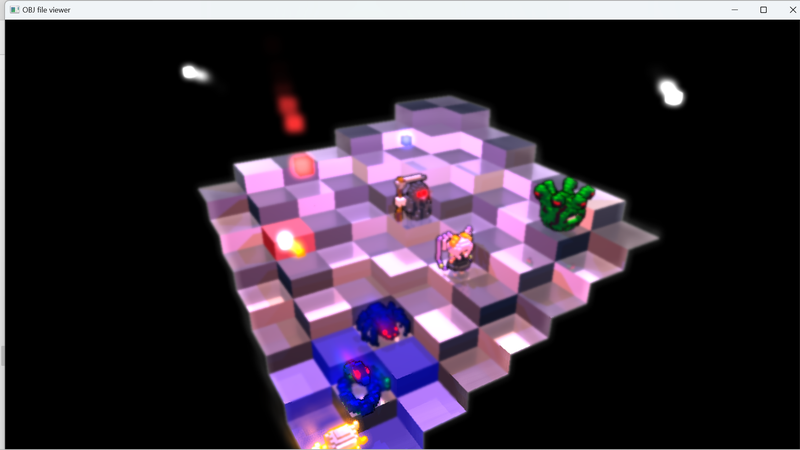
Just saw this voxel game : )

taby
taby

Holy cow, that game looks amazing! AAA

taby
taby

Holy f**k… it’s working!

The C++ code is:

	glUseProgram(glowmap_copier.get_program());


	// create output temp texture
	GLuint temp_tex;

	glGenTextures(1, &temp_tex);
	glActiveTexture(GL_TEXTURE0);
	glBindTexture(GL_TEXTURE_2D, temp_tex);
	glTexParameteri(GL_TEXTURE_2D, GL_TEXTURE_WRAP_S, GL_CLAMP_TO_EDGE);
	glTexParameteri(GL_TEXTURE_2D, GL_TEXTURE_WRAP_T, GL_CLAMP_TO_EDGE);
	glTexParameteri(GL_TEXTURE_2D, GL_TEXTURE_MAG_FILTER, GL_LINEAR);
	glTexParameteri(GL_TEXTURE_2D, GL_TEXTURE_MIN_FILTER, GL_LINEAR);
	glTexImage2D(GL_TEXTURE_2D, 0, GL_RGBA32F, win_x, win_y, 0, GL_RGBA, GL_FLOAT, NULL);
	glBindImageTexture(0, temp_tex, 0, GL_FALSE, 0, GL_WRITE_ONLY, GL_RGBA32F);
	glUniform1i(glGetUniformLocation(glowmap_copier.get_program(), "output_image"), 0);


	// activate glow and last frame glow input textures
	glActiveTexture(GL_TEXTURE1);
	glBindTexture(GL_TEXTURE_2D, glowmap_tex);
	glBindImageTexture(1, glowmap_tex, 0, GL_FALSE, 0, GL_READ_ONLY, GL_RGBA32F);
	glUniform1i(glGetUniformLocation(glowmap_copier.get_program(), "inputa_image"), 1);

	glActiveTexture(GL_TEXTURE2);
	glBindTexture(GL_TEXTURE_2D, last_frame_glowmap_tex);
	glBindImageTexture(2, last_frame_glowmap_tex, 0, GL_FALSE, 0, GL_READ_ONLY, GL_RGBA32F);
	glUniform1i(glGetUniformLocation(glowmap_copier.get_program(), "inputb_image"), 2);

	// call compute shader
	glDispatchCompute(win_x, win_y, 1);

	// Wait for compute shader to finish
	glMemoryBarrier(GL_ALL_BARRIER_BITS);

	glCopyImageSubData(temp_tex, GL_TEXTURE_2D, 0, 0, 0, 0,
		last_frame_glowmap_tex, GL_TEXTURE_2D, 0, 0, 0, 0,
		win_x, win_y, 1);

	// debug -- shows that it works
//	vector<float> output_pixels(win_x * win_y * 4);
//	glActiveTexture(GL_TEXTURE0);
//	glBindImageTexture(0, temp_tex, 0, GL_FALSE, 0, GL_WRITE_ONLY, GL_RGBA32F);
//	glGetTexImage(GL_TEXTURE_2D, 0, GL_RGBA, GL_FLOAT, &output_pixels[0]);
//	save_float_tex_to_disk(win_x, win_y, output_pixels, "temp_tex.tga");

	// debug -- shows that it works
//	glActiveTexture(GL_TEXTURE0);
//	glBindImageTexture(0, last_frame_glowmap_tex, 0, GL_FALSE, 0, GL_WRITE_ONLY, GL_RGBA32F);
//	glGetTexImage(GL_TEXTURE_2D, 0, GL_RGBA, GL_FLOAT, &output_pixels[0]);
//	save_float_tex_to_disk(win_x, win_y, output_pixels, "last_frame_glowmap_tex.tga");

	glDeleteTextures(1, &temp_tex);

The glow shader is:

// OpenGL 4.3 introduces compute shaders
#version 430

layout(local_size_x = 1, local_size_y = 1) in;

layout(binding = 0, rgba32f) writeonly uniform image2D output_image;
layout(binding = 1, rgba32f) readonly uniform image2D inputa_image;
layout(binding = 2, rgba32f) readonly uniform image2D inputb_image;


void main()
{
	// Get global coordinates
	const ivec2 pixel_coords = ivec2(gl_GlobalInvocationID.xy);
	const vec3 output_pixel = imageLoad(inputa_image, pixel_coords).rgb + 0.5*imageLoad(inputb_image, pixel_coords).rgb;

	imageStore(output_image, pixel_coords, vec4(output_pixel, 1.0));
}

And the compositing shader is:

#version 430

uniform sampler2D regular_tex;
uniform sampler2D upside_down_tex;
uniform sampler2D reflectance_tex;
uniform sampler2D upside_down_white_mask_tex;
uniform sampler2D glowmap_tex;
uniform sampler2D last_frame_glowmap_tex;


uniform sampler2D depth_tex;

in vec2 ftexcoord;

uniform int img_width;
uniform int img_height;
uniform int cam_factor;

vec2 img_size = vec2(img_width, img_height);

layout(location = 0) out vec4 frag_colour;

void main()
{


    // for debug purposes
//frag_colour = texture(glowmap_tex, ftexcoord);
  //return;


   const float pi_times_2 = 6.28318530718; // Pi*2
    
    float directions = 16.0; // BLUR directions (Default 16.0 - More is better but slower)
    float quality = 4.0; // BLUR quality (Default 4.0 - More is better but slower)
    float size = 10.0; // BLUR size (radius)
    vec2 radius = vec2(size/img_size.x * cam_factor, size/img_size.y * cam_factor);


   int count = 0;

   vec4 glowmap_blurred_colour =  texture( last_frame_glowmap_tex, ftexcoord);
   count++;
   ...
JoeJ
JoeJ

Nice.

But now, somebody needs to tell you about bad habits all gamedevs share: Once they figure out something new, they tend to overuse it.

For you that means too much blur form DOF. Gamers will call it ‘vaseline graphics’. :D

taby
taby

Yeah, I’m not happy with the result of the DOF. I might just cut it out altogether, as well as the specular map.

JoeJ
JoeJ

Subtlety is key. Usually people use DOF only for cinematic reasons. Like in cutscenes, to guide the focus of the player, or to do some eye candy / special effects.

Technically you still have the issue of a hard transition from DOF off to on. It seems the radius jumps from zero to some somber like 5, but there are no gradual steps in between.
That's not acceptable imo, but otherwise it's nice.

taby said:
as well as the specular map.

Is this also used to get sharp / blurry reflections? That's cool. I'd keep that.

taby
taby

Thanks for all of the guidance, man. Yes the board will keep its specular map. You’re right.

Geri
Geri

me, as the person who introduced you to the glCopyImageSubData function: why you replaced it?

Topic Locked

This topic has been locked by a moderator. New replies are not allowed.

Sign in to reply to this topic.