GameDev.net gamedev.net
🔒 Locked

How to reduce the jitter problem when the character controller moves along uneven wall surface or at coners?

Started by zzaustin Feb 7, 2023 at 2:52 AM 31 replies 49k views
Original Post
zzaustin
zzaustin

Hi, everyone

I'm new to game development, and I'm trying to write a kinematic character controller that handles the movement of my character.

I‘m having some problems working on the behaviour when the character hits a wall or other obstacles. My expected behaviour is simply illustrated below:
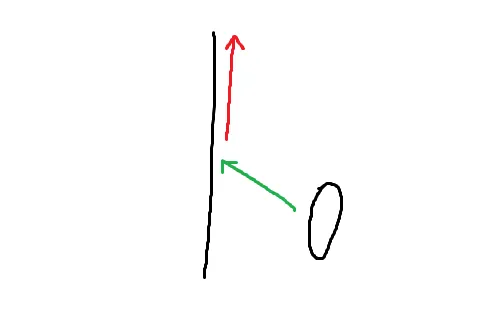
So when the character moves along the green arrow and hit the wall, it will be redirected to a reflection direction indicated by the red arrow, which is roughly parallel to the wall surface.

With a flat and smooth wall surface, I got the expected behaviour, the problem is whenever the character encounters bumpy surface or arrives at the corner of the wall, the reflection direction results tend to bounce between the surfaces for a short period of time and cause the character to jitter. The unstable reflection directions look something like this:
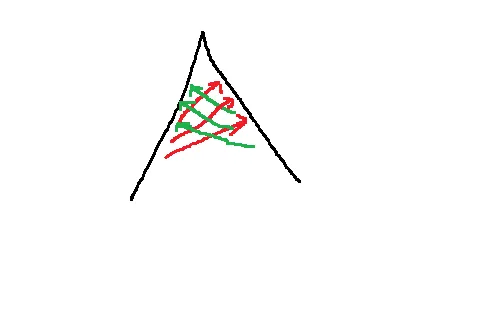
I'm guessing this kind of problem should be quite common for character movement, not only for walls but for uneven ground as well? So I wonder how the game engines handle this problem, is there any classic solution or smoothing algorithms that can reduce the jittering artefact?

Any tips would be appreciated, many thanks in advance.
Gnollrunner
Gnollrunner

So first I'm assuming by your picture you are sweeping a sphere, capsule or ellipse. If you are doing this some other way I can't answer.

I had a similar problem. What I ended up doing is implementing the concept of “touching” a surface. For the purposes of this explanation, I'm going to assume you are using a sphere, but it works the same with a capsule. So, in addition to the collision sphere, I have a slightly larger sphere that defines when you are simply touching geometry. When you are touching something, I add it to a list of touching objects. This list is cleared when you move. After a collision I move collision geometry from the collision list to the touching list. You also check this list just before you move since you can't move into the geometry.

So now let's say you reach a corner. You hit one plane (line or vertex) and then get pushed into another, like with a little valley or something. Since each plane is pushing you into the other you would be at a deadlock, even though technically you should still be able to move. In this case I take pairs of planes in both lists (touching and collision) and do cross products to find a new way I can go. There will normally be only one combination, but technically with complex geometry there could be more. I check these verses the original direction I'm trying to move and flip the result of the cross product if necessary, so I don't move backwards. If there is more than one valid combination, I take the one closest to the way I'm trying to go. I now have my new travel vector which doesn't collide with either plane, so there is no jittering or deadlock.

Edit: I wrote dot product before when I meat cross product. It's fixed now.

JoeJ
JoeJ

zzaustin said:
So when the character moves along the green arrow and hit the wall, it will be redirected to a reflection direction indicated by the red arrow, which is roughly parallel to the wall surface.

I would argue the resolved direction should be exactly parallel, otherwise you risk to move into another wall, increasing the chance of jitter.

So basically you project to the surface. The red (resolved) line can be shortened to get a friction effect, but it should not be longer than the projection, to avoid adding energy.

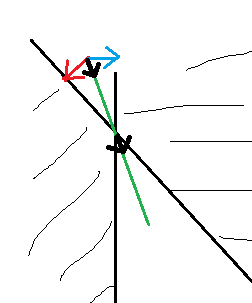
To avoid drifting deeper into a narrowing corner, i've had success by summing up all simultaneous projections, which could work like this:

The red and green vectors project to the colliding face. Their summed average gives the short black vector.
Applying this as displacement at the averaged contact point will not guarantee a state without penetration, but it should converge towards that after multiple frames. Drift into solid space or jitter should not happen.

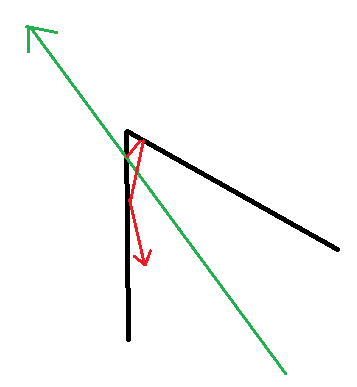
Another method which is more precise is to resolve collisions in order:

Here we can just bounce the ray around until we get the same length as the intended but cut trajectory.
For multiple dynamic bodies such method becomes too expensive very quickly, but for static geometry it's fine.

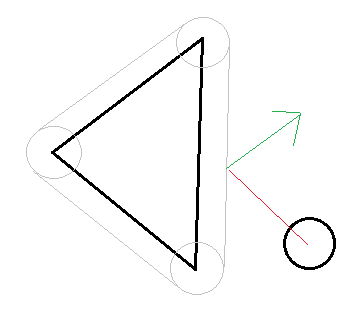
A related, useful concept is to use Minchowsky Sums, so you can treat the character as a simple point moving along a ray.
To achieve this, you extrude the static geometry by the shape of the player, which is simple if it's just a sphere for example:

Gnollrunner
Gnollrunner

JoeJ said:

A related, useful concept is to use Minchowsky Sums, so you can treat the character as a simple point moving along a ray.
To achieve this, you extrude the static geometry by the shape of the player, which is simple if it's just a sphere for example:

I think in general this is what you are doing anyway with basic sweeping. You move the planes out, edges turn into cylinders and points turn into spheres.

zzaustin
zzaustin

@Gnollrunner Thanks a lot for taking time to answer the question, a little bit of following up question on this part:

Gnollrunner said:
In this case I take pairs of planes in both lists (touching and collision) and do cross products to find a new way I can go

I'm not sure what is the detail of implementation on your side, like which vectors do you take to do cross products and such, but does it basically revolve around averaging out info based on surface normals, and try by all means to find a middle direction along which you will less likely to collide with both walls? Maybe something similar to what JoeJ proposed in his answer about “summing all simultaneous projections”?

zzaustin
zzaustin

@JoeJ Thank you very much for such variety of tips!

JoeJ said:
A related, useful concept is to use Minchowsky Sums, so you can treat the character as a simple point moving along a ray.

I'm afraid I'm not quite following up with this concept, I kind of get that once we extruded the static geometry by the CCT shape, then the character shape is sort of reduced to a point, but what do we do afterwards? Do we still do sweeps with the shape, or do we switch to raycast in some way? And how all these is related to the jittering situation?

Can you elaborate on this a little bit? Really appreciate it.

Gnollrunner
Gnollrunner

@zzaustin

zzaustin said:

I'm not sure what is the detail of implementation on your side, like which vectors do you take to do cross products and such, but does it basically revolve around averaging out info based on surface normals, and try by all means to find a middle direction along which you will less likely to collide with both walls? Maybe something similar to what JoeJ proposed in his answer about “summing all simultaneous projections”?

Sorry, I missed a few details. Yes it's the cross product of the surface normals. However, in the case of edges and vertexes you don't have surface normals. So again, when colliding with a sphere, what you use is a normalized vector from the contact point of said sphere to its center. For a face this turns out to be the same as the surface normal. But this way also gives you collision vectors for the other geometry.

As for being “less likely to collide with both walls” (or other geometry), it is in fact “guaranteed” not to collide with them. This assumes no rounding errors. In practice you should put some slop in the calculations. One way to do this is add a small bounce in the response vector. You'll have to play around with it and see if you need it.

Also keep in mind that you can't just do collisions with faces (perhaps you already know this). If a face collision fails, you may need to check its edges and if that fails you need to check its vertexes. Since edges and vertexes are shared between faces, if you want to optimize you can keep track of which ones you have already checked so you don't check them again. This may or may not be worth it depending on if you are using multiple threads.

JoeJ
JoeJ

zzaustin said:
I'm afraid I'm not quite following up with this concept, I kind of get that once we extruded the static geometry by the CCT shape, then the character shape is sort of reduced to a point, but what do we do afterwards? Do we still do sweeps with the shape, or do we switch to raycast in some way? And how all these is related to the jittering situation? Can you elaborate on this a little bit? Really appreciate it.

The Minkowsky Sum approach would be useful for example in a Billiard game. All balls have the same radius, so you could precompute the extruded geometry of the table by the radus.
After that the sweeping collision tests become much easier, because the balls become just points. Simple raytracing is guaranteed to find all collisions during a timestep in order.
Contrary, if you use the real table geometry and spheres for the balls, raytracing is not enough. You would need to cast the sphere against the faces, which is hard if the ball is in motion. You could bound the trajectory with a capsule to find potential collisions, but then it is still hard to find the exact time of collision.
So yeah, this is more useful for continuous collision detection where the goal is to prevent tunneling of fast objects to walls.

Jitter is another problem, more noticeable at low speed or at rest.
The reason is usually a forth and back bouncing caused by multiple contacts. We resolve penetration with the left wall, but this resolve increases penetration with the right wall. We resolve the right, only to penetrate the left again, and so forth.
That's your problem i guess.
The solution is to resolve all penetrations at once, e.g. by summing them up and applying them as a single displacement, which then will minimize all penetrations with all walls.
It might not resolve penetration completely, but it is enough to minimize it. A little bit of penetration is not problem, while a little bit of jitter is.

Another useful tool to reduce jitter is damping. So you can just resolve some percentage of penetration per step, which usually helps.

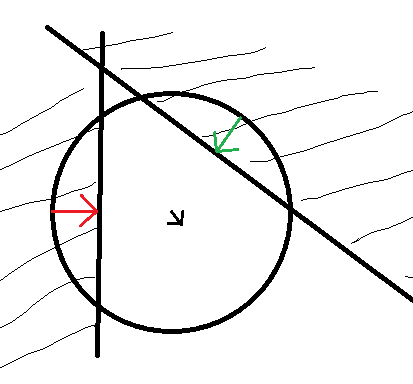
Here again a picture, but this time using a sphere not a point:

You calculate the displacements to project the sphere out of each wall (red and green arrows), then sum them up (black arrow), and apply this sum (times a damping factor of say 0.9) to displace the sphere.
You can imagine it will take quite a lot of steps until the sphere seems out of the corner, and the behavior is somehow soft, but this might be what you want to feel good, stable and robust, and if softness is a problem you can do multiple iterations to make it more rigid.

To look at it differently, our goal is to move the sphere out of the corner with minimal displacement. So for the solution the ball will touch both walls, but not penetrate them.
But with complex geometry this becomes a very hard problem to solve precisely and in one step.
So my proposal is to solve it in a simple but iterative way, and we do not necessarily get the solution within one frame. We just need to generate more pushing back then the player can push into the corner.

The method behaves well even if we would put our ball into a room that is smaller than the ball. In this case, the ball will converge to a state where the penetrations with all walls have the same size.

Gnollrunner
Gnollrunner

JoeJ said:


The solution is to resolve all penetrations at once, e.g. by summing them up and applying them as a single displacement, which then will minimize all penetrations with all walls.
It might not resolve penetration completely, but it is enough to minimize it. A little bit of penetration is not problem, while a little bit of jitter is.

Another useful tool to reduce jitter is damping. So you can just resolve some percentage of penetration per step, which usually helps.

Here again a picture, but this time using a sphere not a point:

We are apparently giving advice about two different algorithms. I have never worked on an actual “physics engine”, but I have read that you do in fact have penetration and then resolve it afterwards. That's not the case with the sweeping algorithm used in many character controllers. You should never get into the geometry at all. In fact, it's a bug if you do. One cool thing about sweeping is you can move as fast as you like, and you can never move through thin geometry. The downside is it's generally not for multiple moving objects colliding with each other, although you can handle basic character collision.

To the OP: If you are doing something more akin to a physics engine you should probably ignore my posts. However, sweeping spheres and/or capsules does work very well for a character controller and it's very smooth once you get the bugs out.

JoeJ
JoeJ

Gnollrunner said:
We are apparently giving advice about two different algorithms.

Yes. But you can make a good character controller with allowed penetration - it's not a bug.
And my proposal is not related to physics simulation either. No velocities or forces - just minimizing penetration.

So it's up to anyone to make a choice. I have used both methods in the past and can't tell any general preference. Both have their limitations, issues and devils in the details.

Physics engines mostly use a mix both methods.
For example, if we only do sweeping along movement to prevent collisions, such method has no way to resolve penetrations in case they happen anyway (which they will). If a penetrating body has zero velocity, there is no point in time to find where the collision happened, so a pure sweeping method will not resolve the penetration.

So you always need to deal with penetration in a non physical way, e.g. by separating intersecting bodies slowly but not affecting velocity or generating forces eventually.
Basically a hack, necessary because in practice you can't guarantee to avoid penetrations.

What we mostly see is sweeping actually only used if an optional Continuous Collision Detection feature is enabled. That's expensive, and usually only used for fast moving bodies. Iirc, Bullet for example always uses the approximation of treating any body like a sphere for its CCD feature, so not very accurate.
The most important way to deal with collisions is indeed a set of multiple contact points, and each contact has some penetration going on, which it tries to minimize, similar to how i proposed. But ofc. solving for contact forces of multiple dynamic bodies trying to respect laws of physics is much harder then our proposals here.

However, afaict pretty any game engine implements its character controller using its physics engine, because it already exposes all required and optimized functionality.
Stand alone Physics Engines also usually have a character controller built in. It's a standard feature. So i don't agree with sweeping being the general way to handle collisions for character controllers, which usually move rather slowly.
But they are not purely physical either. Mostly they are implemented using kinematic bodies, giving more control about how it feels, how they interact with other dynamic bodies, etc.
It's also common to gather a set of nearby faces, and using raytracing sensors to prevent collisions from happening, or to handle difficult movement like stepping stairs.

So it's a mix of various things, and implementations differ a lot across games if we go into details.
There surely is no point to argue which methods are better or what we should or shouldn't recommend. Sharing some things which worked for us is all we can do.

zzaustin
zzaustin

Gnollrunner said:
To the OP: If you are doing something more akin to a physics engine you should probably ignore my posts. However, sweeping spheres and/or capsules does work very well for a character controller and it's very smooth once you get the bugs out.

Yeah, for my character controller, I'm going with the sweeping(a capsule) approach, like you said, normally I don't allow penetration to happen.

But, penetrable or not, I think to solve the “jittering” problem for which I started this thread, the most important aspect that I'm missing is brought up by both of you guys, that is to consider all contacts(or possible contacts) simultaneously. I've never thought about this before, what I had in mind was to predict the jittering trajectory and apply some smoothing algorithm to it, for which now I realized is pretty off track. Actually, I think the “Touching List” concept is quite applicable to the implementation I had so far.

Gnollrunner
Gnollrunner

@JoeJ Well I'm not going to really get into a rat's nest discussion. The OP is writing his own collider of some sort. If he's sweeping spheres (multiple spheres, ellipses or capsules) , what I suggested works for multi geometry collisions because I've implemented it and tested it. I'm not trying to give him a bunch of random stuff I've never tried myself. If he's doing something else, then good luck.

zzaustin
zzaustin

JoeJ said:
The Minkowsky Sum approach would be useful for example in a Billiard game

Okay, quite a comprehensible example. Pretty interesting concept.

Gnollrunner
Gnollrunner

zzaustin said:

Actually, I think the “Touching List” concept is quite applicable to the implementation I had so far.

OK, well if any more questions pop up you can ask them here. Good luck.

JoeJ
JoeJ

Gnollrunner said:
what I suggested works for multi geometry collisions because I've implemented it and tested it.

I do not understand your proposal well enough so i could implement it. There are some flaws on explanation, e.g. the cross product of the two normals in our narrowing corner example would give a direction tangent to the expected. To get a proper blocking normal we would need to do another cross with some ‘forward direction’ (e.g. the movement)?
And second, this would tell me about about a blocking direction, but still not about a blocking obstacle position, which we need as well?

I'm curious, but those questions bother me each time this topic comes up here.
Can you explain your algorithm using the example of the narrowing edge?
To simplify the example, let's replace it with a angled ceiling like this:

How do you prevent the character from creeping towards the corner so it gets stuck?

Gnollrunner
Gnollrunner

JoeJ said:

How do you prevent the character from creeping towards the corner so it gets stuck?

You are looking at a 2D example which does not make sense. In this 2D example the character goes as far as it can and then it will be stuck as it should be. In a 3D example the force needs to be skewed slightly one way or the other (in or out of the screen) or else again the character would stop (again as it should). If the force is skewed it moves at the cross-product of the normals of the planes or the reverse direction. You do a dot-product of the force vector and the aforementioned cross-product, to determine if you have to flip the vector.

This also gives you the correct velocity. For example, if you go straight into a wall or (a crevice for the double plane collision) you will in fact stop. If you are at a slight angle, you go slightly to one side. A very oblique angle gives you much more movement.

JoeJ
JoeJ

Gnollrunner said:
You are looking at a 2D example which does not make sense.

Why would it make no sense? It's the very first test case i use for such things.
Ok, i've drawn it in 3D:

If the character moves to the left, how do you calculate it can't go any further, and which direction of movement is allowed and which not? (Assuming your approach is about preventing penetrations with a guarantee.)

The cross product of the normals points along the Z direction from our view. I tried to visualize this with a cylinder at some perspective. So this does not help.
If we take another cross of that with each of the the normals again, we would get proper blocking directions pointing to the right. So eventually you clip velocity with both those planes, which would prevent further movement to the left.
But then, if the player keeps pushing but also nudges along the Z direction, he likely will be able to drift further towards the left corner.
And if he tries to get back, the algorithm will block this direction as well, since there are still the same two collisions happening, but your ‘force vector’ is reversed. Then the player is ‘stuck’ and can't move anywhere?

I also wonder what you do if there is only contact, so just one normal and the whole idea makes no more sense at all.
Or what if there are 3 contacts, and we can't take a cross product from 3 normals.

So there must be more to your approach to make it work, or likely i just get it completely wrong…

Gnollrunner
Gnollrunner

JoeJ said:


Ok, i've drawn it in 3D:

If the character moves to the left, how do you calculate it can't go any further, and which direction of movement is allowed and which not? (Assuming your approach is about preventing penetrations with a guarantee.)

I seriously don't understand your issue. If the ball is being pushed directly left, it's stuck. What else would it do? It hits both planes. It may hit the top plane first and move along it, or the bottom first and move along that, but eventually it will hit both, and since the force vector is directly left it can't move at that point. That exactly what we want. Now assuming X is left-right, Y is up-down, and Z is in-out of the screen, if the force is generally left but there is some Z component to it, it has to slide in towards the camera or away from it. Note the Z axis is along the cross-product of the two plane normals so it's moving along the that vector which is the cross-product of the normals. So what exactly is the confusion?

The cross product of the normals points along the Z direction from our view. I tried to visualize this with a cylinder at some perspective. So this does not help.
If we take another cross of that with each of the the normals again, we would get proper blocking directions pointing to the right. So eventually you clip velocity with both those planes, which would prevent further movement to the left.

Anytime the contact point on the ball, to ball center vector, opposes the force vector we can't go that direction. It doesn't have to oppose it directly, just with 90 degrees. Normally we calculate the new response path as the OP showed in his first post. But we can't exactly do that here. Let's say we consider the bottom plane. We contacted it and we are moving parallel to it. Then we contact the top plane. Moving parallel to either plane still doesn't let us move since each is blocked by the other, so we are ostensibly stuck. But before we give up, we try the cross-product. Unless our force is directly down the negative X axis the dot-product of the force vector with the cross-product (normalized) will give us our movement distance.

The only issue is since the cross-product can give us a vector either in or out of the screen depending on the order we selected the planes, we have to make sure to compensate for that, which is fairly trivial. In fact, the dot product will let us know as it will give a negative answer if it's pointing the wrong way. So now we can move since we have a direction and distance, and it will be clear of both planes.


But then, if the player keeps pushing but also nudges along the Z direction, he likely will be able to drift further towards the left corner.

No, he slides in or out of the screen. You can't move though geometry when sweeping a sphere. The same thing as I wrote above applies if he keeps pushing.

And if he tries to get back, the algorithm will block this direction as well, since there are still the same two collisions happening, but your ‘force vector’ is reversed. Then the player is ‘stuck’ and can't move anywhere?

No, when you move, you ignore touching geometry that doesn't block the force vector. There is a contact vector associated with touching geometry. It's not like glue.

I also wonder what you do if there is only contact, so just one normal and the whole idea makes no more sense at all.

Come on, that's the easy case. The OP drew that in his first post, and you drew it too. How can it be you don't get it now.


Or what if there are 3 contacts, and we can't take a cross product from 3 normals.

I alluded to that in an earlier post. In more detail the general algorithm is to check pairs of touching geometry. So you have two cross-products in that case. If the 3rd contact in the touching list is blocking the cross product of the other two, you are still blocked as you should be. If both cross products are available, you simply do dot-products with the force vector and find the one that is the closest match.

So there must be more to your approach to make it work, or likely i just get it completely wrong…

There are some details, but I thought it was obvious if you know about the sweep algorithm, that you can't move through geometry. You of course always check all geometry along the path you are going. That's kind of standard. There are no special vector projections for corners or anything like that. My addition simply takes care of multi-geometry collision response, and I would assume other people do similar things. There is no other difference from the standard sweep.

JoeJ
JoeJ

Gnollrunner said:
I seriously don't understand your issue. If the ball is being pushed directly left, it's stuck.

With ‘stuck’ i mean the problem that you can't get back either. Ofc. it's fine if you can't move forward anymore, but such narrowing passages can indeed make the player (or at least dynamic objects) get stuck in some games.
And in many games it's easy to get stuck if the geometry is noisy. You somehow manage to get ‘in’, but then you can't get ‘out’. Happens quite often, and then you have to reload / restart, which is the worst thing that can happen.
I don't mean situations where my way is ‘blocked’ due to obstacles, which ofc. is no problem but expected.

Gnollrunner said:
Note the Z axis is along the cross-product of the two plane normals so it's moving along the that vector which is the cross-product of the normals. So what exactly is the confusion?

Oh, i think get it now: If the player keeps pushing into the narrowing corner, he can't. And instead his motion is projected to the cross (Z axis), so he can only go sideways from his view. Makes sense.

Gnollrunner said:
Come on, that's the easy case. The OP drew that in his first post, and you drew it too. How can it be you don't get it now.

My point is not that some cases are hard or easy, but that you need to treat cases differently at all. If you have one contact, it's easy. If you have two, it becomes a special case you handle differently with the cross direction. If it's many, you may try all potential combinations, picking the one which is closest to the players input? Whatever, it's another special case.
That's certainly higher complexity and more potential issues than allowing penetration to happen, but then resolving it afterwards. A well defined optimization problem without special cases, and the behavior is intuitive to predict and play as well. This has its own problems and limitations, but just saying.

Gnollrunner said:
If the 3rd contact in the touching list is blocking the cross product of the other two, you are still blocked as you should be.

But the outcome depends on the order of which two faces you use to form the first cross? How do you determine this order?

Gnollrunner said:
There are some details, but I thought it was obvious if you know about the sweep algorithm, that you can't move through geometry.

That's the goal, but there is no guarantee it always works. It works as long as there is enough empty space, but if you fill the space with enough characters penetration will happen.
Or you have things like doors, elevators, moving platforms, etc. If the player blocks their path, penetration will happen.
If you have some physics going on with joints or large mass ratios, joint limits will be violated and penetration will happen.
Even with only static geometry and a single player, make the geometry noisy and complex enough and penetration will happen.

So it depends on your game and geometry. But often it's necessary to deal with penetration, if only for the cases where things go wrong.

Topic Locked

This topic has been locked by a moderator. New replies are not allowed.

Sign in to reply to this topic.