GameDev.net gamedev.net
🔒 Locked

Isometric Tile Render Order

Started by j_marvin Sep 30, 2025 at 10:56 AM 12 replies 4.2k views
Original Post
j_marvin
j_marvin

Hi folks

I am attempting to create a 2D isometric “game engine” as a hobby project using SDL2 and C++.

I am using isometric sprites published by KenneyNL - e.g.:

https://kenney.nl/assets/isometric-buildings-1

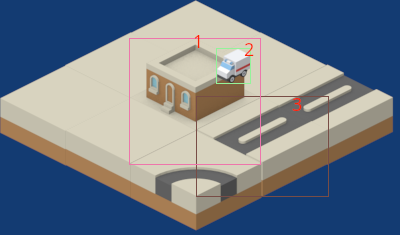
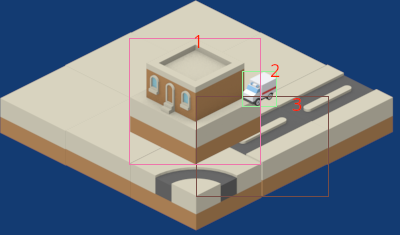
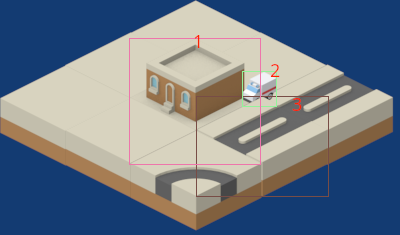
An issue I'm encountering is that the (linked) building tile sprites comprise both the base tile and the building (vertical) component; because of this, I cannot find the strategy I need to implement to enable proper sprite ordering during render time.

Specifically:

  1. Sprite sorting using Y coordinate: when the sprites are rendered in the order they appear on the Y axis (e.g. from their top middle or bottom middle point), sprites which should appear “on top” (e.g. cars) are occluded by tiles which appear further down
  2. Sprite ordering using Y coordinate AND a “z” index: attempting to address this issue by introducing a “z index” (e.g. by forcing cars to be drawn after tiles) may result in:
    1. Tile z_index=0; building tile z_index=0; car z_index=1: the car is drawn “on top” of the vertical portion of the building
    2. Tile z_index=0; building tile z_index=1; car z_index=1: the car and the building's vertical portion are rendered in the “correct” order - but the building tile's base component is rendered “on top” of tiles appearing further down

I will attach some images below to illustrate what I mean.

My question is, is there some accepted approach rendering this popular tileset in the correct order?

Thanks in advance
TooOld2rock-nRoll
TooOld2rock-nRoll

Oh yes, the fun times of iso tiling priority D:

For true isometric rendering, as far as I understand it, you can go (screen orientation) bottom→up or top→down, but there is no escape from obscuring some part of the world.

If I remember correctly, you need to make two or three passes following the “z height” of each object.

So first pass would be the floor, than the walls and characters, than anything that hovers over the map and UI.

In your particular case, just edit the building sprite and remove the ground area, render from top to bottom and the car will be correctly “behind” the building.

"No, you're never too old to rock and roll
If you're too young to die"
JoeJ
JoeJ

j_marvin said:
Sprite sorting using Y coordinate:

Y alone is not enough to describe the distance to the camera plane, you need all 3 coordinates.
Let's say you have a sprite with 3D coords (x,y,z), and you also have a camera direction vector, then the distance to the camera plane is given by:

float dist = camDirection.Dot(coords);

You can then sort each sprite by it's distance and it should work.

Notice there is no need to define the position of the camera, since it won't affect sorting order. Thus i have ignored it.
Also, some tiles will have the same distance, but only where their order does not matter.

But there might be issues if your sprites have different sizes and their given position is at their origin. If so, you need to use their corner which is closest to the camera instead of their origin for precise results.

Also, there is no need to have a normalized camera direction vector. It can have any magnitude, so you can simply use (+/-1, +/-1, +/-1) allowing to optimize and simplify the dot product. (signs depend on your convention)

I never made an isometric game, and likely this process could be explained better. There are surely tutorials around.
I'm also sure the sorting can be avoided completely, replacing it by a certain tile iteration order. But you could do a reference implementation this way, then figuring out iteration order by observing the working results.

JoeJ
JoeJ

TooOld2rock-nRoll said:
If I remember correctly, you need to make two or three passes following the “z height” of each object. So first pass would be the floor

Ah yes, that's what i assumed. Thinking of it, it's clear the outer loop goes from bottom to top, and let's assume we use z for height.
To render one layer of height, we then only need to iterate x/y tiles in an order like this for a small 3x3 example:

1 3 6
2 5 8
4 7 9

(assuming the camera is at the bottom right corner)

Basically it goes in a diagonal way through the array.
Not sure about algorithm, but should not be that hard.

TooOld2rock-nRoll
TooOld2rock-nRoll

Damn @JoeJ I was so good at making it so very intriguing and you go and spill all the beans.

lol

You are correct, the solution is to go diagonally, that is, if you are rendering proper isometric tiles.

The solution I would expect is the optimum, is to have all tiles as 2.5D objects, render as a normal 3D world looking from the top and just rotate the entire view to look like a tradition isometric board.

What ever you are using (opengl, directx, etc…) should do the trick bits of sorting the depth field if you set the correct flags.

"No, you're never too old to rock and roll
If you're too young to die"
j_marvin
j_marvin

Hi folks - thanks for the replies

Let's say you have a sprite with 3D coords (x,y,z), and you also have a camera direction vector […]

At present I don't have 3d coordinates for each sprite; each sprite has an X and Y (glm::vec2) in 2d space, and I have been rendering top-down (e.g. images which have a Y coordinate closer to the bottom of the screen are rendered later).

Is it necessary to use 3D coordinates? Could the same thing be achieved using an integer Z index?

In your particular case, just edit the building sprite and remove the ground area […]

My understanding is that there is no way to achieve the correct ordering without editing the sprite - even if I implement additional logic re. the “distance to camera”. Is this correct?

Thanks again

JoeJ
JoeJ

j_marvin said:
Is it necessary to use 3D coordinates? Could the same thing be achieved using an integer Z index?

It's not necessary. You only need a way to calculate a temporary 3D position for each tile to calculate sorting distance, e.g.:

const glm::vec3 camDir(-1.f, 1.f, -1.f);
glm::vec3 pos ((float)tile.x, (float)tile.y, (float)currentHeight);
float dist = glm::dot(camDir, pos);

The whole thing should also work with integer numbers, but using float is initially easier to prevent eventual rounding errors.

j_marvin said:
My understanding is that there is no way to achieve the correct ordering without editing the sprite - even if I implement additional logic re. the “distance to camera”. Is this correct?

Looking at your images i assume it is possible to have correct ordering with the tiles you have.
Likely the artist designed it with that goal in mind.

We can generalize this to the question: ‘Which kind of objects can i render correctly with back to front order, drawing one entire object after the other?’

The answers are:

Convex objects which do not intersect, e.g. the BSP leafs used to render Quake levels. You could render a Quake level without a depth buffer (which was needed only for the characters).

Or arbitrary concave objects, if their convex hulls do not intersect.

For an isometric game it's the latter constraint which is used to design the sprites.
Usually the world is composed from tiles forming a regular 3D grid, similar to how sidescrollers like Mario use a 2D grid.
A cell of the 3D grid has the shape of a box. The content of any tile must fit into this ‘bounding box’.
As long as those bounding boxes do not intersect each other as you compose the scene,
you can render it correctly if ordered by distance to the camera plane.

For a counter example, imagine a 3D model of a gear, and we compose 2 gears so their teeth fit into each other.
In this case we have two intersecting, concave shapes.
We can not render them in order. No matter which gear we draw first, we always have an error of one gear overriding the other where it should be occluded.
Then we either need to decompose the gears into smaller, convex parts, e.g. one part for each tooth,
or we need a depth buffer with a depth test for each pixel to decide which gear is closer to the camera for that pixel.

I hope this makes sense. Looking at it from a more general perspective helps to deal with related isometric confusion.

TooOld2rock-nRoll
TooOld2rock-nRoll

j_marvin said:

My understanding is that there is no way to achieve the correct ordering without editing the sprite - even if I implement additional logic re. the “distance to camera”. Is this correct?

I can not find a way around it, no.

You tried all the variations already and it always break something, I don´t think every artist will take the time or have the understanding of the different ways in which their resources will be applied, some customization from the programmer is expected.

I don't see how the distance to camera is particularly helpful to the problem, it's easier for me to think in layers.

Have you ever seen these?
https://www.pinterest.com/pin/839780661737286889/

You have the exact same problem, but in two axle (since everything is tilted).

Our coordinate system is an abstraction, it can always be inferred by other things besides specific spacial coordinates. We can say any of your objects has a Z height simple by the expectation of being “on top” of another.

"No, you're never too old to rock and roll
If you're too young to die"
JoeJ
JoeJ

TooOld2rock-nRoll said:
I can not find a way around it, no. You tried all the variations already and it always break something

Ah, i guess you mean the car?
Yeah, agree that's a problem. Because the car can move freely, its bounding box can intersect bounding boxes of the static scene, which can cause issues (but might still work well enough in practice depending on the game).
I assume many isometric games also have a depth channel in the images to have robust dynamic objects.

TooOld2rock-nRoll said:
I don't see how the distance to camera is particularly helpful to the problem

It becomes helpful for example if you do not align your tiles to a regular grid but place them freely (also if only for dynamic objects).
Or if some tiles can be subdivided to support smaller tiles to break a repetitive look.

RmbRT
RmbRT

JoeJ said:
float dist = camDirection.Dot(coords);

I'm pretty sure that manhattan distance should be sufficient for a tile-based design, but actually, you don't need any distance calculation. Intertwined sprites don't work, you would have to split them up into multiple depth layers. You render from the back to the front, and on each tile, you render bottom to top. Or, if you have a Z buffer, you render front to back, top to bottom, and apply the proper Z value to each tile based on tile coordinate and occlusion layers within a tile (if multiple sprites can inhabit a tile). In that case, you don't even need any sorting or distance calculation or anything. You just have a fixed order in which you iterate through the grid that's contained in the frustum.

I recommend using the Z buffer, manual stencil via discard (to reduce pixel overdraw). If you have semi-transparency, put those sprites into a separate draw call using blending and back-to-front rendering. The manual stencil only works properly for nearest filtering, though (I assume). Then you put all static geometry into one buffer, and dynamic geometry into another. This should let you render a scene in just two draw calls, as well as one update to the dynamic object buffer per frame (if there are any).

As an aside: does anyone here use glFlush() during the rendering code to render stuff while producing more draw calls and buffer data? I never tried it, but assuming the call itself does not have much overhead, it should be worth it to start rendering the static geometry early, right? I know it's probably silly with the relatively low complexity of a isometric sprite scene, but just for the sake of curiosity.

Regarding render order: assuming your have ↗ being X+, and ↖ being Z+, and ↑ being Y+, then a tile's distance is X+Z. So you diagonally go through all elements that are on the X+Z = d line of the tile grid, and render these all with the same priority, and within each tile, you prioritise based on Y layer. It gets a bit hairy if you can have multiple partial occluders within each X/Y/Z position, though. For example an L-shaped store counter, and if a guy walks behind it, it occludes him. That would then require X/Z sorting within a tile. Depending on the graphical complexity, you'll have to find a more specific solution to your specific circumstances.

Walk with God.
JoeJ
JoeJ

RmbRT said:
I'm pretty sure that manhattan distance should be sufficient for a tile-based design but actually, you don't need any distance calculation.

Yeah, Manhattan should work. I would put this into the topic of ‘optimizing the dot product’.
Also, if all your tiles are aligned to regular grid cells, distance and sorting is not needed but just the right grid iteration order, which is another optimization.

However, if you have such grid for static world tiles, but also dynamic object sprites placed anywhere as well, sorting all of that by distance is the simplest and most general way to get it to work. I would optimize only after i see that i get the expected results.

RmbRT
RmbRT

JoeJ said:
However, if you have such grid for static world tiles, but also dynamic object sprites placed anywhere as well, sorting all of that by distance is the simplest and most general way to get it to work. I would optimize only after i see that i get the expected results.

Yeah. The real problem starts when you have more granular positioning than just tiles. For example a tree that is on the near sidewalk of a horizontal road, and one on the far side. And then a dynamic car drives through the road. Still doable with static rendering + z buffer, as you still have distance = X+Z, but it can quickly become quite a bit more complicated. At some point you're better off with just doing proper 3D models for some stuff, I think, maybe mixed with lots of billboards.

Walk with God.
LorenzoGatti
LorenzoGatti

You are rendering a cubic grid; some cells contain scenery (probably only a portion of what you consider a “tile”), some contain car sprites. Assuming the camera points from somewhere with large positive x, y and z towards 0, 0, 0 and the populated grid cells are in the octant with positive coordinates, you can render grid cells in back to front order:

  • cells with x+y+z=0 (only one)
  • then cells with x+y+z=1 in parallel
  • then cells with x+y+z=2 in parallel
  • and so on up to the near clip plane of the camera at x+y+z=N
Omae Wa Mou Shindeiru

Topic Locked

This topic has been locked by a moderator. New replies are not allowed.

Sign in to reply to this topic.