GameDev.net gamedev.net
🔒 Locked

Correctly wrapping UV coordinates for a decal mesh over 90-degree corners and concave surfaces

Started by GameDevEddington Oct 4, 2025 at 5:30 AM 28 replies 5k views
Original Post
GameDevEddington
GameDevEddington

Hello. New to the forum but hoping to get some insight into how I may be able to resolve an issue I am seeing with the decal system that I am currently working on.

I have a decal volume in the shape of a box. The center of the volume is placed at the collision point and rotated so it is facing along the normal. Any overlapping meshes are then clipped to the volume and the clipped vertices are triangulated and given a normal.

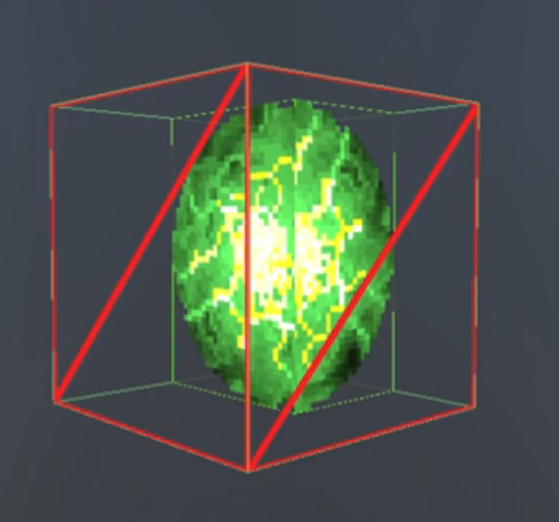
The problem is that when I assign the UVs to the vertices they project onto separate axes relative to the centre of the box and do not take into account the collision normal and current size of the projected image.

Here is a link to a short video demonstrating the problem - https://www.dropbox.com/scl/fi/f5ysstjcz3i38gf7823ow/UVDecalProblem.mov?rlkey=meo3f43wnl5h0bw7vpcznoug7&st=adhwx4p7&dl=0

I've embedded a still image to provide some idea also.

In the image above the collision normal is on the left, the red wireframe is the decal volume, and the duplicated projection onto the 90-degree face relative to the box centre is on the right.

I would like the uv coordinates on the right face to take into account that most of the image has been projected onto collision surface normal and wrap around the uv coordinates accordingly (created one seamless image) rather than project and duplicate the image onto the adjacent surface using the box center.

I would also like this to be robust enough to handle other cases such as concave surfaces so computing a weighted-average normal and projecting onto that plane will not be enough to resolve this.

Does anyone have any ideas on how this can be resolved? Happy to share code if anyone would find it useful?

RmbRT
RmbRT

What exactly is this trying to accomplish? Are you making separate sprites for each face of the object, and are trying to blend them so that you see a perspectivically somewhat accurate view of the depicted object?

For the exact image you show, you do not need that, a camera-facing sprite would be enough. If you want perspectivic sprites, you may want to look at what Smack studio is doing. They're using two sprites (front and back face) and two height maps to model a 3D shap. They combine multiple such sprites into an animated mesh, and then invoke a compute shader to render the model into a texture, and paint it onto a quad, or something, as far as I know.

Even in the case where the sprites line up, this doesn't even work properly, as it will perspectivically bend the texels. You can see from the shape of the texels that they are on two planes, and you lose the spherical look. If you tried to use this to model a human head, it would look extremely jarring, as the left half of the face would be cut off and directly transition into the left ear and back side of the head.

But if your goal is to use the exact same sprite for both sides, why not simply use a single quad that always faces the camera, and put the sprite onto it?

I also don't get what you mean by concave surfaces in this context. Do you want to have a sprite depicting a concave shape, or do you want a concave geometric shape that you project the sprite onto? And yes, your current approach only works for circles or other shapes that are highly symmetric like that.

Walk with God.
JoeJ
JoeJ

GameDevEddington said:
I would like the uv coordinates on the right face to take into account that most of the image has been projected onto collision surface normal and wrap around the uv coordinates accordingly (created one seamless image) rather than project and duplicate the image onto the adjacent surface using the box center.

Sounds you want a simple planar projection, but what you currently have looks more like tri-planar mapping.

To calculate the UV coords of any point, you would transform the world space point into the local space of the volume.
Assuming the z axis of the volume aligns to the surface/projection normal, the local xy coords give you the UV coords.

Your image is actually confusing because seemingly one wall coincidentally aligns to the right face of the volume.
This is a better image from your video:


And this is how the result would look in this case, using planar projection as proposed and painting manually:

Because the wall corner is right angled, a single texel becomes stretched out on the other wall.
Which is the typical worst case artifact of this method. But i see that a lot in games and it's usually accepted.

Rotating the volume to an average surface normal of both walls would prevent this extreme stretch at the cost of having minor stretching on both walls. It's probably better, but not perfect either.

Notice a perfect solution is impossible, because you can not map a 2D image to a curved 3D surface without stretching.
It's only possible to minimize the stretching using an UV solver like 3D modeling tools provide, but that's not realtime, pretty difficult, and surely not worth it for a decal system.

Hope this helps. Not sure if i got your question right.

(Edit: Alpha blending at the boundary of the volume could prevent harsh decal on/off transitions.)

GameDevEddington
GameDevEddington

What exactly is this trying to accomplish?

I would like to have a decal mesh that hugs the geometry and draws the entire green image once across all the surface of the geometry. Generating the decal mesh is fairly straightforward and in place. Assigning UVs to each vertex to only draw the image once and aligned across all surfaces is proving to be more challenging.

Are you making separate sprites for each face of the object, and are trying to blend them so that you see a perspectivically somewhat accurate view of the depicted object?

I am generating a mesh for each separate mesh that is intersected by the decal box. In the example above only one mesh is generated because the decal box is overlapping a single cube mesh. However, geometry can be more complex and move independently. In this case it makes sense to generate separate meshes and make them a child of the moving geometry so they can stay attached to the surface.

Sounds you want a simple planar projection, but what you currently have looks more like tri-planar mapping.

From my understanding a simple planar projection would only work without smearing if you can use a plane that best satisfies all clipped triangles. You can approximate this with a weighted-average normal but this will not work if intersecting a concave surface where normals cancel each other out (for example, a |_| shape).

JoeJ
JoeJ

GameDevEddington said:
From my understanding a simple planar projection would only work without smearing if you can use a plane that best satisfies all clipped triangles. You can approximate this with a weighted-average normal but this will not work if intersecting a concave surface where normals cancel each other out (for example, a |_| shape).

Yes.
Ad said, it's not possible to map an image around sphere (genus 0) without texture seams and stretching.
A torus (genus) would cause even more artifacts.

Let's say you would use a cube map instead a single planar image.
A cube is also genus 0, and you can map it to the sphere without seams and with minor stretching.
A cylinder (same topology, again genus 0 because it has zero holes) can also be mapped without seams, but stretching could be improved by adjusting the UV map to minimize distortion (usually not realtime).
A torus, and any higher genus object can't be mapped without seams.
A tree would be genus 0, so it can be mapped in theory without seams, but in practice the stretching / distortion will be high and results will be terrible.

Still, a cubemap with its standard projection could work well enough, as we see with reflection probes for example. Stretching would appear along the direction to the center, and parts of decal texture my mirror and repeat, but it's seamless.
But i would not really know how to paint decals which such a projection, so i don't think it's useful for the purpose either.

So, if you really want to avoid the stretching, the only practical option is volumetric decals using a 3D texture.

GameDevEddington
GameDevEddington

So, if you really want to avoid the stretching, the only practical option is volumetric decals using a 3D texture.

Are volumetric decals possible in the built-in forward rendering pipeline for Unity? I'm thinking that we would need to sample the camera's depth texture and then draw over it. We would require a deferred pipeline for that, right?

JoeJ
JoeJ

GameDevEddington said:
I'm thinking that we would need to sample the camera's depth texture and then draw over it. We would require a deferred pipeline for that, right?

It works with 3D texture coords per vertex, so per pixel or deferred isn't needed.
Idk. if Unity supports this, but probably yes.

GameDevEddington
GameDevEddington

It works with 3D texture coords per vertex, so per pixel or deferred isn't needed.

That makes sense, it sounds like I can continue to use the decal mesh approach but I would need to make some adjustments. I think I should be able to generate a 3D texture from a 2D texture. How would I then go about generating the 3D texture coordinates per vertex for the decal mesh?

JoeJ
JoeJ

GameDevEddington said:
How would I then go about generating the 3D texture coordinates per vertex for the decal mesh?

It's trivial. Transform vertices to local space of the volume cube, then uvw = (xyz + 1) / 2 for example.

GameDevEddington said:
I think I should be able to generate a 3D texture from a 2D texture.

That's some work, since painting 3D textures is basically like modeling a voxel model.
For the artstyle you have, Magica Voxel might be a good tool.

RmbRT
RmbRT

I'm pretty sure 3D textures kill your performance, though. Yeah, GPUs have caches and all that, and lots of VRAM nowadays, but a 64×64×64 pixel image has 2¹⁸ or almost a million pixels. That's equivalent to a 512×512 pixel 2D texture. Sure, you can compress that, maybe, but it's still a sizeable thing. And I don't think GPUs are that optimised for 3D textures. If you then also have any mipmapping and/or linear filtering going on, you'll quickly reach up to 16 memory lookups per sample. Texture lookups and texture sizes can easily bottleneck your rendering, which means you would probably massively shrink your viable audience. Is your 64×64×64 decal really so important that you have to use that approach instead of using a 512×512 pixel texture instead?

I also don't really understand what the concrete outcome is that you are trying to achieve. I'm pretty sure that whatever it is you're trying to do is much better solved in a much simpler and efficient way. Can you maybe give a sketch of a concrete scenario in which this decal mechanism is used, and what the intended result would be?

P.S.: Btw, splatting a decal onto a mesh dynamically has been done for ages already. Like the black burns on walls or ground from explosions. If that's what you're trying to do, you don't need a 3D texture or anything weird like that. You simply take a center point, and then splat this onto all surrounding geometry based on distance to center and some basic rule for UV orientation, and maybe alpha based on distance as well or something.

Walk with God.
JoeJ
JoeJ

RmbRT said:
I'm pretty sure 3D textures kill your performance, though.

Doubt it. The bottleneck should be polygon clipping and extra draw calls, not the actual rendering. He also uses nearest filter, so it's still just one sample.
I expect the difference is hard to measure, but ofc. keep an eye on it.

RmbRT
RmbRT

Is there a confusion of words here? A decal to me is a material modifier that you apply onto a surface, such as rust, dirt, or cracked glass patterns, or bullet holes or explosion stains.

The image OP shows in his example hardly looks like an actual decal he would want to apply onto a surface, so I assume it is a non-representative placeholder (at least I cannot imagine how that could be an intended decal for any use case). So I assume he will in practice use different textures for that, and they might have higher resolutions than 64×64, and they might be linearly filtered and mipmapped. And then, 3D texturse do become expensive, I think, because they will have huge memory locality issues, as a polygon would stretch through many “layers” of the texture, meaning you touch tons of different cache lines (I'm assuming GPUs do have cache lines and that they matter, performance-wise). And doubling the resolution to 128×128 would produce a 128×128×128 texture, which would be 2²¹ pixels, so 1024×2048 equivalent. For a single decal. That's like 8MiB of texture data before compression.

P.S.: And regarding polygon clipping: that would be a one-time thing when the decal is created, I think. Because you usually don't have decals that remain static in space while the geometry they are projected onto moves around. That would make the decal more like a fixed light that projects a texture instead. I just can't fathom the actual goal he is trying to achieve with all this.

Walk with God.
JoeJ
JoeJ

RmbRT said:
I think, because they will have huge memory locality issues, as a polygon would stretch through many “layers” of the texture

GPUs do not use the standard memory layout you typically use on CPU. (Having a line of vertical pixels after the other, each line covering the whole width of the image.)

Instead they use vendor specific layout, typically dividing into small image blocks, and ordering the blocks using a cache efficient space filling curve (like e.g. hilbert curve or morton code).

Calculating morton codes isn't that expensive. Here's some code that i use:

static inline uint64_t Coords3DToMorton (
			const uint64_t x, const uint64_t y, const uint64_t z, 
			const uint32_t base)
		{
			uint64_t mortonCode = 0;
			uint64_t bit = 1;
			uint64_t shift = 0;
			for (uint32_t i=0; i<base; i++)
			{
				mortonCode |= (x & bit) << (shift++);
				mortonCode |= (y & bit) << (shift++);
				mortonCode |= (z & bit) << shift; bit<<=1;
			}
			return mortonCode;
		}

		static inline void MortonToCoords3D (
			uint64_t &x, uint64_t &y, uint64_t &z, 
			const uint64_t mortonCode, const uint32_t base)
		{
			x=0; y=0; z=0;
			uint64_t bit = 1;
			uint64_t shift = 0;
			for (uint32_t i=0; i<base; i++)
			{
				x |= (mortonCode & bit) >> (shift++); bit<<=1;
				y |= (mortonCode & bit) >> (shift++); bit<<=1;
				z |= (mortonCode & bit) >> shift; bit<<=1;
			}
		}

It helps a lot with data locality and is often useful on CPU as well.
So if you did not know this, it's maybe a must have for your homebrew GPU.

This also causes quite some trouble exposed when using low level gfx APIs.
If you generate a texture from compute shaders, the vendor layout is unknown and there are no tooling functions to provide it.
So you have to write the image in the inefficient standard layout first, afterwards you have to do an image transition to shuffle memory layout, and only then you have an 'efficient' texture to use for rendering (but it still lacks compression which is important for perf. too)

So i just realize, for your own FGPA renderer, you actually want to learn Vulkan first, because it tells you much more details about how GPUs work under the hood. OpenGL is too much abstraction maybe.
(Vulkan is ‘hard or annoying’, but it's verbose debug error feedback is so good, i do not miss the ease of OpenGL at all.)

Back on topic, i assume a 64^3 texture isn't much slower to sample than a 512^2, even with filtering.
Also, drawing all decals in it's own draw call means the texture will be fully cached quickly anyway.
But ofc. only profiling will tell.

RmbRT said:
P.S.: And regarding polygon clipping: that would be a one-time thing when the decal is created, I think.

Likely, but you still need to find the geometry intersecting the volume, then iterating mesh data.
Even if this happens only once each Nth frame, you get a runtime spike which is the worst thing that can happen.
And in the end of the day you have to assume paying that cost every frame to maintain a guaranteed frame rate.
(Background thread can eventually help on static geometry, but maybe a typical Unity workflow does not go that far.)

GameDevEddington
GameDevEddington

The image OP shows in his example hardly looks like an actual decal he would want to apply onto a surface, so I assume it is a non-representative placeholder

That's correct, it is just a non-representative placeholder.

And regarding polygon clipping: that would be a one-time thing when the decal is created, I think.

That's also correct in my case. I generate the decal mesh once based on the collision point, collision normal, and clipping the overlapping meshes to the decal box volume.

Btw, splatting a decal onto a mesh dynamically has been done for ages already. Like the black burns on walls or ground from explosions. If that's what you're trying to do, you don't need a 3D texture or anything weird like that. You simply take a center point, and then splat this onto all surrounding geometry based on distance to center and some basic rule for UV orientation, and maybe alpha based on distance as well or something.

Are you suggesting spherical projection in this case? Something along the lines of

float3 dir = normalize(localPos);
float2 uv = 0.5 + 0.5 * float2(atan2(dir.x, dir.z) / PI, dir.y);

Back on topic, i assume a 64^3 texture isn't much slower to sample than a 512^2, even with filtering.
Also, drawing all decals in it's own draw call means the texture will be fully cached quickly anyway.
But ofc. only profiling will tell.

I found https://www.humus.name/index.php?page=3D&ID=83 which looks to be using volume decals but with a deferred render setup. That claims to run on very old GPUs but I would like to continue using my forward rendering, mesh generation approach if possible.

JoeJ
JoeJ

GameDevEddington said:
That's also correct in my case. I generate the decal mesh once based on the collision point, collision normal, and clipping the overlapping meshes to the decal box volume.

The question is more likely: Do you use the decal system primarily for projectile impacts (requiring decal mesh generation at runtime), or do you use for for decoration (e.g. adding dirt to walls; mesh generation just once and could be offline)?

In case you want decoration first, volume decals is probably no good choice due to memory cost and artist burden.

GameDevEddington said:
Are you suggesting spherical projection in this case?

I guess he means to use no image at all, but just a procedural spherical blob, darkening around a given spot using a distance falloff.

GameDevEddington said:
That claims to run on very old GPUs but I would like to continue using my forward rendering, mesh generation approach if possible.

Volume decals do work with forward, the same way you have it now. You only need 3D texture coords instead 2d.
It should be very easy to try out.

GameDevEddington
GameDevEddington

The question is more likely: Do you use the decal system primarily for projectile impacts (requiring decal mesh generation at runtime), or do you use for for decoration (e.g. adding dirt to walls; mesh generation just once and could be offline)?

The decal system is primarily being used for projectile impacts which require decal mesh generation at runtime.

Volume decals do work with forward, the same way you have it now. You only need 3D texture coords instead 2d.
It should be very easy to try out.

The generation of the 3D texture may need some thought. I can currently think of the following options

  • Gain artistic skills and create something using voxels to use as them as a guide to generate each slice
  • Repeat the same texture along each slice but fade from the center
  • Procedural generation tools to fill in each slice based on the original texture

Repeating the same texture likely the easiest option but may not be enough.

JoeJ
JoeJ

GameDevEddington said:
Repeat the same texture along each slice but fade from the center

You can get the exact same result from a 2d image using planar projection, plus a falloff using alpha blending.
That's still a very practical option, but then you really don't need volume textures.

Proc. gen. tools is probably the most widely used option for realistic artstyle. I guess blender can do this pretty well.
But i could not tell any tips and tricks. It's not an intuitive problem for an artist i think.

I must say i have never seen impact decals in games which do actually look good.
‘Good’ results would require to consider the existing material and doing some kind of basic fracture simulation.
So personally i would be quite tolerant about various artifacts, like the stretching from planar projection.
If you feel like doing damage to the surfaces you shoot at, it's maybe good enough, even if there are some glitches.

JoeJ
JoeJ

To give some more personal opinion, to make decals cool i would rather work on a dimishing glow effect. So you see the hot impact is cooling down with time. This is great for powerful weapons at least. And there could be some smoke particles on top.

That's probably much higher benefit compared to solving the stretching problem at the cost of making the artwork harder.

But it always depends in the project ofc.

RmbRT
RmbRT

GameDevEddington said:
Are you suggesting spherical projection in this case?
Something along the lines of

float3 dir = normalize(localPos);
float2 uv = 0.5 + 0.5 * float2(atan2(dir.x, dir.z) / PI, dir.y);

Something like that, maybe? I'm not sure. I'm not up to speed on geometry to check that formula without a lot of effort. But it also depends, does the decal originate from a central point that is outside of the surface, and is then put onto surfaces? Or does it originate directly on the surface? etc. But spherical projection and establishing an orientation axis of the sprite should be pretty good, yeah. Although that only covers the straight distance from the origin of the sprite, and not the arc distance along the surface the decal is applied to. This means it would not work well with a torus or similar geometry. But I think no generic solution would actually work out of the box with such geometry. But it definitely is quite stable and warp-free, I assume. You could use normal vector at the origin to define the axes of the U/V plane, but instead of looking at the distance on the normal vector's plane, you look at the real spatial distance from origin to mesh vertex to see how far the U/V distance goes, while the projection onto the normal vector's plane would determine the U/V direction.

JoeJ said:
So you have to write the image in the inefficient standard layout first, afterwards you have to do an image transition to shuffle memory layout, and only then you have an 'efficient' texture to use for rendering (but it still lacks compression which is important for perf. too)

Hence a fully software-driven renderer on a hardware architecture that is suited for exactly that task would not have that problem, because you know exactly how it works, or it can expose its internal data structures to you freely as a header or something. You could directly compile against your renderer, which directly runs on the actual silicon, without obscured hardware internals.

JoeJ said:
So i just realize, for your own FGPA renderer, you actually want to learn Vulkan first, because it tells you much more details about how GPUs work under the hood. OpenGL is too much abstraction maybe.

OpenGL is the right abstraction ballpark at least, when considering the way the host application wants to talk to the graphics API. Of course all that crap abound binding slots etc. is useless, and they thankfully removed it in 4.x, but it was somewhat too late, since not all devices have drivers for recent OpenGL. Another useless thing is the forced CPU-side validation of the commands. Just let the GPU send back an error if something invalid was requested, and then let me debug it afterwards. Or just crash the entire program and send me to the debugger or something. Especially since the command validation in OpenGL validates the command against the OpenGL global state object, and not against the actual GPU's requirements. So it is an artificial validation. Maybe an optional debug mode should do that.

Anyway, vulkan is too complicated. Why do I need to know how the GPU works when I just want to draw a triangle? Just give me an interface that lets me efficiently tell the GPU what to do, not how to do it. And then let GPU vendors come up with neat ways to figure out an efficient how. As long as the API lets me state my intent of what to achieve clearly, I don't need to know any internals, as it is a blackbox that just accomplishes what I request of it.

Walk with God.
JoeJ
JoeJ

RmbRT said:
Hence a fully software-driven renderer on a hardware architecture that is suited for exactly that task would not have that problem, because you know exactly how it works, or it can expose its internal data structures to you freely as a header or something. You could directly compile against your renderer, which directly runs on the actual silicon, without obscured hardware internals.

You can get all that now by buying a playstation dev kit from ebay ;D

It's cool we can replace parts on our PCs. But this freedom comes at a cost of HW abstraction.

RmbRT said:
Maybe an optional debug mode should do that.

After decades of waiting i can assure you: We'll never get proper debugging on GPU. Never. Deal with it. : )

RmbRT said:
Anyway, vulkan is too complicated. Why do I need to know how the GPU works when I just want to draw a triangle?

It's not just about you. Low level API gives us more performance, flexibility and control, and responsibility.
And it also makes it easier for driver developers. Even Intel could not make native drivers for all those bloated legacy APIs.

RmbRT said:
And then let GPU vendors come up with neat ways to figure out an efficient how.

Well, that's what they did with high level APIs. Every game got its driver where they have fixed bugs and inefficiency.
Every game. Except yours.

With low level API they no longer need to fix your bugs, nor is there much left they could do if they wanted.
They may still optimize some shaders, though. Some, just not yours.

It's all up to you now. And it is good that way. \:D/

Topic Locked

This topic has been locked by a moderator. New replies are not allowed.

Sign in to reply to this topic.