
GameDev.net gamedev.net
🔒 Locked

Problems when performing a 'translation' on a model

Started by DividedByZero Dec 4, 2025 at 11:11 PM 5 replies 1.8k views
Original Post
DividedByZero
DividedByZero

Hi Guys,

I am experiencing a weird problem when I locate an object in 3D space in DirectX 11.

If I perform a single translation on an object it locates nicely, but when I add another translation to it. the object then becomes distorted.

            DirectX::XMMATRIX translate;
            DirectX::XMMATRIX matObject = DirectX::XMMatrixTranspose(DirectX::XMMatrixIdentity());

            translate = DirectX::XMMatrixTranslation(0, 0.5, 0);
            matObject = DirectX::XMMatrixTranspose(DirectX::XMMatrixMultiply(matObject, translate));

            // translate = DirectX::XMMatrixTranslation(0, -0.5, 0);
            // matObject = DirectX::XMMatrixTranspose(DirectX::XMMatrixMultiply(matObject, translate));

            char objectData[sizeof(DirectX::XMMATRIX)];
            memcpy(objectData, &matObject, sizeof(DirectX::XMMATRIX));
            d3dContext->UpdateSubresource(d3dConstantBufferObject, 0, 0, objectData, 0, 0);
            d3dContext->VSSetConstantBuffers(1, 1, &d3dConstantBufferObject);

With the uncommented area the object looks like this, which is as expected.
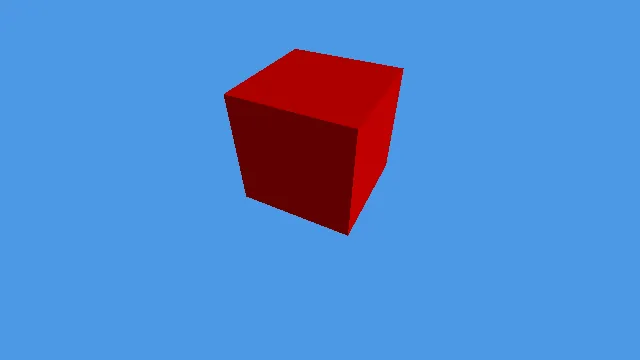
But If I uncomment the lines in the middle there, I would expect to have the cube move back to its original position of (0, 0, 0). But instead, I get a distorted cube as shown below.

Leaving the cube at (0, 0, 0) and performing no translations at all renders fine as well, as would be expected.

I'm presently at a loss as to why this is happening.

Any thoughts would be greatly appreciated.

DividedByZero
DividedByZero

Ah, I worked it out. Don't transpose the result until you are completely finished.

I'm a little rusty. Haha!

RmbRT
RmbRT

The order of model transformations is SROT: scale, rotate, orbit, translate. And then you got MVP: model (SROT), view (camera-relative), project (ortho/perspective). Orbit is usually skipped, though.

Walk with God.
DividedByZero
DividedByZero

RmbRT said:

The order of model transformations is SROT: scale, rotate, orbit, translate. And then you got MVP: model (SROT), view (camera-relative), project (ortho/perspective). Orbit is usually skipped, though.

Well, it depends. But yeah.

Aerodactyl55
Aerodactyl55

You are transposing the object matrix after every matrix operation which is messing up everything.

What you should do is transpose the object matrix right before updating the constant buffer.

The way you are doing now, you will always mess up the second transformation, because the first transpose is making your object matrix column major (and DX Math uses row major). So you are no longer translating twice.

DividedByZero
DividedByZero

Thanks guys, yes this is what I said a few minutes after making the post. I quickly realised the error of my ways.

Topic Locked

This topic has been locked by a moderator. New replies are not allowed.

Sign in to reply to this topic.