What goes into the formula if you want to add Depth Testing to your scene?
I took a snippet of code from the Depth Testing tutorial in the DirectX SDK and placed it in another tutorial hopping it will enable Depth Testing. Adding the code didn't produce the expected result. This is the code snipped is question
// Create depth stencil texture
   D3D10_TEXTURE2D_DESC descDepth;
   descDepth.Width = width;
   descDepth.Height = height;
   descDepth.MipLevels = 1;
   descDepth.ArraySize = 1;
   descDepth.Format = DXGI_FORMAT_D32_FLOAT;
   descDepth.SampleDesc.Count = 1;
   descDepth.SampleDesc.Quality = 0;
   descDepth.Usage = D3D10_USAGE_DEFAULT;
   descDepth.BindFlags = D3D10_BIND_DEPTH_STENCIL;
   descDepth.CPUAccessFlags = 0;
   descDepth.MiscFlags = 0;
   hr = g_pd3dDevice->CreateTexture2D(&descDepth, NULL, &g_pDepthStencil);
   if (FAILED(hr))
       return hr;
   // Create the depth stencil view
   D3D10_DEPTH_STENCIL_VIEW_DESC descDSV;
   descDSV.Format = descDepth.Format;
   descDSV.ViewDimension = D3D10_DSV_DIMENSION_TEXTURE2D;
   descDSV.Texture2D.MipSlice = 0;
   hr = g_pd3dDevice->CreateDepthStencilView(g_pDepthStencil, &descDSV, &g_pDepthStencilView);
   if (FAILED(hr))
       return hr;

   //g_pd3dDevice->OMSetRenderTargets( 1, &g_pRenderTargetView, NULL );
   g_pd3dDevice->OMSetRenderTargets(1, &g_pRenderTargetView, g_pDepthStencilView);
Do I have to change other things as well?
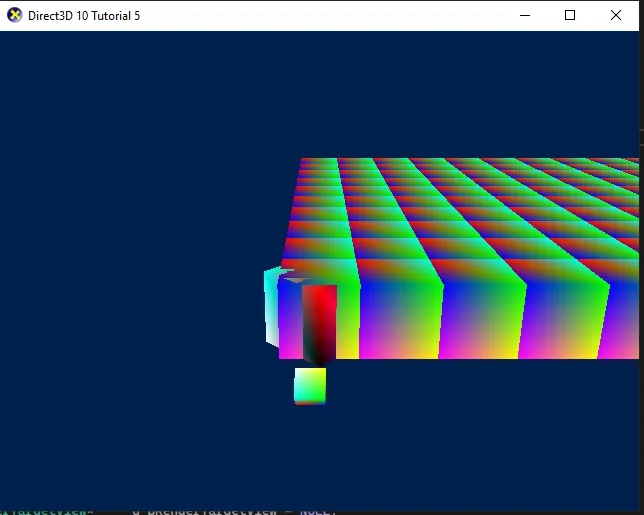
Without depth testing the scene looks like this, obviously incorrect perspective
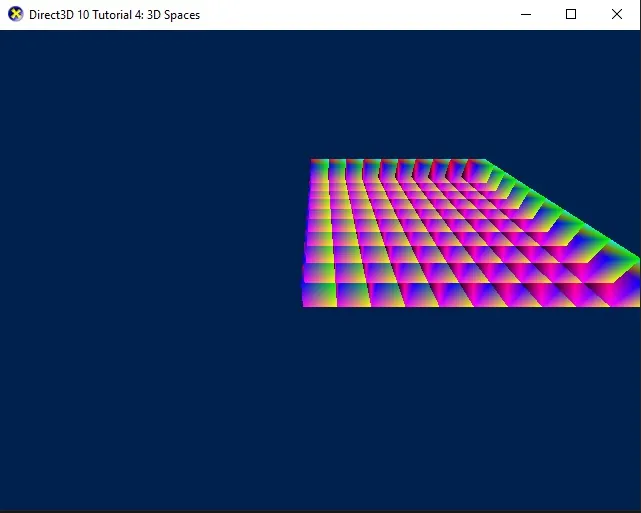
After adding the snippet it looks like this

I can get the grid of boxes displayed with a correct perspective if I edit and add the grid to the tutorial with basic animations (the one that uses depth testing) but the tutorial has so many variables and parameters I can't figure out what's different, what else is required to get to work in the other tutorials.