Original Post

I am still learning unity 6 and c# I am working on a simple tank game. what should I add to my game?
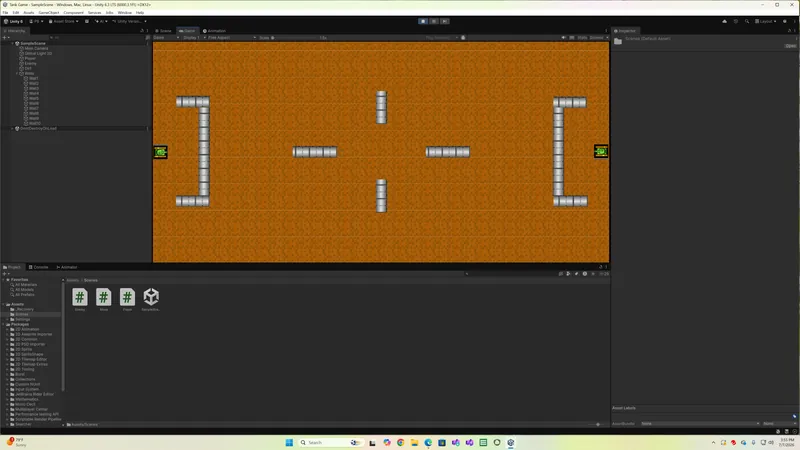
I am still learning unity 6 and c# I am working on a simple tank game. what should I add to my game?
Stripper babes, time travel, portals, dinosaurs with laser eyes. And maybe AI so you can play alone.
maybe I will include portals and maybe some AI
What features does it have so far?
Are there different maps?
Some basic AI would be excellent if you don't already have it!
The screenshot only shows 2 tanks, maybe you could add some more?
I am working on having my tank shoot bullets
pbivens67 wrote:
I am working on having my tank shoot bullets
Excellent, that's probably a great next step before worrying about things like AI, other maps, etc. 🙂
I am using the following c# script but it does not work, what do I have to setup in unity
using UnityEngine;

public class TankShooting : MonoBehaviour
{
    [Header("Shooting Settings")]
    public Transform firePoint; // Assign a child GameObject at the tip of the barrel
    public float bulletSpeed = 20f;
    public Color bulletColor = Color.yellow;

    void Update()
    {
        // Shoots when pressing the Spacebar or Left Mouse Button
        if (Input.GetButtonDown("Fire1"))
        {
            ShootBullet();
        }
    }

    void ShootBullet()
    {
        // 1. Create a blank GameObject at the fire point
        GameObject bullet = new GameObject("RuntimeBullet");
        bullet.transform.position = firePoint.position;
        bullet.transform.rotation = firePoint.rotation;

        // 2. Create a 2D Square Sprite programmatically
        SpriteRenderer sr = bullet.AddComponent<SpriteRenderer>();
        sr.sprite = CreateSquareSprite();
        sr.color = bulletColor;
        sr.sortingOrder = 5; // Ensure it renders in front of the tank

        // 3. Scale the square into a sleek bullet shape
        bullet.transform.localScale = new Vector3(0.4f, 0.15f, 1f);

        // 4. Add Physics to launch the bullet
        Rigidbody2D rb = bullet.AddComponent<Rigidbody2D>();
        rb.gravityScale = 0f; // Prevent the bullet from falling down
        rb.collisionDetectionMode = CollisionDetectionMode2D.Continuous; // Prevent clipping

        // 5. Launch the bullet forward (assuming the barrel's right side is the front)
        rb.linearVelocity = firePoint.right * bulletSpeed;

        // 6. Destroy the bullet after 3 seconds to clear memory
        Destroy(bullet, 3f);
    }

    // Helper method to generate a clean 4x4 white texture sprite at runtime
    Sprite CreateSquareSprite()
    {
        Texture2D texture = new Texture2D(4, 4);
        Color[] pixels = new Color[16];
        for (int i = 0; i < pixels.Length; i++)
        {
            pixels[i] = Color.white;
        }
        texture.SetPixels(pixels);
        texture.Apply();

        return Sprite.Create(texture, new Rect(0, 0, 4, 4), new Vector2(0.5f, 0.5f));
    }
}
This topic has been locked by a moderator. New replies are not allowed.
With your permission, GameDev.net uses analytics cookies to understand how people use the platform. You can accept analytics or continue with necessary cookies only. Learn more