GameDev.net gamedev.net
🔒 Locked

I made a browser-based Text Effects Editor for game UI, logos, and banners

Started by GROmGames Jul 30 at 11:50 AM 11 replies 1.1k views
Original Post
GROmGames
GROmGames

Hey everyone!

I wanted to share a small tool I’ve been building and would love to hear what you think:

Text Effects Editor
https://text-effects.grom-games.art/

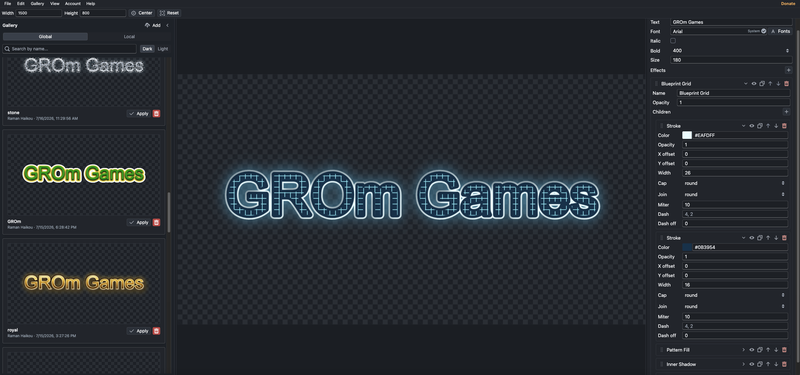
It’s a browser-based editor for creating stylized text effects and exporting them as transparent PNGs. The idea is to make it easier to create game UI labels, logo text, thumbnails, banners, stickers, and other quick typography assets without opening a full graphics editor every time.

Some features:

  • Layered text effects with groups

  • Fill, stroke, gradients, patterns, noise, shadows, glow, blur, wave, distort, blend/composite effects

  • Drag-and-drop effect ordering

  • Import/export JSON presets

  • Export transparent PNG

  • Copy PNG directly to clipboard

  • Local and global effect gallery

  • Works directly in the browser

I also separated the rendering engine into an open-source npm module:
https://www.npmjs.com/package/grom-font-effects

I’m especially interested in feedback from game developers:

  • Is this useful for your workflow?

  • What effects or export options would you expect?

  • Does the UI feel understandable?

  • Any obvious missing features?

Would love to hear your thoughts. Thanks!
GROmGames
GROmGames

Unity Source Code wrote:

Nice work! I like that it runs directly in the browser and exports transparent PNGs—that could make creating UI assets much faster during prototyping. Have you considered adding presets optimized for game engines like Unity or Unreal (for example, button labels, achievement banners, or in-game notifications)? I think that would be really useful for game developers.

Thanks! Yes, users can already create and save their own presets as JSON, but I like your idea of adding built-in starter presets for common game UI use cases.

I’m thinking of adding categories like button labels, achievement banners, HUD titles, damage numbers, quest notifications, level-up text, and warning messages. These wouldn’t be Unity/Unreal-specific technically, since the output is transparent PNG/JSON, but they could be optimized for workflows common in those engines.

That would probably make the tool more useful immediately, especially for prototyping. Thanks for the suggestion!

GROmGames
GROmGames

Thanks, I really appreciate the feedback!

Yes, that’s exactly the direction I want to take it. I’d like the editor to stay engine-agnostic, but still feel useful for real game UI workflows out of the box.

I’m planning to add more starter presets around common use cases like achievement banners, quest notifications, HUD titles, level-up text, damage numbers, warning messages, and button labels. The idea is that you can start from a preset, tweak the text/effects, then export a transparent PNG or save the stack as JSON.

I also want to keep expanding the effect system itself, but I think curated presets will make the tool much easier to evaluate quickly. Thanks again for the suggestion!

ecpm_insights
ecpm_insights

The transparent PNG export looks useful for prototyping. One export option I would want is a fixed canvas and baseline, with batch sizes such as 1x, 2x and 4x.

Effects like glow, blur and shadow can change the image bounds. If each export is cropped differently, swapping text variants inside a HUD may cause the label to shift slightly. Keeping consistent padding and anchor information would make the assets easier to use in an actual interface.

A preview at realistic HUD and button sizes could also help show whether an effect remains readable after it is scaled down.

GROmGames
GROmGames

Thanks, that makes sense.

The editor actually already exports using a fixed canvas size: the Width and Height fields define the PNG canvas, so the exported image is not auto-cropped around the text. You can already keep several text variants on the same canvas size this way.

But I agree that the workflow could be clearer and more game-UI oriented. Explicit anchor/baseline guides, padding helpers, and export presets for 1x/2x/4x would make it easier to produce consistent assets without guessing.

A small HUD/button-size preview is also a good idea, because some effects look great at large size but lose readability when scaled down.

So I think the core is already possible, but the UI could communicate and support that workflow much better. Thanks for pointing it out!

GROmGames
GROmGames

Yes, the exported PNG already uses the fixed canvas size defined in the editor, so it is not auto-cropped around the text. If the font settings and text position stay the same, different text variants should share the same baseline.

What I probably need to make clearer is the workflow/UI around that: showing anchor/baseline guides, maybe adding explicit export scale options like 1x/2x/4x, and adding a small-size preview for HUD/button readability. That would make the consistency more obvious and easier to verify.

taby
taby

Yeah that’s super cool! I’m thinking that we might try it out for our game development in progress.

GROmGames
GROmGames

Quick update: I added Batch PNG Export.

Now you can export a whole set of text variants into a single .zip archive, which should be useful for game UI work like button labels, HUD text, achievement banners, menu states, etc.

How it works:

  • enter multiple text lines, one per PNG;
  • choose a filename pattern, for example {text};
  • optionally add a suffix for UI states like up, down, or over;
  • output names can become:
    • play-up.png
    • settings-up.png
    • shop-up.png
  • duplicate filenames are handled automatically with -2, -3, etc.;
  • the selected item has a preview with pan, zoom, center, and reset controls;
  • everything is exported as transparent PNGs inside one ZIP file.

The batch text list and export settings are saved in the browser after export.

Link: https://grom-games.art/game/text-effects-editor/

Thanks again for the feedback. This was a useful suggestion and fits the tool pretty well.

GROmGames
GROmGames

Small update on the editor.

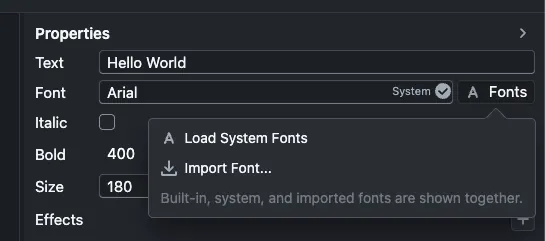
I added a new font workflow:

  • system fonts can now be loaded from the user’s computer
  • custom .ttf, .otf, and .woff fonts can be imported
  • imported fonts are stored locally in the browser and restored after reload
  • the font picker now shows where each font comes from: Built-in, System, or Imported

This was based on the feedback about the editor having too few fonts and no obvious way to add custom ones.

Live version:
https://text-effects.grom-games.art/

Still interested in feedback, especially around game UI workflows and export needs.

GROmGames
GROmGames

Here’s an update on the Text Effects Editor.

I added a few workflow improvements based on the feedback here:

  • Batch PNG export: you can now enter a list of text variants and export them all at once as a ZIP.
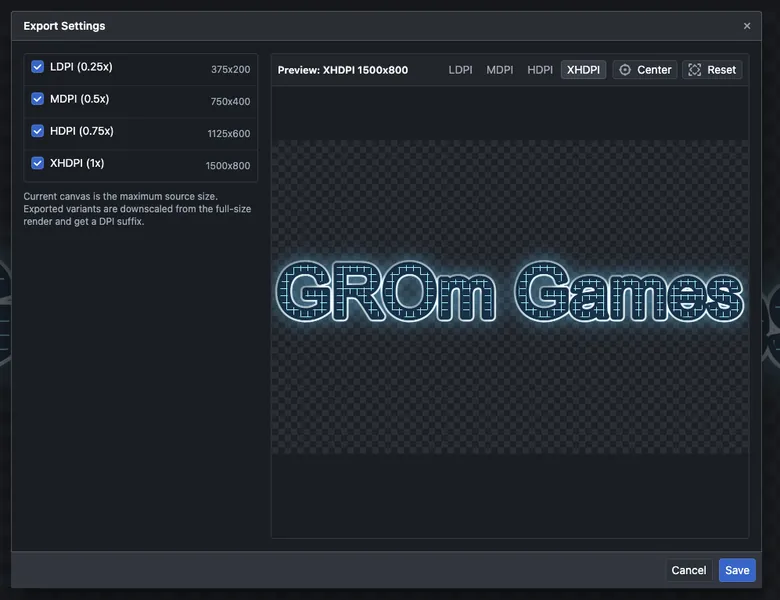
  • Global DPI export settings: exports can generate ldpi, mdpi, hdpi, and xhdpi PNGs from the same source canvas.
  • The current canvas size is treated as the maximum resolution, and smaller DPI variants are downscaled from it.
  • Exported filenames automatically get DPI suffixes, for example play-up-xhdpi.png, play-up-mdpi.png, etc.
  • Batch export also supports optional suffixes, which is useful for button states like play-up, play-down, play-over.
  • I also fixed a canvas rerender issue when changing canvas size.

The idea is to make it easier to create consistent UI text assets for buttons, HUD labels, banners, and similar game UI elements without manually exporting each text variant one by one.

Live version:
https://grom-games.art/game/text-effects-editor/

Would be happy to hear more feedback, especially around export workflows and what presets would be useful for game UI prototyping.

GROmGames
GROmGames

Small update: the Text Effects Editor has moved to a new hosting URL.

New link:
https://grom-games.art/game/text-effects-editor/

The editor is still the same browser-based tool for creating game UI text, logos, banners, button labels, HUD text, and exporting transparent PNGs.

Recent features are still available there:
- batch PNG export;
- DPI variants: ldpi, mdpi, hdpi, xhdpi;
- transparent PNG export;
- local/global effect gallery;
- imported and system fonts;
- editable effect stacks with glow, shadow, blur, gradient, pattern, noise, wave, distort, and more.

If you tried the old link before, please use the new one from now on:
https://grom-games.art/game/text-effects-editor/

Feedback is still very welcome, especially around game UI workflows, export options, and useful presets.

Topic Locked

This topic has been locked by a moderator. New replies are not allowed.

Sign in to reply to this topic.