
Texture Sampling Lab
by GameDev.net · GLSL ES 3.00 (WebGL2) · 25 Aug 2026
Run the shader to adjust these controls.
What it demonstrates
Sampling a texture is one function call. Everything that makes it look right or wrong happens to the coordinate before that call, and to the channel settings around it. This lab puts a diagnostic chart on a channel and exposes scale, offset and rotation, so aspect errors, wrap behaviour, filtering and alpha are all things you can see rather than things you remember.
Shader inputs
void mainImage(out vec4 fragColor, in vec2 fragCoord)
Called once per pixel. Write the colour to fragColor.
-
iResolutionvec3 - Viewport size in pixels (z is the pixel aspect ratio).
-
iTimefloat - Seconds since the shader started.
-
iTimeDeltafloat - Seconds since the previous frame.
-
iFrameRatefloat - Frames per second, smoothed.
-
iFrameint - Frames rendered since the start.
-
iMousevec4 - Mouse position: xy while held, zw of the last click.
-
iDatevec4 - Year, month, day, and seconds within the day.
-
iChannel0sampler2D - Texture bound to channel 0.
-
iChannel1sampler2D - Texture bound to channel 1.
-
iChannel2sampler2D - Texture bound to channel 2.
-
iChannel3sampler2D - Texture bound to channel 3.
-
iChannelResolutionvec3[4] - Pixel size of each bound channel texture.
-
iChannelTimefloat[4] - Playback time of each channel, in seconds.
-
iSampleRatefloat - Audio sample rate, always 44100.
Main Image5
uniform float uScale; // @param 0.25..4.0 = 1.0 "UV scale"
uniform vec2 uOffset; // @param -1.0..1.0 = 0.0, 0.0 "UV offset"
uniform float uRotation; // @param -3.15..3.15 = 0.0 "Rotation"
uniform bool uMarkOutside; // @param = 1 "Mark outside 0-1"
void mainImage(out vec4 fragColor, in vec2 fragCoord) {
vec2 centered = (fragCoord - 0.5 * iResolution.xy) / iResolution.y;
float c = cos(uRotation);
float s = sin(uRotation);
vec2 rotated = vec2(centered.x * c - centered.y * s,
centered.x * s + centered.y * c);
vec2 uv = rotated * uScale + 0.5 + uOffset;
vec4 texel = texture(iChannel0, uv);
float checker = mod(floor(fragCoord.x / 16.0) + floor(fragCoord.y / 16.0), 2.0);
vec3 backdrop = mix(vec3(0.09, 0.10, 0.12), vec3(0.15, 0.16, 0.19), checker);
vec3 color = mix(backdrop, texel.rgb, texel.a);
if (uMarkOutside) {
vec2 outside = max(vec2(0.0) - uv, uv - vec2(1.0));
if (max(outside.x, outside.y) > 0.0) {
color = mix(color, vec3(0.95, 0.25, 0.40), 0.22);
}
}
fragColor = vec4(color, 1.0);
}
Inputs for this pass
-
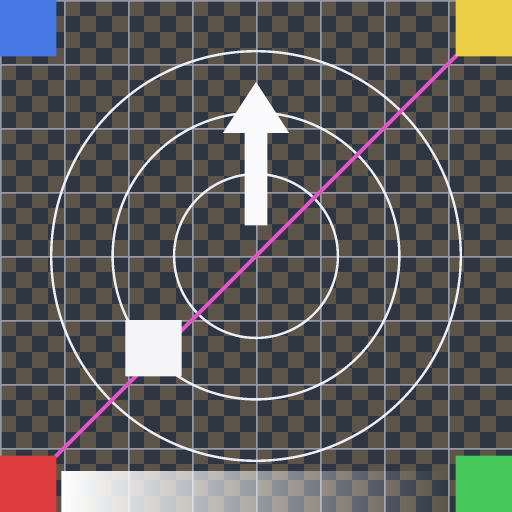 iChannel0
textures/uv-test-v1.png
iChannel0
textures/uv-test-v1.png
- iChannel1 Empty
- iChannel2 Empty
- iChannel3 Empty
Learn from this shader
How it works
The fragment coordinate is centred and divided by height, which keeps the square chart square whatever shape the canvas is. That coordinate is rotated, scaled and shifted back to the middle before sampling. The chart is built to make mistakes obvious: four differently coloured corners and a single diagonal so a flip is unmistakable, concentric rings that turn into ellipses under an aspect error, a fine checkerboard that reveals filtering and minification, and a band along one edge whose alpha ramps to zero. Because the channel is set to repeat, scaling past one tiles the chart rather than smearing its edge pixels, and the tint marks every fragment whose coordinate left the zero to one range.
Try changing
Raise UV scale past one and watch the tiles appear, then imagine the same shader with the channel set to clamp instead. Rotate and note the rings stay circular. Drag UV offset and see the alpha band cross the frame. Turn the outside marker off to see how convincingly a repeat wrap hides itself.
Using it in a game
This is the coordinate maths behind every sprite atlas, scrolling background, decal and detail map. The two settings that are not code — filter and wrap — belong to the sampler in every engine, and choosing clamp instead of repeat is what stops a scrolled texture bleeding its opposite edge into frame.
Explore the techniques
Continue with curated explanations and progressively related examples.
-
 Explained
GLSL
Explained
GLSL
-
 Explained
GLSL
Explained
GLSL
-
 Explained
GLSL
Explained
GLSL

Discussion