

Memory Usage Optimization Using Cache
Using a cache is a popular way to optimize your memory usage, reducing the chance of swapping memory pages from slow hard drives. Let's discover the advantages of using the cache by studying two scenarios
- The container: it could be a queue, an array, a list or maybe a custom container. The choice of one of these containers could impact your cache performance a lot.
- The max size of the cache.
- The algorithm used to free entries from the cache: When the cache reaches its maximum, you have to decide which entries to release, for example you could:
- Release the first slots loaded.
- Release the last slots loaded.
- Release the less-used slots.
Scenario 1: The application uses a big amount of data stored in disk (Irrlicht engine)
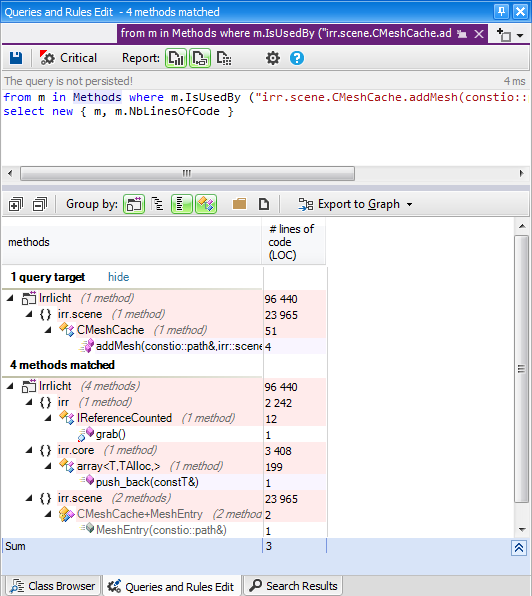
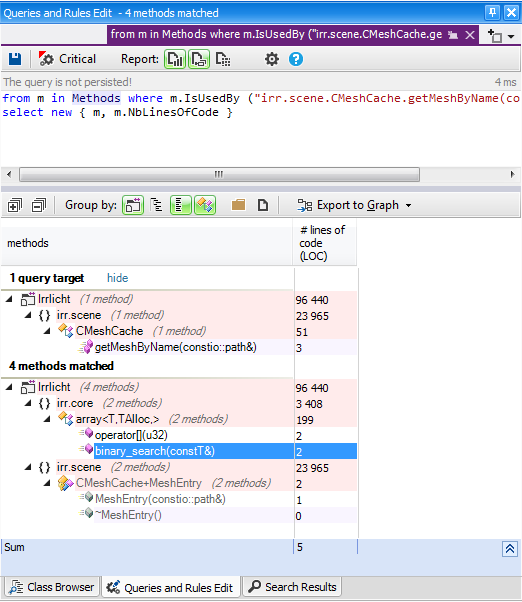
This scenario occurs when you use a large amount of data stored in the disk, and when you load this data into the memory, your application becomes slow. When you search for the cause, you discover that your application consumes a lot of memory. You decide to free the data as soon as you finish using it, but the application is still slow, and this time it's due to thrashing. Indeed you need many times to reload the data released. Let's take a look inside the Irrlicht engine using CppDepend and discover some facts about the cache used. The Irrlicht Engine is an open-source high performance realtime 3D engine written in C++. And as every game engine it manages mesh classes. A mesh is a collection of polygons. Each polygon is stored in memory as an ordered list of 3D points. In order to create a 3D cube mesh we would need to specify the eight corner points of the cube in 3D space. Each polygon could then be defined using four of eight points. Meshes are stored in disk, and they must be loaded into memory to work with. Irrlicht provides the IMeshCache interface to define the cache contract, and the CMeshCache implement it.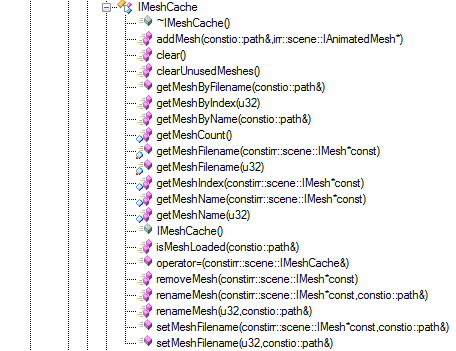
Scenario 2: The application uses a big ammount of calculated data in memory (Doxygen)
In this case the data used is not stored in the disk, but it's calculated after some process treatments. Let's take as example the Doxygen tool, which is a useful tool for generating documentation from annotated C++ sources. Doxygen take as entry source files to parse, and after a lexical analysis, many datas are extracted from these files to be stored in the memory to treat them and generate the documentation. If you parse a big project, the data extracted from the sources become very big, and it would consume a lot of memory, and to resolve this issue Doxygen uses a cache to store these data. Doxygen gets the cache max size from the configuration file: int cacheSize = Config_getInt("SYMBOL_CACHE_SIZE"); It's a good idea to let this parameter be configurable, so you can increase the cache if you have a machine with a big physical memory size to increase the cache performence. However for the newer Doxygen releases this parameter is removed from the config file, and a default value is used. And here's the container used by Doxygen: Doxygen::symbolCache = new ObjCache(16+cacheSize); // 16 -> room for 65536 elements, What about the algorithm to free entries from cache? The Doxygen developers could decide the optimized algo to release the cache, it depends on how they implemented the parser; here's the code snippet from Doxygen code source responsible for releasing the cache when it reaches its maximum: void MemberDef::makeResident() const { if (m_cacheHandle==-1) // not yet in cache { MemberDef *victim = 0; MemberDef *that = (MemberDef*)this; // fake method constness that->m_cacheHandle = Doxygen::symbolCache->add(that,(void **)&victim); //printf("adding %s to cache, handle=%d\n",m_impl->name.data(),that->m_cacheHandle); if (victim) // cache was full, victim was the least recently used item and has to go { victim->m_cacheHandle=-1; // invalidate cache handle victim->saveToDisk(); // store the item on disk } else // cache not yet full { //printf("Adding %s to cache, handle=%d\n",m_impl->name.data(),m_cacheHandle); } if (m_storagePos!=-1) // already been written to disk { if (isLocked()) // locked in memory { assert(m_impl!=0); that->m_flushPending=FALSE; // no need to flush anymore } else // not locked in memory { assert(m_impl==0); loadFromDisk(); } } } else // already cached, make this object the most recently used. { assert(m_impl!=0); //printf("Touching symbol %s\n",m_impl->name.data()); Doxygen::symbolCache->use(m_cacheHandle); } } As specified in the makeResident method code, the least recently used item is removed if the cache is full. Let's discover where this method is invoked: 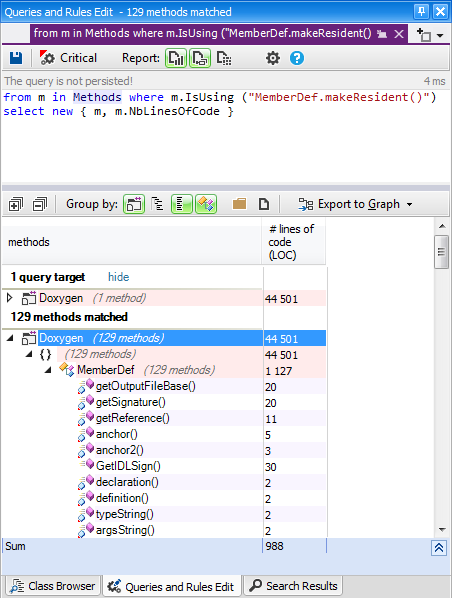
The impact of using the cache
Using the cache could increase the performence of your application, but did the cache bring a big optimisation or just a micro optimisation and it's not worth to add it in your application? Let's take as example the Doxygen project, I modified its code to not use the cache and I parsed some C++ projects with this modified version. And surprisingly the parsing time has much increased, sometimes from 5 min to 25 min.Conclusion
Using the cache is a powerful technique to increase the performance if you use a large amount of data. Discovering how open-source projects implement the cache could be very useful to understand how to implement it in your applications.Related Tutorials
Balancing Game Development and Creative Direction in Indie Production
A practical look at how indie developers can balance creative direction with hands-on game development. This article co…
 huseyin_onur
My Unreal Engine Development Process: From Core Idea to Playable Build
A practical overview of my Unreal Engine development process, covering how I move from a core game idea to a playable b…
huseyin_onur

Introducing LaneGraph: The Ultimate Road Network Solution for Unity
Discover the power of LaneGraph, a lightweight and flexible lane-based navigation system for Unity. LaneGraph makes it…
Retargeting Mixamo Characters with Root Motion In Unreal Engine 5.4.
I have always found Retargeting Mixamo Characters To have Root Motion is a serious lengthy Tast, Recently I stumbled up…

How To Make A SIMPLE Main Menu In Unity
In this tutorial for unity, i go over how to make a simple main menu for unity, it's an unlisted video because i do not…
 FlipThaSwitzh

Guide to Gameplay Balance
A perspective on competitive gameplay balance, from a background of "shooter" sandbox design.
 Tucker933
Discussion
More from Issam Lahlali
Spring RTS Engineering Internals
Uses an open source RTS engine to demonstrate how the CppDepend tool can be used to break down and understand a game's …
Learn from Irrlicht the API Mapping Between OpenGL and Direct3D
Discover from the Irrlicht source code, how to map functions between OpenGL and Direct3D.
Discussion