
VaW progress: Week 5
1,258
0
Advertisement
Welcome back!
Same story, busy weekend, lots of homework, not much done, blah blah blah. This entry is going to be pretty short.
Screenie!
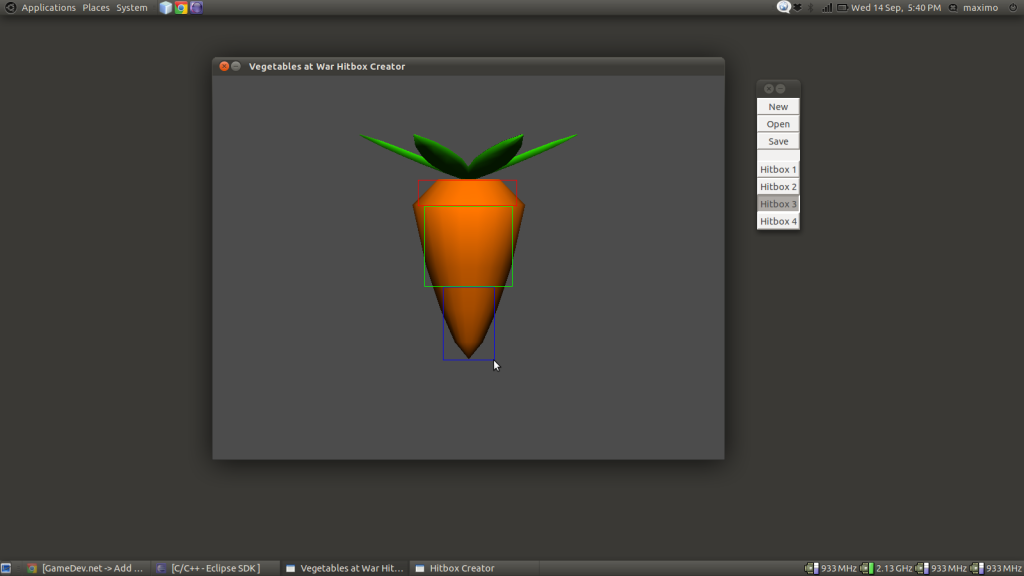
This week I've been doing a bit more on collision detection. I created a program that allows you to open up a model in either Wavefront OBJ or my own 3D file formats (SMM (SuperMaximo Model) and SMO (SuperMaximo Object)), and simply click and drag rectangles over the model which will act as the hitboxes for when the game does precise collision detection. It uses GTK 3 for the little side window.
As you can see from the screenshot, the hitboxes are quite rough, but the game is going to be fast paced, so it doesn't really matter. The game engine generates an even rougher hitbox on load time for super-quick collision checking, so there's no need to create one here. The hitboxes created with this program are actually rotated by the engine by multiplying each vertex with a rotation matrix when the asset rotates, so that the collisions don't screw up, but the auto-generated rough one is big enough so that it doesn't need to be rotated.
Here's a snippet from my game library that handles 2D point-in-polygon collision (I did this a while back, but it doesn't hurt to have it here). This is done for each vertex of asset A's hitbox against the hitboxes of asset B (and then vice versa), during the precise collision checking stage. If the dot product of the vector of the first vertex of a polygon edge to the point and the perpendicular vector of the polygon edge are less than 0, then the point is outside of the polygon.
And that's it for this week. Not much, I know, but at least it's one more thing crossed off my checklist!
See you next week
Max
@supermaximo93
Same story, busy weekend, lots of homework, not much done, blah blah blah. This entry is going to be pretty short.
Screenie!
This week I've been doing a bit more on collision detection. I created a program that allows you to open up a model in either Wavefront OBJ or my own 3D file formats (SMM (SuperMaximo Model) and SMO (SuperMaximo Object)), and simply click and drag rectangles over the model which will act as the hitboxes for when the game does precise collision detection. It uses GTK 3 for the little side window.
As you can see from the screenshot, the hitboxes are quite rough, but the game is going to be fast paced, so it doesn't really matter. The game engine generates an even rougher hitbox on load time for super-quick collision checking, so there's no need to create one here. The hitboxes created with this program are actually rotated by the engine by multiplying each vertex with a rotation matrix when the asset rotates, so that the collisions don't screw up, but the auto-generated rough one is big enough so that it doesn't need to be rotated.
Here's a snippet from my game library that handles 2D point-in-polygon collision (I did this a while back, but it doesn't hurt to have it here). This is done for each vertex of asset A's hitbox against the hitboxes of asset B (and then vice versa), during the precise collision checking stage. If the dot product of the vector of the first vertex of a polygon edge to the point and the perpendicular vector of the polygon edge are less than 0, then the point is outside of the polygon.
bool vec2::polygonCollision(unsigned vertexCount, vec2 * vertices) {
 for (unsigned i = 1; i < vertexCount; i++) {
 if ((vertices[i-1]-(*this)).dotProduct((vertices-vertices[i-1]).perpendicular()) < 0.0f) return false;
 }
 if ((vertices[vertexCount-1]-(*this)).dotProduct((vertices[0]-vertices[vertexCount-1]).perpendicular()) < 0.0f)
 return false;

 return true;
}
And that's it for this week. Not much, I know, but at least it's one more thing crossed off my checklist!
See you next week
Max
@supermaximo93
Advertisement
Advertisement
Advertisement
Discussion