
GameDev.net gamedev.net
🔒 Locked

2d Collision detection theory problem...

Started by Thrust Dec 20, 2004 at 2:56 PM 11 replies 2.1k views
Original Post
Thrust
Thrust
Hi, so far my 2d game is coming along way better then I ever thought it would. I run in to small problems, but usially overcome them less then an hour later. Now it seems ive hit a larger problem. My theory of collision detection on a tile based map is if you move one pixel at a time, if the tile one pixel at any side of you isnt walkable then you dont allow movement. Now here is the code for my movement:

if(event.type == SDL_KEYDOWN)
        {
            if(event.key.keysym.sym == SDLK_ESCAPE)
                isRunning = false;
        } 
       keys = SDL_GetKeyState(NULL);
       if ( keys[SDLK_UP] )
       {
          if (ypos -1 == notWalkable)
          ypos -= 0;
          else
          ypos -= 1; 
       }
       if ( keys[SDLK_DOWN] ) 
       {
          if (ypos +1 == notWalkable)
          ypos += 0;
          else
          ypos += 1; 
       }
       if ( keys[SDLK_LEFT] ) 
       {
          if (xpos -1 == notWalkable)
          xpos -= 0;
          else
          xpos -= 1;
       }
       if ( keys[SDLK_RIGHT] )       
       {
          if (xpos +1 == notWalkable)
          xpos += 0;
          else
          xpos += 1; 
       }

now my problem begins. First, I only have two tiles, a wall and grass. How do I determine if something is or isnt walkable? Here is full code:

//Mark St. Jean
//Brandon Walton
//WASTEDink 2004
//First online game alpha 1.0

#include <iostream>
#include <stdlib.h>
#include <winsock2.h>
#include <SDL/SDL.h> 

//Functions
void host();
void join();
void drawMap();
void drawScene();
//draws bitmaps, x = o is top, y = 0 is left, sprite is the image
void draw(int x, int y, SDL_Surface *sprite, SDL_Surface *screen);
    
    //Globals
    //Main screen
    SDL_Surface *titleScreen;
    SDL_Surface *gameScreen;
    //Tile Surfaces
    SDL_Surface *tile1 = SDL_LoadBMP("gfx/tiles/tile1.bmp");
    SDL_Surface *tile2 = SDL_LoadBMP("gfx/tiles/tile2.bmp");
   //Sprites
    SDL_Surface *sprite1 = SDL_LoadBMP("gfx/sprites/sprite1.bmp");
    //Sprite coordniates
    int xpos = 40;
    int ypos = 320;

using namespace std;
  
int main(int argc, char *argv[])
{
    Uint8* keys;
   
    //Surfaces used in SDL
    SDL_Surface *title1;
    SDL_Surface *title2;
    SDL_Surface *title3;

    //Initalize Graphics
    title1 = SDL_LoadBMP("gfx/title1.bmp");
    title2 = SDL_LoadBMP("gfx/title2.bmp");
    title3 = SDL_LoadBMP("gfx/title3.bmp");
    //Sets transparency
    SDL_SetColorKey(sprite1, SDL_SRCCOLORKEY, SDL_MapRGB(sprite1->format, 255, 100, 255));

    
    //boolean used to determine if the game is running
    bool isRunning;
    //A SDL event, used to keep gamerunning.
    SDL_Event event;

    //unload function
    atexit(SDL_Quit);
    
    //sets the video mode that SDL uses
    // Peremiters are window width, window height,color depth, then flags
    titleScreen = SDL_SetVideoMode(760, 400, 0, SDL_HWSURFACE|SDL_DOUBLEBUF);

    //gives the boolean a value
    isRunning = true;
    drawMap();
    
    //Main game loop
    while(isRunning == true)
    {
        //Poll event 
        SDL_PollEvent(&event);

        //event that ends SDL and main game loop
       if(event.type == SDL_KEYDOWN)
        {
            if(event.key.keysym.sym == SDLK_ESCAPE)
                isRunning = false;
        } 
       keys = SDL_GetKeyState(NULL);
       if ( keys[SDLK_UP] )
       {
          if (ypos -1 == notWalkable)
          ypos -= 0;
          else
          ypos -= 1; 
       }
       if ( keys[SDLK_DOWN] ) 
       {
          if (ypos +1 == notWalkable)
          ypos += 0;
          else
          ypos += 1; 
       }
       if ( keys[SDLK_LEFT] ) 
       {
          if (xpos -1 == notWalkable)
          xpos -= 0;
          else
          xpos -= 1;
       }
       if ( keys[SDLK_RIGHT] )       
       {
          if (xpos +1 == notWalkable)
          xpos += 0;
          else
          xpos += 1; 
       }

       drawScene();
    }
  
  cout << "WELCOME 3 DA GAME!!! Well its actuially not here yet..." << endl;
  cout << "This just tests the connection :)" << endl;
  
  if (event.type == SDL_QUIT)
       {
              SDL_FreeSurface(title1);
              SDL_FreeSurface(title2);
              SDL_FreeSurface(title3);
              isRunning = false;
       }  
  
  return 0;
}


//SDL code---------------------------------------------


//Draws stuff to the screen
void draw(int x, int y, SDL_Surface *sprite, SDL_Surface *screen)
{
    SDL_Rect source;
    SDL_Rect dest;

    source.x = 0;
    source.y = 0;
    source.w = sprite->w;
    source.h = sprite->h;

    dest.x = x;
    dest.y = y;
    dest.w = source.w;
    dest.h = source.h;

    SDL_BlitSurface(sprite, &source, screen, &dest);

    return;
}


//DRAWS MAP!!!

void drawMap()
{ 
 
 int map [10][19]= {0,0,0,0,0,0,0,0,0,0,0,0,0,0,0,0,0,0,0,
                    0,1,1,1,1,1,1,1,1,1,1,1,1,1,1,1,1,1,0,
                    0,1,1,1,1,1,1,1,1,1,1,1,1,1,1,1,1,1,0,
                    0,1,1,1,1,1,1,1,1,1,1,1,1,1,1,1,1,1,0,
                    0,1,1,1,1,1,1,1,1,1,1,1,1,1,1,1,1,1,0,
                    0,1,1,1,1,1,1,1,1,1,1,1,1,1,1,1,1,1,0,
                    0,1,1,1,1,1,1,1,1,1,1,1,1,1,1,1,1,1,0,
                    0,1,1,1,1,1,1,1,1,1,1,1,1,1,1,1,1,1,0,
                    0,1,1,1,1,1,1,1,1,1,1,1,1,1,1,1,1,1,0,
                    0,0,0,0,0,0,0,0,0,0,0,0,0,0,0,0,0,0,0};

for(int y = 0;y < 10; y++)
{ 
    for(int x = 0;x < 19; x++)
    {
        if(map[y][x] == 1)
         {
           draw(x*40,y*40,tile1,titleScreen);
         }
        else if (map[y][x] == 0)
         {
           draw(x*40,y*40,tile2,titleScreen);
         }
    }
}
}


//draws background
void drawScene()
{
  drawMap();
  draw(xpos, ypos, sprite1, titleScreen);

  SDL_Flip(titleScreen);
}


Mark St. Jean - OwnerWastedInkVwmaggotwV@Yahoo.com
Krisc
Krisc
I have never done any work with tiles so take this with a grain of salt but seriously as well.

The idea as I understand it is to always know what tile of the map your player is on. I think if you get the X and Y position and divide by the tile width and height you get the tile they are on. That said all you have to do is check the tile class *if you don't have a tile class you should make one...* and inside the tile class should be a method or a variable simply called bool isWalkable(). If it isn't then don't let the player move.

Good luck and I hope this helps.

p.s. I just looked at your code. Might want to invest in a tile class and a map class. If you have both of these you can easily load from configuration files and have numerous maps in a matter of minutes instead of hardcoding them.
Thrust
Thrust
Yes, I plan on changing the map system in a later update, I just want to get the basic/important elements done first, then fix up the code, make it more effecient,etc...


Thanks the the input, yet I dont really know how I would go about that.
Mark St. Jean - OwnerWastedInkVwmaggotwV@Yahoo.com
Krisc
Krisc
For this simple code that you are writing try this:

make the map a global variable so the moving functions can get at the data.

Then in the move function when the user hits left, right, up or down check this:
int i_x = xpos / 40;
int i_y = ypos / 40;

// here add the correct value to i_x or i_y...like this
[psuedo code]
if left key then i_x--;

if(map[i_x][i_y] == 1)
move the player here...

I know this is really junky right now and I hope you get the idea... You also might want to try moving the player one tile at a time. It will make it easier.
Thrust
Thrust
OK, I basicially copied your code and into my program, and changed the map to a global, but it gives me errors on my map array, saying i_x, i_y arent declared, so I declare those in the globals, and yet it still wont work inless I keep the numbers 10 and 19 in it. I dont get this...
Mark St. Jean - OwnerWastedInkVwmaggotwV@Yahoo.com
Krisc
Krisc
Ok ok send me your complete code an I will look at it.

If you want to email it: sedlaj2@rpi.edu

p.s. I think I do not have the required libraries...any idea as to where to get them?
Thrust
Thrust
Files sent. Thanks for your help, and I will stay in touch through e-mail. Thanks alot.
Mark St. Jean - OwnerWastedInkVwmaggotwV@Yahoo.com
evillive2
evillive2
The movement might be a bit messed up on faster computers where time between frames is so low you get round off errors but it should give you an idea of what you are looking for.

Clicky
Evillive2
Thrust
Thrust
Thanks for the download. The help you both gave is very appreciated, yet it still doesn't help. Im so lost, I feel like an idot if I can get this far, and get stuck on collision detection.
Mark St. Jean - OwnerWastedInkVwmaggotwV@Yahoo.com
Thrust
Thrust
Ok, I have colision working. The only problem, it wont work for right and down. For some reason the code looks right, but yet it still wont work. I changed some values around, still wont work. Please help.


//Mark St. Jean//Brandon Walton//WASTEDink 2004//First online game alpha 1.0// EDITED// Name: John Sedlak// December 20, 2004// Main edits://  Made map global.//  Made key function work with collision detection//  Added some theoretical class ideas at bottom, commented out#include <iostream>#include <stdlib.h>#include <winsock2.h>#include <SDL/SDL.h> // EDITED: Made globalint map [10][19]= {0,0,0,0,0,0,0,0,0,0,0,0,0,0,0,0,0,0,0,                    0,1,1,1,1,1,1,1,1,1,1,1,1,1,1,1,1,1,0,                    0,1,1,1,1,1,1,1,1,1,1,1,1,1,1,1,1,1,0,                    0,1,1,1,1,1,1,1,1,1,1,1,1,1,1,1,1,1,0,                    0,1,1,1,1,1,1,1,1,1,1,1,1,1,1,1,1,1,0,                    0,1,1,1,1,1,1,1,1,1,1,1,1,1,1,1,1,1,0,                    0,1,1,1,1,1,1,1,1,1,1,1,1,1,1,1,1,1,0,                    0,1,1,1,1,1,1,1,1,1,1,1,1,1,1,1,1,1,0,                    0,1,1,1,1,1,1,1,1,1,1,1,1,1,1,1,1,1,0,                    0,0,0,0,0,0,0,0,0,0,0,0,0,0,0,0,0,0,0};//Functionsvoid host();void join();void drawMap();void drawScene();//draws bitmaps, x = o is top, y = 0 is left, sprite is the imagevoid draw(int x, int y, SDL_Surface *sprite, SDL_Surface *screen);        //Globals    //Main screen    SDL_Surface *titleScreen;    SDL_Surface *gameScreen;    //Tile Surfaces    SDL_Surface *tile1 = SDL_LoadBMP("gfx/tiles/tile1.bmp");    SDL_Surface *tile2 = SDL_LoadBMP("gfx/tiles/tile2.bmp");   //Sprites    SDL_Surface *sprite1 = SDL_LoadBMP("gfx/sprites/sprite1.bmp");    //Sprite coordniates    int xpos = 40;    int ypos = 320;using namespace std;  int main(int argc, char *argv[]){    Uint8* keys;       //Surfaces used in SDL    SDL_Surface *title1;    SDL_Surface *title2;    SDL_Surface *title3;    //Initalize Graphics    title1 = SDL_LoadBMP("gfx/title1.bmp");    title2 = SDL_LoadBMP("gfx/title2.bmp");    title3 = SDL_LoadBMP("gfx/title3.bmp");    //Sets transparency    SDL_SetColorKey(sprite1, SDL_SRCCOLORKEY, SDL_MapRGB(sprite1->format, 255, 100, 255));        //boolean used to determine if the game is running    bool isRunning;    //A SDL event, used to keep gamerunning.    SDL_Event event;    //unload function    atexit(SDL_Quit);        //sets the video mode that SDL uses    // Peremiters are window width, window height,color depth, then flags    titleScreen = SDL_SetVideoMode(760, 400, 0, SDL_HWSURFACE|SDL_DOUBLEBUF);    //gives the boolean a value    isRunning = true;    drawMap();    int i_x, i_y;        //Main game loop    while(isRunning == true)    {        // Setup the indexing for collision detection        i_x = ypos / 40;        i_y = xpos / 40;        //Poll event         SDL_PollEvent(&event);        //event that ends SDL and main game loop       if(event.type == SDL_KEYDOWN)        {            if(event.key.keysym.sym == SDLK_ESCAPE)                isRunning = false;        }        keys = SDL_GetKeyState(NULL);       if ( keys[SDLK_UP] )       {           // If the tile above the player is walkable...           if(map[i_x][i_y - 1] == 1)           {               // Subtract his yposition               ypos--;           }           else           {               // If it isn't the player might not be as close               //   as the tile since we are subtracting by pixels.               //   This takes care               if(ypos > i_y * 40 + 40)                   ypos--;           }          /*if (ypos -1 == notWalkable)          ypos -= 0;          else          ypos = 1; */       }       if ( keys[SDLK_DOWN] )        {           // Same as before, just adjusted for the down key...           if(map[i_x][i_y + 1] == 0)           {               ypos++;           }           else           {               if(ypos < i_y * 40 + 40)                   ypos++;           }       }       if ( keys[SDLK_LEFT] )        {           if(map[i_x - 1][i_y] == 1)           {               xpos--;           }           else           {               if(xpos > i_x * 40)                   xpos--;           }       }       if ( keys[SDLK_RIGHT] )              {           if(map[i_x + 1][i_y] == 0)           {               xpos++;           }           else           {               if(xpos < i_x * 40)                   xpos++;           }          /*if (xpos +1 == notWalkable)          xpos += 0;          else          xpos += 1; */       }       drawScene();    }    cout << "WELCOME 3 DA GAME!!! Well its actuially not here yet..." << endl;  cout << "This just tests the connection :)" << endl;    if (event.type == SDL_QUIT)       {              SDL_FreeSurface(title1);              SDL_FreeSurface(title2);              SDL_FreeSurface(title3);              isRunning = false;       }      return 0;}//SDL code---------------------------------------------//Draws stuff to the screenvoid draw(int x, int y, SDL_Surface *sprite, SDL_Surface *screen){    SDL_Rect source;    SDL_Rect dest;    source.x = 0;    source.y = 0;    source.w = sprite->w;    source.h = sprite->h;    dest.x = x;    dest.y = y;    dest.w = source.w;    dest.h = source.h;    SDL_BlitSurface(sprite, &source, screen, &dest);    return;}//DRAWS MAP!!!void drawMap(){   int map [10][19]= {0,0,0,0,0,0,0,0,0,0,0,0,0,0,0,0,0,0,0,                    0,1,1,1,1,1,1,1,1,1,1,1,1,1,1,1,1,1,0,                    0,1,1,1,1,1,1,1,1,1,1,1,1,1,1,1,1,1,0,                    0,1,1,1,1,1,1,1,1,1,1,1,1,1,1,1,1,1,0,                    0,1,1,1,1,1,1,1,1,1,1,1,1,1,1,1,1,1,0,                    0,1,1,1,1,1,1,1,1,1,1,1,1,1,1,1,1,1,0,                    0,1,1,1,1,1,1,1,1,1,1,1,1,1,1,1,1,1,0,                    0,1,1,1,1,1,1,1,1,1,1,1,1,1,1,1,1,1,0,                    0,1,1,1,1,1,1,1,1,1,1,1,1,1,1,1,1,1,0,                    0,0,0,0,0,0,0,0,0,0,0,0,0,0,0,0,0,0,0};for(int y = 0;y < 10; y++){     for(int x = 0;x < 19; x++)    {        if(map[y][x] == 1)         {           draw(x*40,y*40,tile1,titleScreen);         }        else if (map[y][x] == 0)         {           draw(x*40,y*40,tile2,titleScreen);         }    }}}//draws backgroundvoid drawScene(){  drawMap();  draw(xpos, ypos, sprite1, titleScreen);  SDL_Flip(titleScreen);}//Network Code-------------------------------------------------//~~~~~~~~~~~~~~~~~~~~~~~~//~~~~~~~~~~~~~~~~~~~~~~~~//~~~~~~~~~~~~~~~~~~~~~~~~//Hosts the game//~~~~~~~~~~~~~~~~~~~~~~~~//~~~~~~~~~~~~~~~~~~~~~~~~//~~~~~~~~~~~~~~~~~~~~~~~~void host(){  int error;  //loads winsock  WSADATA wsaData;  error = WSAStartup(MAKEWORD(2, 0), &wsaData);    //error handler  if (error != 0)  {    cout << "Couldn't Initialize Winsock: 1" << endl;  // unload WinSock  WSACleanup ();  return;  }    cout << "Winsock initialized..." << endl;    //creates a socket  SOCKET connectSocket;  connectSocket = socket(AF_INET, SOCK_STREAM, IPPROTO_TCP);    //error handler  if (connectSocket == INVALID_SOCKET)  {    cout << "Couldnt create socket: 2" << endl;  // unload WinSock  WSACleanup ();  return;   }    cout << "Socket created..." << endl;    //This is the port it connects to, we are using 12521  const int port = 12521;   // the address structure for a TCP socket  sockaddr_in addr;  addr.sin_family = AF_INET;      // Address family Internet  addr.sin_port = htons (port);   // Assign port to this socket  addr.sin_addr.s_addr = htonl (INADDR_ANY);   // No destination    if (bind(connectSocket, (LPSOCKADDR)&addr, sizeof(struct sockaddr)) == SOCKET_ERROR)  {   cout << "Couldn't bind socket: 3" << endl;  // unload WinSock  WSACleanup ();  return;  }    cout << "Socket binded..." << endl;    //Waits for the connection   cout << "Waiting for connection from other player..." << endl;  listen(connectSocket, 1);    //Socket for connection  SOCKET connectPlayer;    connectPlayer = accept(connectSocket, NULL, NULL);  cout << "Client accepted... SUCCESS!" << endl;    closesocket(connectPlayer);}  //~~~~~~~~~~~~~~~~~~~~~~~~//~~~~~~~~~~~~~~~~~~~~~~~~//~~~~~~~~~~~~~~~~~~~~~~~~//Joins the host//~~~~~~~~~~~~~~~~~~~~~~~~//~~~~~~~~~~~~~~~~~~~~~~~~//~~~~~~~~~~~~~~~~~~~~~~~~void join(){  int error;  string ipAddress;     cout << "Please enter in the hosts IP address: ";  cin >> ipAddress;    //loads winsock  WSADATA wsaData;  error = WSAStartup(MAKEWORD(2, 0), &wsaData);    //error handler  if (error != 0)  {    cout << "Couldn't Initialize Winsock: 1" << endl;    // unload WinSock    WSACleanup ();    return;  }    cout << "Winsock initialized..." << endl;    //Stores information about the hosting player  LPHOSTENT hostEntry;  in_addr iaHost;  //Hosts IP address  iaHost.s_addr = inet_addr(ipAddress.c_str());  //Gathers information using the IP address  hostEntry = gethostbyaddr((const char *)&iaHost, sizeof(struct in_addr), AF_INET);  //error handling  if (!hostEntry)  {     cout << "Error gathering data..." << endl;    WSACleanup ();    return;  }          //Creates socket  SOCKET connectSocket;  connectSocket = socket(AF_INET, SOCK_STREAM,IPPROTO_TCP);    //error handler  if (connectSocket == INVALID_SOCKET)  {    cout << "Couldnt create socket: 2" << endl;  // unload WinSock  WSACleanup ();  return;  }    cout << "Socket created..." << endl;    //This is the port it connects to, we are using 12521  const int port = 12521;   // the address structure for a TCP socket  sockaddr_in serverInfo;  // Address family Internet  serverInfo.sin_family = AF_INET;    serverInfo.sin_port = htons (port);   // Assign port to this socket    serverInfo.sin_addr = *((LPIN_ADDR)*hostEntry->h_addr_list);   // Hosts IP address      //Connects to the host  error = connect(connectSocket,(LPSOCKADDR)&serverInfo,sizeof(struct sockaddr));    //error handler  if (error != 0)  {   cout << "Couldn't connect to host: 3" << endl;  // unload WinSock  WSACleanup ();  return;  }    cout << "Connected" << endl;  }


[Edited by - Thrust on January 4, 2005 2:38:09 PM]
Mark St. Jean - OwnerWastedInkVwmaggotwV@Yahoo.com
evillive2
evillive2
The collision detection in the download I provided you is just a simple and not very practicle way of doing collision detection but more of a simple "see if you can recreate it and improve on it" type thing. Basicly in your code above, every time a keypress is detected your character moves 1 pixel IF it can. I won't get into how your movement is locked into the framerate cus the issue here is the collision detection, but I do want to mention that you will want to change that sooner or later.

Back to collision detection :). Basicly you want to see if your player has collided with a non walkable tile and for some reason you can't get it to work right. Don't be shocked or ashamed.. I am pretty sure everyone here has had difficulties in this area at some point in their game dev'ing lifetime, I know I did/do. The easiest way I have found for myself is called "bounding box" collision testing. This is exactly as it sounds. There is a "bounding box" of space around every game object in which other objects are not allowed to violate. Think back to those NES games where you got so mad at the controller because you got nailed by a bomb or bad guy but you swear it never hit you. This is because there is an invisible rectangular area around objects or parts of objects that generates a collision. You could do it by checking if any of the other sprites pixels are touching the object but this can be expensive on the CPU and hurt your framerate depending on multiple factors. But at any rate, this all boils down to checking if one rectangle intersects with another.

The example you downloaded from the link in the above post does an even simpler check than intersecting rectangles, it just checks if a point is inside a recangle. This is great to know for things like seeing if a user clicked on a button, or which object on the screen you are clicking on etc. but is rather dodgy for a decent game's collision detection. If you ever decide to do Win32 programming and use GDI, then you might be familiar with the IntersectRect, PointInRect and UnionRect functions. While using these with SDL will negate any platform independence SDL gives you, I am sure you can locate how to make your own versions on google.

Once you have the knowhow to check for the intersection of 2 rectangles, it is pretty simple to check for intersection between 2 objects. Now, the difficult part is how to obtain/store the bounding box for a tile and a sprite. This will vary quite a bit depending on the game but here is an example of how I have done it for 2d tile based games.
typedef struct point_struct{    Sint16        x;    Sint16        y;}POINT;typedef struct tile_struct{    Uint32        tile_id;    SDL_Rect      source_rect;    SDL_Rect      collision_rect;    SDL_Surface   *source_surface;    Uint32        movement_flags;    // etc....}TILE;typedef struct sprite_struct{    Uint32        sprite_id;    SDL_Rect      source_rect;    SDL_Rect      collision_rect;    SDL_Surface   source_surface;    POINT         world_position;    POINT         anchor_point;    // etc...}SPRITE;


Ok, so both tiles and sprites have a collision rectangle but how do we fill them with values? Well, I have tried a few ways and the easiest for me (your opinion may differ) is to use offsets to generate useable rectangles.

We know that tile XXX is always 32x32 pixels wide and I don't want it to be walkable. Do I know before I load my map where tile XXX will be in the world? Probably not and in many cases it may be reused so valid world coordinates here would be pretty uselss. So instead I make the collision_rect = {0,0, 32,32}. 0,0 is the top left corner of the tile, 32,32 is the width and height of the rectangle. This will be the same for all of the 32x32 rectangles. To get a valid in game collision rectangle, just offset this rectangle by the world coordinates of the tile on the map and viola, you have the world coordinates of the tiles collision rectangle. Not bad.

To get the collision rect for a tile is pretty simple, it would look something like:
// tile_x and tile_y are the world coordinates of the top left corner of the tilevoid GetTileCollisionRect( Sint16 tile_x, Sint16 tile_y, TILE *tile, SDL_Rect *rect ){    rect->x = tile_x + tile->collision_rect.x;    rect->y = tile_y + tile->collision_rect.y;    rect->w = tile->collision_rect.w;    rect->h = tile->collision_rect.h;}


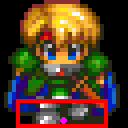
Sprites are slightly different but the same principle applies. The anchor point is used as the placement of our sprite in the world. Usually this is a point at the sprites feet. For a 32x32 sprite, I might have an anchor point of 16,32. This is an offset of pixels from the top left of the sprite to it's feet. This is helpful because when we draw things at point x,y on the screen, we don't want x,y to represent one of our sprites shoulders :) This is also important because our bounding rectangle will be another offset from the anchor point. If we treat our anchor point as the location of our player, we want our bounding box to surround that point. Using the anchor point as our origin (or 0,0 if you wish) we want to surround it say by 4 pixels on all sides. Then our collision_rect would look something like { -4, -4, 8, 8 }. To produce world coordinates from this box, you simply offset this rectangle by the players world location.

Lets put this in perspective now:


the red box represents our collision rect and the pink dot represents our anchor point. Were this sprites dimensions 32x32 the anchor point would be something like 16,30 and the collision rect would be something like -8,-6, 16,8. To get the collision rect for this sprite based on his position in the world it would look something like:
void GetSpriteCollisionRect( SPRITE *sprite, SDL_Rect *rect ){    rect->x = sprite->world_position.x + sprite->collision_rect.x;    rect->y = sprite->world_position.y + sprite->collision_rect.y;    rect->w = sprite->collision_rect.w;    rect->h = sprite->collision_rect.h;}


I hope that helps out a bit. I know it got a little longer than I intended but hopefully it is something like what you are looking for.

[edit] html tags! arg! [/edit]
Evillive2
Krisc
Krisc
For the down take off the + 40 and try that. As for right I will take another look at it and see what I can do.

For down and right the if statement should also be testing the values against 1 not 0. Try that.

Topic Locked

This topic has been locked by a moderator. New replies are not allowed.

Sign in to reply to this topic.