GameDev.net gamedev.net
🔒 Locked

Trying to make a console Rougelike in C# where are my extended characters

Started by ThoughtCriminal Mar 13, 2007 at 12:38 AM 10 replies 8.8k views
Original Post
ThoughtCriminal
ThoughtCriminal
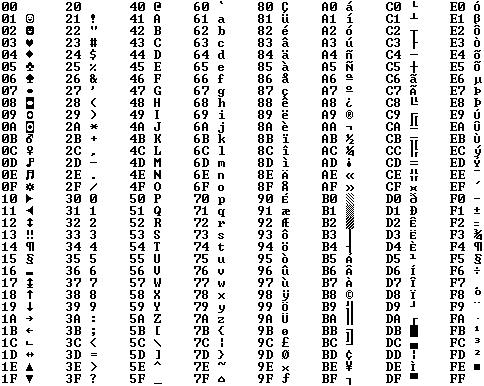
I'm using XP, my only font option is "Raster Fonts". The XP raster font do not seem to have the graphic characters above 128. I a char array and filled it with the values from 0 to 255, looking in the watch window, there are a lot of blanks. When I rune my program those blanks show up as a ?. Any ideas? Thanks.

ThoughtCriminal
ThoughtCriminal
Seems I need to change the ANSI code page. Any idea how to do that, while I google for a method?

I want page 473.

Thanks.

zaphod2
zaphod2
Hi!

I think you misunderstood something about code pages. The C# uses Unicode for its characters and strings. It contains any character in any code pages (except some asian multibyte code pages). And if a font doesn't have a character in it, then you can try to use any code pages, you won't success. That's all. You have to find a font that contains your needed characters. I advise, that you find a monospaced truetype font.
ThoughtCriminal
ThoughtCriminal
Found something of help:

Unicode and .NET

Apparently System.Text.Encoding might help. just haven't found anything that actually set the encoding.

MSDN shows:

protected Encoding (
int codePage
)

But no matter what I try I can get the MSDN code to work.

Thanks.
Zahlman
Zahlman
Quote:
Original post by ThoughtCriminal
Found something of help:

Unicode and .NET

Apparently System.Text.Encoding might help. just haven't found anything that actually set the encoding.

MSDN shows:

protected Encoding (
int codePage
)

But no matter what I try I can get the MSDN code to work.

Thanks.


System.Text.Encoding is a class; the illustrated code would be a constructor for it. The constructor is 'protected' because you're not supposed to be able to call it directly. The idea is that the library defines some subclasses of the base class - which you can use as if they were instances of the main System.Text.Encoding class - and needs to be in control of the process of choosing which subclass you get. So the library exposes to you, among others, the "factory" function Encoding.getEncoding(int codePage), i.e. a static member function of the Encoding class. You call it as 'Encoding.getEncoding(473)' (i.e., specifying the class name rather than an instance of the class - since obviously you don't have such an instance yet ;) ) and it gives you back the instance you need.

The next step would be to use a pair of streams, both of which are "connected" to char[]'s, to translate data from one to the other (i.e. "reading" from the source char[] and "writing" to the other). You use the Encoding object for the code page when you make the "read" stream, and a normal Encoding.Unicode encoding for the "write" stream.

Assuming, of course, that whatever you're using to output the text is expecting Unicode-encoded stuff. What are you using to output the text?

Regardless, though, it would be much simpler to just store the characters you need directly. In C#, a 'char' is more than one byte, so as long as you're not using characters outside the BMP (and the "box-drawing characters" should be well within it), you can just store them directly.

You can represent characters with code points 256 through 65535 directly in source code (i.e., character literals) by using Unicode-escaped literals, i.e. \uXXXX where the X's are hex digits that make up the number. For example, ╠ becomes '\u2560', which is 9,568 if interpreted as an integer.
ThoughtCriminal
ThoughtCriminal
I'm using the console. I'm doing this to help me learn C#. I'm still in the early stages.

My byte array method does give me a working program and I see the available font letters in a watch window. In console properties is shows I'm using:

949 (ANSI/OEM - Korean)

I have the Korean IME installed on English XP.

The page I posted has more info about using streams with the Encoding class.

I was looking for a way to hard-code also as a possible solution so /uxxxx may very well work.

Thank you very much.

edit: Nope that wont work:

cp949 to Unicode table

Guess I need to change the code page.

Hmmmm I get an exception that tells me that code page in not available. Guess I'll have to find a way to install it.


[Edited by - ThoughtCriminal on March 13, 2007 11:40:26 AM]
benryves
benryves
To set the code page on the command line (as a test) use the chcp command. Running it without arguments displays the current one;

C:\Documents and Settings\Benjamin>chcpActive code page: 850
[Website] [+++ Divide By Cucumber Error. Please Reinstall Universe And Reboot +++]
ThoughtCriminal
ThoughtCriminal
I think I found what I'm looking for:

MSDN

Console.OutputEncoding Property

Gets or sets the encoding the console uses to write output.


public static Encoding OutputEncoding { get; set; }

Now I need to learn what get and set wants. So now I'm looking a tutorials about properties. Anyone know one that makes it as simple a possible.

Thanks.


edit: spelling

[Edited by - ThoughtCriminal on March 14, 2007 12:24:40 AM]
benryves
benryves
The getter and setter take and return (in this instance) an Encoding.

Sorry, I was being really quite dim earlier. After all, I've written a rough guide to working with the console over here, which goes over the WriteConsoleOutput function for dumping an array of characters and colour attributes to a console window - the best (and fastest) way to do so.

That's evidently native Win32 code, but you can possibly glean some insight from this C# code I wrote.

If you'd like me to write a simpler demo app for you, give me a shout (that code is rather overcomplicated, as it handles converting 16-bit colours to console characters and colours).

Edit: To clarify, as it's directly writing to the console it should make encoding worries easier, but you'll probably still have the encoding issues if using extended ASCII characters. I'll write something up if you can bear with me. [smile]
[Website] [+++ Divide By Cucumber Error. Please Reinstall Universe And Reboot +++]
Zahlman
Zahlman
Quote:
Original post by ThoughtCriminal
I think I found what I'm looking for:

MSDN

Console.OutputEncoding Property

Gets or sets the encoding the console uses to write output.


public static Encoding OutputEncoding { get; set; }

Now I need to learn what get and set wants. So now I'm looking a tutorials about properties. Anyone know one that makes it as simple a possible.


A property is the C# way of giving a "read or write a data member" interface, without necessarily having an actual data member with that name. I.e., you would set the encoding like 'Console.OutputEncoding = {Encoding instance};', just as if it were declared 'public static Encoding OutputEncoding;'. (Again, 'Console' rather than an instance of the class, because it's 'static'.)

So in your case,

Console.OutputEncoding = Encoding.getEncoding(473);


What this does, for the implementor, is allow for adding extra code to validate the passed-in thing, and/or do something different with the passed-in thing than simply assigning it to a data member. But the point is, you don't care what it actually does, because that part of the code isn't your responsibility - it's the responsibility of the Console class.
ThoughtCriminal
ThoughtCriminal
Thank you so much for your help. I now changes to the right code page.

It like I will need to learn the stream writes next as my byte array does not work despite the change.
benryves
benryves
In case it's of any use to you, Buffered Console Access does away with unsafe code (uses a GCHandle instead) and has a box drawing demo. You can just dump these values to the console directly.
[Website] [+++ Divide By Cucumber Error. Please Reinstall Universe And Reboot +++]

Topic Locked

This topic has been locked by a moderator. New replies are not allowed.

Sign in to reply to this topic.