GameDev.net gamedev.net
🔒 Locked

Using palettes

Started by 39ster Jul 4, 2009 at 12:08 AM 11 replies 1.7k views
Original Post
39ster
39ster
Is there anyway for me to use palettes in my game (2D)? Let's say i want to render a character multiple times, each with a different colour shirt. I want to use palettes to achieve this. I see alot of older games being upgraded with an option to use openGL for rendering (which you can turn on and off in the settings) and these games use palettes. Maybe they arn't doing hardware rendering, and instead doing something like glDrawPixels?
Trienco
Trienco
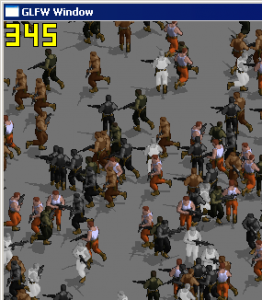
There is a somewhat unpleasant way to use color palettes, but I find it way easier to use a 1D texture as palette. Simply use the color in the first texture as texture coordinate for the second. I started rewriting Jagged Alliance 2 for fun and that's one of two methods I implemented. The other isn't overly practical, because it relies on the original image already containing useful info (for example pants only use green, shirt only blue, etc. so you can set a color for each and multiply with the original color value).

In this screenshot, they all use the first method, except for the ones in orange pants which basically do color replacement in a shader.
f@dzhttp://festini.device-zero.de
39ster
39ster
Not to sure how to do the first one? Do you have any example code?

The game i want to make is very simple graphics wise. It's just a simple 2D game with "zelda: a link to the past" style graphics. I was going to use SDL on it's own but i want to take advantage of fast rendering and i also want to be able to do other cool stuff such as blending, scaling, rotating, etc. The only trouble i'm having is drawing characters with different coloured clothing.
dpadam450
dpadam450
Why not just duplicate the texture and paint the characters "hot spots" the team color.
NBA2K, Madden, Maneater, Killing Floor, Sims 
39ster
39ster
Quote:
Original post by dpadam450
Why not just duplicate the texture and paint the characters "hot spots" the team color.


No this isn't a team colour thing. The clothes can have different colours, like red sleeves, blue gloves, black shirt, etc. There is no teams at all. If you have 20 players all in the same area then you would have to duplicate the texture 20 times (since each one can have their own unique colours), which would use a crap load of video memory just for the clothing.

I would happily use glDrawPixels to render the player, but can you do stuff like stretching, rotating, colour blending, etc with that?
ma_hty
ma_hty
Quote:
Original post by 39ster
...use a crap load of video memory...


Oh, consuming a huge space of video memory, how HUGE it could be precisely?
39ster
39ster
Quote:
Original post by ma_hty
Quote:
Original post by 39ster
...use a crap load of video memory...


Oh, consuming a huge space of video memory, how HUGE it could be precisely?


Ok, ill just be blunt. Duplicating the texture for every possible colour combination is not the answer i'm looking for so let's stay clear from it. I just want some more help with the first suggestion by "Trienco" or possibly something with glDrawPixels().
ma_hty
ma_hty
Quote:
Original post by 39ster
Ok, ill just be blunt. Duplicating the texture for every possible colour combination is not the answer i'm looking for so let's stay clear from it. I just want some more help with the first suggestion by "Trienco" or possibly something with glDrawPixels().


Is that an appropriate attitude for someone to look for help? (Funny 39ster...)

Before you shout, here is your answer.

There is an OpenGL extension GL_EXT_paletted_texture which is designed precisely for the indexed color map. However, there are no existing GPU supporting it. And, there are no hardware vendors going to support it (because there are no such demand in the market). Anyway, you can afford to use glDrawPixels(), right? Whether this extension is hardware supported or not shouldn't bother you a lot.
39ster
39ster
Quote:
Original post by ma_hty
Quote:
Original post by 39ster
Ok, ill just be blunt. Duplicating the texture for every possible colour combination is not the answer i'm looking for so let's stay clear from it. I just want some more help with the first suggestion by "Trienco" or possibly something with glDrawPixels().


Is that an appropriate attitude for someone to look for help? (Funny 39ster...)

Before you shout, here is your answer.

There is an OpenGL extension GL_EXT_paletted_texture which is designed precisely for the indexed color map. However, there are no existing GPU supporting it. And, there are no hardware vendors going to support it (because there are no such demand in the market). Anyway, you can afford to use glDrawPixels(), right? Whether this extension is hardware supported or not shouldn't bother you a lot.


There was never any intention for that to look rude. By answering your question it would of mislead you to believe that there was a possibility that i was going to use that solution.

Anyways about glDrawPixels...how slow is it? If it's only as slow as SDL_BlitSurface then that's ok, but does it work with glRotate, glScale, glColor?
ma_hty
ma_hty
39ster,

Part of the reasons why I sound so negatively toward your request is that you keep asking for an outdated solution.

Let's use your case as an example, the different color shirts. It might seem to be a good idea to change the color of shirt by altering the palette. However, it is actually less flexible than drawing all required shirts on a texture map. By using a texture map, not only the colors but also the actual content can be changed. In addition, it is far easier and more intuitive to be maintained.

In case you insist to use a palette texture, Trienco's solution is the best choice you can have. Unfortunately, you need to know how to write a shader for it. If you can appreciate the performance boost offered by writing your own shader, you won't even consider a palette texture.

I have never use SDL. So, I'm not quite sure what SDL_BlitSurface() does. However, if you are using it to draw some image data resided in main memory to the screen, it should be as slow as glDrawPixels().

Lastly, glRotate() and glScale() are functions for vertex position. As long as the texture coordinates are assigned properly, the texture mapping should work correctly. And, you don't need (and should not use) glDrawPixels() throughout the application.

Gary

PS: I'm trying to avoid writing the sentences begin with "And,". Can anyone tell me an appropriate connective to replace it?

[Edited by - ma_hty on July 5, 2009 10:10:16 PM]
Oluseyi
Oluseyi
Quote:
Original post by ma_hty
PS: I'm trying to avoid writing the sentences begin with "And,". Can anyone tell me an appropriate connective to replace it?

Omit it entirely. Observe:
Quote:
As long as the texture coordinates are assigned properly, the texture mapping should work correctly. And, you don't need (and should not use) glDrawPixels() throughout the application.

vs:
Quote:
As long as the texture coordinates are assigned properly, the texture mapping should work correctly. You don't need (and should not use) glDrawPixels() throughout the application.


If you absolutely insist on some form of connective, you can consider "besides," "however," "nevertheless" and "anyway" depending on whether the following sentence is an addendum, a contradiction or simply ancillary to the previous one.
Trienco
Trienco
I think I just spent 5min searching for the shader files before I realized I dumped them in a source file for now.

This is just bits and pieces which don't profit from my attempts to make the switch to newer shader versions and prepare for OpenGL 3.1 (which pretty much removes all the easy ways to do stuff in favour of the ways you will eventually use for best performance).

const GLchar* defaultVertexShader ="#version 130\n""uniform mat4 projection;""centroid out vec2 texCoord;""void main() {""	gl_Position = projection*gl_Vertex;""   texCoord = gl_MultiTexCoord0.xy;""}";const GLchar* paletteFragmentShader = "#version 130\n""out vec4 outColor;""centroid in vec2 texCoord;\n""uniform sampler2D texture0;\n""uniform sampler1D texture1;\n""void main() {""    outColor = texture1D(texture1,  texture2D(texture0, texCoord).r );""}";Code before drawing:glUseProgram(shaderPrograms[SHADER_PALETTE]);glActiveTexture(GL_TEXTURE1);glBindTexture(GL_TEXTURE_1D, palettes[palette]);glActiveTexture(GL_TEXTURE0);The above assumes texture 0 having the palette index (0-255)and texture 1 being the palette.The index texture is created like this:glPushClientAttrib(GL_CLIENT_PIXEL_STORE_BIT);glPixelStorei(GL_UNPACK_ALIGNMENT, 1);glTexImage2D(GL_TEXTURE_2D, 0, GL_LUMINANCE8, textureWidth, textureHeight, 0,      GL_LUMINANCE, GL_UNSIGNED_BYTE, textureData);glPopClientAttrib();The UNPACK thing cost me a lot of time to find out. If your texture widthisn't a multiple of 4, the 4byte alignment will cause ugly effects.The palette:glTexImage1D(GL_TEXTURE_1D, 0, GL_RGBA8, 256, 0, GL_RGBA, GL_UNSIGNED_BYTE, palette);Always useglTexParameteri(GL_TEXTURE_2D, GL_TEXTURE_MAG_FILTER, GL_NEAREST);glTexParameteri(GL_TEXTURE_2D, GL_TEXTURE_MIN_FILTER, GL_NEAREST);Because you really don't want to interpolate indices or palette colors.


How to load, compile and link the shader program is a bit more complex and I suggest googling for a tutorial. Depending on your platform you might have to make changes or maybe can't use shaders at all.


As for just creating different textures for different combinations. JA2 has at least 40MB in animations for mercs with their palette approach. With all kinds of combinations of pants, shirts, skin and hair it would be an insane amount of data. Of course you could split up all animations in just pants, shirts, skin and hair, but I'd imagine your graphic artist would kill you for the suggestion.

If you don't mind searching through messy code, the entire source code (of an early state) is here

[Edited by - Trienco on July 6, 2009 12:53:36 AM]
f@dzhttp://festini.device-zero.de

Topic Locked

This topic has been locked by a moderator. New replies are not allowed.

Sign in to reply to this topic.