GameDev.net gamedev.net
🔒 Locked

Old PC problem

Started by NukeCorr Feb 25, 2016 at 2:56 PM 15 replies 5.3k views
Original Post
NukeCorr
NukeCorr

Hey.

I was visiting my relatives today and they told me to take a look at their really old Hewlett Packard PC which has Windows 98 since something was wrong with it.

So I booted it and it instantly started doing long beeps continously, the windows loading screen came up and it loaded for a while (still beeping). After that screen went black for about 15secs and it started to load windows again, but this time the beeps changed to short beeps that kept repeating. It got stuck in an endless loop loading windows over and over again but never got past it and the beeping never stopped.

Didn't have time to check out BIOS yet but gonna check that tomorrow.

Bad PSU or some RAM problem maybe?

edit: it also did show artifacts on the screen before and after windows loading screen

What the h*ll are you?
ryan20fun
ryan20fun

Have you googled the beeps?

AFAIK the beep Morse codes are standard across different manufacturers/platforms.

Never say Never, Because Never comes too soon. - ryan20fun

Disclaimer: Each post of mine is intended as an attempt of helping and/or bringing some meaningfull insight to the topic at hand. Due to my nature, my good intentions will not always be plainly visible. I apologise in advance and assure you I mean no harm and do not intend to insult anyone.
NukeCorr
NukeCorr

I did google and found info about continous long beeps but nothing about continous short beeps. And different sites said that long beeps are PSU problem and other sites said it's something else so not sorta sure which one to trust

What the h*ll are you?
ryan20fun
ryan20fun

Can/Have you counted out the long and short beeps and found the repeat point?

The error beep code repeats after a short while, And you have to get the code right (otherwise you lookup an unrelated error)

Each combination of short and long beeps means something different.

Do you know the error beep code?, If so could you post it?

HTH

Never say Never, Because Never comes too soon. - ryan20fun

Disclaimer: Each post of mine is intended as an attempt of helping and/or bringing some meaningfull insight to the topic at hand. Due to my nature, my good intentions will not always be plainly visible. I apologise in advance and assure you I mean no harm and do not intend to insult anyone.
Matias Goldberg
Matias Goldberg

While it could be bad PSU, bad RAM, overheating CPU (i.e. thermal grease not correctly making contact with the sink), bad IDE cable, bad HDD, bad GPU.

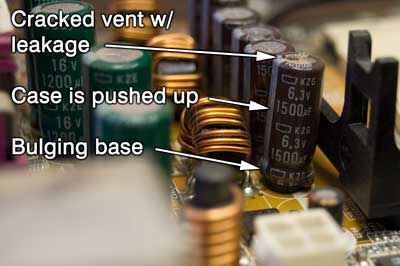
Something you can do easily and save a lot of time is to open the case and look for bad caps.

If it looks like this:

image004.png

Or if they look like the Pisa Tower:

Side-view-of-a-failed-capacitor.jpg

Then those caps need to be replaced. Or just throw the motherboard into your nearest recycle center.

By the way, if you have bad caps, it's also possible the PSU is sending poor quality power output which damaged the caps in the first place.

Gian-Reto
Gian-Reto

Windows 98.... holy cow. If the hardware is just as old, your relatives are actually quite lucky the thing still boots up.

I had problems with the PC once (not so stone age, mind you), and was able to figure it out with the beep morse code.

Last thing to take into account: can't be the RAM, else you wouldn't get far enough for windows to load. If something is wrong with RAM, you get a black screen, a bad beep morse code, and will not even reach the BIOS.

frob
frob


really old Hewlett Packard PC which has Windows 98

I wouldn't bother with fixing it. I would get a new computer. Or an old computer.

To recover their data I'd move the drive over to the new machine and copy over what they want salvaged.

But if you are intent on actually addressing the hardware issue:


I did google and found info about continous long beeps but nothing about continous short beeps. And different sites said that long beeps are PSU problem and other sites said it's something else so not sorta sure which one to trust

Others were a big vague here, talking about "Morse code".

Since the boards don't have a way to communicate problems, they have a speaker that would beep. (Newer computers often just have a place for the speaker with none plugged in.)

They beep out a pattern, often treated similar to Morse code.

Nearly all the vendors use one short beep as "everything checks out". Other than that, every vendor is different.

Two short beeps was usually a memory test error, it would often show up on the screen as well.

One long beep followed by three short beeps meant the graphics card had failed.

For several companies, a pattern of four short beeps, three short beeps, four short beeps meant the clock battery needed to be replaced.

A long-short-long-short endlessly repeating pattern meant your CPU was damaged.

So if you really want to try to fix it (I wouldn't), you need to figure out what the beep pattern is, and on another computer look up the beep code for the motherboard.

NukeCorr
NukeCorr

Thanks all for the replies, I'm sure to check for bad caps tomorrow.

And yeah I'm trying to find out the problem, since my relatives only use the PC for playing Solitaire and I don't think they feel like buying a new PC just for that heh (they're really old).

The long beeps are like:

*long beep*

(~0.2 second pause)

and repeat. that repeates like over 20-30 or more times, it goes so fast it's impossible to keep track of how many times it beeps but it's alot.

Same with the short beeps:

*short beep*

(~0.2 second pause)

and repeat +30 times.

There is no short beep, long beep or any other special pattern

The beeping is constant as long as the PC is running, there is no longer than 0.2s pause between them. However the beeping starts maybe after 5 seconds after booting up while the screen shows some artifacts on the screen and goes to windows loading screen

The PC never loads to windows, it just keeps starting the windows load screen again and again once it has loaded it a while

What the h*ll are you?
Nypyren
Nypyren
Some GPUs will also beep if you forget to plug in their auxiliary power connectors. Though with an HP computer that old, I doubt it even has a separate GPU.

Also, you should open it up and clean all the dust out. Sometimes dust alone is enough to cause these problems. You should see my parents' computer... sad.png
NukeCorr
NukeCorr

Some GPUs will also beep if you forget to plug in their auxiliary power connectors. Though with an HP computer that old, I doubt it even has a separate GPU.

Also, you should open it up and clean all the dust out. Sometimes dust alone is enough to cause these problems. You should see my parents' computer... sad.png

It actually has separate GPU, PNY something I installed a long loooong time ago, but it has no power connectors at all it's just plugged in to the motherboard

What the h*ll are you?
Nypyren
Nypyren


Some GPUs will also beep if you forget to plug in their auxiliary power connectors. Though with an HP computer that old, I doubt it even has a separate GPU.

Also, you should open it up and clean all the dust out. Sometimes dust alone is enough to cause these problems. You should see my parents' computer... sad.png

It actually has separate GPU, PNY something I installed a long loooong time ago, but it has no power connectors at all it's just plugged in to the motherboard


Should be fine then, unless it has failed for other reasons. If you have good ears you might be able to tell if there are multiple speakers, and which one is beeping.
PeterStock
PeterStock
I'd check out the capacitors like Matias suggests. My old motherboard broke with no beeps, but with odd behaviour, like instant reboots, blue screens and the like. Opening it up I saw all the caps next to the CPU were worse than in Matias's first picures - they looked like little volcanoes that had erupted!
cozzie
cozzie
I'm with frob, you should be able to pick up a desktop with that specifications altist for free. Move the hard disk and reinstall.

Voila, a Nice fresh machine for your relatives :)
Crealysm game & engine development: http://www.crealysm.com

Looking for a passionate, disciplined and structured producer? PM me
Bregma
Bregma

Calculating machines of that vintage often had batteries on the mainboard to keep the BIOS settings while the system power was not supplied, and those batteries needed replacing every few years. They're a small silvery disc about the size of a US quarter dollar. If you get into the BIOS screen and the settings are all weird, or don't save between reboots, that's your problems right there. You can usually still get these components at electronics vendors like Radio Shack or Wal-Mart and they're usually easy to replace.

Stephen M. Webb
Professional Free Software Developer
Brain
Brain
Try removing hardware one item at a time and see if the symptom goes away.

My bet is that the beeps are caused by a dodgy keyboard - is the Keyboard as old as the rest of the pc?

You said the Beeps continue as windows tries to boot?

I think you have multiple failed components though and the beeps are the symptom of just one.

How much is your time worth? It is Probably cheaper to go and get a replacement second hand windows 98 pc from Craigslist or similar.

Good luck! :D
Rekusi
Rekusi

...How much is your time worth? It is Probably cheaper to go and get a replacement second hand windows 98 pc from Craigslist or similar...

i was just about to mention this. Even If you were to figure out what the problem is, you may not even be able to replace the part. And even if you do find the part, its totally not worth it. I always see Dell Core2Duo machines on craigslist between $50-$100. It sounds like they barely do anything with it. After resitting all parts in the HP (taking ram out/putting back in. same with video card, checking all connectors, etc) if it still doesnt start up, Id just buy them a good decent working used PC and be done. Maybe with a replacement PC they may want to do a little more than just play Solitaire on it.

NukeCorr
NukeCorr

Sorry for very late reply! (I was traveling in Latvia)

The (first) problem was what braindigitalis said, the keyboard was causing the beeps. I replaced the keyboard with my old keyboard and the beeps were gone. However when shutting down the PC it gives a BSOD that refers to RAM failure. So I'll try my old PC's RAM if that makes a difference (in a few days or so).

I've already changed PSU for that PC in the past (because the old one died). Kinda challenging to keep that PC going after all these years... haha...eh

My relatives already said "we'll buy a laptop".. Okay buy a laptop but I'll do my best with this...

PS. There are no places or websites to replace PC parts/etc like that in the country where I live (or at least nearby. I guess I could get one from craigslist but.. no offense don't trust that site). So I'm pretty much going here with limited choices and limited services. But I have alot of spare old PC parts.

What the h*ll are you?

Topic Locked

This topic has been locked by a moderator. New replies are not allowed.

Sign in to reply to this topic.