
Original Post

Well i found out Here what's the problem and how to solve it (Something about world coordinates and object coordinates) but i can't understand how ti works. Can you show me some examples in code on how you implement this???
Scaling Matrix:
	m_Impl->scale = glm::mat4(1.0f);
	m_Impl->scale = glm::scale(m_Impl->scale, glm::vec3(width, height, 0));
Verticies:
	//Verticies.
	float verticies[] =
	{

		//Positions.		//Texture Coordinates.
		1.0f,    1.0f,      0.0f, 0.0f,
		2.0f,    1.0f,      1.0f, 0.0f,
		2.0f,    2.0f,      1.0f, 1.0f,
		1.0f,    2.0f,      0.0f, 1.0f
	};
Rendering:
	//Projection Matrix.
	glm::mat4 proj = glm::ortho(0.0f, (float)window->GetWidth(), 0.0f, (float)window->GetHeight(), -1.0f, 1.0f);

	//Set the uniform.
	material->program->setUniformMat4f("u_MVP", proj * model); //model is the scale matrix from the previous code.

	//Draw.
	glDrawElements(GL_TRIANGLES, material->ibo->GetCount(), GL_UNSIGNED_INT, NULL);
Shader:
#shader vertex
#version 330 core

layout(location = 0) in vec4 aPos;
layout(location = 1) in vec2 aTexCoord;

out vec2 texCoord;

uniform mat4 u_MVP;

void main()
{
	gl_Position  = u_MVP*aPos;
	texCoord     = aTexCoord;
}


#shader fragment
#version 330 core

out vec4 colors;
in vec2  texCoord;

uniform sampler2D u_Texture;

void main()
{
	colors = texture(u_Texture, texCoord);
}
Before Scaling (It's down there on the bottom left corner as a dot).

After Scaling
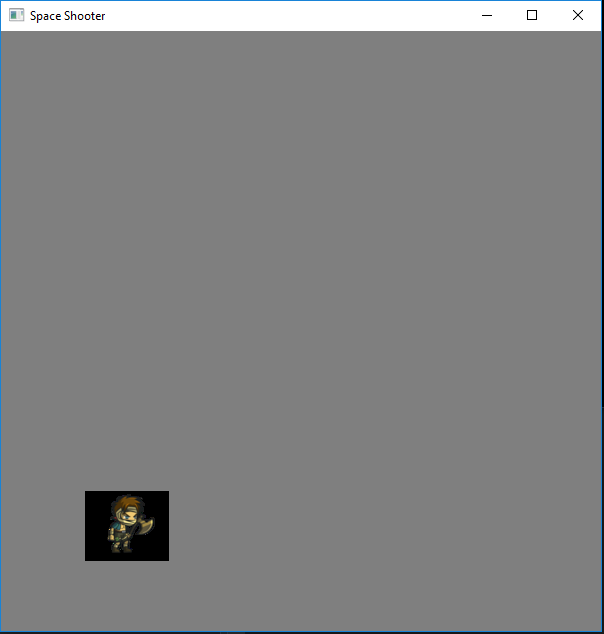
Problem: Why does the position also changes?? If you see my Verticies, the first position starts at 1.0f, 1.0f , so when i'm scaling it should stay at that position
