GameDev.net gamedev.net
🔒 Locked

40 seconds to compile a .cpp file - is it totally normal?

Started by hyyou Oct 10, 2019 at 5:55 AM 29 replies 22.5k views
Original Post
hyyou
hyyou

In my most complex gameplay source file (single .cpp) with a lot of necessary #include,

... whenever I edit it (e.g. add a single space character), it needs to recompile 40 seconds.

Linking takes only 3-5 seconds.

  • Is it what to be expected?
  • Do you also face this issue?
  • Should I just buy a new computer or more RAM?

I am using Visual Studio 2017. I am not using Unity Build (single compilation unit technique).

Just thinking that the cause is my code, I can't eat and sleep well. It also induces nightmare at my bedtime. Please help.


fleabay
fleabay

How many lines long is it? If it is huge you should refactor into smaller files.

How long is the .cpp file? How much RAM and what CPU do you have?

🙂🙂🙂🙂🙂<←The tone posse, ready for action.
Shaarigan
Shaarigan

Compilation depends on many circumstances. First the compiler has to handle your preprocessor directives, these are includes but also anything conditional you define with a # in front. Therefore the preprocessing unit has to resolve all of these statements from top to bottom before anything else can take place.

Every include will be processed, the file will be loaded and added to the process too. After the conditionals are resolved and the preprocessor knows what code to push to the compiler, macro replacement takes place. Any macro definition (so a define with additional arguments required) are resolved recursively wherever you used the definition in code. It is truely recursively until either the preprocessor dosen't find anymore defined identifiers in the macro code or the macro calls itself, then the processor breaks. This steps may happen at the same time, this is preprocessor dependant.

The preprocessor I wrote in C# to detect dependencies between C++ files does all of this on the fly for example.

Templates are resolved (specific code is generated for each template for each different arguments passed to them, this is why templates may cause code bloat) and then the code is pushed finally to the compilation unit.

So to answer your question, it depends: how many include files do you have, how much and complex are the macros you use, how many templates do you use with different arguments. Did you set the include guards correctly (to not include a file twice as you already processed it in this compilation unit) or included more files as necessary, does a simple forward declare can be used instead of the whole header?

By the way, 40 seconds are nothing. Huge projects like game engines (Unreal for example) use so called "Unity Files" where anything is included at once in one file. This is a try to reduce huge build times that may occure else, our Unreal project for example took more than 10 minutes to compile before we toggled it to generate a Unity File.

What I like to do in such cases is to have our custom build tool generate a dependency graph of each include and where it has been used. This not just helps avoid circular dependencies and helps modularizing the project but also shows unnecessary include directives that can cause much higher compile times

hyyou
hyyou

I (OP) want to add more information :

  • My computer is Intel Core i5-4460 CPU @ 3.20GHZ, memory 8GB, Windows7 64 bit.
  • My problematic .cpp is 230 lines. It has around 30 #includes. I don't know how to count summation of the line including all in #include. (5000? not sure)
  • My program (all=100K line) are currently splited into a lot of header. Most implementation is in source file (not header).
20 minutes ago, Shaarigan said:

our Unreal project for example took more than 10 minutes to compile before we toggled it to generate a Unity File.

Thank. How much the recompiling took after you generate the Unity File?

Is the Unity File you mentioned is a part of unity build technique?

JoeJ
JoeJ
2 hours ago, hyyou said:

My problematic .cpp is 230 lines. It has around 30 #includes.

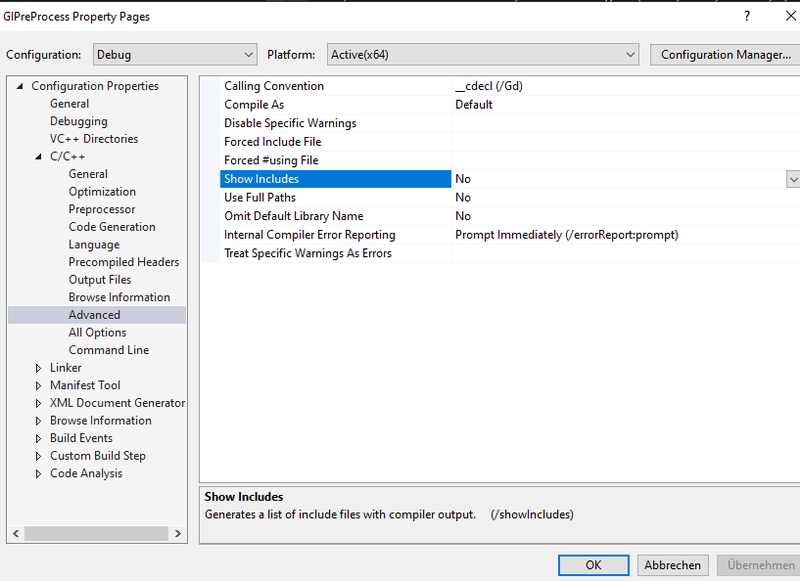
Ther is some option in Visual Studio, and enabling it lists how inclusion dependencies are resolved, so while compiling it prints all header files in order, and from that you can see unnecessary cycles or something. Helps to fix it.

I think it's this option:

image.png.e26cba958907a892491894ee9e11e8cd.png


A helpful work around is to make certain files compile faster by using debug build, even if release build is selected.

snippet from @Hodgman


	#if defined _MSC_VER
  #define MAKE_DEBUGGABLE __pragma(optimize("", off))
#elif defined __clang__
  #define MAKE_DEBUGGABLE _Pragma ("clang optimize off")
#else
  #define MAKE_DEBUGGABLE
#endif


With this included, just add MAKE_DEBUGGABLE on top of your slowly compiling files (before or after the includes matters ofc.)

Very helpful also in case debug builds run too slow to be useful.

Shaarigan
Shaarigan
3 hours ago, hyyou said:

Is the Unity File you mentioned is a part of unity build technique?

To not get any misapprehensions, Unity File dosen't involve anything from Unity3D or Unity Technologies Inc, it is just named like this because it has all dependencies in one file. The only resource I was able to find about it without pointing you to the source code is UnrealBuildTool Build Configuration chapter

Our compile time was reduced to round about 3 minutes after turning Unity Build Mode on

Bregma
Bregma

Without seeing code, my guess is that you include unnecessary headers, or else you're using a lot of 'header only' libraries.

You can reduce the number of unnecessary headers by only including those you need, and by using forward declarations (which, for compile safety, can be placed in smaller simpler headers) and making sure you use include guards properly.

Header only libraries make distribution of the library easier, but the cost is increased compilation times.

My next guess is that you're using template-heavy code. It's going to increase compilation times. Header only libraries and template-heavy code go hand-in-hand, and both are compile-time performance killers.

Sometimes you jut need to go back to the olden days. When I was young, compilation could take hours between when you submitted the job at the card reader and when you got the results back at the line printer. The best time-saving technique was to make sure your code was correct in the first place, a term called 'desk checking'. It seems modern technology is expanding to consume all of the time- and labour-saving convenience it has introduced.

Stephen M. Webb
Professional Free Software Developer
hyyou
hyyou
1 hour ago, JoeJ said:

A helpful work around is to make certain files compile faster by using debug build, even if release build is selected.

Thank! I set optimization flag (only) of the most-frequently-changed project to false, and it becomes 25-30 seconds.

It takes some large performance hit, but it is acceptable. Yeah thank, JoeJ!!

Acosix
Acosix
6 hours ago, hyyou said:

In my most complex gameplay source file (single .cpp) with a lot of necessary #include,

... whenever I edit it (e.g. add a single space character), it needs to recompile 40 seconds.

Linking takes only 3-5 seconds.

  • Is it what to be expected?
  • Do you also face this issue?
  • Should I just buy a new computer or more RAM?

I am using Visual Studio 2017. I am not using Unity Build (single compilation unit technique).

Just thinking that the cause is my code, I can't eat and sleep well. It also induces nightmare at my bedtime. Please help.

Download Visual Studio 2019. Buy newest Windows 10; and update both

8 RAM is a lot. So is 3.2 GHz.

ChaosEngine
ChaosEngine
13 hours ago, Acosix said:

Download Visual Studio 2019. Buy newest Windows 10; and update both

8 RAM is a lot. So is 3.2 GHz.

For a dev machine in 2019? Not really. 3.2GHz i5 is fine, but not excessive. 8Gb is definitely on the low side.

That said, for a 320 line file, it should be fine.

if you think programming is like sex, you probably haven't done much of either.-------------- - capn_midnight
a light breeze
a light breeze
10 hours ago, ChaosEngine said:

That said, for a 320 line file, it should be fine.

320 lines of code in the main C++ files, and however many thousands lines of code are directly and indirectly included. The code in the actual C++ file is rarely the main culprit when it comes to slow compile speeds.

hyyou
hyyou
On 10/10/2019 at 7:30 PM, Acosix said:

8 RAM is a lot. So is 3.2 GHz


On 10/11/2019 at 8:43 AM, ChaosEngine said:

3.2GHz i5 is fine, but not excessive. 8Gb is definitely on the low side.

Thank a lot, Acosix and ChaosEngine. It is very useful advise.

On 10/11/2019 at 7:53 PM, a light breeze said:

.... however many thousands lines of code are directly and indirectly included. The code in the actual C++ file is rarely the main culprit when it comes to slow compile speeds.

Yes, absolutely true. I found no automatic tool that count all lines indirectly included though. >.<

a light breeze
a light breeze
3 hours ago, hyyou said:


Thank a lot, Acosix and ChaosEngine. It is very useful advise.

Yes, absolutely true. I found no automatic tool that count all lines indirectly included though. >.<

gcc and clang support the -E option to preprocess a source file without compiling. By checking the output, I can easily see that (for example) #include by itself yields 28138 lines of code on my computer!

hyyou
hyyou
19 hours ago, a light breeze said:

#include by itself yields 28138 lines of code on my computer!

That is a stunning figure. I will be more careful about #include.

Thanks, a light breeze!

bmarci
bmarci
On 10/10/2019 at 12:36 PM, Bregma said:

My next guess is that you're using template-heavy code. It's going to increase compilation times. Header only libraries and template-heavy code go hand-in-hand, and both are compile-time performance killers

That is a very good candidate. Are you using any std related stuff?
Instead of workarounds try to locate the real problem. if your cpp file is not that big, try removing parts of it (code/include/both) and see what happens. 40 sec is way too much for a single file. It should be enough to full-rebuild a half million line code base, without unity build ;)

hyyou
hyyou


18 hours ago, Alessio1989 said:

Did OP tried to use a pre-compiled header?

Thank. OP (me) uses it.

1 hour ago, bmarci said:
On 10/10/2019 at 5:36 PM, Bregma said:

My next guess is that you're using template-heavy code. It's going to increase compilation times. Header only libraries and template-heavy code go hand-in-hand, and both are compile-time performance killers

That is a very good candidate. Are you using any std related stuff?

Thank.

Yes, I do #include for printing log. It is included as the top header. I don't use Boost.

Most other libraries I used are created by custom, e.g. I use my own MyArray instead of std::vector, and custom MyPtr (probably direct+indirect ~400 lines) instead of just T*.

I don't know how to measure/profile compile-time penalty I get from template. I am using Visual Studio.

lawnjelly
lawnjelly

Probably made the mistake of #including windows.h... :D

One of the tricks I use for non-template external libraries / functions that have 'expensive' includes, is to wrap them in your own .h / .cpp file. So you only include your own .h to use the functions rather than the third party. Yours can be clean and fast compiling, even if the external is rubbish.

E.g.


//my_windows_wrapper.h
#pragma once

#ifndef QUICK_BUILD
#include <windows.h>
#endif
   
class WinWrapper
{
public:
#ifdef QUICK_BUILD
	void some_windows_func();
#else
	// will get optimized out
	void some_windows_func()
	{
		// call windows
		some_dodgy_windows_func()
	}
#endif
};

//my_windows_wrapper.cpp
#include "my_windows_wrapper.h"
  
#ifdef QUICK_BUILD
#include <windows.h>

void WinWrapper::some_windows_func()
{
	// call windows
	some_dodgy_windows_func()
}
#endif

Then for final release you can change the QUICK_BUILD define and it will link directly to the third party code. There might be an even better way of doing this.

Optimizing compile / link times can be really important in big projects to reduce iteration time, and there's no reason why you can't do it at zero cost for final release builds.

Wyrframe
Wyrframe
28 minutes ago, lawnjelly said:

One of the tricks I use for non-template external libraries / functions that have 'expensive' includes

Why would you parameterize that with a macro, when you can just isolate that implementation detail into its own .CPP?


// service.h
#pragma once

class ServicePayload { ... };

class Service {
public:
  void send_operation(ServicePayload const &);
  void default_operation(void);
};


// common/service.cpp
#include "../service.h"

void Service::default_operation() {
  ServicePayload basic( /* ... */ );
  send_operation(basic);
}


// windows/service.cpp
#include "../service.h"
#include <windows.h>

void Service::send_operation(ServicePayload const &p) {
  // ...
}


// linux/service.cpp
#include "../service.h"
#include <iostd.h>

void Service::send_operation(ServicePayload const &p) {
  // ...
}

... and then always link against common/*.o, and link against only windows/*.o or linux/*.o depending on which EXE you're building.

RIP GameDev.net: launched 2 unusably-broken forum engines in as many years, and now has ceased operating as a forum at all, happy to remain naught but an advertising platform with an attached social media presense, headed by a staff who by their own admission have no idea what their userbase wants or expects.Here's to the good times; shame they exist in the past.
hyyou
hyyou
8 hours ago, lawnjelly said:

Probably made the mistake of #including windows.h... :D

7 hours ago, Wyrframe said:

Why would you parameterize that with a macro, when you can just isolate that implementation detail into its own .CPP?

Thank, lawnjelly and Wyrframe. I already separated to .cpp.

My problematic cpp file does not #include neither directly nor indirectly (I just check it), but your advises (and JoeJ's) make me realize that I really should enable "C/C++>Advanced>Show Includes" compiler log. Thanks.

Topic Locked

This topic has been locked by a moderator. New replies are not allowed.

Sign in to reply to this topic.