GameDev.net gamedev.net
🔒 Locked 🎮 Unity

breakout in c#

Started by pbivens67 Feb 26, 2021 at 8:32 PM 22 replies 19.6k views
Original Post
pbivens67
pbivens67

I am working on a breakout game using c# and gdi+. I am unsure of how to implement the collision detection between the ball and the bricks. I am thinking about using a list function.

using System;
using System.Collections.Generic;
using System.ComponentModel;
using System.Data;
using System.Drawing;
using System.Linq;
using System.Text;
using System.Threading.Tasks;
using System.Windows.Forms;
using System.Timers;

namespace WindowsFormsApp1
{
    public partial class Form1 : Form
    {
        private static System.Timers.Timer aTimer;

        int xstep = 5;
        int ystep = 5;

        int x1 = 0;
        int y1 = 0;

        public Form1()
        {
            InitializeComponent();
        }

        private void Form1_Load(object sender, EventArgs e)
        {
            this.DoubleBuffered = true;
            this.Paint += new PaintEventHandler (Form1_Paint);
            this.KeyDown += new KeyEventHandler(Form1_KeyDown);
            aTimer = new System.Timers.Timer(50);
            aTimer.Elapsed += new ElapsedEventHandler(timer1_Tick);
            aTimer.Start();
        }

        int move_paddle = 0;

        private void Form1_KeyDown(object sender, KeyEventArgs e)
        {
            switch (e.KeyCode)
            {
                case Keys.Left:
                    move_paddle-=5;
                    if(move_paddle <= -320)
                    {
                        move_paddle = -320;
                    }
                    break;
                case Keys.Right:
                    move_paddle+=5;
                    if(move_paddle >= 320)
                    {
                        move_paddle = 320;
                    }
                    break;
                default:
                    return;
            }
        }

        private void Form1_Paint(object sender, PaintEventArgs e)
        {
            e.Graphics.FillRectangle(Brushes.Black, 0, 0, 1104, 768);
            e.Graphics.DrawImage(Properties.Resources.paddle, new Rectangle(320+move_paddle, 425, 80, 40));
            this.Invalidate();
            for (int i = 0; i <= 480; i += 240) 
            {
            e.Graphics.DrawImage(Properties.Resources.red, new Rectangle(i, 0, 80, 40));
            }
            for (int i = 80; i <= 560; i += 240)
            {
            e.Graphics.DrawImage(Properties.Resources.green, new Rectangle(i, 0, 80, 40));
            }
            for (int i = 160; i <= 640; i += 240)
            {
            e.Graphics.DrawImage(Properties.Resources.blue, new Rectangle(i, 0, 80, 40));
            }

            for (int i = 0; i <= 480; i += 240)
            {
                e.Graphics.DrawImage(Properties.Resources.green, new Rectangle(i, 40, 80, 40));
            }
            for (int i = 80; i <= 560; i += 240)
            {
                e.Graphics.DrawImage(Properties.Resources.blue, new Rectangle(i, 40, 80, 40));
            }
            for (int i = 160; i <= 640; i += 240)
            {
                e.Graphics.DrawImage(Properties.Resources.red, new Rectangle(i, 40, 80, 40));
            }

            for (int i = 0; i <= 480; i += 240)
            {
                e.Graphics.DrawImage(Properties.Resources.blue, new Rectangle(i, 80, 80, 40));
            }
            for (int i = 80; i <= 560; i += 240)
            {
                e.Graphics.DrawImage(Properties.Resources.red, new Rectangle(i, 80, 80, 40));
            }
            for (int i = 160; i <= 640; i += 240)
            {
                e.Graphics.DrawImage(Properties.Resources.green, new Rectangle(i, 80, 80, 40));
            }
            e.Graphics.DrawImage(Properties.Resources.bullet, new Rectangle(355 + x1, 232 + y1, 10, 10));
        }

        private void timer1_Tick(object sender, EventArgs e)
        {
            if (x1 >= 360 || x1 <= -360) 
            {
                xstep = -xstep;
            }
            if (y1 >= 227 || y1 <= -232)
            {
                ystep = -ystep;
            }
            x1 += xstep;
            y1 += ystep;
        }
    }
}
pbivens67
pbivens67

I have stubbed out my list function in c#

using System;
using System.Collections.Generic;
using System.Linq;
using System.Text;
using System.Threading.Tasks;

namespace ListBricks
{
    class Program
    {
        class Brick
        {
            public int x;
            public int y;
        }
        static void Main(string[] args)
        {
            List<Brick> bricks = new List<Brick>();
            int count = 0;
            for (int j = 0; j <= 80; j += 40)
            {
                for (int i = 0; i <= 480; i += 240)
                {
                    bricks.Add(new Brick());
                    bricks[count].x = i;
                    bricks[count].y = j;
                    count++;
                }
                for (int i = 80; i <= 560; i += 240)
                {
                    bricks.Add(new Brick());
                    bricks[count].x = i;
                    bricks[count].y = j;
                    count++;
                }
                for (int i = 160; i <= 640; i += 240)
                {
                    bricks.Add(new Brick());
                    bricks[count].x = i;
                    bricks[count].y = j;
                    count++;
                }
            }
            foreach (Brick aBrick in bricks)
            {
                Console.WriteLine(aBrick.x);
                Console.WriteLine(aBrick.y);
            }
        }
    }
}
pbivens67
pbivens67

I have added the list function into my code.

        private void Form1_Paint(object sender, PaintEventArgs e)
        {
            e.Graphics.FillRectangle(Brushes.Black, 0, 0, 1104, 768);
            e.Graphics.DrawImage(Properties.Resources.paddle, new Rectangle(320+move_paddle, 425, 80, 40));
            this.Invalidate();
            List<Brick> bricks = new List<Brick>();
            int count = 0;

            for (int j = 0; j <= 80; j += 40)
            {
                for (int i = 0; i <= 480; i += 240)
                {
                    bricks.Add(new Brick());
                    bricks[count].x = i;
                    bricks[count].y = j;
                    e.Graphics.DrawImage(Properties.Resources.red, new Rectangle(bricks[count].x, bricks[count].y, 80, 40));
                    count++;
                }
                for (int i = 80; i <= 560; i += 240)
                {
                    bricks.Add(new Brick());
                    bricks[count].x = i;
                    bricks[count].y = j;
                    e.Graphics.DrawImage(Properties.Resources.green, new Rectangle(bricks[count].x, bricks[count].y, 80, 40));
                    count++;
                }
                for (int i = 160; i <= 640; i += 240)
                {
                    bricks.Add(new Brick());
                    bricks[count].x = i;
                    bricks[count].y = j;
                    e.Graphics.DrawImage(Properties.Resources.blue, new Rectangle(bricks[count].x, bricks[count].y, 80, 40));
                    count++;
                }
            }
                    e.Graphics.DrawImage(Properties.Resources.bullet, new Rectangle(355 + x1, 232 + y1, 10, 10));
        }
JoeJ
JoeJ

pbivens67 said:
I am unsure of how to implement the collision detection between the ball and the bricks.

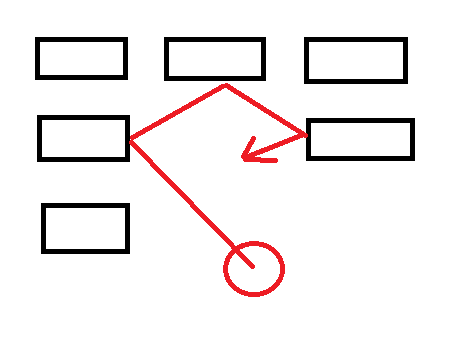
Because Breakout balls can become very fast usually, it's likely necessary to process multiple collisions in one frame, and calculating the path of the ball. So you calculate the distance the ball should travel (timestep * ball velocity), and then trace a ray through the grid of bricks, which may look lime this:

We get 4 segments, and after the sum of all segments equals the calculated length we are done.

So that's a bit of geometry and surely the hardest part of the game. You can limit ball speed to ensure you have to process only one brick per frame, but that's not much easier because you have to work out ball-box collision response anyway.

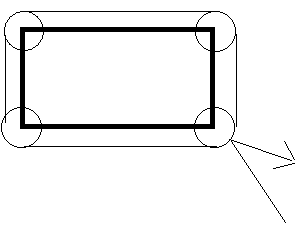
Eventually it is easier to treat the problem like this:

By extending the rectangle with the ball shape (Minkovski Sum of ball and brick), we can treat the ball only as a point, while the rectangles become rounded.

Endurion
Endurion

The safe version is to not move the ball the full delta, but pixel per pixel. At every step you check for a collision (Yes, computers nowadays are easily fast enough for doing that) and handle it. Handling a collision may reset/reverse the left delta for the current frame, be aware of that.

Fruny: Ftagn! Ia! Ia! std::time_put_byname! Mglui naflftagn std::codecvt eY'ha-nthlei!,char,mbstate_t>
Shaarigan
Shaarigan

To speed things up you could also just put those bricks into a special collision array, that are reachable for the ball. So every brick which is on the bottom of it's column and bricks that don't have any left/right neighbour. Some spatial positioning data structure would also help to speed things up but it should be ok for C# to perform some checks per frame.

Instead of creating new rectangles every frame, you should precompute them once and store them in an array. Then you just need to perform a rectangle collision check with the rectangle of your ball. Rectangle.IntersectsWith is a usefull neat function which will tell if the rectangles overlap each other before you start to compute the bounce angle

pbivens67
pbivens67

well I have implemented a collision between the ball and the paddle, is there a way to implement the collision between the ball and the bricks that is streamlined?

here is my collision code so far.

            if(paddle.IntersectsWith(ball))
            {
                paddle.Intersect(ball);
                if(!paddle.IsEmpty)
                {
                    ystep = -ystep;
                }
            }
fleabay
fleabay

pbivens67 said:
if(!paddle.IsEmpty)

Never name a bool with a negative connotation.

🙂🙂🙂🙂🙂<←The tone posse, ready for action.
Shaarigan
Shaarigan

fleabay said:
Never name a bool with a negative connotation

In C#, a lot an I mean A LOT of classes have such members and I don't see any reason why this shouldn't be valid

fleabay
fleabay

Shaarigan said:
I don't see any reason why this shouldn't be valid

It's valid, just confusing and hard to reason about especially when you have several bools strung together.

What do you mean, in C# a lot of classes have such members? You mean like a standard library?

🙂🙂🙂🙂🙂<←The tone posse, ready for action.
Shaarigan
Shaarigan

C# running on .NET Framework/ .NET Core 5 (or just .NET 5) has a lot of classes which define such boolean members. For example String.IsNullOrEmpty as relative prominent connotation. And yeah, to negate that, you have to write

if(!string.IsNullOrEmpty(myString))

This can be confusing but it is the way how Microsoft designed it

pbivens67
pbivens67

can I get an answer to my question not just a running commentary

Tom Sloper
Tom Sloper

Ask your question, Phil. And be nice.

-- Tom Sloper    --      sloperama.com
pbivens67
pbivens67

I have got the ball to collide with the paddle and bounce off, is there a simple way to make the ball hit the brick and bounce off and erase the brick.

fleabay
fleabay

pbivens67 said:
and erase the brick

This again?

You clear the screen every frame and only draw what needs to be drawn. But you can't even draw a brick that's not there, so why does the game still know about a removed brick? Remove it from whatever list you have it in and when you redraw the screen, it CAN'T be drawn.

Also, don't worry about bouncing off the bricks yet. Just let the ball pass through the bricks and remove them. Then after you get that working, then get the collision response (ricochet) working. I'm assuming you have the ball bouncing off the walls already?

🙂🙂🙂🙂🙂<←The tone posse, ready for action.
pbivens67
pbivens67

I am using a list to store the bricks, is there a way to remove the bricks from the list.

fleabay
fleabay

I don't know C# but this is close.

foreach (var brickIndex in bricks) {
  if (brickIndex.colliding()) {
    bricks.RemoveAt(brickIndex);
  }
}

Though I'm not sure how to resolve brickIndex to an object if it is an int.

🙂🙂🙂🙂🙂<←The tone posse, ready for action.
pbivens67
pbivens67

I have stubbed out some code in a c# console app. I am attempting to implement a collision detection method. Am I on the right track with my code?

using System;
using System.Collections.Generic;
using System.Linq;
using System.Text;
using System.Threading.Tasks;

namespace ListBricks
{
    class Program
    {
        class Brick
        {
            public int x1;
            public int y1;
            public int width1;
            public int height1;
            public int x2;
            public int y2;
            public int width2;
            public int height2;
            public bool Colliding()
            {
                if(x1<=x2+width2&&x1+width1>=x2&&y1<=y2+height2&&y1+height1>=y2)
                {
                    return true;
                }
                return false;
            }
        }
        static void Main(string[] args)
        {
            List<Brick> bricks = new List<Brick>();
            int count = 0, x = 0, y = 0, xstep = 0, ystep = 0;
                for (int i = 0; i <= 640; i += 80)
                {
                bricks.Add(new Brick());
                bricks[count].x1 = i;
                bricks[count].y1 = 0;
                bricks[count].width1 = 80;
                bricks[count].height1 = 40;
                bricks[count].x2 = x;
                bricks[count].y2 = y;
                bricks[count].width2 = 10;
                bricks[count].height2 = 10;
                x += xstep;
                y += ystep;
                count++;
                }
                for (int i = 0; i <= 640; i += 80)
                {
                bricks.Add(new Brick());
                bricks[count].x1 = i;
                bricks[count].y1 = 40;
                bricks[count].width1 = 80;
                bricks[count].height1 = 40;
                bricks[count].x2 = x;
                bricks[count].y2 = y;
                bricks[count].width2 = 10;
                bricks[count].height2 = 10;
                x += xstep;
                y += ystep;
                count++;
                }
                for (int i = 0; i <= 640; i += 80)
                {
                bricks.Add(new Brick());
                bricks[count].x1 = i;
                bricks[count].y1 = 80;
                bricks[count].width1 = 80;
                bricks[count].height1 = 40;
                bricks[count].x2 = x;
                bricks[count].y2 = y;
                bricks[count].width2 = 10;
                bricks[count].height2 = 10;
                x += xstep;
                y += ystep;
                count++;
                }
                foreach(Brick brickIndex in bricks)
                {
                if (brickIndex.Colliding()) 
                {
                Console.WriteLine(brickIndex.x1);
                Console.WriteLine(brickIndex.y1);
                Console.WriteLine(brickIndex.width1);
                Console.WriteLine(brickIndex.height1);
//              bricks.RemoveAt(brickIndex.x);
//              bricks.RemoveAt(brickIndex.y);
                }
            }
        }
    }
}
SuperVGA
SuperVGA

@pbivens67 Could you explain how this part works?

public bool Colliding()
{
    if(x1<=x2+width2&&x1+width1>=x2&&y1<=y2+height2&&y1+height1>=y2)
    {
        return true;
    }
    return false;
}

I was under the impression that you'd want to compare the boundaries with the brick with the position of the ball,
not check whether the members of a brick are sane. But perhaps I'm just not understanding the members properly.
Also, for higher ball speeds or slower machines, it may be beneficial to go with some intersection math here, but I get why it's nice to start out with a naive approach.

Topic Locked

This topic has been locked by a moderator. New replies are not allowed.

Sign in to reply to this topic.