GameDev.net gamedev.net
🔒 Locked

How to make blurry reflections without using LODs?

Started by Shem_Namo Jul 11, 2021 at 10:24 AM 14 replies 18.7k views
Original Post
Shem_Namo
Shem_Namo

Hi everyone, how is it going?

I'm working on a shader that uses Equirectangular reflection mapping to add reflections to a material.

The shader is for a image compositing software, not a game so it doesn't need to be anywhere near real-time speeds.

The shader uses an Equirectangular HDRI map to get the reflections by converting the reflection vector to UV coordinates and sampling the texture.

The platform I'm using can only sample textures, but no LODs. I also can't use cubemaps, pre-filtering, multiple passes, uint datatypes, or bitwise operators like in the radical inverse function used everywhere.

So I had to use a different method to blur the reflections(code attached below).

It works something like this, for a number of samples(32-256). Create a random vec3 vector(range -0.5 to 0.5) and multiply it by the roughness value. Add the random vector to the reflection vector. Renormalize the vector, convert the new reflection vector to UVs and sample the texture, add the sample to the accumulator and after the loop, divide by the number of samples.

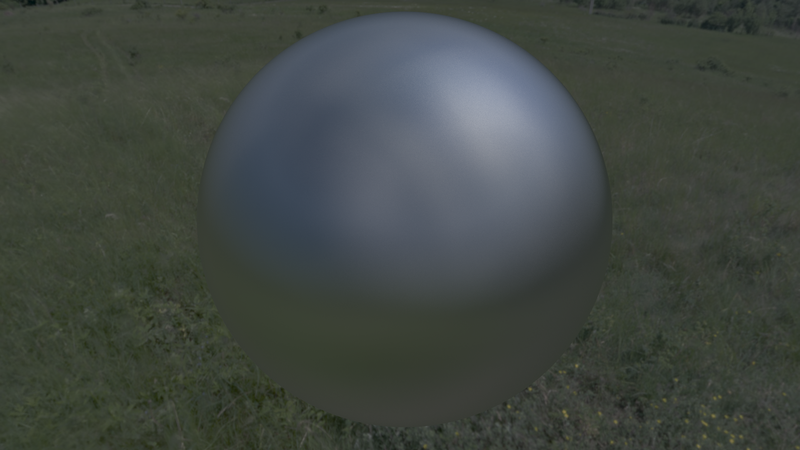
This works very well since there are no seams and no distortion, but the result is still a little lackluster. Especially when the material is set to metallic and all you see is the specular reflection.

Even though the image I'm using is an HDR and the textures are set to support HDR, the result is missing that nice hotspot falloff that you get with specular reflection convolutions.

Is there any way that I can incorporate a nice falloff to this method. Attached is the code that I use for the reflection blur, and the result that I get and the result that I would like to get.

Could someone please point me in the right direction?

float random3(vec3 co) {
   return fract(sin(dot(co,vec3(12.9898, 78.233, 94.785))) * 43758.5453);
}		

		
vec3 randomize3(vec3 r) {
   vec3 newR = fract(r * vec3(12.9898, 78.233, 56.458));
   return fract(sqrt(newR.x + .001) * vec3(sin(newR.y *  6.283185), cos(newR.y *  6.283185), tan(newR.z *  6.283185)));
}		
		
		
vec2 VectorToUV(vec3 vector) {
   vector = (RotationMatrix * vec4(vector, 1.0)).xyz;
   vector = normalize(vector);	
	
   vec2 uv = vec2(0.0, 0.0);
   uv.x = atan(vector.x, -vector.z) * 0.159154 + 0.5;
   uv.y = asin(vector.y) * 0.318308 + 0.5;
		
   return uv;
}
		
vec3 convolve(vec3 vector, float radius, int samples)
{			
	vec3 rnd = vec3(random3(vector));

	vec3 acc = vec3(0.0);
	for (int i = 0; i < samples; i++) {
		vec3 R = normalize(vector + ((randomize3(rnd + vec3(i)) - vec3(0.5))* vec3(radius)));
		vec2 uv = VectorToUV(R);			
        acc += texture(EnvMap, uv).xyz;
	}
	vec3 final = acc / vec3(samples);
    return final;			
}
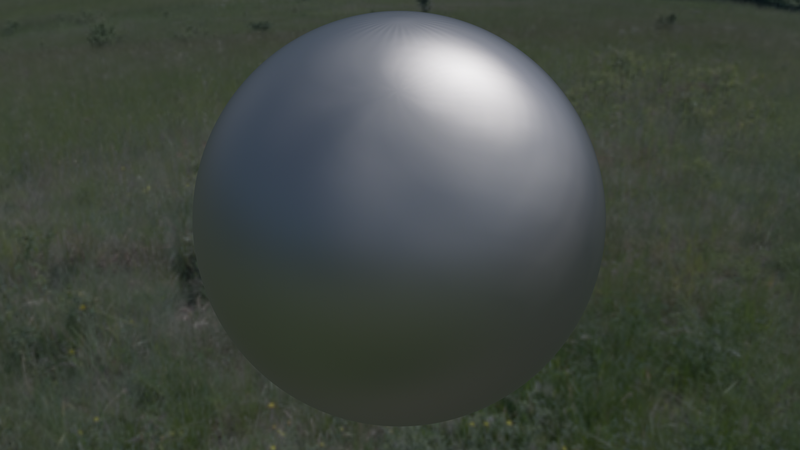
Reference
My Result

Thanks in advanced,

Shem Namo

JoeJ
JoeJ

Shem_Namo said:
It works something like this, for a number of samples(32-256). Create a random vec3 vector(range -0.5 to 0.5) and multiply it by the roughness value. Add the random vector to the reflection vector. Renormalize the vector,

This sounds a bit naive. In raytracing people try to optimize this by generating N random direction vectors respecting the probability density function defined from material BRDF. Keyword is ‘Importance Sampling’, introduced by papers of Veach, and there's still ongoing work. I tried to learn this for fun some while back, and while interesting it's hard to be sure results indeed match the BRDF we want.

Probably you want to read tutorials on ray tracing / path tracing. They have this exact same problem there, and it's common to solve it with many samples not using mip maps.

This is code i got from implementing a paper of Walter, which seemingly is used to define the general convention of ‘roughness’:

			static vec GlossyDir (float roughness) // Walter
			{ 
				float r0 = rand();
				float r1 = rand();

				float theta = atan(roughness*sqrt(r0));
				float phi = float(PI*2) * r1;

				float X = cos(phi) * sin(theta);
				float Y = sin(phi) * sin(theta);
				float Z = cos(theta);
				return vec(X,Y,Z); 
			}

So this would give you one random sample direction (looks like Z is ‘up’, so we would need to rotate the resulting direction from (0,0,1) to our current normal if we work in worldspace).
You would generate N sampling directions, accumulate texture fetches using those directions, finally divide by N. (Because we do importance sampling, each sample has a weight of 1, so no need for weighting.)

However, i was not happy with this, because with increasing roughness the function generates more samples at the cone surface than it's interior, which seems wrong and causes circular shaped artifacts. Thus i worked out my own math, where sample directions are uniformly distributed within the cone. (Cone angle is defined from roughness, but IDK what's the general convention here between roughness and cone angle exactly. Also, what we really want might be a lobe, not a cone, so all this is quite loose and subjective.)

			static vec GlossyDir3 (float roughness)
			{ 
				// simple generalization of glossy and diffuse reflection
				float r0 = rand();
				float r1 = rand();
				float r = sqrt(r1) * roughness;
				float a = r0 * float(PI*2);
				vec d(cos(a) * r, sin(a) * r, 0);
				d[2] = sqrt (1 - r*r);
				return d;
			}

Recently i found this resource, which looks nice. And those guys should know better about conventions than i do: [Damn, lost the link. Will post if i can find it again.]

Shem_Namo
Shem_Namo

Thank you for this really well detailed answer @joej!!

Let me just make sure I understand,

So you're saying I need to use Importance Sampling to “randomize” the Normal vector(N) and then calculate the Reflection vector vector from this new Normal?

The lighting model I want to add these reflections to is the Disney BRDF model, does that mean I need to look for a Importance Sampling Function that uses that BRDF?

Thanks for recommending to look in Ray Tracing papers, until now I just couldn't find the right term for this technique to search for it on Google.

Another question, does Importance Sampling make the shader a lot slower? Would it require more samples?

Thanks again!!

Shem Namo

JoeJ
JoeJ

Shem_Namo said:
So you're saying I need to use Importance Sampling to “randomize” the Normal vector(N) and then calculate the Reflection vector vector from this new Normal?

Almost. It would be like this, to be precise:

const int N = 100;
vec3 normal = worldSpaceNormalAtShadingPoint;
Rotation R = MakeRotationFromVecToVec(vec3(0,0,1), normal);
vec3 accum (0);
for (int i=0; i<N; i++)
{
vec3 worldSpaceSampleDir = R * GlossyDir (roughness);
vec2 uv = ConvertToEnvironmentMapProjection (worldSpaceSampleDir);
accum += Sample(envTexture, uv);
}
vec3 result = accum / N;

Shem_Namo said:
The lighting model I want to add these reflections to is the Disney BRDF model, does that mean I need to look for a Importance Sampling Function that uses that BRDF?

Yes, sounds a good search term. I remember i came across some sites with code respecting Disney.

(I hope i understood all terminology correctly and don't confuse things.)

Shem_Namo said:
Another question, does Importance Sampling make the shader a lot slower? Would it require more samples?

No, it is about minimizing cost and maximizing performance. A ‘slow’ approach would be to make just random directions, trace or fetch all of them, and calculate a weighting factor from BRDF for each. That's easier, but needs more samples for the same quality.

MJP
MJP

Like Joe mentioned, you typically do not want to apply some arbitrary filtering kernel to your environment in order to compute specular IBL. Instead you want to multiply each sample with your specular BRDF, and for increased performance you want to choose samples so that they approximately match the distribution of that BRDF (AKA importance sampling). For importance sampling GGX, you would want to use something like what's in the code described in this blog post: https://schuttejoe.github.io/post/ggximportancesamplingpart2/

For IBL, you would essentially want to sample your environment map with that final “wi” vector and multiply “reflectance” with the value sampled from that environment map.

JoeJ
JoeJ

JoeJ said:
No, it is about minimizing cost and maximizing performance. A ‘slow’ approach would be to make just random directions, trace or fetch all of them, and calculate a weighting factor from BRDF for each. That's easier, but needs more samples for the same quality.

I forgot to mention that using just random numbers to generate samples still is not ‘most efficient’. Even if statistically correct, some samples end up too close together, other places remain undersampled. So we still need more samples than we want. This is often addressed with improved sampling strategies to place samples more evenly, for example utilizing precomputed blue noise. Or analyzing a given env. map as shown here: https://cs.dartmouth.edu/wjarosz/publications/clarberg05wavelet.html

But just said for completeness. I would not go there as your performance needs ar not that important.

Found the link i've missed yesterday: https://boksajak.github.io/blog/BRDF

Shem_Namo
Shem_Namo

Thank you @joej and thank you @mjp!!

I did some searching and found some functions online for Importance Sampling and Low Discrepancy sequences like you guys said to make the shader more realistic and efficient.

I implemented these functions, but it needs at least like 500 samples to get a decent result and even then, there are still some artifacts left.

Could you tell me what is wrong?

Thanks again,

I really appreciate your help!!

#define M_GOLDEN_RATIO 0.618034

vec2 fibonacci2D(int i, int nbSamples)
{
	return vec2(float(i+1) * M_GOLDEN_RATIO, (float(i)+0.5) / float(nbSamples));
}

vec3 importanceSampleGGX(vec2 Xi, vec3 A, vec3 B, vec3 C, float roughness)
{
	float a = roughness * roughness;
	float cosT = sqrt((1.0-Xi.y)/(1.0+(a*a-1.0)*Xi.y));
	float sinT = sqrt(1.0-cosT*cosT);
	float phi = 2.0 * N_PI * Xi.x;
	return (sinT*cos(phi)) * A + (sinT*sin(phi)) * B + cosT * C;
}

void computeSamplingFrame(vec3 iFS_Tangent, vec3 iFS_Binormal, vec3 fixedNormalWS, out vec3 Tp, out vec3 Bp)
{
	Tp = normalize(iFS_Tangent - fixedNormalWS * dot(iFS_Tangent, fixedNormalWS));
	Bp = normalize(iFS_Binormal - fixedNormalWS * dot(iFS_Binormal, fixedNormalWS) - Tp * dot(iFS_Binormal, Tp));
}

vec3 fresnel(float vdh, vec3 F0)
{
	float sphg = pow(2.0, (-5.55473 * vdh - 6.98316) * vdh);
	return F0 + (vec3(1.0) - F0) * sphg;
}

vec3 fresnel(float vdh, vec3 F0, vec3 F82)
{
  if (F82 == vec3(1.0)) {
    return fresnel(vdh, F0);
  }
  else {
    vec3 b = (1.0 - F82) * mix(F0, vec3(1.0), 0.462664366) / 0.0566527796;
    float one_minus_cos_theta = 1.0 - vdh;
    vec3 offset = (1.0 - F0 - b * vdh * one_minus_cos_theta) * pow(one_minus_cos_theta, 5.0);
    return clamp(F0 + offset, 0.0, 1.0);
  }
}

float G1(float ndw, float k)
{
	return 1.0 / ( ndw * (1.0-k) + k);
}

float visibility(float ndl, float ndv, float roughness)
{
	float k = roughness * roughness * 0.5;
	return G1(ndl,k) * G1(ndv,k);
}

vec3 cook_torrance_contrib(float vdh, float ndh, float ndl, float ndv, vec3 F0, vec3 F82, float roughness)
{
    return fresnel(vdh, F0, F82) * (visibility(ndl, ndv, roughness) * vdh * ndl / ndh);
}

vec3 IBL(inout FuFragment f, vec3 N, vec3 V, vec3 Tangent, vec3 Binormal, int nbSamples, float roughness)
{
	vec3 radiance = vec3(0.0);
	float NdotV = dot(V, N);

	for(int i = 0; i < nbSamples; ++i)
	{
        vec2 Xi = fibonacci2D(i, nbSamples);
		
		vec3 Tp = vec3(0.0);
		vec3 Bp = vec3(0.0);		
		
		computeSamplingFrame(Tangent, Binormal, N, Tp, Bp); 		
		
		
        vec3 Hn = importanceSampleGGX(Xi, Tp, Bp, N, roughness);
        vec3 Ln = -reflect(V, Hn);
 

		float NdotL = max(1e-8, dot(N, Ln));
        float VdotH = max(1e-8, dot(V, Hn));
        float NdotH = max(1e-8, dot(N, Hn));
		vec2 uv = VectorToUV(Ln);
        radiance += envSample(f, uv) * cook_torrance_contrib(VdotH, NdotH, NdotL, NdotV, vec3(1.0), vec3(1.0), roughness);
  }
  radiance /= float(nbSamples);

  return radiance;
}		
Tommato
Tommato

With RT the farther objects are reflected more blurry, and vice versa, closer less, due to rays dispersion. Without RT anyway a some “envirtonment map” is sampled like an infinite far spjere/cube. So it makes no sense to generate different directions (anyway all of them hit the same texture), it's simpler and faster just to sample a larger texture area. Also importance sampling would not help because without real rays

JoeJ
JoeJ

Tommato said:
With RT the farther objects are reflected more blurry, and vice versa, closer less, due to rays dispersion. Without RT anyway a some “envirtonment map” is sampled like an infinite far spjere/cube. So it makes no sense to generate different directions (anyway all of them hit the same texture), it's simpler and faster just to sample a larger texture area. Also importance sampling would not help because without real rays

That's not true at all. A direction is just one sample here for us, and it does not matter if we use it to lookup a environment texture, or if we trace rays against some meshes represnting that same environment. To sample a larger texture area as you say, we need many samples. One texture lookup won't give us that. Even if we had mip maps, we would take more samples to model the brdf. A anisotropic or even a trilinear texture lookup on GPU also takes multiple samples internally on GPU, to help us sampling wider areas (or angles) with less fetches.

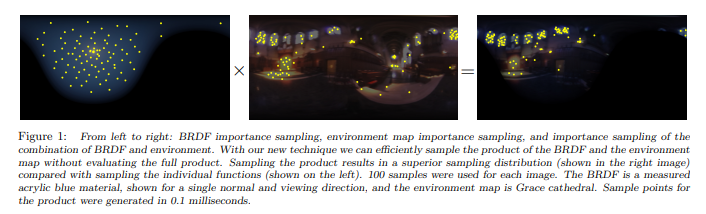
Sampling a larger texture area, as you say, involves the non trivial problem of sample distribution and weighting. The paper i've linked is a good example to show this is not easy. It respects both brdf (left) and environment (middle) to minimize samples (right) at the cost of complexity:

JoeJ
JoeJ

Shem_Namo said:
I implemented these functions, but it needs at least like 500 samples to get a decent result and even then, there are still some artifacts left.

I really lack experience, but 500 samples does not sound so unrealistic. Do you match the reference if you take more, e.g. 4000 samples? That's what i would do to proof correctness, but you need to be sure things like gamma, tonemapping, etc. are equal too. Usually it helps to turn all this off if possible.

Shem_Namo
Shem_Namo

Hi @JoeJ,

Yeah, so if I set the sample count to even 2000, it matches the reference pretty well.

But if the Environment Map is an HDR, I get a lot of fireflies in a very distinct spiral pattern(I think that's because of the Fibonacci Function).

Even if I bring the samples up to 6000, the fireflies are still there, but less noticeable.

But still 2000 samples is a bit expensive, is there any way to use less samples and still get a decent result?

I had an idea to multiple each sample by the inverted dot product between the original reflection vector and the one made with the new Normal.

And also create an accumulator to add all of the values of the non inverted dot product.

So then after the loop, and after I divide the color accumulator by the number of samples, I would then multiply the result with the dot weight accumulator.

That way the end result will have a weight of 1, I haven't tried this out yet, but I think it will work to reduce the fireflies.

I'll report how that goes ?

Thanks again!!

I really appreciate it!!

JoeJ
JoeJ

Well, if you only you could add converstaion to mip mapped cube map. Then you could do what games do and trade for some better accuracy by doing some more samples than just one.

I guess the fireflies come from some small but very bright spots in the env. map, like the sun or other light sources. Some pixels hit it by luck, others don't. One way to address this is 'denoising' (blurring in image space, or identifying and removing outliers). The other way is to importance sample the env. map, as proposed by the paper (which may be out of date).

Shem_Namo
Shem_Namo

Yeah, I wish I could use mipmaps for this, it seems like a very good solution.

I am pretty sure that you're right about the bright spots causing fireflies.

I'll keep trying and see if there is a faster way to deal with this.

Thanks again!!

Tommato
Tommato

IBL (image-based lighting) is another story. It uses pre-calculated rays directions, environment image (typically HDRI) is first sub-divided into pieces with “same energy”. The result is an interested combination of directional and environment illumination There is no ovstacles to do this on GPU, but again, with only maps (no rays) the abilities are very limited, in fact no any shadow.

But it's “illimiation” that has no relation with “blurred reflections” ;-)

MJP
MJP

“IBL” just means you're getting lighting from an image. Any method for sampling lighting from an image is IBL, what the OP is doing here definitely qualifies. There are of course many other options for implementing IBL, such as pre-filtered cubemaps and other related techniques.

If your image has small, bright spots it makes sense that it will cause fireflies. In simple terms your odds of a sample landing on a bright spot are low, and so they don't end up properly combining with rest of the result. You can improve this by using importance sampling the image itself, which roughly boils down to “take more samples at the brighter spots of the image and apply appropriate weighting”. If you then combined this with the BRDF sampling you already have by using multiple importance sampling, you can get better results in less samples. Any kind of traditional IBL importance sampling typically requires some kind of pre-processing of the image to find the important spots and compute weighting factors, although there is some good recent research into building up that kind of information on-the-fly as you're taking samples.

Topic Locked

This topic has been locked by a moderator. New replies are not allowed.

Sign in to reply to this topic.