GameDev.net gamedev.net
🔒 Locked

Calculate the character's destination based on projectile's location in UE 4.26

Started by Jvdicator Feb 11, 2022 at 11:53 AM 10 replies 17.1k views
Original Post
Jvdicator
Jvdicator

Greetings gentlemen,

I'm new to this forum and I hope this is the right section since by the looks of the other ones they host more complex stuff than I'm asking and in need of help to.

I'm working to a project in Unreal Engine 4.26 bluepritns where two opponents standing on platforms facing and throwing discs at each other in order to hit the walls behind them which affect the tiles of thew platform they are standing on.

I'm struggling with the AI character movement: I have a basic behavior tree which the opponent keep tracks of discs and moves laterally on the platform according to the disc's position with. I calculate the character's destination by subtracting the character's and disc's location then multiplying the result for the character's right vector and finally add it to the character's location.

That works fine until the discs move directly from and to the characters, along their forward vectors to be clear, but when the discs fly diagonally the character's destination is totally all over the place.

How can I properly calculate the character's position?
Thaumaturge
Thaumaturge

It seems to me that this might be done by finding the position at which the disc will intersect the line on which the AI character stands--that presumably being then the position that the AI character should aim to move towards.

If your playing field is aligned such that the AI character's line lies along one of the axes (e.g. if it's at y = -5, with only the x-coordinate varying), then finding that point should be just a matter of entering the static coordinate (i.e. “-5” in the previous example) into a line-equation that corresponds to the disc's velocity, and using the point that results.

If not, then you can likely find the desired point by calculating the general (2D) intersection of the AI character's line with the disc's velocity.

MWAHAHAHAHAHAHA!!! My Twitter Account: @EbornIan
Jvdicator
Jvdicator

Thaumaturge said:
It seems to me that this might be done by finding the position at which the disc will intersect the line on which the AI character stands--that presumably being then the position that the AI character should aim to move towards.

@Thaumaturge

Thaumaturge said:
It seems to me that this might be done by finding the position at which the disc will intersect the line on which the AI character stands--that presumably being then the position that the AI character should aim to move towards.

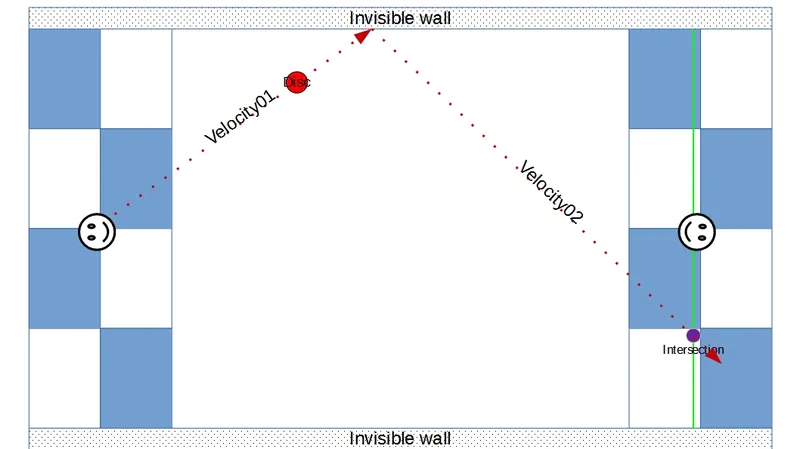
Let's see if I got this right: I needto find the intersection between the disc velocity vector and the one that lies on the character's right's? And then add it to the character's location?

Like in the picture? (Was masterfully handcrafted by me).

The velocity01 vector vill ever intersect the green one?


Thaumaturge
Thaumaturge

Jvdicator said:
Let's see if I got this right: I needto find the intersection between the disc velocity vector and the one that lies on the character's right's? And then add it to the character's location?

Hmm… Not quite. If you add that intersection-point to the character's current position then you'll end up with the character being placed incorrectly, I would expect!

Put it this way:

Let's say that your AI character is standing at the point x = 0, y = 5, and that the character moves along the x-axis. That is, that the line on which the character stands and moves is the line y = 5.

Then, let's say that we calculate that the disc will intersect the AI character's line at the point x = 7, y = 5.

If we then add that intersection-point to the AI character's position we get a new position of x = 0+7 = 7, y = 5+5 = 10--which results in moving the AI character away from their line.

Instead, I would imagine that the thing to do would be to treat the intersection-point as a target, and to move the AI character towards it. To do this, I would suggest finding the vector that lies between the AI character's current point and the intersection-point, and moving the character along this new vector.

Jvdicator said:
Like in the picture? (Was masterfully handcrafted by me).

That is the intersection that I have in mind, yes.

I hadn't realised that you also have walls against which your discs might bounce--that introduces a complication, but one that can be dealt with, I do think.

Jvdicator said:
The velocity01 vector vill ever intersect the green one?

That depends on whether the green line is a line segment, or an infinite line. If it's a line-segment, then there will be no intersection; if it's an infinite line, then there will be an intersection, I believe.

(To be more accurate, the maths is more or less the same for both an infinite line and a segment, but in the case of a segment one discards results that lie beyond the ends of the segment, if I'm not much mistaken.)

MWAHAHAHAHAHAHA!!! My Twitter Account: @EbornIan
Jvdicator
Jvdicator

OK, I should find the intersection between the vector that lies along the disc's velocity and the the one along the character's right vector, then move it to that location.

I've looked into the vector intersection formulas and, man, it's a bit complicated: https://mathworld.wolfram.com/Line-LineIntersection.html.​

Scared by that I've found shelter at Wikipedia: https://en.wikipedia.org/wiki/Line%E2%80%93line_intersection

It has to be noted that I'm ignoring the Z component for gameplay reasons as I'm only considering two different Z values for the disc that are added according to the player's input.

Thaumaturge
Thaumaturge

Remember: If the line that your character moves along is aligned with an axis, then you likely don't need the full line-line intersection maths: you should be able to substitute the character's location on the other axis into an equation for the disc's movement-vector, and from that then get the intercept position on the aligned axis.

To explain by example, if I'm not much mistaken:

Let's say that your character moves along the x-axis, and is located at a y-coordinate of 5. Note that, since it only moves on the x-axis, its y-coordinate should not change.

Now, let's assume that the disc has a movement-vector of, let's say, (2, 3), and is at position (1, 2). From that we can say that it has the following two equations:

x = 1 + 2*t
y = 2 + 3*t

That is, it starts at an x-position of 1, and moves along the x-axis at a rate of 2, and starts at a y-position of 2 and moves along the y-axis at a rate of 3. The variable “t” is “time”--i.e. after 1 unit of time it will have moved 2 units along the x-axis and 3 units along the y-axis.

Now, we're not currently interested in time, but that's okay--that will disappear presently, I think that we'll find.

So, we know that the AI character is standing at a y-coordinate of 5. Thus the intercept will presumably also happen at a y-coordinate of 5. Thus we can substitute that value into the equation for the y-axis, and get this:

5 = 2 + 3*t
5 - 2 = 3*t
3 = 3*t
t = 1

And since we now have a value for “t”, we can put that into the equation for the x-axis, and thus get an x-value:

x = 1 + 2*t
x = 1 + 2*1
x = 1 + 2 = 3

Thus we find that the disc will intercept the AI character's line at a location of (3, 5)!

MWAHAHAHAHAHAHA!!! My Twitter Account: @EbornIan
Jvdicator
Jvdicator

The math is clear.

So I could just replace the character's X value with the disc's one and call it a day, apparently?

That would not work in case I had to change the rotation of the platforms, then I would have to go for the scary math, right?

Thaumaturge
Thaumaturge

Jvdicator said:
So I could just replace the character's X value with the disc's one and call it a day, apparently?

As long as you don't mind the character perfectly matching the disc's position, with no mistakes and never being too slow to reach the disc, then indeed, that should work.

Jvdicator said:
That would not work in case I had to change the rotation of the platforms, then I would have to go for the scary math, right?

I believe so, yes.

MWAHAHAHAHAHAHA!!! My Twitter Account: @EbornIan
Jvdicator
Jvdicator

I'm still onto this but between the work and some mild discouragement due to my lack of math skills I feel a bit overwhelmed, especially now that I'm dealing with stuff totally new which often makes it hard to tell where and what I am doing wrong and how to do stuff in the proper way.

I need to focus and keep my head straight, I'm going to take a few days off still and then I'm going to keep on working on it.

Thaumaturge
Thaumaturge

Good luck, and strength to you for it! I hope that you do succeed in getting it working! ^_^

MWAHAHAHAHAHAHA!!! My Twitter Account: @EbornIan
Jvdicator
Jvdicator

It's been a bit since my last post.

I've been definitely discouraged by the amount of math I keep struggling with, then work and life in general didn't help but were lazyness and being out of my comfort zone what really kept me away of my project.

To be honest a few weeks after my last post I came to know of a specific blueprint node that just does the job, it's called “Line Plane Intersection”, you basically input both a start and end point (vector's) and an origin and normal for the plane then it just outputs the intersection coordinates and another couple of values. I know it's a lame way to do stuff but in my case it really helped.

I just fed the output coordinates to the character and that's it! Now he happily moves to the point of intersection.

The "code" needs to be refined in a sense that the character moves only if there's an intersection and not there's none, IE: the projectile is going to bounce off a wall first.

So I should, as soon as the projectile is fired, calculate the trajectory after the bounce, if there's any at all, and use that instead.

I'd like to thank you again Thaumaturge for pointing me in the right direction.

Thaumaturge
Thaumaturge

Jvdicator said:
I know it's a lame way to do stuff …

Nonsense! It's the use of a tool, the application of a previously-solved problem to simplify the current problem.

After all, if we always required ourselves to solve things from first principles, then we'd likely not have most of the technology that we do have, I daresay. If you want to dig a hole, is it important that you first be able to construct your own spade?

Anyway, I'm glad that you found this tool, and that it seems to have helped! ^_^

Jvdicator said:
I'd like to thank you again Thaumaturge for pointing me in the right direction.

It's my pleasure. ^_^

MWAHAHAHAHAHAHA!!! My Twitter Account: @EbornIan

Topic Locked

This topic has been locked by a moderator. New replies are not allowed.

Sign in to reply to this topic.