GameDev.net gamedev.net
🔒 Locked

Collision prevention Block to Block in 3d Space

Started by Aloxen Nov 30, 2022 at 9:28 PM 19 replies 13k views
Original Post
Aloxen
Aloxen

Hello,

I am currently programming a Jump and Run Game with OpenGL and I don't know how I prevent the Kamera from moving into a Block.

So far, there are only cubes in the Scene (length = 1) and the camera is a cuboid 1,2,1 (y is the upgoing coordinate).

I am already able to check if the camera is going to be inside a cube in the next render call but I am struggling on preventing it from going inside it. I have tried it with different approaches but I don't think that those are the right way to go.

Can anyone tell me what the code should look like and how it is done or link me to a tutorial?

JoeJ
JoeJ

You need a function to calculate the closest point on a box surface from a given point inside the box.
This tells you where to move the camera to get outside and travelling the shortest distance.

You also need such things for collision detection and resolve anyway.
Algorithm could be to calculate distances to the 4 edges, project to the edge with the shortest distance.

JoeJ
JoeJ

Some code (untested):

vec2 CalcClosestPointIfInside (vec2 boxMin, vec2 boxMax, vec2 point)
{
	if (point.x < boxMin.x || point.x > boxMax.x ||
		point.y < boxMin.y || point.y > boxMax.y) 
			return point; // point is outside the box
			
	vec2 center = (boxMin + boxMax) * .5f;
	vec2 result;
	result.x = (point.x - center.x > 0.f ? boxMax.x : boxMin.x); // project to the closer edge
	result.y = (point.y - center.y > 0.f ? boxMax.y : boxMin.y);
	return result;
}

boxMin may refer to the top left corner of the axis aligned box, boxMax to the bottom right. But this depends on conventions of your coordinate system, so i prefer min max naming.

If your box is not axis aligned, you can transform the point into the local space of the box, and transform the result back to world space afterwards.

JoeJ
JoeJ

Best resource to look up such tests for more complex shapes: https://github.com/davideberly/GeometricTools/blob/master/GTE/Mathematics/DistPointAlignedBox.h

Looks a bit complicated due to heavy OOP, so it takes some time to find the actual math, though. : )

JoeJ
JoeJ

Aloxen said:
and the camera is a cuboid 1,2,1

Oops, so your camera is a box too, not a point?

So you want to project a box out of another box, correct?

Some years ago this was asked here, and i made an algorithm for a continuous solution.
Continuous here means the solution changed gradually even if the box crosses a diagonal of the other box, which might be nice.
But while continuous, this no longer minimizes energy, so the projection is not along the shortest path near corners.

I'd need to search for this, so let me know first which option sounds better to you…

I also assume you want to keep both boxes axis aligned, so no rotation, like real world physics would cause?

Aloxen
Aloxen

Thank you, I will have a look at it.
For the min and Max point calculation: I have the position of a Block, which is the center of it. why is the box min a vec2?
Would I compute the min point x coordinate like : min.x =Center-0.5, min.y = Center-0.5 and min.z = Center - 0.5?

Aloxen
Aloxen

@undefined Well, like in Minecraft, the cam is 1.75 tall and the surrounding is 0.5 in all directions.

JoeJ
JoeJ

Aloxen said:
For the min and Max point calculation: I have the position of a Block, which is the center of it. why is the box min a vec2?

So your boxes store a center position, which is x and y in 2D, thus we can use a vec2 if we use some linear math lib. (Edit: I thought you're in 2D, but 3D is the same math ofc.)
There are two primary ways to store boxes:

struct box1
{
	float centerX, centerY; // = vec2 center
	float halfWidth, halfHeight; // = vec2 extent // we could also store full width ofc.
}
struct box2
{
	float left, bottom; // = vec2 minCorner
	float right, up; // = vec2 maxCorner
}

Option 1 usually is faster for geometric intersection and closest point tests

Option 2 usually is faster for range queries, e.g. collision detection

Because collision detection processes way more boxes, usually option 1 is the better choice.
But just to let you know. No need to change your preferred conventions you are used to.

Aloxen said:
Would I compute the min point x coordinate like : min.x =Center-0.5, min.y = Center-0.5 and min.z = Center - 0.5?

Yes.

Aloxen
Aloxen

My Collision Detection Function is just a simple If Statement.

if (A.x-0.5 < B.x+0.5) and (A.x+0.5 > B.x-0.5) and

(A.y-1.5 < B.y+0.5) and (A.y+0.5 > B.y-0.5) and

(A.z-0.5 < B.z+0.5) and (A.z+0.5 > B.z-0.5){

result = true else result:=false

I have to write the program in Pascal so the code might not be 100% correct.

JoeJ
JoeJ

Aloxen said:
Well, like in Minecraft, the cam is 1.75 tall and the surrounding is 0.5 in all directions.

Ok.

First, you should use a generic data structure to represent boxes. Don't hard code magic numbers like 1.75 or use custom variables for that. Use Boxes, capsules, spheres, etc. You need such shapes and math much more often than just for the current special case, so it should be generic functionality. You know, write once, reuse anywhere.

Second, you more likely talk about a player controller, not just a camera. Player controllers usually use a capsule, a compressed capsule (to make the round ends more flat), or a cylinder (which causes harder math than capsules).
Box characters are not ideal, because the corners don't give uniform behavior independent of view direction, or worse: View direction affects physics. (Depending on if they remain axis aligned or not)
The link i gave should cover all necessary tests to implement collisions with a static box world.
Sounds you're a beginner. This isn't so easy to get right. Expect to spend some time on it… ; )

Aloxen
Aloxen

I have looked at the link and it is really hard to follow, since I only know pascal. I have seen that there are collisions for every different object, but for me, why is it so hard for block to block? I mean, the Checkcollision works perfectly fine. How would I compute the vec3 which pushes the Player out? I tried to solve it visualy by setting specific coordinates to 0 but that doesn’t work for all directions

Aloxen
Aloxen

I had a look in those hub files and since I am programming in Pascal, it is very hard to follow the code. I have seen that there are collision detections for every kind of shape. My collision detection is working just fine, I just need a way to calculate the vector that pushes the character out out the obstacle.

I can define the Players Hitbox as you recommend it. Can you give me the easiest way to calculate the vector? The only information that I have ist the position of the camera(player) and the Block. These coordinates are referring to the center of the Block/cam.

JoeJ
JoeJ

It's here: https://github.com/davideberly/GeometricTools/blob/master/GTE/Mathematics/DistAlignedBoxAlignedBox.h​

But agree that's maybe a bit overkill. The problem is easy enough to figure out on your own, and easy enough you should understand how it works.

We can reduce the problem to 1D to figure it out. Basically we have two spans (or line segments), one static, the other should move to resolve penetration.

void ResolveSpan (float &dynCent, float &dynHWidth, float statCent, float statHWidth) // the & means the given variable can be changed by the function; the other variables are given as a copy
{
	float diff = dynCent - statCent; // difference between the centers
	float totalW = dynHWidth + statHWidth; // the sum of both half widths
	
	if (diff > 0) // dynamic span on the right side of the static
	{
		if (diff > totalW) 
			return; // it is so much on the right they do not intersect, so change nothing and return
		
		// intersection - project further to the right to resolve overlap
		float overlap = diff - totalW;
		dynCent += overlap; // done
	}
	else // same for the left side case...
	{
		if (diff < -totalW)
			return;
			
		float overlap = diff - totalW; // i'm uncertain and confused from the signs. Ideally i have a testcase prepared to compile and run, to fix it by trial and error if wrong.
		dynCent -= overlap;	
	}
} 

That's very simple math and logic, but already enough complexity to make me uncertain. : )
Assuming it works, we can now apply this to all 3 dimensions:

void ResolveAABoxCollision (AABox &dynamicBox, AABox staticBox)
{
	ResolveSpan (dynamicBox.center.x, dynamicBox.width*.5f, staticBox.center.x, staticBox.width*.5f);
	ResolveSpan (dynamicBox.center.y, dynamicBox.height*.5f, staticBox.center.y, staticBox.height*.5f);
	ResolveSpan (dynamicBox.center.z, dynamicBox.depth*.5f, staticBox.center.z, staticBox.depth*.5f);
}

So this should work for axis aligned boxes which are not allowed to rotate.
After the function the dynamic box is already displaced to the new and resolved position. To get a displacement vector you would do some minor changes (return signed overlap, and fill the 3 dimensions with that).

It should be fine for now. To handle an upright capsule vs. box, you would need to handle more cases, actually point vs. rectangle and line vs. rectangle.
Key is to treat the capsule as a point (from above) or as an axis aligned upwards line (from the side). Then you only need to ‘add’ the radius of the capsule to difference / overlap.

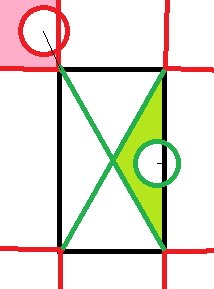
However, you should figure out sphere vs. box first, because that's a bit easier. The cases in detail here are then point in the ‘voronoi regions’ of either a face, a edge, or a corner of the box, if the sphere center is actually outside the box.
If the sphere center is inside, we only have the face region to detect. Here a 2D image to illustrate what i mean with such regions:

Red regions and circles are outside, green inside. Thin black lines show the displacement direction. They are no longer axis aligned in corner cases (and edge cases in 3D).

That's stuff every game dev should be able to do on his own, imo. But depending on your actual experience and education, it may well take years even to get to the point where you really need this and work on it.
The alternative is to use physics engines (or full game engines). But to use them, some basic knowledge and experience is required too. So it's never wrong trying to get as far as you can get.

Calin
Calin

at Aloxen: JoeJ probably told you already everything you need to know but here’s my take. If you want to prevent a collision from taking place you still need a bit of collision to take place, you need the later because you want to know when to stop the objects from moving.

My project`s facebook page is “DreamLand Page”
Calin
Calin

If you want no collision whatsoever between your objects you will have to make use of helper objects, larger objects surrounding your original objects that is. In this scenario the collision test should take place between the helper objects

My project`s facebook page is “DreamLand Page”
JoeJ
JoeJ

Calin said:

at Aloxen: JoeJ probably told you already everything you need to know but here’s my take. If you want to prevent a collision from taking place you still need a bit of collision to take place, you need the later because you want to know when to stop the objects from moving.

Sounds you describe a method of simulation where penetration never is allowed to happen.
This was the first take on rigid body simulation, but it has a big performance problem, so isn't practical for larger simulations with multiple bodies. Here's an example why:

Imagine a billiard game at the start. The white ball is shot towards the group of colored balls.
When the first collision happens, the hit colored ball will collide with two neighboring balls, each of them as well going to collide with two other balls, one of them being hit from two former balls at almost the same time. And so on.
If you want to simulate this with your approach, you have to order the collisions sequentially in time to find the first event. Then you roll back the whole simulation to this moment in time, and re-simulate from there.
Again many collisions are detected, the first needs to be found, rollback, restart from there. This continues until you are at the destination time.
Due to the exponentially growing complexity from the multi body problem, you will need hundreds of simulation steps, detecting thousands of collisions, to advance just one timestep. The simulation of one timestep takes longer than step size, and you're no longer real time.

The faster option which is now standard is to do only one simulation step, treat all found collisions to happen simultaneously, try to solve for reaction forces resolving all collisions, accept the small quantization error but hope the solution converges over time on failure cases. It works almost just as well and is much faster.

Maybe that's not what you meant but just to mention. A game like Minecraft has no multi body simulation anyway. There are no stacks of boxes which may tumble over or stay at rest, so the hard multi body problem requiring a solve isn't there.
But making a robust player controller colliding with a static world isn't easy either. However, it is not needed to predict and prevent penetration.
You can let the penetration happen, then resolve it. Next frame the same penetration will happen again, but if your resolve also gives the same result again, the behavior is stable and does not jitter.
To make your resolve stable and consistent, you need to conserve / minimize energy. Which is guaranteed if your resolve projects along the shortest distance.

But this isn't easy in case of multiple, simultaneous collisions. The classical test case is this:

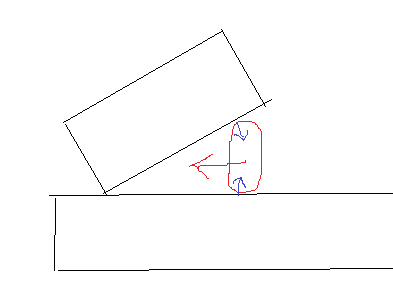
The player tries to push into a narrow corner. The resolve from box A pushes into box B and vice versa. This often causes jitter in old games, or you might even get stuck so you can't move back.
I remember this was difficult for me to get right too, but can't remember the solution which worked for me. Probably it was just to add all resolution vectors together and applying the sum. Penetration would not be zero after the resolve, but it should converge towards that with time.
Now i'm a happy user of a physics engine and no longer need to care. :D

And in a Minecraft game there are no narrow corners, just right angles, which should help.

Calin
Calin

at JoeJ: I was under the impression he’s looking for something simple something that could be reduced to axis aligned CD in 2d

My project`s facebook page is “DreamLand Page”
Aloxen
Aloxen

And I was proud to get myself through OpenGL, actually understanding it xD.

Well here I am and I need it to get my game working for my school project. Im trying to understand what you two are saying.

First of all, @joej should I use box vs box for Player Block collision, or should the player be a sphere?

Second, what is does the dynamic and static part mean? If I it means what I think it means it is the camera/Player position Center coordinate. I don't think we have that in Pascal, but if what I just said was correct, then I know how to translate it into pascal.

I can tell you how my movement based on Keyboard inputs is working right now.

First, all key inputs are checked and a movement vector is created, which is based on those inputs. After that, set:

vec3 OldCamPos = camPos;
vec3 NewCamPos = CamPos+movement;

Then I Check if there would be a Collision with NewCamPos and the Block and if that is true, it should compute a Vector, which is then subtracted from CamPos.

After that it always comes CamPos += movement; and then CamPos is going into the LookAt function which moves the Camera.

Is there a mistake in the order of statements I made or would you do something different?

JoeJ
JoeJ

Aloxen said:
First of all, @joej should I use box vs box for Player Block collision, or should the player be a sphere?

It's up to you, really.
But as you mentioned Minecraft, i guess your world is a uniform grid of big voxels. Like a Super Mario tile map, just in 3D.
So the world is all axis aligned, and if you keep your box character axis aligned as well, it won't be much of a difference in comparison to a sphere character.
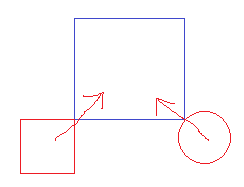
The difference will mostly show if you move towards a convex corner at 45 degrees angle. In this case, the box geometry of the character either snaps to the left or the right side from the corner, and then slides along.
A spherical shape would behave better. You would almost stop at contact with the corner, and then you have time to decide which side to choose for further movement.
Here a top-down view of the example:

Round shape will behave clearly better and more natural.
But for now, you can stick at the box, because it's easier. Add the spherical / capsule shaped shape to your todo list, in case there's still time left for such improvements later.

Aloxen said:
Second, what is does the dynamic and static part mean?

The dynamic box will be moved outside of the static box, which stays in place and never changes collision. So dynamic = characters, static = world.

Aloxen said:
Then I Check if there would be a Collision with NewCamPos and the Block and if that is true, it should compute a Vector, which is then subtracted from CamPos.

That's fine.
Using my code example you would first create box from the cameraPos (which you really should rename to playerPos eventually).
Then use it as the dynamic input for the function. Then set cameraPos to the displaced dynamicBox.center modified by the function.
Alternatively, the vector you talk about would be: dynamicBox.center - cameraPos. Adding this vector to cameraPos woudl bring the camera to the dispalced dynamicBox.center.

Aloxen said:
After that it always comes CamPos += movement; and then CamPos is going into the LookAt function which moves the Camera. Is there a mistake in the order of statements I made or would you do something different?

I would do it in this order:

  1. add movement to camera. (it might now penetrate the static world boxes)
    2. Resolve the collision.
    3. Render. (So our image does not show the penetrating state)

But technically and physically your plan would work equally well. It's only about a visual improvement.

Aloxen said:
And I was proud to get myself through OpenGL, actually understanding it xD.

Physics is harder than graphics. But this is how games work, not just how they look. How the player interacts with the simulation of a virtual world. So that's where the real magic is, i would say. ; )

Tom Sloper
Tom Sloper

Aloxen said:
I need it to get my game working for my school project.

Thread locked. We have a “no homework” policy here. We may need to institute a “no Pascal” rule too. :p

-- Tom Sloper    --      sloperama.com

Topic Locked

This topic has been locked by a moderator. New replies are not allowed.

Sign in to reply to this topic.