GameDev.net gamedev.net
🔒 Locked

Groups of units and collision response

Started by Calin Nov 16, 2023 at 9:56 AM 15 replies 12.9k views
Original Post
Calin
Calin

When two units collide and there is no one arround scenario. If one unit tries to move in to a tile and that tile hosts another unit in movement the first unit will wait. If the first unit tries to move in to a tile and that tile hosts another unit that is waiting, the first unit will add the tile where the second unit is as obstacle in the pathfinding map and then will call the pathfinder to find a new route.

But how do you proceed when you have a bunch of units around you (right next to you )all waiting? Do you add all of them as obstacles to the pathfinder obstacle map?

My project`s facebook page is “DreamLand Page”
JoeJ
JoeJ

Calin said:
But how do you proceed when you have a bunch of units around you (right next to you )all waiting? Do you add all of them as obstacles to the pathfinder obstacle map?

If you do this, assuming all units eventually have the same goal, there will be always one first unit which is closest to the goal. This unit is not blocked and can move one cell. The second unit then can enter the empty cell and the crowd does not get stuck. After some time the cloud may organize in a way there is always one free cell between adjacent units, and they may move on at constant speed without much waiting.

This works, but a problem is that the quantization of grid cells becomes very visible. It now not only shows because units always move just one cell in 45 or 90 degrees angles, it also shows with other behaviors like waiting for a free cell, moving forth and back eventually, etc.
So your units move in restricted (quantized) ways, like chess pieces do.
For some games that's desired, e.g. if we want predictable movement. Factorio maybe is an example. But for most games it's not desired, and we may prefer natural smooth movement instead.
To make it smooth, the grid and pathfinding would be only used to give a coarse direction. But the units are particels which can move to any position, ignoring the quantization of the grid. Collisions can be handled as particle collisions in a physical way, rather than a logical way requiring a strict order. Particle units can also smooth the given path, hiding the quantized corners and grid aligned path segments we see otherwise.

So, i can't tell what classic RTS games usually did, but i guess you need to make this decision first. You might want to look into simple simulations at this point, instead into graph algorithms ans strictly ordered priorities.
With particles, eventually units would never mark a grid cell blocked, even if a larger crowd of units covers it. Related collisions would be resolved by physical collision resolution, or some smarter form of flock behavior, etc.
Only very large units might mark grid calls as obstacles, if needed.

Calin
Calin

So what I said is not such a crazy idea. I don’t need anything fancy, making it past the viable RTS entry point is all I want.

>with particles, eventually units

and

>only very large units

I don’t have in mind units of different sizes for my current game. I’m only looking for basic RTS behavior at this point. I can’t provide you with useful feedback on your last idea even in a hypothetical discussion since I don’t have a clear idea how a feature like that would work

My project`s facebook page is “DreamLand Page”
JoeJ
JoeJ

Calin said:
I don’t have in mind units of different sizes.

Collision detection grows in complexity if you support variable size, because then you either need a multi level grid (larger units go into the grid with larger cells, so they still always fit into a square of 2x2 cells), or you add large units into multiple cells (which is not really easier, but usually slower).
So to keep things simple, your units should be small enough so the fit into a single cell. This still allows some small variance on size ofc., which may be good enough.
But if your unit count is small (<100), you don't need to worry about efficient collision detection initially. You can just collide each unit with each other, which is brute force and slow but has no need for spatial acceleration structures to find nearby units quickly.

For the simulation itself, support of variable size and mass is easy, so i would add this from the start.
Let's say we have a tank unit and a soldier. If they collide, the tank is heavy and should not move as much as the soldier to resolve the collision. We can have that by giving the tank a mass of 9 and the soldier a mass of 1. Then the soldier will move 90%, and the tank only 10% of the required displacement. This way the tank will also be able to push multiple soldiers out of its way simply because it has a larger mass.

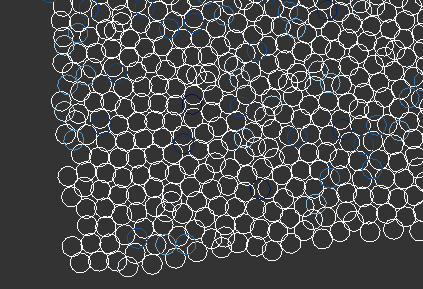
Imagine we have 100 soldiers in a single spot. They all collide with each other and should be separated. After many steps of simulation they will, and their distribution will look something like that:

That's actually a screenshot from some SPH fluid simulation i did. It's 3D, so some particles are on top of others and thus it looks like they would collide, but they don't.
But you also see many particles are distributed well and maintain distance to nearby particles. That's what you can expect. Even if there would be some obstacles, e.g. mountains, the particles would spread out through the valley and still separate if there is enough space.
And there is no need for logic, priorities, order, or AI. It's just simple laws of physics which resolves the problem. That's what i try to say, and why it's worth to consider working with simulations.

Calin
Calin

it’s just simple laws of physics

That’s interesting. Starcraft workers behave somewhat similar.

Collision detection grows in complexity if you support variable size

I suspected that. I’m still confused about some simple things you should have in a RTS, I’m not exploring the possibility of different sizes just yet.

My project`s facebook page is “DreamLand Page”
Aressera
Aressera

You should look into research on path planning for multi agent simulations. Reciprocal Velocity Obstacles is one such technique that does collision detection not on the agents themselves, but on a shape representing the forward-predicted velocity. AFAIK this approach was used in some high-profile RTS games.

RVO2 is a library that implements this, which was used in the game Warhammer 40,000: Space Marine.

frob
frob

I think the crux of your question is: How can I clear up a traffic jam?

The simple answers are already given. Pathfinding should generally not include transitory obstacles, and objects should include a type of steering behavior that will automatically queue up, along with a pushing priority behavior to help eventually clear itself up as units start to slide through. Bottlenecks and choke points will always throttle traffic.

More complex systems are complex. You could build systems that incorporate complex flow mechanics, travel lanes, routes of highways and byways and flow control, systems that predict and redirect for congestion, and more. Unless you're building a traffic simulation game those are probably overkill.

taby
taby

Calin said:

it’s just simple laws of physics

That’s interesting. Starcraft workers behave somewhat similar.

Anything good at maintaining a territory will end up forming a Voronoi diagram.

Calin
Calin

frob: The simple answers are already given

for seen it all guys like you and with todays standards in mind it is probably simple, in my case it’s much more than that, it took a year to figure it out, and I’m still shaky about it and probably don’t understand all the implications yet.

My project`s facebook page is “DreamLand Page”
LorenzoGatti
LorenzoGatti

“Unit A is blocked by unit B” means “unit A should move after unit B” (hoping that unit B is able to move and gets out of the way, allowing unit A to move later).

This is a partial ordering of units, which can be the source of a topological sorting (computed from collision tests) that can be used in the movement phase to decide the order in which units move and to detect clusters of mutually blocking units

Omae Wa Mou Shindeiru
Calin
Calin

JoeJ you often write so much that I find it difficult to keep up with you feedback wise. Your physics driven “unit” spreading screenshot looks interesting that’s all I can say. I understand the principle, making things behave like they would in real life but I don’t understand the laws of physics like formulas and stuff

at everyone else: thank you guys for sharing useful information and resources.

My project`s facebook page is “DreamLand Page”
JoeJ
JoeJ

Calin said:
I understand the principle, making things behave like they would in real life but I don’t understand the laws of physics like formulas and stuff

Well, i can give a little primer on that. Simulation can range from very to easy to very hard, but you should get away with the easy things for your needs.
And actually we do not even need a full simulation. This would mean you have to deal with velocity and acceleration for all your stuff, which i think is not common for RTS. Movement rather looks like constant velocity motion usually.

So let's say we just want to resolve traffic jams, ignoring stuff like integrating equations of motion.
Then we don't need a simulation, just a solver for our jam problem.

But the philosophy remains the same: Instead thinking about global logic to do things in some order, we think about simple local behavior, which then hopefully solves our jam problem if we observe global results.
The behavior is simply to move both units apart of each other for each pair that intersects. And to keep the math simple, we use simple shapes. Actually circles for units and rectangles for obstacles.
Expected problem: If A and B intersect, we move them apart. But now B intersets with C, which it did not do initially. And because we had already checked B vs. C before we have handled A vs. B, we now miss to resolve this collision we have created without intent.
Solution: Repeat the whole process for a number of iterations. That's expensive, but it will find the new collision and address it.
So our plan is to create an iterative solver.

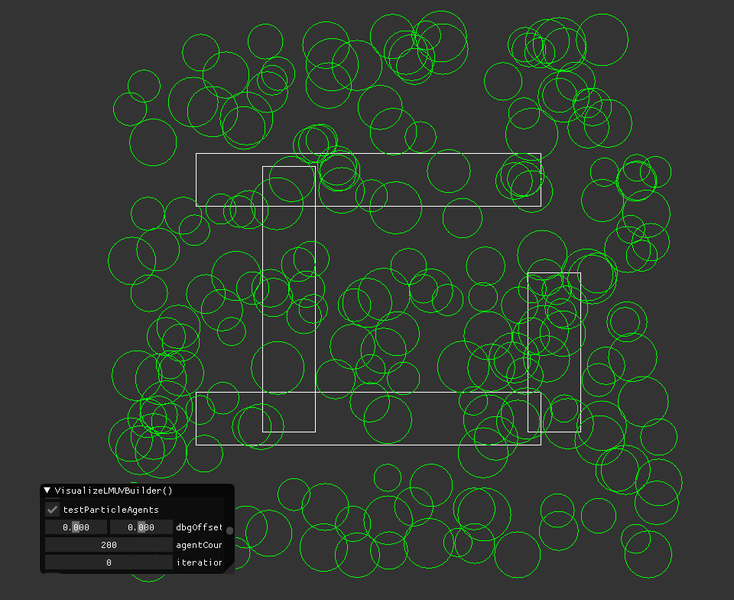
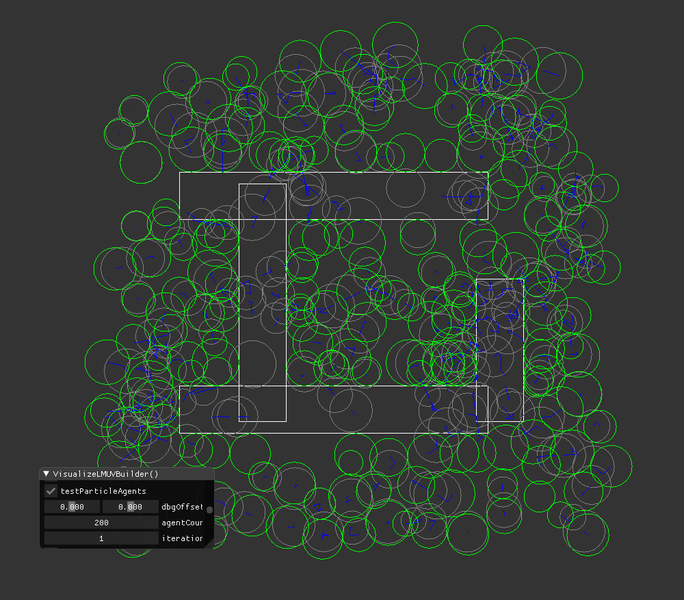
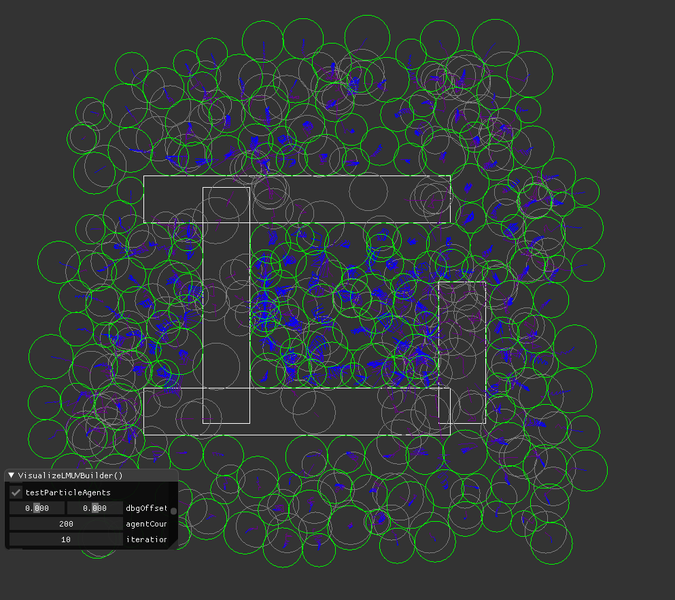
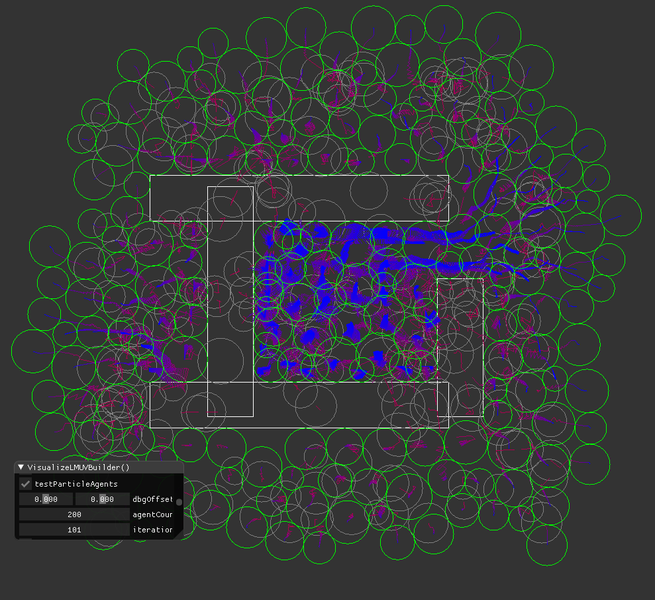
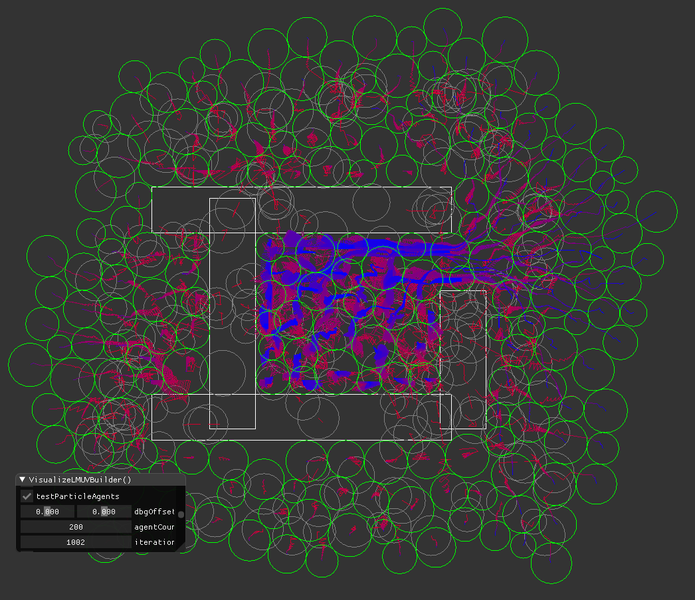
I made one of my applets and here is what i got:

Initially, without any solver iterations, we have lots of intersections.

After one iteration, it;'s a bit better, but not yet good. But notice no more agents inside static obstacles.

With 10, it looks pretty good for many areas. But inside my 'building' those circles still often intersect.

… i drag my slider up to 100, and i can see how circles get pushed out through the ‘door’ of my building. Pretty cool to watch…

Better. You can see the trajectories (red→blue lines), and you see the heavy movement near the door.

With 1000, result looks acceptable to me.

But it's 2 fps. How can we make it faster?
1. Use some acceleration structure for collision tests, as discussed here:
2. But most importantly: Do just N iterations per frame of your game. Let's say we do 4 at 60 fps. Then we have our 1000 iterations result after 4 seconds while playing the game.
3. Make a better solver.

For a better solver, here is an idea:
Observing the trajectories, we see they form a vector field, pointing outwards from initially dense spots.
So we could, for each agent, look up for nearby agents in a larger area. From those nearby but many agents we can calculate a density gradient, and displace particles along then gradient until we have target density.
That's in part how SPH fluid simulation works.
The same idea can also give us flocking behavior: We calculate average velocity of nearby fish and then swim in this direction too.

You don't need a degree in math to experiment with such ideas. It's easy and fun. ; )

		static bool testParticleAgents = 1; ImGui::Checkbox("testParticleAgents", &testParticleAgents);
		if (testParticleAgents)
		{
			struct Agent
			{
				vec2 pos;
				float mass;
				float radius;

				void Vis (float r, float g, float b)
				{
					RenderCircle (radius, pos, vec(0,0,1), r,g,b);
				}
			};

			struct Obstacle
			{
				vec2 minCorner;
				vec2 maxCorner;

				void Vis (float r, float g, float b)
				{
					//assert(minCorner[0] < maxCorner[0] && minCorner[1] < maxCorner[1]);
					RenderAABBox(minCorner, maxCorner, r,g,b);
				}
			};

			// create some obstacels

			std::vector<Obstacle> obstacles(4);
			int i=0;
			obstacles[i].minCorner = vec2(-0.5f, -0.5f); obstacles[i].maxCorner = vec2(-0.3f, 0.5f); i++;
			obstacles[i].minCorner = vec2(0.5f, -0.5f); obstacles[i].maxCorner = vec2(0.7f, 0.1f); i++;
			obstacles[i].minCorner = vec2(-0.75f, -0.55f); obstacles[i].maxCorner = vec2(0.55f, -0.35f); i++;
			obstacles[i].minCorner = vec2(-0.75f, 0.35f); obstacles[i].maxCorner = vec2(0.55f, 0.55f); i++;		
			for (auto &r : obstacles) r.Vis(1,1,1);

			// create random agents
			static vec2 dbgOffset (0.f); ImGui::SliderFloat2("dbgOffset", (float*)&dbgOffset, -0.5f, 0.5f);
			//static float dbg (0.f); ImGui::DragFloat("dbg", &dbg, -0.01f);
			static int agentCount = 200; ImGui::DragInt("agentCount", &agentCount);
			std::srand(0);
			std::vector<Agent> agents;
			for (int i=0; i<agentCount; i++)
			{
				Agent a;
				vec2 pos(0.f);
				for (int d=0; d<2; d++)
				{
					float c = float(std::rand()) / float(RAND_MAX);
					c = (c-0.5f) * 2.f; 
					pos[d] = c;
				}
				a.pos = pos + dbgOffset;
				a.radius = 0.05f + 0.05f * float(std::rand()) / float(RAND_MAX);
				a.mass = a.radius * a.radius;
				agents.push_back(a);
			}
			for (auto &a : agents) a.Vis(0.5f,0.5f,0.5f);

			static int iterationCount = 500; ImGui::DragInt("iterationCount", &iterationCount);
			for (int n=0; n<iterationCount; n++)
			{
				float colorize = pow(float(n+1) / float(iterationCount), 0.25f);

				// collide each agent against each other
				for (int i=0; i<agentCount-1; i++)
				for (int j=i+1; j<agentCount; j++)
				{
					Agent &a0 = agents[i];
					Agent &a1 = agents[j];
					float minDist = a0.radius + a1.radius;
					vec2 diff = a1.pos - a0.pos;
					float dist = diff.Length();
					if (dist < minDist) // colliding
					{
						float massSum = a0.mass + a1.mass;
						vec2 sep = diff / dist * (minDist - dist); // vector to resolve the intersection
						RenderVector(a0.pos, -sep * (a1.mass / massSum), 1-colorize,0,colorize); // visualize trajectory
						RenderVector(a1.pos,  sep * (a0.mass / massSum), 1-colorize,0,colorize);
						a0.pos -= sep * (a1.mass / massSum); // we distribute the vector to both agents, weighted by mass
						a1.pos += sep * (a0.mass / massSum);
					}					 
				}

				// collide each agent against each obstacle 
				for (int j=0; j<obstacles.size(); j++)
				{
					Obstacle &o = obstacles[j];
					vec2 center = (o.minCorner + o.maxCorner) * .5f;
					vec2 half = o.maxCorner - center;

					for (int i=0; i<agentCount; i++)
					{
						Agent &a = agents[i];
						if (a.pos[0] < o.minCorner[0]-a.radius ||
							a.pos[1] < o.minCorner[1]-a.radius ||
							a.pos[0] > o.maxCorner[0]+a.radius ||
							a.pos[1] > o.maxCorner[1]+a.radius)
								continue; // skip if no collision
					
						// calculate closest point on obstacle boundary
						vec2 closest;
						bool inside;
						{
							vec2 diff = a.pos - center;
							vec2 clampedDiff (	min(max(diff[0], -half[0]), half[0]),
												min(max(diff[1], -half[1]), half[1]) );
							inside = (clampedDiff == diff);

							if (inside) // circle center is inside rectangle
							{
								closest = a.pos;
								int d = (half[0] - fabs(clampedDiff[0]) > half[1] - fabs(clampedDiff[1]));
								//RenderLabel (a.pos, 0,0.5f,1, "%i", d);
								closest[d] = center[d] + half[d] * (diff[d]<0.f ? -1.f : 1.f);
							}
							else // outside, in the voronoi regions of either edges or vertices
							{
								closest = center + clampedDiff;						
							}
						}

						// resolve collision
						{
							vec2 diff = a.pos - closest;
							float dist = diff.Length();
							if ((inside || dist < a.radius) && dist > FP_EPSILON)
							{
								float mag = (!inside ? a.radius - dist : -dist - a.radius);
								a.pos += diff / dist * mag;
							}
						}

						//RenderLine (a.pos, closest, inside,0.5f,!inside);								
					}
				}
			}
			for (auto &a : agents) a.Vis(0,1,0);
		}
Calin
Calin

I think I can understand bits of your primer JoeJ. You move the overlapping circles gradually away from the walls. The ”house“ entrance is where most movement takes place because you need to spew out all the extra circles that are found inside. Also I‘ve noticed you have a structure defined inside a function, it’s the first time I see a thing like that

My project`s facebook page is “DreamLand Page”
JoeJ
JoeJ

Calin said:

Also I‘ve noticed you have a structure defined inside a function, it’s the first time I see a thing like that

Reminds me i always complained about this. Back then, when it did not work. But they added this feature with C++11. Seems you did not care for a decade about what has changed on the language. ;D

It's a real game changer imo. Look at this, i have changed the code slightly:

static bool testParticleAgents = 1; ImGui::Checkbox("testParticleAgents", &testParticleAgents);
		if (testParticleAgents)
		{
			struct Agent
			{
				vec2 pos;
				float mass;
				float radius;

				void Vis (float r, float g, float b)
				{
					RenderCircle (radius, pos, vec(0,0,1), r,g,b);
				}
			};

			struct Obstacle
			{
				vec2 minCorner;
				vec2 maxCorner;

				void Vis (float r, float g, float b)
				{
					//assert(minCorner[0] < maxCorner[0] && minCorner[1] < maxCorner[1]);
					RenderAABBox(minCorner, maxCorner, r,g,b);
				}
			};

			struct Collision // making this only to have a local function
			{
				static void ResolvePairOfAgents (Agent &a0, Agent &a1, float colorize)
				{
					float minDist = a0.radius + a1.radius;
					vec2 diff = a1.pos - a0.pos;
					float dist = diff.Length();
					if (dist < minDist) // colliding
					{
						float massSum = a0.mass + a1.mass;
						vec2 sep = diff / dist * (minDist - dist); // vector to resolve the intersection
						RenderVector(a0.pos, -sep * (a1.mass / massSum), 1-colorize,0,colorize); // visualize trajectory
						RenderVector(a1.pos,  sep * (a0.mass / massSum), 1-colorize,0,colorize);
						a0.pos -= sep * (a1.mass / massSum); // we distribute the vector to both agents, weighted by mass
						a1.pos += sep * (a0.mass / massSum);
					}
				}
			};

			auto ResolveAgentObstaclePair = [](Obstacle &o, Agent &a) // lambas also give us local functions, but it's more convenient
			{
				if (a.pos[0] < o.minCorner[0]-a.radius ||
					a.pos[1] < o.minCorner[1]-a.radius ||
					a.pos[0] > o.maxCorner[0]+a.radius ||
					a.pos[1] > o.maxCorner[1]+a.radius)
						return; // skip if no collision
					
				vec2 center = (o.minCorner + o.maxCorner) * .5f;
				vec2 half = o.maxCorner - center;
				
				// calculate closest point on obstacle boundary
				vec2 closest;
				bool inside;
				{
					vec2 diff = a.pos - center;
					vec2 clampedDiff (	min(max(diff[0], -half[0]), half[0]),
										min(max(diff[1], -half[1]), half[1]) );
					inside = (clampedDiff == diff);

					if (inside) // circle center is inside rectangle
					{
						closest = a.pos;
						int d = (half[0] - fabs(clampedDiff[0]) > half[1] - fabs(clampedDiff[1]));
						//RenderLabel (a.pos, 0,0.5f,1, "%i", d);
						closest[d] = center[d] + half[d] * (diff[d]<0.f ? -1.f : 1.f);
					}
					else // outside, in the voronoi regions of either edges or vertices
					{
						closest = center + clampedDiff;						
					}
				}

				// resolve collision
				{
					vec2 diff = a.pos - closest;
					float dist = diff.Length(); // todo: if the agent is axactly at the wall this becomes zero and won't work. fix: introduce a contact normal
					if ((inside || dist < a.radius) && dist > FP_EPSILON)
					{
						float mag = (!inside ? a.radius - dist : -dist - a.radius);
						a.pos += diff / dist * mag;
					}
				}
			};

			// create some obstacels

			std::vector<Obstacle> obstacles(4);
			int i=0;
			obstacles[i].minCorner = vec2(-0.5f, -0.5f); obstacles[i].maxCorner = vec2(-0.3f, 0.5f); i++;
			obstacles[i].minCorner = vec2(0.5f, -0.5f); obstacles[i].maxCorner = vec2(0.7f, 0.1f); i++;
			obstacles[i].minCorner = vec2(-0.75f, -0.55f); obstacles[i].maxCorner = vec2(0.55f, -0.35f); i++;
			obstacles[i].minCorner = vec2(-0.75f, 0.35f); obstacles[i].maxCorner = vec2(0.55f, 0.55f); i++;		
			for (auto &r : obstacles) r.Vis(1,1,1);

			// create random agents
			static vec2 dbgOffset (0.f); ImGui::SliderFloat2("dbgOffset", (float*)&dbgOffset, -0.5f, 0.5f);
			//static float dbg (0.f); ImGui::DragFloat("dbg", &dbg, -0.01f);
			static int agentCount = 200; ImGui::DragInt("agentCount", &agentCount);
			std::srand(0);
			std::vector<Agent> agents;
			for (int i=0; i<agentCount; i++)
			{
				Agent a;
				vec2 pos(0.f);
				for (int d=0; d<2; d++)
				{
					float c = float(std::rand()) / float(RAND_MAX);
					c = (c-0.5f) * 2.f; 
					pos[d] = c;
				}
				a.pos = pos + dbgOffset;
				a.radius = 0.05f + 0.05f * float(std::rand()) / float(RAND_MAX);
				a.mass = a.radius * a.radius;
				agents.push_back(a);
			}
			for (auto &a : agents) a.Vis(0.5f,0.5f,0.5f);


			static int iterationCount = 500; ImGui::DragInt("iterationCount", &iterationCount);
			for (int n=0; n<iterationCount; n++)
			{
				float colorize = pow(float(n+1) / float(iterationCount), 0.25f);

				// collide each agent against each other
				for (int i=0; i<agentCount-1; i++)
				for (int j=i+1; j<agentCount; j++)
				{
					Collision::ResolvePairOfAgents(agents[i], agents[j], colorize);
				}

				// collide each agent against each obstacle 
				for (int j=0; j<obstacles.size(); j++)
				for (int i=0; i<agentCount; i++)
				{
					ResolveAgentObstaclePair (obstacles[j], agents[i]);
				}
			}
			for (auto &a : agents) a.Vis(0,1,0);
		}

Look at the final loop doing the solve. How clean and easy to read it is. The whole concept and idea becomes visible instantly.

Ofc. i could just make the Resolve() functions global like with C, but then we pollute our code base with tons of little helper functions we need only in one spot. The crap shows up in intellisense pop ups, and it becomes hard to find the important functions within all that noise.

With C++11 we can finally write our helper functions inside the one function where we need them. So they are easy to find while working on that, but completely hidden when working on anything else.
Also, think about all those copy pasted code sections. We can use local lambdas to get rid of this noise, and write significantly less code for the same result.

Personally i was lazy and slow with learning the new syntax of lambdas, so i was using local structs instead. Under the hood both is the same anyway, but today i say it's worth to learn about lambdas asap.
However, in the code i used both ways to give an example.

Calin said:
The ”house“ entrance is where most movement takes place because you need to spew out all the extra circles that are found inside.

Yes. If a bottle has a hole the will spill out due to gravity or pressure, and we try to simulate this behavior.
Maybe you remember my alternative path finding method some years ago. The idea was to fill honey into the goal of a labyrinth. Once the honey has reached all exits, we can find the shortest path to the goal simply by following increasing height of honey.
Both those ideas are closely related and typical ‘simulation’ examples, where we solve problems more with math and less with logic.

Calin said:
I think I can understand bits of your primer JoeJ. You move the overlapping circles gradually away from the walls.

Broadly yes, although i do not resolve static collisions gradually. I project the circles to the boundary of the rectangle in one step. It's not gradual. Static collision is not our problem.
The problem is the many dynamic objects. That's why we need many iterations at all, and why we seemingly approach a solution 'gradually'.

But your use of the word ‘gradually’ shows you understand the concept. So let's dig deeper.

I claim that our solver is bad. Because if we use it in a game, our units may jitter. Look at the trajectories again. They form zig zag paths. If i see jitter in a game, i refund and uninstall this amateurish crap immediately, and play a proper game instead.

So what do you think where this jitter comes from, and what could we eventually do about it?

Calin
Calin

I claim that our solver is bad

My math class marks were embarrassing from the beginning of the high school until the end. And I haven’t improved since then. I don’t think I can help you build a better solver. I’ve noticed you make heavy use of motion vectors which is probably a normal thing to do in a situation like this. A couple of years ago I was naive enough to think I can build a ray tracing engine on my own. I had to look at the source of a professional made ray tracing demo to realize it’s not my league.

In recent months I have been trying to understand how you could simulate RTS unit micromanagement. That gave me a bit of insight into vectors. But I still don’t understand them properly. And it doesn’t bother me. I can build my game without them.

My project`s facebook page is “DreamLand Page”
JoeJ
JoeJ

Calin said:
In recent months I have been trying to understand how you could simulate RTS unit micromanagement. That gave me a bit of insight into vectors. But I still don’t understand them properly. And it doesn’t bother me. I can build my game without them.

I see. I also lack related education completely and had to learn everything myself.
It's true for 2D games you can get away without vectors, but it's also true that vectors are not really something new. We can understand them geometrically, including transformation matrices. And i wanted to make 3D games, which gave me the motivation to learn it.
To rewrite the above code without vectors, any line involving them would become two lines, doing the math on both x and y separately. And to calculate the length of a vector formed form x and y, we use Pythagoras as learned in school: A^2 + B^2 = C^2, so length = sqrt(xx + yy).

Today i think the point when i started to use vectors and matrices was the point when i transitioned from trial and error on C64 towards serious programming. And it also made everything so much easier. I just loved those vectors.
It's the foundation of both graphics and physics, including related simulations. So we can't get further with the simulation primer until you did some linear math homework. : )

You use DirectX, which comes with a linear math lib. XMM vectors and that stuff, or how they call it. Assuming they also have a 2D vector not just 3D and 4D, you should use this. Otherwise there is GLM and others.
Or you write your own. E.g. a vec2 could be as simple as this:

struct Point2D
	{
		float x, y;

		Point2D () {};

		Point2D (float x, float y) : x(x), y(y) {};


		Point2D operator + (const Point2D &p) const 
		{
			return Point2D (x + p.x, y + p.y);
		}
		Point2D operator - (const Point2D &p) const
		{
			return Point2D (x - p.x, y - p.y);
		}
		Point2D operator * (const float v) const
		{
			return Point2D (x * v, y * v);
		}
		
		float Dot (const Point2D &p) const
		{
			return x * p.x + y * p.y;
		}		
		
float Length
 () const
		
{
		
	return sqrt(x * x + y * y);
		
}

	}; 

It should be called Vec2D, not Point2D. But otherwise that's already enough for my example i guess.

The only ‘new' thing here for you should be the dot product, so there may be not as much to learn as you might think. Totally worth the time.

Topic Locked

This topic has been locked by a moderator. New replies are not allowed.

Sign in to reply to this topic.