GameDev.net gamedev.net
🔒 Locked

Reading ray tracing result to the CPU and back onto the GPU in order to do image denoising

Started by taby Feb 8, 2024 at 11:37 PM 109 replies 121.4k views
Original Post
taby
taby

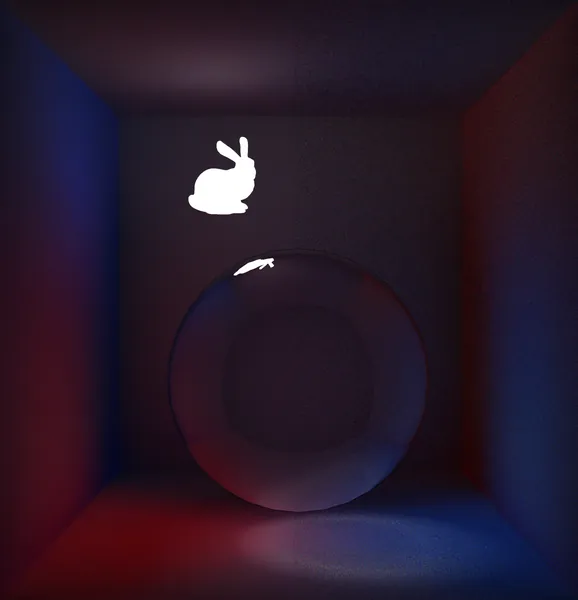
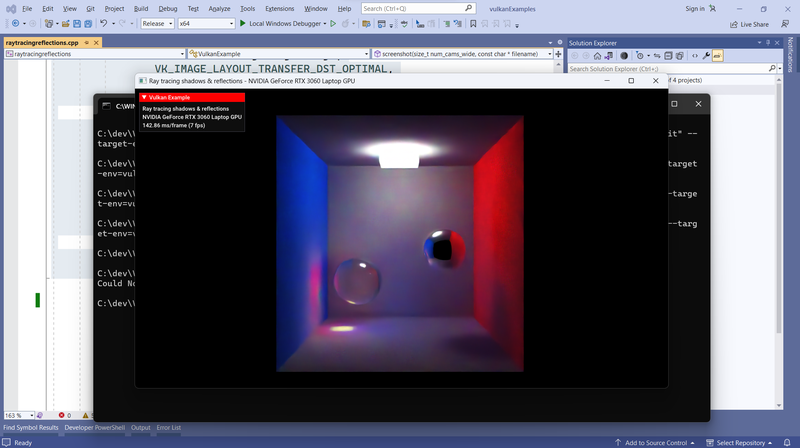
I got the Intel Open Image Denoiser library working in conjunction with the high-res screenshot functionality. With regard to the image attached below, on the left is the denoised image, and on the right the noisy input image. Works pretty good!

I do not have it working in conjunction with the render to screen functionality however.

I basically need to trace the rays, then read that into a CPU buffer, run it through the denoiser, and then write that back into GPU memory to be drawn to the screen.

I have no idea where to begin. I am using Sascha Willems' raytracingreflections demo code as a base.

https://github.com/sjhalayka/bidirectional_path_tracer/blob/a7cdc885fc850cf6555f56c320bfdeed240c409c/raytracingreflections.cpp#L1081

Any Vulkan experts in the crowd? :)

\
taby
taby

I'm trying to copy from a vector back to the screenshot image. Any glaring errors in my code? Am I going about this all wrong?

VkImageSubresourceRange subresourceRange = { VK_IMAGE_ASPECT_COLOR_BIT, 0, 1, 0, 1 };

vks::tools::setImageLayout(
	screenshotCmdBuffer,
	screenshotStorageImage.image,
	VK_IMAGE_LAYOUT_GENERAL,
	VK_IMAGE_LAYOUT_TRANSFER_DST_OPTIMAL,
	subresourceRange);

VkBufferImageCopy copyRegion{};
copyRegion.bufferOffset = 0;
copyRegion.bufferRowLength = 0;
copyRegion.bufferImageHeight = 0;

copyRegion.imageSubresource.aspectMask = VK_IMAGE_ASPECT_COLOR_BIT;
copyRegion.imageSubresource.mipLevel = 0;
copyRegion.imageSubresource.baseArrayLayer = 0;
copyRegion.imageSubresource.layerCount = 1;

copyRegion.imageOffset = { 0, 0, 0 };
copyRegion.imageExtent.width = px;
copyRegion.imageExtent.height = py;
copyRegion.imageExtent.depth = 1;

vkCmdCopyBufferToImage(
	screenshotCmdBuffer,
	screenshotStagingBuffer.buffer,
	screenshotStorageImage.image,
	VK_IMAGE_LAYOUT_TRANSFER_DST_OPTIMAL,
	1,
	&copyRegion);

VkBufferMemoryBarrier barrier = {};
barrier.sType = VK_STRUCTURE_TYPE_BUFFER_MEMORY_BARRIER;
barrier.srcAccessMask = VK_ACCESS_HOST_READ_BIT;
barrier.dstAccessMask = VK_ACCESS_TRANSFER_WRITE_BIT;
barrier.buffer = screenshotStagingBuffer.buffer;
barrier.size = screenshotStagingBuffer.size;

// Crashes here!
vkCmdPipelineBarrier(
	screenshotCmdBuffer,
	VK_PIPELINE_STAGE_HOST_BIT,
	VK_PIPELINE_STAGE_TRANSFER_BIT,
	0,
	0, nullptr,
	1, &barrier,
	0, nullptr);

vulkanDevice->flushCommandBuffer(screenshotCmdBuffer, queue);

memcpy(screenshotStagingBuffer.mapped, &uc_output_data[0], size);

JoeJ
JoeJ

taby said:
// Crashes here!

Do you use Validation Layers to get verbose error descriptions?

taby
taby

JoeJ said:

taby said:
// Crashes here!

Do you use Validation Layers to get verbose error descriptions?

I do not, because I'm not familiar with them. Let me look into it. Thanks for the pointer!

taby
taby

I've gone through a few tutorials on enabling validation layers, but it's not clear to me how to enable them.

taby
taby

I wonder why I can't just do this and be done with it:

memcpy(screenshotStagingBuffer.mapped, &uc_output_data[0], size);
JoeJ
JoeJ

taby said:
I've gone through a few tutorials on enabling validation layers, but it's not clear to me how to enable them.

It's really a must do. It's a debug callback. When there is an error, in the callback you get pointers to involved VK objects and a text message explaining the error. It's then easy to track back and fix things.

Posting some code to enable it, which i've got from some minimal ‘render a rotating cube’ example that came with the Vulkan SDK.

It won't help you much, but at least it gives some functions to search for.

I know this whole setup should be much easier nowadays. See the usual VK tutorials. I'm sure Sascha Willems has this too. Nobody could start with VK without this help.

	static VKAPI_ATTR VkBool32 VKAPI_CALL
	BreakCallback (VkFlags msgFlags, VkDebugReportObjectTypeEXT objType,
				  uint64_t srcObject, size_t location, int32_t msgCode,
				  const char *pLayerPrefix, const char *pMsg,
				  void *pUserData) 
	{
		SystemTools::Log (pMsg); // the text massage describing the error
		SystemTools::Log ("\n");


		// some messages i have disabled manually, which i got after uninmstalling Steam or NVidia GPU...

		
		//if (!strcmp(pMsg, " [ UNASSIGNED-CoreValidation-Shader-DescriptorTypeMismatch ] Object: VK_NULL_HANDLE (Type = 0) | Type mismatch on descriptor slot 0.0 (expected `VK_DESCRIPTOR_TYPE_STORAGE_BUFFER, VK_DESCRIPTOR_TYPE_STORAGE_BUFFER_DYNAMIC`) but descriptor of type VK_DESCRIPTOR_TYPE_UNIFORM_BUFFER")) return false;
		
		if (!strcmp(pMsg, "loader_get_json: Failed to open JSON file C:\\Program Files (x86)\\Steam\\SteamFossilizeVulkanLayer64.json")) return false; // uninstalling Steam? how dare you !!?
		if (!strcmp(pMsg, "loader_get_json: Failed to open JSON file C:\\Program Files (x86)\\Steam\\SteamOverlayVulkanLayer64.json")) return false;


		DebugBreak(); // Win32 function acting like a breakpoint
		return false;
	}


	struct Context
	{
		enum 
		{
			MAX_GPUS = 8,
		};

		VkInstance inst; // Vulkan instance, stores all per-application states

		struct Gpu gpus[MAX_GPUS];
		uint32_t gpuCount;

		bool validate;
		bool use_break;
		
		PFN_vkCreateDebugReportCallbackEXT CreateDebugReportCallback;
		PFN_vkDestroyDebugReportCallbackEXT DestroyDebugReportCallback;
		VkDebugReportCallbackEXT msg_callback;
		PFN_vkDebugReportMessageEXT DebugReportMessage;

		void InitVK (const char* APP_SHORT_NAME, const bool validate = false, const bool use_break = false);
		
		void Destroy ()
		{
			for (uint32_t i=0; i<gpuCount; i++) gpus[i].Destroy();
			if (validate) DestroyDebugReportCallback (inst, msg_callback, NULL);
			vkDestroyInstance (inst, NULL);
		}
	};


	void Context::InitVK (const char* APP_SHORT_NAME, const bool validate, const bool use_break)
	{
		SystemTools::Log ("InitVK...\n");

		this->validate = validate;
		this->use_break = use_break;

		for (int i=0; i<MAX_GPUS; i++) gpus[i].Init();
		gpuCount = 0;

			
		uint32_t instance_validation_layer_count = 0;
		//@char *instance_validation_layers[MAX_LAYERS] = {};
		const char *instance_validation_layers[] = {""};//"VK_LAYER_LUNARG_standard_validation"};
			
		uint32_t enabled_instance_extension_count = 0;
		char const *instance_extension_names[MAX_EXTENSIONS] = {};

		VkResult err;


		// Look for instance layers 
		if (validate) 
		{
			//@VkBool32 validation_found = FindInstanceValidationLayers (instance_validation_layers, instance_validation_layer_count);
			instance_validation_layer_count = 0;//1;
		}	

		// Look for instance extensions 
		VkExtensionProperties* instance_extensions = NULL; 
		FindInstanceExtensions (instance_extensions, 
			enabled_instance_extension_count, instance_extension_names, 	
			MAX_EXTENSIONS, validate, true);

		inst = CreateInstance (APP_SHORT_NAME, 
			instance_validation_layer_count,
			instance_validation_layers,
			enabled_instance_extension_count,
			instance_extension_names,
			validate, use_break);

		if(instance_extensions) free(instance_extensions);


		// Make initial call to query gpu_count, then second call for physicalDevice info
		err = vkEnumeratePhysicalDevices(inst, &gpuCount, NULL);
		assert(!err && gpuCount > 0);

		SystemTools::Log ("\nfound GPUs: %i\n", gpuCount);

		if (gpuCount > 0) 
		{
			VkPhysicalDevice *physical_devices = (VkPhysicalDevice*) malloc(sizeof(VkPhysicalDevice) * gpuCount);
			err = vkEnumeratePhysicalDevices(inst, &gpuCount, physical_devices);
			assert(!err);

			for (uint32_t i=0; i<min(MAX_GPUS, gpuCount); i++)
			{
				gpus[i].physicalDevice = physical_devices[i]; //@@@
				vkGetPhysicalDeviceProperties(gpus[i].physicalDevice, &gpus[i].physicalDeviceProps);
				vkGetPhysicalDeviceFeatures(gpus[i].physicalDevice, &gpus[i].features);
				vkGetPhysicalDeviceMemoryProperties(gpus[i].physicalDevice, &gpus[i].memoryProperties);

				SystemTools::Log ("deviceName: %s\n", gpus[i].physicalDeviceProps.deviceName);
				SystemTools::Log ("apiVersion: %i\n", gpus[i].physicalDeviceProps.apiVersion);
				SystemTools::Log ("driverVersion: %i\n", gpus[i].physicalDeviceProps.driverVersion);
#if 0
				// Look for validation layers
				if (validate) 
				{
						uint32_t device_enabled_layer_count;
						VkBool32 validation_found = CheckDeviceValidationLayers (device_enabled_layer_count,
							gpus[i].physicalDevice, instance_validation_layer_count, instance_validation_layers, validate);
				}
#endif

				// Look for device extensions

				uint32_t enabled_device_extension_count = 0;
				char *device_extension_names[MAX_EXTENSIONS] = {};

				VkExtensionProperties* device_extensions = NULL;

				LoadDeviceExtensions (device_extensions, enabled_device_extension_count, device_extension_names, 	
					gpus[i].physicalDevice, MAX_EXTENSIONS, true, /*true*/false); // todo: loading all Extensions causes vkCreateDevice to fail on AMD


				gpus[i].device = CreateDevice (
					gpus[i].queueFamilyProps,	
					gpus[i].queueFamilyCount,
					gpus[i].physicalDevice,
					instance_validation_layer_count,
					(const char *const *)((validate) ? instance_validation_layers : NULL),
					enabled_device_extension_count,
					device_extension_names);

				if (device_extensions) free(device_extensions); // should we keep them?

				/*VkDevice device2 = 0;
				device2 = CreateDevice (
					gpus[i].queueFamilyProps,	
					gpus[i].queueFamilyCount,
					gpus[i].physicalDevice,
					instance_validation_layer_count,
					(const char *const *)((validate) ? instance_validation_layers : NULL),
					enabled_extension_count,
					extension_names);*/

				VkPipelineCacheCreateInfo pipelineCacheCreateInfo = {};
				pipelineCacheCreateInfo.sType = VK_STRUCTURE_TYPE_PIPELINE_CACHE_CREATE_INFO;
				err = vkCreatePipelineCache (gpus[i].device, &pipelineCacheCreateInfo, nullptr, &gpus[i].pipelineCache);
				assert(!err);

				SystemTools::Log ("\n");

			}
			free(physical_devices);
		} 
		else 
		{
			ERR_EXIT("vkEnumeratePhysicalDevices reported zero accessible devices.\n\n"
						"Do you have a compatible Vulkan installable client driver (ICD) "
						"installed?\nPlease look at the Getting Started guide for "
						"additional information.\n",
						"vkEnumeratePhysicalDevices Failure");
		}

//*
		if (validate) 
		{
			CreateDebugReportCallback = (PFN_vkCreateDebugReportCallbackEXT)vkGetInstanceProcAddr(inst, "vkCreateDebugReportCallbackEXT");
			if (!CreateDebugReportCallback) ERR_EXIT("GetProcAddr: Unable to find vkCreateDebugReportCallbackEXT\n", "vkGetProcAddr Failure");
			DestroyDebugReportCallback = (PFN_vkDestroyDebugReportCallbackEXT)vkGetInstanceProcAddr(inst, "vkDestroyDebugReportCallbackEXT");
			if (!DestroyDebugReportCallback) ERR_EXIT("GetProcAddr: Unable to find vkDestroyDebugReportCallbackEXT\n", "vkGetProcAddr Failure");
			DebugReportMessage = (PFN_vkDebugReportMessageEXT)vkGetInstanceProcAddr(inst, "vkDebugReportMessageEXT");
			if (!DebugReportMessage) ERR_EXIT("GetProcAddr: Unable to find vkDebugReportMessageEXT\n", "vkGetProcAddr Failure");
				
			PFN_vkDebugReportCallbackEXT callback = use_break ? BreakCallback : dbgFunc;
			VkDebugReportCallbackCreateInfoEXT dbgCreateInfo = {};
				dbgCreateInfo.sType = VK_STRUCTURE_TYPE_DEBUG_REPORT_CREATE_INFO_EXT;
				dbgCreateInfo.pNext = NULL;
				dbgCreateInfo.pfnCallback = callback;
				dbgCreateInfo.pUserData = NULL;
				dbgCreateInfo.flags = VK_DEBUG_REPORT_ERROR_BIT_EXT | VK_DEBUG_REPORT_WARNING_BIT_EXT;
			err = CreateDebugReportCallback(inst, &dbgCreateInfo, NULL, &msg_callback);
			switch (err) 
			{
			case VK_SUCCESS:
				break;
			case VK_ERROR_OUT_OF_HOST_MEMORY:
				ERR_EXIT("CreateDebugReportCallback: out of host memory\n", "CreateDebugReportCallback Failure");
				break;
			default:
				ERR_EXIT("CreateDebugReportCallback: unknown failure\n", "CreateDebugReportCallback Failure");
				break;
			}
		}
//*/	


	}
JoeJ
JoeJ

taby said:

I wonder why I can't just do this and be done with it:

memcpy(screenshotStagingBuffer.mapped, &uc_output_data[0], size);

Maybe you can. I think VK supports some form of pointers to GPU memory now. Was added recently, but maybe that's more about using pointers within SpirV shaders.

Another related issue is the need to unswizzle framebuffer or texture data so the memory layout is as expected, and some compressed format the GPU is using internally. So maybe there is a need for a resource transition i guess.

You will figure it out… : )

taby
taby

Yeah, for some reason I have to swap the R and B channels for onscreen rendering. I just changed the format to BGR.

Thanks for your vote of confidence. :)

taby
taby

JoeJ said:

taby said:
I've gone through a few tutorials on enabling validation layers, but it's not clear to me how to enable them.

It's really a must do. It's a debug callback. When there is an error, in the callback you get pointers to involved VK objects and a text message explaining the error. It's then easy to track back and fix things.

Posting some code to enable it, which i've got from some minimal ‘render a rotating cube’ example that came with the Vulkan SDK.

It won't help you much, but at least it gives some functions to search for.

I know this whole setup should be much easier nowadays. See the usual VK tutorials. I'm sure Sascha Willems has this too. Nobody could start with VK without this help.

Thank you for showing me the way. I will read through your code.

JoeJ
JoeJ

taby said:
I will read through your code.

It's a mess. There should be better examples to find.

I still have problems with minimizing my window and making it big again, which rarely causes a crash (and some validation warning regarding swap chain which i've ignored so far).

I'm migrating to Linux currently, and i'll try to use GLFW to abstract OS.
Ideally this would also include VK initialization and validation setup, but probably i'm expecting too much, considering it's primarily for OpenGL.

An app framework library written specifically for VK would be really nice.

taby
taby

It's no messier than the other examples that I read through.

Regarding the path tracing: do I need to use a staging buffer to copy from CPU memory to image? Or can I somehow just use memcpy? You'd think it would be well documented, especially on stack exchange.

JoeJ
JoeJ

taby said:
do I need to use a staging buffer to copy from CPU memory to image? Or can I somehow just use memcpy? You'd think it would be well documented, especially on stack exchange.

The problem is that docs read like patents, and tutorials etc. can't get around that slang easily either.

I helps me to know about the HW. From that i make an assumption of what should work deally technically, and then i research resources to confirm those assumptions and providing details on how to implement them.

So in this is case i start from the example of a texture in VRAM. I know very little about framebuffers, but i guess it's similar enough to a texture.

The texture must be tiled. Otherwise for a filtered texel fetch, we would have a large vertical stride between rows of pixels if they span the whole horizontal resolution of the image.
So let's guess they tile it to 16x16 texel blocks, and arrange the tiles in Morton or Hilbert order in memory, or some other cache efficient space filling curve.

Details don't matter, but they surely do something like that. Thus, no matter if our VRAM is on dGPU or iGPU, resource transitions are needed to convert forth and back to those vendor specific formats ('swizzling').
Likely the driver has to dispatch compute shaders to do this work, beside handling the memory transfer itself.

Another point is the type of memory we want to use. Ideal choices depend on HW, so vendors but mainly if it's dGPU or iGPU.
Newer HW can address the whole VRAM on a dGPU afaik, and maybe this could avoid a need for a staging buffer. Idk.
But you'd need a fallback using the staging buffer for older HW anyway, so i would not bother and just use the staging buffer.

Maybe, if you really know what you do, you could use memcpy using all hacks and tricks, on some HW configurations.
But i would not want to do this, because we can't treat all those various memory pools as general RAM. Sometimes the memory can't be cached for example, and so i rather use API functions over memcopy, assuming they implement related care, optimizations, scheduling AGP transfers, etc. properly.

Having all this in mind, i expect related VK functions require information about all those points, and translating patents blah to english becomes a bit easier… : /

taby
taby

Yeah, ‘check the spec' is a common fallback.

taby
taby

OK, the good news is that Validation Layers have been enabled in Sascha WIllems' code:

  1. I added the statement #define _VALIDATION 1 to the top of base\vulkanexamplebase.cpp
  2. I changed base\VulkanDebug.cpp to use a MessageBox (on Windows) or text file (on all systems), instead of cerr and cout. This is because anything written to cerr and cout in Windows are lost to the bit bucket, never to be shown in the terminal window. They just… vanish.

The bad news is that there are hundreds of errors. I've only written like 10% of the C++ code, so I can't be the author of this many fuck ups. LOL – seriously, where does one begin?

I took the chance of getting banned from computer graphics stack exchange by asking this question, basically – how do I copy from a vector of unsigned char to an image? Hopefully they don't ban me!!

JoeJ
JoeJ

taby said:
LOL – seriously, where does one begin?

Well, the first one… :D
… hoping fixing one fixes many others as well… : )

taby said:
how do I copy from a vector of unsigned char to an image?

You mean you have not yet uploaded textures at all?

I could post related code, but probably it's a lot.

EDIT:

Actually i remember Willems code has related examples of using the staging buffer to upload textures.
You should be able to copy paste from that i guess.

taby
taby

No sir, I am a rank amateur when it comes to the C++ end of Vulkan.

OK, I've got the validation to a manageable state. There are like 10 errors, not hundreds anymore. Whew!


ERROR: [1458672316][VUID-VkSamplerCreateInfo-anisotropyEnable-01070] : Validation Error: [ VUID-VkSamplerCreateInfo-anisotropyEnable-01070 ] | MessageID = 0x56f192bc | vkCreateSampler(): Anisotropic sampling feature is not enabled, pCreateInfo->anisotropyEnable must be VK_FALSE. The Vulkan spec states: If the samplerAnisotropy feature is not enabled, anisotropyEnable must be VK_FALSE (https://vulkan.lunarg.com/doc/view/1.3.261.1/windows/1.3-extensions/vkspec.html#VUID-VkSamplerCreateInfo-anisotropyEnable-01070)

ERROR: [1458672316][VUID-VkSamplerCreateInfo-anisotropyEnable-01070] : Validation Error: [ VUID-VkSamplerCreateInfo-anisotropyEnable-01070 ] | MessageID = 0x56f192bc | vkCreateSampler(): Anisotropic sampling feature is not enabled, pCreateInfo->anisotropyEnable must be VK_FALSE. The Vulkan spec states: If the samplerAnisotropy feature is not enabled, anisotropyEnable must be VK_FALSE (https://vulkan.lunarg.com/doc/view/1.3.261.1/windows/1.3-extensions/vkspec.html#VUID-VkSamplerCreateInfo-anisotropyEnable-01070)

ERROR: [706474367][VUID-VkShaderModuleCreateInfo-pCode-01379] : Validation Error: [ VUID-VkShaderModuleCreateInfo-pCode-01379 ] | MessageID = 0x2a1bf17f | SPIR-V module not valid: Invalid SPIR-V binary version 1.5 for target environment SPIR-V 1.4 (under Vulkan 1.1 semantics). The Vulkan spec states: If pCode is a pointer to GLSL code, it must be valid GLSL code written to the GL_KHR_vulkan_glsl GLSL extension specification (https://vulkan.lunarg.com/doc/view/1.3.261.1/windows/1.3-extensions/vkspec.html#VUID-VkShaderModuleCreateInfo-pCode-01379)

ERROR: [706474367][VUID-VkShaderModuleCreateInfo-pCode-01379] : Validation Error: [ VUID-VkShaderModuleCreateInfo-pCode-01379 ] | MessageID = 0x2a1bf17f | SPIR-V module not valid: Invalid SPIR-V binary version 1.5 for target environment SPIR-V 1.4 (under Vulkan 1.1 semantics). The Vulkan spec states: If pCode is a pointer to GLSL code, it must be valid GLSL code written to the GL_KHR_vulkan_glsl GLSL extension specification (https://vulkan.lunarg.com/doc/view/1.3.261.1/windows/1.3-extensions/vkspec.html#VUID-VkShaderModuleCreateInfo-pCode-01379)

ERROR: [706474367][VUID-VkShaderModuleCreateInfo-pCode-01379] : Validation Error: [ VUID-VkShaderModuleCreateInfo-pCode-01379 ] | MessageID = 0x2a1bf17f | SPIR-V module not valid: Invalid SPIR-V binary version 1.5 for target environment SPIR-V 1.4 (under Vulkan 1.1 semantics). The Vulkan spec states: If pCode is a pointer to GLSL code, it must be valid GLSL code written to the GL_KHR_vulkan_glsl GLSL extension specification (https://vulkan.lunarg.com/doc/view/1.3.261.1/windows/1.3-extensions/vkspec.html#VUID-VkShaderModuleCreateInfo-pCode-01379)

ERROR: [706474367][VUID-VkShaderModuleCreateInfo-pCode-01379] : Validation Error: [ VUID-VkShaderModuleCreateInfo-pCode-01379 ] | MessageID = 0x2a1bf17f | SPIR-V module not valid: Invalid SPIR-V binary version 1.5 for target environment SPIR-V 1.4 (under Vulkan 1.1 semantics). The Vulkan spec states: If pCode is a pointer to GLSL code, it must be valid GLSL code written to the GL_KHR_vulkan_glsl GLSL extension specification (https://vulkan.lunarg.com/doc/view/1.3.261.1/windows/1.3-extensions/vkspec.html#VUID-VkShaderModuleCreateInfo-pCode-01379)

ERROR: [1132206547][VUID-VkPipelineShaderStageCreateInfo-pSpecializationInfo-06849] : Validation Error: [ VUID-VkPipelineShaderStageCreateInfo-pSpecializationInfo-06849 ] | MessageID = 0x437c19d3 | vkCreateRayTracingPipelinesKHR(): pCreateInfos[0] After specialization was applied, VkShaderModule 0x5011aa0000000066[] does not contain valid spirv for stage VK_SHADER_STAGE_RAYGEN_BIT_KHR. The Vulkan spec states: If a shader module identifier is not specified, the shader code used by the pipeline must be valid as described by the Khronos SPIR-V Specification after applying the specializations provided in pSpecializationInfo, if any, and then converting all specialization constants into fixed constants (https://vulkan.lunarg.com/doc/view/1.3.261.1/windows/1.3-extensions/vkspec.html#VUID-VkPipelineShaderStageCreateInfo-pSpecializationInfo-06849)

ERROR: [-507995293][VUID-vkCmdBindDescriptorSets-pDescriptorSets-00358] : Validation Error: [ VUID-vkCmdBindDescriptorSets-pDescriptorSets-00358 ] Object 0: handle = 0x612f93000000004e, type = VK_OBJECT_TYPE_DESCRIPTOR_SET; | MessageID = 0xe1b89b63 | vkCmdBindDescriptorSets(): descriptorSet #1 being bound is not compatible with overlapping descriptorSetLayout at index 1 of VkPipelineLayout 0x5dbcf90000000065[] due to: Binding 0 for VkDescriptorSetLayout 0x9f58380000000064[] from pipeline layout has stageFlags VK_SHADER_STAGE_RAYGEN_BIT_KHR|VK_SHADER_STAGE_CLOSEST_HIT_BIT_KHR but binding 0 for VkDescriptorSetLayout 0x73a850000000004d[], which is bound, has stageFlags VK_SHADER_STAGE_FRAGMENT_BIT. The Vulkan spec states: Each element of pDescriptorSets must have been allocated with a VkDescriptorSetLayout that matches (is the same as, or identically defined as) the VkDescriptorSetLayout at set n in layout, where n is the sum of firstSet and the index into pDescriptorSets (https://vulkan.lunarg.com/doc/view/1.3.261.1/windows/1.3-extensions/vkspec.html#VUID-vkCmdBindDescriptorSets-pDescriptorSets-00358)

ERROR: [387543851][VUID-vkCmdCopyImageToBuffer-srcImageLayout-00189] : Validation Error: [ VUID-vkCmdCopyImageToBuffer-srcImageLayout-00189 ] Object 0: handle = 0x22a6263b320, type = VK_OBJECT_TYPE_COMMAND_BUFFER; Object 1: handle = 0x421a0f0000000074, type = VK_OBJECT_TYPE_IMAGE; | MessageID = 0x1719732b | vkCmdCopyImageToBuffer: Cannot use VkImage 0x421a0f0000000074[] (layer=0 mip=0) with specific layout VK_IMAGE_LAYOUT_TRANSFER_SRC_OPTIMAL that doesn't match the previous known layout VK_IMAGE_LAYOUT_GENERAL. The Vulkan spec states: srcImageLayout must specify the layout of the image subresources of srcImage specified in pRegions at the time this command is executed on a VkDevice (https://vulkan.lunarg.com/doc/view/1.3.261.1/windows/1.3-extensions/vkspec.html#VUID-vkCmdCopyImageToBuffer-srcImageLayout-00189)

ERROR: [455308668][VUID-vkCmdPipelineBarrier-commandBuffer-parameter] : Validation Error: [ VUID-vkCmdPipelineBarrier-commandBuffer-parameter ] Object 0: handle = 0x22a5165bde0, type = VK_OBJECT_TYPE_INSTANCE; | MessageID = 0x1b23757c | vkCmdPipelineBarrier(): Invalid VkCommandBuffer Object 0x22a6263b320. The Vulkan spec states: commandBuffer must be a valid VkCommandBuffer handle (https://vulkan.lunarg.com/doc/view/1.3.261.1/windows/1.3-extensions/vkspec.html#VUID-vkCmdPipelineBarrier-commandBuffer-parameter)

I'll have to meditate upon these errrors.

JoeJ
JoeJ

taby said:
I'll have to meditate upon these errrors.

Nice and informative error messages. They really work on making it as easy to use as possible.
They also send surveys asking for feedback, and work on some ‘easy’ paths.

People often rant about the Khronos committee, but i think they do good work.

The error about the image layout could be related.

taby said:
I am a rank amateur when it comes to the C++ end of Vulkan.

I can imagine you just use Willems RT example and focused on the things which interest you.

But his code is educational. You can look up other examples to see how this or that works.
He also has some abstractions and tooling functions, and you can use them.
I also have them. They work well at the lowest level, e.g. to ease up work with memory buffers, command buffers, and uploading them.

I would look for his simplest example to use some texture, and copy paste from there.
Validation messages help to guide you from there. But even the simplest things are and remain difficult.

Some oversight is needed ofc. E.g. keep in mind that anything the GPU should do has to be recorded to a command buffer, uploaded, and executed. That's different from calling an API function which might do some work on CPU right away, and sometimes this has confused me initially.

Yes, i miss those immediate mode glVertex() commands too! :D

taby
taby

I still use glVertex calls in my simple apps. :)

Yes, I stole Sascha Willems' code and used his path tracer as a base. So, I wrote like 90% of the shader code.

Thanks again for your input JoeJ.

taby
taby

OK, I figured it out. I was not recreating the command buffer after it's been flushed. This is basically what validation layers were saying. Thanks for the guidance with validation layers.

The working code uses a image memory barrier:


		if (num_cams_wide == 1)
		{
			VkCommandBuffer screenshotCmdBuffer = vulkanDevice->createCommandBuffer(VK_COMMAND_BUFFER_LEVEL_PRIMARY, true);

			memcpy(screenshotStagingBuffer.mapped, &uc_output_data[0], size);

			VkImageSubresourceRange subresourceRange = { VK_IMAGE_ASPECT_COLOR_BIT, 0, 1, 0, 1 };

			vks::tools::setImageLayout(
				screenshotCmdBuffer,
				screenshotStorageImage.image,
				VK_IMAGE_LAYOUT_UNDEFINED,
				VK_IMAGE_LAYOUT_TRANSFER_DST_OPTIMAL,
				subresourceRange);

			VkBufferImageCopy copyRegion{};
			copyRegion.bufferOffset = 0;
			copyRegion.bufferRowLength = 0;
			copyRegion.bufferImageHeight = 0;
			copyRegion.imageSubresource.aspectMask = VK_IMAGE_ASPECT_COLOR_BIT;
			copyRegion.imageSubresource.mipLevel = 0;
			copyRegion.imageSubresource.baseArrayLayer = 0;
			copyRegion.imageSubresource.layerCount = 1;
			copyRegion.imageOffset = { 0, 0, 0 };
			copyRegion.imageExtent.width = size_x;
			copyRegion.imageExtent.height = size_y;
			copyRegion.imageExtent.depth = 1;

			VkImageMemoryBarrier imageMemoryBarrier;
			imageMemoryBarrier.image = screenshotStorageImage.image;
			imageMemoryBarrier.subresourceRange = subresourceRange;
			imageMemoryBarrier.srcAccessMask = VK_ACCESS_HOST_READ_BIT;
			imageMemoryBarrier.dstAccessMask = VK_ACCESS_TRANSFER_WRITE_BIT;
			imageMemoryBarrier.oldLayout = VK_IMAGE_LAYOUT_UNDEFINED;
			imageMemoryBarrier.newLayout = VK_IMAGE_LAYOUT_TRANSFER_DST_OPTIMAL;
			imageMemoryBarrier.sType = VK_STRUCTURE_TYPE_IMAGE_MEMORY_BARRIER;

			vkCmdCopyBufferToImage(
				screenshotCmdBuffer,
				screenshotStagingBuffer.buffer,
				screenshotStorageImage.image,
				VK_IMAGE_LAYOUT_TRANSFER_DST_OPTIMAL,
				1,
				&copyRegion);

			vkCmdPipelineBarrier(
				screenshotCmdBuffer,
				VK_PIPELINE_STAGE_HOST_BIT,
				VK_PIPELINE_STAGE_TRANSFER_BIT,
				0,
				0, nullptr,
				0, nullptr,
				1, &imageMemoryBarrier);

			vulkanDevice->flushCommandBuffer(screenshotCmdBuffer, queue);
		}

The final image is the denoised image:

Topic Locked

This topic has been locked by a moderator. New replies are not allowed.

Sign in to reply to this topic.