GameDev.net gamedev.net
🔒 Locked

9 Slicing in OpenGL, want to have the center of the texture repeat instead of stretch

Started by Diaspora Jul 20, 2024 at 4:25 PM 11 replies 15.2k views
Original Post
Diaspora
Diaspora

I have some sprites in my game, mostly though not entirely UI related, that I would like to be able to scale to different sizes without warping the borders of the sprite.

Looking around I was able to find the following two threads

https://gamedev.stackexchange.com/questions/153848/how-do-i-set-up-9-slicing-in-opengl

https://www.gamedev.net/forums/topic/696879-glsl-9-slicing/

And from those, was able to get the following fragment shader

#version 330 core

in vec2 TextureCoordinates;

uniform sampler2D image;

uniform vec2 u_dimensions;
uniform vec2 u_border;
uniform vec4 spriteColor;
uniform vec4 bounds;


float map(float value, float originalMin, float originalMax, float newMin, float newMax) {
    return (value - originalMin) / (originalMax - originalMin) * (newMax - newMin) + newMin;
}

// Helper function, because WET code is bad code
// Takes in the coordinate on the current axis and the borders 
float processAxis(float coord, float textureBorder, float windowBorder) 
{
    if (coord < windowBorder)
        return map(coord, 0, windowBorder, 0, textureBorder) ;
    if (coord < 1 - windowBorder) 
        return map(coord,  windowBorder, 1 - windowBorder, textureBorder, 1 - textureBorder);
    return map(coord, 1 - windowBorder, 1, 1 - textureBorder, 1);
} 

vec2 subspriteMap(vec2 inner) 
{
    return mix(vec2(bounds.x, bounds.z), vec2(bounds.y, bounds.w), inner.xy);
}

void main(void) 
{
    vec2 newUV = vec2(
        processAxis(TextureCoordinates.x, u_border.x, u_dimensions.x),
        processAxis(TextureCoordinates.y, u_border.y, u_dimensions.y)
    );

    newUV = subspriteMap(newUV);

    gl_FragColor = vec4(spriteColor) * texture2D(image, newUV);

}

Where u_dimensions is the border size divided by what I am scaling the sprite to, u_border is the border size divided by the original size of the sprite, and bounds are the uv coordinates of the sprite within the sprite sheet.

This works perfectly fine when the interior of my textures is featureless, and allows those textures to be part of a larger sprite sheet/atlas.

However, if I want to have some sort of pattern in the interior, that is still stretched out.

With some additional research, I made the following changes

float map(float val, float oMin, float oMax, float nMin, float nMax) {
    return (val - oMin) / (oMax - oMin) * (nMax - nMin) + nMin;
}
float mapInside(float val, float min, float innerStart, float innerSize, float wBorder, float tBorder) {
	float scale = (1.0 - wBorder * 2.0) / (1.0 - tBorder * 2.0);
    return mod((val - min) * scale, innerSize) + innerStart; 
}
float processAxis(float val, float tBorder, float wBorder) {
    if (val < wBorder) {   // check if in near border
        return map(val, 0.0, wBorder, 0.0, tBorder);
    }
    float farEdge = 1.0 - wBorder;
    if (val >= farEdge) {  // check if in far border
        return map(val, farEdge, 1.0, 1.0 - tBorder, 1.0);
    }
    // must be in inside section of sprite
    return mapInside(val, wBorder, tBorder, 1.0 - tBorder - tBorder, wBorder, tBorder);
} 

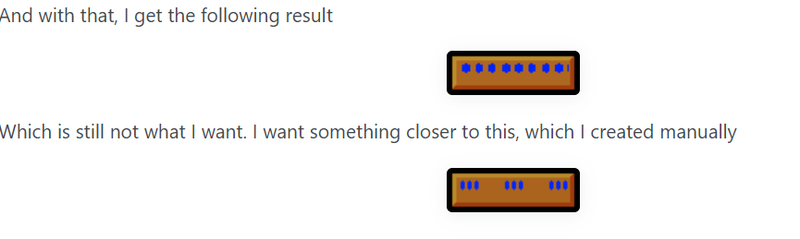
And with that, I get the following result

Which is still not what I want. I want something closer to this, which I created manually

What I would like is for the interior of the pattern to repeat, similar to an example image of something that one can do in Gamemaker, and indeed most engines that I have seen.
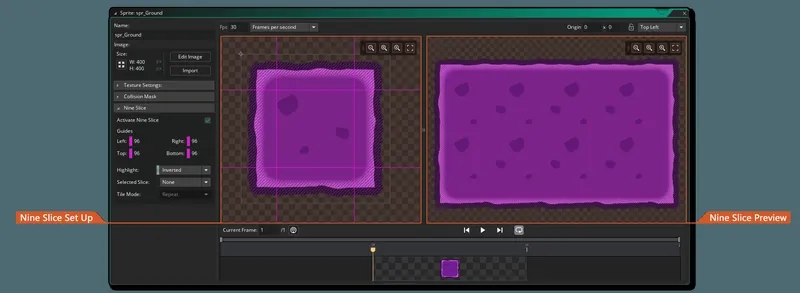
While it seems like it is just a simple option in most game engines, I am at a loss for how I could set it up myself. Any ideas? Using GL_REPEAT as a texture parameter doesn't really work, as the sprites I am using are part of a sheet, and I don't want to repeat most of them, just the interiors of these ones.

voidptr_t
voidptr_t

I haven't tried it myself, but, I can think of two potential solutions:

  1. Sub-divide the central section into more quads, and give all quads the same uv coordinates
  2. Parameterize the shader so that you can repeat the texture while sampling for the fragments there.
    1. This one might donk up mipmapping, though, so, handling that situation will likely add some complexity.
    2. EDIT: If you're trying to reduce render state changes and draw calls, you might run into additional complexity getting the shader to work for all 9 slices, too, but, I'm not sure.

EDIT: I assume you considered it, but, for completeness: you could also have the repeating texture outside of the atlas, and render with GL_REPEAT

dpadam450
dpadam450

This would be much easier outside of a shader. I'm sure I could come up with a solution in 30-min to an hour.

The easiest thing to do is: if they are all supposed to be square containers inside, then take your width of container / height of container. This tells you how many can fit in the container. Then slice up the container. You can figure out exactly how you want them packed with edge padding etc and be done with it. It only adds a couple additional instanced draws of some quads that you have.

Or the smarter thing, just make the art source have the artwork embedded. I cant imagine you need infinite combination of tiles and markings inside?

NBA2K, Madden, Maneater, Killing Floor, Sims 
Diaspora
Diaspora

Thanks for the responses.

voidptr_t said:

I haven't tried it myself, but, I can think of two potential solutions:

  1. Sub-divide the central section into more quads, and give all quads the same uv coordinates
  2. Parameterize the shader so that you can repeat the texture while sampling for the fragments there.
    1. This one might donk up mipmapping, though, so, handling that situation will likely add some complexity.
    2. EDIT: If you're trying to reduce render state changes and draw calls, you might run into additional complexity getting the shader to work for all 9 slices, too, but, I'm not sure.

EDIT: I assume you considered it, but, for completeness: you could also have the repeating texture outside of the atlas, and render with GL_REPEAT

Option 1 sounds closer to what I am already trying to do, I just don't know how to do it. I assume this is in fact possible as the code I have is repeating the interior section, it's just doing it wrong.

As for having a separate repeating texture, I'm not entirely opposed, though I would really rather not.

dpadam450 said:

This would be much easier outside of a shader. I'm sure I could come up with a solution in 30-min to an hour.

The easiest thing to do is: if they are all supposed to be square containers inside, then take your width of container / height of container. This tells you how many can fit in the container. Then slice up the container. You can figure out exactly how you want them packed with edge padding etc and be done with it. It only adds a couple additional instanced draws of some quads that you have.

Or the smarter thing, just make the art source have the artwork embedded. I cant imagine you need infinite combination of tiles and markings inside?

I am indifferent to whether this is done in or out of the shader, though I'm not really sure how it would be easier outside of it. I don't even know how you would do it outside of the shader. For the exterior the shader works perfectly fine. I'm also not sure I know what you mean by “make the art source have the artwork embedded”.

voidptr_t
voidptr_t

Option 1 sounds closer to what I am already trying to do, I just don't know how to do it. I assume this is in fact possible as the code I have is repeating the interior section, it's just doing it wrong.

Ah, yeah, I must have misread or just skimmed that part of your post. It does look like your “step” is just wrong in your shader; though, what I was envisioning is that the shader would be parameterized with the info it would need to properly repeat the texture across all “sub-sections”. I did a quick search, and there were some results from Khronos forums, that seem to have the same thought, possibly describing it better (some code samples, too, that might help?

https://community.khronos.org/t/repeat-tile-from-texture-atlas/104500

https://gamedev.stackexchange.com/questions/73586/how-can-i-repeat-scroll-a-tile-which-is-part-of-an-texture-atlas

https://community.khronos.org/t/texture-atlas-and-repeating-textures/52706 (seems to be more concerned with mipmapping texture atlases)

As for having a separate repeating texture, I'm not entirely opposed, though I would really rather not.

Reasonable. It wouldn't have many benefits I could see, wouldn't even reduce draw calls or anything. In case it comes back up, though, you might be able to use texture arrays instance things better, but, I'm not sure on that either.

dpadam450
dpadam450

Diaspora said:
I am indifferent to whether this is done in or out of the shader, though I'm not really sure how it would be easier outside of it.

100% going to be easier out of the shader. What you have to compute is what pixels are outside the bounds of the inner tiles. So every pixel has to test if its inside/outside what bounds and what texture coordinate it needs.

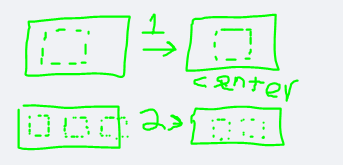
If you do it on the CPU it would be something simple like this. How many tiles fit in a box? Then compute the center location of them aka “center” them. Once you do that you draw a 2D sprite at the locations you determined, with the same texture coordinates, same texture applied. Done. Obviously way simpler than a shader. No strange generation of coordinates/bounds/discarding pixels. You just compute 3 locations by using division.

Source Art means no tricks. Go into photoshop create all the combinations of inner+outer tiles and save a spritesheet. Then just draw them at will already done. Unless you plan to have a list of 5 inner tiles and 20 outer tiles, leading to thousands of combinations, then that is what I would have done already.

NBA2K, Madden, Maneater, Killing Floor, Sims 
Diaspora
Diaspora

dpadam450 said:

Diaspora said:
I am indifferent to whether this is done in or out of the shader, though I'm not really sure how it would be easier outside of it.

100% going to be easier out of the shader. What you have to compute is what pixels are outside the bounds of the inner tiles. So every pixel has to test if its inside/outside what bounds and what texture coordinate it needs.

If you do it on the CPU it would be something simple like this. How many tiles fit in a box? Then compute the center location of them aka “center” them. Once you do that you draw a 2D sprite at the locations you determined, with the same texture coordinates, same texture applied. Done. Obviously way simpler than a shader. No strange generation of coordinates/bounds/discarding pixels. You just compute 3 locations by using division.

Source Art means no tricks. Go into photoshop create all the combinations of inner+outer tiles and save a spritesheet. Then just draw them at will already done. Unless you plan to have a list of 5 inner tiles and 20 outer tiles, leading to thousands of combinations, then that is what I would have done already.

Okay I understand now. So the problem with the first solution is similar to what I was saying to voidptr_t, I would really prefer to just have all of my related sprites on one texture if possible.

Simply creating variants of all of the possible shapes and sizes also doesn't really work for me. I don't have an infinite number, but I do have a variable number of elements. As an example, I am planning to have a inventory window with a height that will vary depending on how many items are in the inventory. It doesn't really make sense to me to make 6, 7, or 8 variants of the same element, and then check the sprite inventory size to determine which of them I draw.

dpadam450
dpadam450

"Okay I understand now. So the problem with the first solution is similar to what I was saying to voidptr_t, I would really prefer to just have all of my related sprites on one texture if possible. "

You can still do that. If its one big texture and you know where each sub-texture coordinate for each 2D box is, when you create the 3 inner tiles you can just copy the texture coordinates for them to pair with the sprite or sprites vertices. This would literally take about 30 mins to do for me and at that point if its one texture and one 3D/2D model updated every frame, you just generate all the vertex positions and texture coordinates, bind one single texture and make one single 3D model draw call.

NBA2K, Madden, Maneater, Killing Floor, Sims 
Diaspora
Diaspora

dpadam450 said:

"Okay I understand now. So the problem with the first solution is similar to what I was saying to voidptr_t, I would really prefer to just have all of my related sprites on one texture if possible. "

You can still do that. If its one big texture and you know where each sub-texture coordinate for each 2D box is, when you create the 3 inner tiles you can just copy the texture coordinates for them to pair with the sprite or sprites vertices. This would literally take about 30 mins to do for me and at that point if its one texture and one 3D/2D model updated every frame, you just generate all the vertex positions and texture coordinates, bind one single texture and make one single 3D model draw call.

I'm sorry, I'm really not seeing how this process is easier than what I already have which is seemingly already half way to working. It also seems like kind of a work around for the problem, and I'm not sure how it would work in cases in which I do something like, scale up from 32x32 to 48x32. Ideally it would only repeat half of the inner part, and I don't know if what you're suggesting would work out that way either.

dpadam450
dpadam450

“I'm sorry, I'm really not seeing how this process is easier than what I already have which is seemingly already half way to working.”

Yea I dont know, this would be a 30 minute task for me doing it how I said. Obviously works in rectangular and square boxes of any size using a few lines of code. This is how any UI stretch feature packs buttons into a container. It's also more flexible as you can have every single inner container be a completely random texture and not just one texture like you have.

If you haven't improved further than your original post, which I didnt see any update, then I dont know. This has nothing to do with texture atlas or repeat, this has to do with custom fitting boxes into other boxes. Your shader has to calculate how much padding between these 3 inner tiles etc. and has to also know every pixels calculated texture coordinate which unless someone here has done it before, doesn't seem like a straightforward simple task. It can be done I'm certain, but what a headache especially if you would have to repeat it more than 3 times or deal with horizontal and vertical repeating.

NBA2K, Madden, Maneater, Killing Floor, Sims 
Diaspora
Diaspora

After some more experimentation, I was able to make the following changes to the mapInside function

float mapInside(float val, float min, float innerStart, float innerSize, float uDimensions, float uBorder) {
    float scale = uBorder / uDimensions;
    if(fract(val * scale) < uBorder)
    {
        return fract(min*scale);
    }
    if(fract(val*scale) > innerStart + innerSize)
    {
        return fract(min*scale);
    }
    return mod((val - min) * scale, innerSize) + innerStart; 
}

I noticed by dividing the original size by the new size I could get the scale. When I did that it was repeating the center section, but it was repeating it at the edge of my central section. So, if my central section was 18 pixels, this would repeat it every 18 pixels. When resizing to 96, this meant it was drawn 5 times, instead of the three that I wanted. If I account for values outside of the range I want and just draw the value I want at those places, it seems to fix my problem. Here is my example sprite resized to 96x96

And here it is resized to 56x32. You can see the interior pattern is cut off as it cannot be completed.

This works well enough for me. If anyone comes across this, note my use of fract(min*scale) for the values outside of the central parts I want is fairly arbitrary, I just happen to know that the results there are going to be the colors I want. Were that not the case, if my shape instead looked like this

you end up with something that looks like this

There's probably a simpler way to do this, but it works for me, so I'll call this solved.

Geri
Geri

I dont see what this program has to do with shaders or opengl.

Use multiple polygons for your boxes, not just 4 edges…. each polygon should have the proper UV to avoid distortion on the edges.

LorenzoGatti
LorenzoGatti

You can only accomodate arbitrary sizes with one 9-slices asset by allowing some stretching of the border and/or of the repeated interior. If your tolerance for stretching is low you might need variant assets to use with different output sizes.

For example, suppose the initial and final border in your asset are 13 pixels each and the tileable middle section is 36 pixels (total image size 62 pixels) and you need to fit a 420 pixels space.

With borders at their natural size you'd need 10.9444 repeats of the middle section to fill 394 pixels: you can round that to 11 repeats reduced by a 394/396 factor or 10 repeats expanded by a 394/360 factor (a worse approximation, but might look better).

Squeezing the borders by a 12/13 factor instead (to get 396 pixels of tiled middle section) you could place 11 copies of the middle texture at their natural size.

You can also stretch border and middle equally: if you choose 11 repeats in the example (13+396+13=422 pixels at natural size) you can then reduce all texture coordinates by a 420/422 factor to draw 420 pixels.

Omae Wa Mou Shindeiru

Topic Locked

This topic has been locked by a moderator. New replies are not allowed.

Sign in to reply to this topic.