GameDev.net gamedev.net
🔒 Locked

Overlapping vertices?

Started by Newgamemodder Jun 3, 2025 at 6:07 PM 15 replies 6.8k views
Original Post
Newgamemodder
Newgamemodder

Hi Gamedev! :D

So I'm using some existing models from other games for a PRIVATE mod im working on (so no restributing, don't wanna rip of talented artists and using existing meshes form games due to cost). But when i import them into blender or 3ds max the modeling software tells me it's got overlapping vertices. Is this normal with game models or is every vertex supposed to be welded?

Kind regards!

frob
frob

Maybe.

They might not be duplicates, it could be that there was additional information which was lost, such as two points that had different normal information or texture coordinates even though they're at the same position.

It could be normal for that project, but no, in general duplicate verts, overlapping verts, degenerate triangles, and similar can cause rendering issues and are often flagged by tools. If it is something you extracted it might be the result of processing that took place rather than coming from the original, like a script that ends up stripping the non-duplicate information or that ends up traversing a mesh more than once.

Most likely your warning is exactly the same one artists in the game would receive, and they just need to be welded, fused, or otherwise processed back into place.

JoeJ
JoeJ

It's normal. Reasons to split a mesh edge of geometrically adjacent triangles are:

Differing materials / textures / uv coords
Edge should show discontinutiy in lighting (e.g. cube) instead smooth shading (e.g. sphere)
Dividing mesh into smaller pieces for fine grained culling

Thus, splitting models and duplicating vertices is a post process necessary to use them in game engines, while artists keep the original models to do changes and for archivation.

Turning such assets back to editable models requires welding with a tolerance of zero, or eventually a very small number. Issues might still remain.
Other things, e.g. the original cage of a subdivision model, or Nurbs control points, etc. can't be reconstructed that easily.

Newgamemodder
Newgamemodder

Hi Guy's so i usually use this tutorial if i get overlapping:

The reason im asking this is because: Does it matter if faces are welded or not if i convert them to meshlets like Nvidias asteroids? Or should they still be welded then?

Does it matter how small/large the mesh is when welding by distance?

Kind regards!

frob
frob

That is another “it depends on the details” question. There might be visual artifacts or not, depending on the details. There can be performance differences depending on the details. There are reasons to do it that we're already covered, a vertex can have far more than just position data which would make them different despite both being at the same location. There are details and choices beyond just the vertex positions overlapping.

JoeJ
JoeJ

Newgamemodder said:
Does it matter if faces are welded or not if i convert them to meshlets like Nvidias asteroids?

Usually no. You need to regenerate the meshlets anyway after editing a model. It's done by a preprocessing tool, and the usual asset pipeline is: Model from artist → automated tool to split edges where needed to get one mesh per material, compute meshlet clusters, quantization for compression, reorder vertices for cache efficiency, etc → save as asset to ship with the game.

So meshlets do not add to the risks from welding vertices which you already have (e.g. accidental corruption of UV coordinates or merging of material groups). Artwork is not affected from meshlets in general.

However, this applies to games production, not to modding. Things like Nanite and meshlets ofc. make it even harder to mod existing assets, since modders don't have those automated preprocessing tools if devs don't provide them.

Newgamemodder said:
Does it matter how small/large the mesh is when welding by distance?

Yes. Usually you give a distance threshold for the welding, so the scale of the model matters.
My advise is to use the smallest threshold possible and observing UVs, which should not change from the welding operation.

taby
taby

This reminds me of when I wanted to use Taubin smoothing on a mesh. The cracks from overlapping vertices turn into huge holes.

See https://paulbourke.net/geometry/polygonise/

“It has been suggested that the interpolation should be handled as shown here, that this solves an issue of small cracks in the isosurface.”

Newgamemodder
Newgamemodder

So whaty do you guys suggest? 🙂

Should i leave the model alone or do the weld by distance from Blender? 🙂

JoeJ
JoeJ

Should i leave the model alone or do the weld by distance from Blender?

Ideally don't touch it.
You only want to weld if you need to edit the model in ways that can't be done otherwise.

LorenzoGatti
LorenzoGatti

frob said:

That is another “it depends on the details” question. There might be visual artifacts or not, depending on the details.

Perform a complete test (rip the model, edit it and use it in a mod), because the outcome might be that your models are too messy to be used and because there are too many ways for something to fail to attempt predicting problems. On the other hand, models that are terrible “on paper” might have no serious glitches in actual use because of favorable "details".

Omae Wa Mou Shindeiru
Newgamemodder
Newgamemodder

Thanks for the reponse guys!

The only reason im confused if i should weld or not is how the “meshlet” generator handles vertices and “splitting” up the mesh.

JoeJ
JoeJ

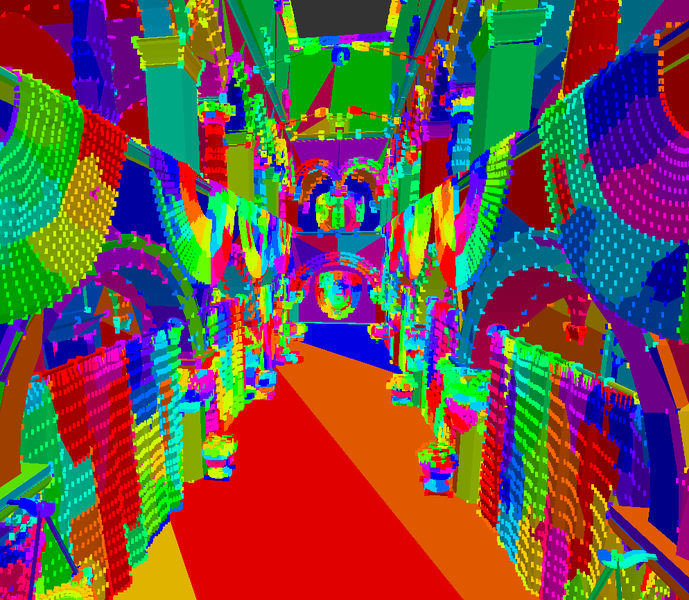
Here is a debug visualization i use to show meshlets:

Because this is a low poly model, it looks different than the usual small clusters on high poly meshes, but it still works.
It should even work if you would split all vertices, depending on the algorithm. Ideally it should still group nearby triangles.

Mesh shaders have limits on the maximum of vertices and triangles which can be processed for one meshlet.
I don't have a new GPU, but iirc the limits are 64 vertices and 126 triangles at most.

Now i assume, if each triangle has its own 3 unique vertices, we hit the vertex limit much earlier than if each vertex is shared by typically 6 triangles. So we pay a cost by splitting vertices. Probably - i can't be totally sure because i don't use mesh shaders yet.
However, even without mesh shaders it's clear that we pay a cost because we need more vertices for the same amount of triangles. The same must apply to mesh shaders as well.
And even before we used mesh shaders or clusters, we always wanted to minimze duplicated vertices. Mesh shaders don't change anything about that, and also nothing changes for artists and content generation.

Does this imply that you want to weld as much vertices as possible?
Yes if you are a modeller, since modeling with duplicated vertices sucks.
But probably no if you extract meshes from ripped game assets. Because almost certainly the duplicated vertices you see in the asset data are there for the typical reasons requiring to split them. UV chart / material boundaries, normal dicontinuities, etc.
So even if you would weld them temporarily, e.g. to edit the shape of the model more easily, you would split them again later when finally exporting back into a game ready asset format.

I hope this does not sound too complicated. It might be easier to help if you tell us why you want to weld vertices.
Is it because of some modeling work?
Or is it because you want to manually optimize data?

In case it's the latter, this work is usually automated. E.g. if i import a model into my engine using AssImp library, i can say things like ‘fuse vertices where possible, reorder data to be cache efficient, etc.’
Idk how modding tools deal with this, but i guess in most cases they do those optimization steps as well.

Newgamemodder
Newgamemodder

The reason i want to “weld” vertices is because i'm wondering if it increases the amount of meshlets in the mesh. Ill try to explain.

Lets say i have 2 triangles connected. Triangle A has the vertex coordinates 10, 5 and 1. Triangle B has vertex coordinates 10, 20 and 30. If triangle A and B are in different meshlets they will both have a vertex each on 10. If A and B are welded together there will only be 1 vertex where 10 is instead of 2. Did i explain correctly? :P

I assume i should aim to have as little amount of meshlets as possible?

So yes weld when scratch made, no when model is extracted from another game?

JoeJ
JoeJ

Newgamemodder said:
The reason i want to “weld” vertices is because i'm wondering if it increases the amount of meshlets in the mesh.

Likely you meant ‘decreases’, not ‘increases’.
You want to weld vertices, so it becomes less vertices and thus more optimized.
And i remember you want pretty high geometry detail, like modern games have.

Then we can safely say: No, you don't need to, and you should not try to optimize manually.
At high detail it's simply not possible to optimize by hand, because it's too many vertices. We have algorithms which do this automatically, better than artists could do.

With modding ther is a chance that such automatic processes are bypassed, because modders don't have the tools developers originally used to process the assets. But even then there is no point to do it manually. Too much guessing, too much time, and likely no win at all.

So do not worry about such low level technical details. That's actually just a form of ‘premature optimaztion’, meaning to spend work on optimizing stuff which does not really matter and thus a waste of time. Not optimizing at all is better in this case.

Some meaningful optimization advise for artists would be: ‘Don't use high tessellation on flat curvature’, or ‘Try to use as few UV charts as possible’. The latter one will minimize duplicated vertices, and that's all they need to know. But they don't need to know anything about meshlets. This topic only affects programmers, but not content generation.

Newgamemodder said:
So yes weld when scratch made, no when model is extracted from another game?

Yeah, mostly. It always depends on what you want to do, what's your data, etc.

But again: Duplicated vertices are not created by the artist. Modeling tools use more complex data structures for a mesh. A single vertex can have multiple UV coordinates for example.
But in game engines a vertex has only one UV (per texture), and that's why vertices need to be duplicated when turning the intital model into the final asset.

So if you import a ripped model, you should see duplicated vertices mostly at UV chart boundaries.
If so, then all i've said above applies, and you don't need to weld or worry, since the duplication is just necessary.

If not, and instead you would see ALL vertices are duplicated for example, then something went wrong while ripping or importing the mesh. Can happen. And then you would need to weld, because performance would be affected badly.

Another common reason to weld is if you want to change the model. Duplicated vertices break the tools, so you might weld them temporarily to do your edits. But then on export to asset the same duplication would happen again.

JoeJ
JoeJ

JoeJ said:
With modding there is a chance that such automatic processes are bypassed

This can be a reason why you should not edit the mesh, and why ‘manual optimization’ could do more harm than good.

Let's say you import the ripped asset, which has cache optimized vertex order and duplicated vertices as needed.
But you weld some vertices, thinking that's a good idea.
The modeling tool changes the vertex order with the welding operation. In the worst case it's randomized.
You import the asset back to game, which now has 2 less vertices but is no longer cache optimized, and thus much slower than before.

Just an example to make you 'worrying less' ; )

Newgamemodder
Newgamemodder

Ill do the really smart thing you said by checking if ALL vertices are duplicated :D

Checked one of the character meshes in blender and aslong as i don't have any strange setting enabled/disabled, the mesh didn't have duplicated vertices. So i wont modify the mesh in that case :D

ill leave my fingers from “manually optimizing” the meshes from that game :D

Topic Locked

This topic has been locked by a moderator. New replies are not allowed.

Sign in to reply to this topic.