
Hi Guys,
I've been working the past few days trying to figure out where I am going wrong with my shadow mapping. I'm using a mix of older code of mine (which I had working many years ago) and the RasterTek tutorials.
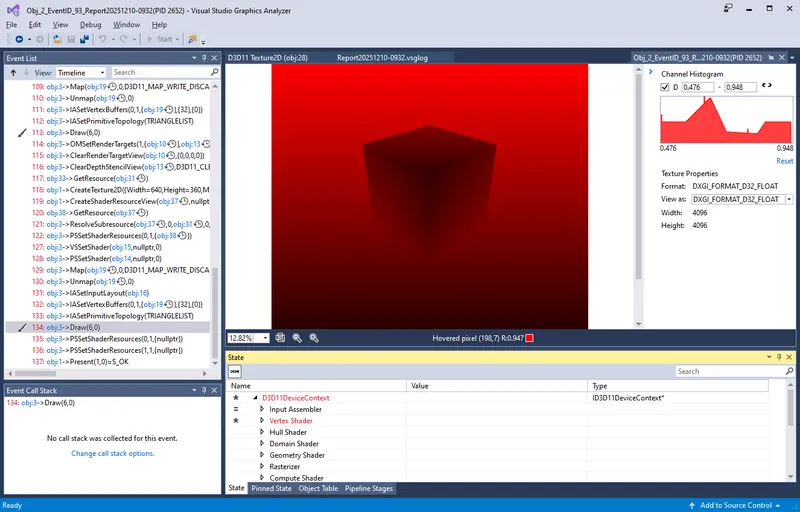
I seem to be able to generate a depth map happily enough from the perspective of the light source and mapping that to texture slot 1 in the pixel shader, as seen below.
I'm also sending the light information to the Vertex shader as per below.
cbuffer CB_WVP          : register(b0)
{
    matrix worldMatrix;
    matrix viewMatrix;
    matrix projectionMatrix;
}

cbuffer CB_Object       : register(b1)
{
    matrix worldMatrixObject;
}

cbuffer LightBuffer     : register(b2)
{
    matrix matLightWorld;
    matrix matLightView;
    matrix matLightProjection;
};

struct VS_Input
{
    float4 position             : POSITION;
    float3 normal			    : NORMAL;
    float2 texcoord             : TEXCOORD0;
};

struct VS_Output
{
    float4 position             : SV_POSITION;
    float3 normal   		    : NORMAL;
    float2 texcoord             : TEXCOORD0;
    float4 lightViewPosition	: TEXCOORD1;
};

VS_Output vs_main(VS_Input input)
{
    float4 objectSpacePos = mul(float4(input.position.xyz, 1.0), worldMatrixObject);

    // Model position
    VS_Output output;
    output.position = mul(objectSpacePos, worldMatrix);
    output.position = mul(output.position, viewMatrix);
    output.position = mul(output.position, projectionMatrix);
    output.normal = normalize(input.normal);
    output.texcoord = input.texcoord;

    // Light position
    output.lightViewPosition = mul(input.position, matLightWorld);
    output.lightViewPosition = mul(output.lightViewPosition, matLightView);
    output.lightViewPosition = mul(output.lightViewPosition, matLightProjection);

    return output;
}
And the pixel shader as follows. Not that I'm not attempting to apply any sort of light shading to the object at this stage, just purely trying to get the shadow on to the plane (for the sake of removing complexity and further errors).
Texture2D TextureStandard       : register(t0);
Texture2D TextureDepthMap       : register(t1);
SamplerState SamplerClamp       : register(s0);
SamplerState SamplerWrap 		: register(s1);


struct PS_Input
{
    float4 position             : SV_POSITION;
    float3 normal			    : NORMAL;
    float2 textureCoord         : TEXCOORD0;
    float4 lightViewPosition	: TEXCOORD1;
};

float4 ps_main(PS_Input input) : SV_TARGET
{
    float bias = 0.0005f;

    float2 texCoord;
    texCoord.x = input.lightViewPosition.x / input.lightViewPosition.w / 2.0f + 0.5f;
    texCoord.y = -input.lightViewPosition.y / input.lightViewPosition.w / 2.0f + 0.5f;

    if ((saturate(texCoord.x) == texCoord.x) && (saturate(texCoord.y) == texCoord.y))
    {
        float depthValue = TextureDepthMap.Sample(SamplerClamp, texCoord).r;
        float lightDepthValue = (input.lightViewPosition.z / input.lightViewPosition.w) - bias;

        if (lightDepthValue < depthValue)
        {
            // ***** NEVER GETS TO HERE *****
            // Out of shadow
            return TextureStandard.Sample(SamplerWrap, input.textureCoord) * 1.0f;
        }
        else
        {
            // In shadow
            float4 color = TextureStandard.Sample(SamplerWrap, input.textureCoord) * 0.5f;
            color.w = 1.0f;
            return color;
        }
    }

    // The remainder that is ouside of the shadow frustum
    return TextureStandard.Sample(SamplerWrap, input.textureCoord);

}
However the end result is as per below.

So I can see the pixel shader can ‘sort of see’ what area it is working with for the shadow map, but just casts the entire area in to a shadow.
Any help would be greatly appreciated. I have been battling with this for a few days now and have run out of ideas.
Many thanks! :D