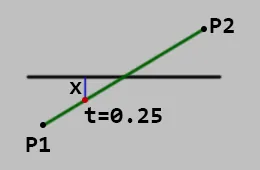
Hi guys, I want to compute the points on a 3D line that are a specified (not necessarily closest) distance to a plane. I really just need the parametric value of the first point so that I can find it with P1 + t0 * (P2 - p1). I hope someone can help. Thanks.
Line-Plane Question
val9 wrote:
I want to find the point that is x units away from the plane
Ok. To get it, you could move the plane by x units along it's normal, then do an intersection with this new plane.
I have two functions for intersection. One defines the plane with a point and a normal,
the other defines it with 4 numbers where the first 3 are the normal and the 4th is the distance along the normal to the origin.
(I use a 'qVec3' for that too because it can store 4 numbers)
inline float IntersectRayPlane (qVec3 &rO, qVec3 &rD, qVec3 &plane)
{
// rD does not need to be unit length
float DdN = rD.Dot(plane);
float signedDistance = plane.Dot(rO) + plane[3];
if (fabs(DdN) > FP_EPSILON) return -signedDistance / DdN; // line not parallel to plane
if (fabs(signedDistance) <= FP_EPSILON) return 0; // The line is coincident with the plane
return FLT_MAX; // no intersection
}
inline float IntersectRayPlane (qVec3 &rO, qVec3 &rD, qVec3 &pO, qVec3 &pN)
{
// rD does not need to be unit length
float d = pN.Dot(rD);
float n = pN.Dot(pO - rO);
if (fabs(d) < FP_EPSILON) // ray parallel to plane
{
if (fabs(n) < FP_EPSILON) return 0; // ray lies in plane
else return FLT_MAX; // no intersection
}
float t = n / d;
//sVec3 intersectionPoint = rP + rD * t;
return t;
}So you can do:
vec3 rO = P1;
vec3 rD = P2 - P1;
vec3 pO = myPlane.pos + myPlane.norm * x;
vec3 pN = myPlane.norm;
float t = IntersectRayPlane (rO, rD, pO, pN);val9 wrote:
Hi guys, I want to compute the points on a 3D line that are a specified (not necessarily closest) distance to a plane.
I guess the 3 points you mean are the two endpoints of the line segment projected to the plane, and the intersection point where the infinite line goes through the plane.
Is this correct or do you mean something else?

Hi, no, I'm not projecting the point to a plane. I included a 2D diagram that should explain what I mean. The point goes from P1 to P2 where the parametric t at P1 is 0.0 and at P2 is 1.0. I want to find the point that is x units away from the plane, in this case the answer would be t = 0.25. I'm doing this in 3D. Thanks.
Create a new plane parallel to the original plane, but shifted by x. Then compute the intersection of that plane with the line.
Note that "points" only exist if the line is parallel to the plane (and then all points of the line are at that distance). In all other cases, there is exactly one point at the requested distance.
If you also need the point at distance x at the other side of the plane, you can either do the same trick again, or exploit the symmetry of lines and planes. The distance of both x points to the intersection point of the line with the original plane is the same.
Alberth wrote:
Create a new plane parallel to the original plane, but shifted by x. Then compute the intersection of that plane with the line.
That is not necessary. This is a dot product with the normal of the plane problem.
bvanevery wrote:
That is not necessary. This is a dot product with the normal of the plane problem.
How you imagine it does not matter if your solution needs the same amount of operations than ours, so it's probably equivalent.
But feel free to share it.
The core of what needs to be solved is "P dot N = x", where P is the parametric line expression and N is the plane's normal. If the parametric line expression is already in the coordinate system of the plane, it could save a step. The one you accomplished by "making a parallel plane". The math on a dot product is certainly as simple as it's gonna get.
bvanevery wrote:
The core of what needs to be solved is "P dot N = x", where P is the parametric line expression and N is the plane's normal. If the parametric line expression is already in the coordinate system of the plane, it could save a step. The one you accomplished by "making a parallel plane". The math on a dot product is certainly as simple as it's gonna get.
But that's again just an idea but no solution we could compare to the given one. Which, if you look at it, does all the things you mention?
However, i do think a speedup is possible.
It's proposed to move the plane, or equivalently we could move the given point on the line. But those are 3D movements, and since we calculate the dot product in the function anyway we could use it to make the movement a simpler 1D operation, i guess.
JoeJ wrote:
But that's again just an idea but no solution we could compare to the given one.
Beg pardon? I personally can compare the solutions in my head, because I'm experienced with the matrix math necessary for 3D graphics. I'm obviously too lazy to spell it out in tutorial fashion, but the core expression is only 1 dot product, as far as what the OP wants. And the OP knows how to express a line in parametric form, so no education is needed about that. Any other savings are likely just due to how the geometry storage came down the pipeline.
bvanevery wrote:
I'm obviously too lazy to spell it out in tutorial fashion, but the core expression is only 1 dot product
Well, then we can can only agree, since the need for that dot product is obvious.
My second dot product then is a matter of:
bvanevery wrote:
Any other savings are likely just due to how the geometry storage came down the pipeline.
... to know how far the given line point as away from the plane. Which we have to.
It just sounded you would know a better way, so i was interested to see it. 'Knowing about the parametric form of a line' does not get me there, though.
JoeJ wrote:
... to know how far the given line point as away from the plane. Which we have to.
This confuses me. That distance is "x" per the OP's diagram. It is known. Lots of stuff is known. We would be solving for "t" in the parametric line representation. It is the only unknown. I'm repeating what may seem obvious to you, because I genuinely don't understand why you wrote the sentence I quoted.
bvanevery wrote:
This confuses me. That distance is "x" per the OP's diagram. It is known.
X is a given constant, yes. But the point, or its parameter t at the line to give it, x is unknown.
This point is affected from the distance of the line to the plane, so a second dot product is needed to get it.
bvanevery wrote:
We would be solving for "t" in the parametric line representation.
If you do this, and implement the solution with 3D vector operations, you get what's in my first code snippet.
It does not matter if you start from thinking about geometry, or about equations describing said geometry. The math remains the same.
But both approaches come with their typical opportunities to miss some optimizations, so it can be worth to compare operation counts.
bvanevery wrote:
I'm repeating what may seem obvious to you, because I genuinely don't understand why you wrote the sentence I quoted.
Once more: We need to factor in the distance of the line to the plane in some form.
I guess the single dot product you probably have in mind only handles the angle from the line direction to the plane, but not the distance.
So we need that second dot product, as there is no other way to know the distance of some point to a plane.
Now i don't know if you eventually think of a higher dimensional dot product, or if you classify some operations into the setup category to remove them from the equation you care about, but we could argue about this objectively only if you provided a working solution to see how and if our operations differ in some (unexpected) way.
Otherwise, we can both only repeat ourselves, which is what we do and it's pointless. I shouldn't have asked but will stop at least here.
JoeJ wrote:
This point is affected from the distance of the line to the plane, so a second dot product is needed to get it.
Uhh, it is not a dot product. Having solved for t, scaling the line is multiplication of a vector by the scalar parameter t. Dot products have 2 more additions after you do multiplication. 3 if you're using 4-field x y z w homogeneous coordinates. And the result is a scalar. So unless you know some way of manipulating line parameterization that I personally haven't run into, there isn't any 2nd dot product. I make allowance for the possibility of there being more than one way to skin a cat, but I did used to do 3d graphics drivers for a living, 30 years ago. Granted, rasterization much more than geometry processing, but still. "Been there done that," have scaled many lines by t.
A dot product against a normalized vector is equivalent to multiplying by the cosine of the angle. I'm sure we agree upon that. I'm always looking for the cosine / dot product somewhere because I'm lazy.
bvanevery wrote:
Uhh, it is not a dot product. It is multiplication of a vector by the scalar parameter t.
But a vector by scalar multiplication does not give you the distance from a point to a plane. A dot product is needed.
I speculate you assume there is already some given relation from the line to the plane, e.g. the parameter t or point of intersection.
Then you would only need one dot product to shift the plane, and i would agree.
But the way i understand the question only P1 and P2 to define the line is given.
JoeJ wrote:
But a vector by scalar multiplication does not give you the distance from a point to a plane
The OP already knew the distance. It's x. In their diagram. It and other things are used to solve for t.
bvanevery wrote:
The OP already knew the distance. It's x.
But he does not know where on the line x is, so it does not help to build up any given relation from line to plane, which we need to calculate t.
We're turning in circles again. If you want to convince me, showing working code is the only way. ; )
JoeJ wrote:
We're turning in circles again. If you want to convince me, showing working code is the only way. ; )
Not really. I think you're making a conceptual mathematical error about what was asked for. The OP didn't ask for a line segment perpendicular to the plane. They asked for a point on their line that is at the distance x from the plane. For any given x they provide, all they want is t. I gave a correct mathematical answer, using a trivial planar normal test that is standard drill for boundaries in geometry processing. Going over gory details about ASM code or shader code does not change this.
bvanevery wrote:
I gave a correct mathematical answer
No, you didn't. Such answer would be a formula or ideally code, not a verbal claim.
My cards lie open on the table. Yours are still in your hand and it's up to you if you want to show them or not.
JoeJ wrote:
No, you didn't. Such answer would be a formula or ideally code, not a verbal claim.
Oh FFS, the math on this one is completely trivial. You presumably remember your grade school verbal problems where you had to set up the formulas yourself. This is no different, and I provided the core concepts just fine. At length. Trying to be generous about it, but I'd expect 3D people to know the equivalent basic operations of "Computer Graphics: Principles and Practice" or some such.
JoeJ, do what you want. Can lead a horse to water, can't make them drink.
OP, when dealing with planes, dot product against the normal is your friend. 'Nuff said.
Topic Locked
This topic has been locked by a moderator. New replies are not allowed.