
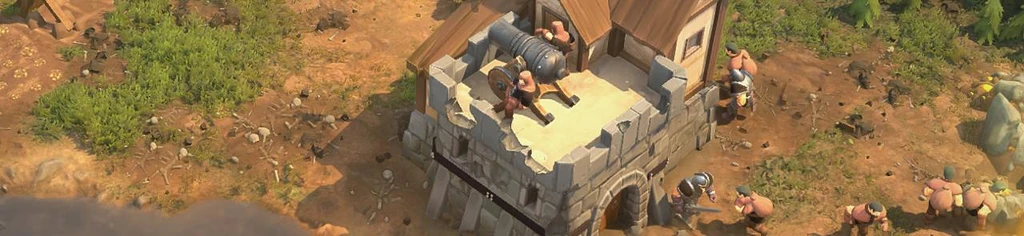
Buildings destruction for RTS games
This little article describes details of the buildings destruction system used in upcoming RTS game "The Scouring"
Hello dear readers!
I've been working on my RTS game for about 3 years, using my personal game engine, and one of the things I'm really happy with is the way buildings are demolished, have a look -
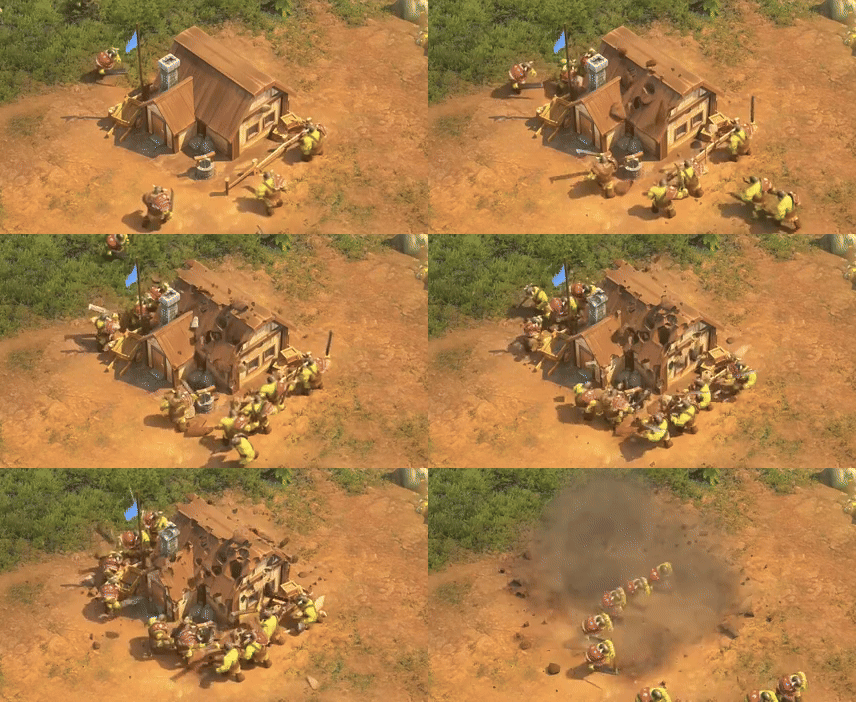
We are a very small team, so I had some important conditions for destruction system
- It need to be easy to set up, because we don't have time and resources to i.e. decompose meshes and then animate them
- It need to be reliable because I can't be coming back to it once it's done
- It need to look cool and make my game stand out among dozens of other RTS games
Those points are especially important because we expect the community to make mods for our game, and our destruction solution should work out of the box for them.
So here's how it's done in The Scouring.
Part 1. Setup
All the artist need to do is attach mesh blobs to parts of the building that he wants to come off, like this -

We use about 100-150 blobs for buildings, and it takes just a couple of hours to set them up.
And that's it.
Part 2. Mesh Processing
Most destruction systems use geometric intersections (boolean operations) to break mesh into pieces. However, it is a very slow and complex process that generally requires the mesh to be constructed in a specific, “correct” way.
Instead we use alpha-clipping to break the mesh into pieces.
2.1. So the first thing is to generate blob intersections against the original mesh.

These are our chunks that will break off the building.
We also generate the “backsides” of each hole.
This might be the trickiest part of the whole thing, but I would not like to go into details of it as it is very technical. Get in touch with me if you need more details.
2.2. Next, generate a texture atlas for our building

There are publicly available libraries that can do that, I used https://github.com/jpcy/xatlas.
For an RTS camera and a building like that, 512x512 atlas has enough accuracy.
2.3. Iterate every pixel in the atlas, and mark it with chunk id when the corresponding 3d position on the building surface is within one of the “blobs”

This is the most time-consuming process (relatively speaking, the whole process described in this paper takes 0.25 ms on my 10 years old PC).
The most important thing to speed things up is to assume all blobs to be “convex” (and there is no reason not to do so).
Checking if a given point is inside a 3d convex hull is trivial. And there is a public library that generates convex hulls - https://github.com/akuukka/quickhull
Part 3. Runtime
So when a unit hits a building, we detect the chunk that is closest to the hit position, and mark it as active. Each building has a texture buffer with the size of “n chunks”, storing a boolean for each chunk, whether it is active or not.
In pixel shader, we read the texture atlas storing chunks id’s, and do a clip if this chunk is active.
We also need to show the “backside” of a clipped hole. We render the “backsides” mesh, with the inverted logic of the check mentioned above (if a chunk is active - DON’T clip the backside).
And of course the chunk itself. If the building is visible, we spawn a physical body for it. If not, we simply activate it in its resting position (next to the building).

We only use 3 calls to draw the whole thing:
- Building itself
- Backsides
- Chunks. We put all of the chunks geometry into a single geometry buffer, and use the same texture buffer in pixel shader to clip-out inactive chunks.
When the building is being repaired, instead of activating the chunks, we deactivate them.
Last (but not least) a few notes about additional effects.

We separate the building into “burnable” and “static” parts. The “burnable” part slides down when the building is destroyed, and has some fancy shader effects applied to. The “static” parts simply dissolves (using a screen-space per-pixel technique)
Thank you for reading!
If you have any questions, please fire at pavzag@gmail.com!
And please check out our game on Steam!
Related Tutorials

Procedural Generation of 2D Tile Maps in Games
The article explains how to build a procedural 2D cave map generator using cellular automata. It covers map representat…

Localizing A Game Into French — Which Variant Should You Choose?
So, you’re making an awesome indie game, and now you’re thinking about localizing it into French? Great idea! There ar…
 Level Up Translation

How Long Does It Take To Localize An Indie Game?
So you’re planning on localizing your indie game, but you’re not sure how much time to schedule in. While the timing o…
Level Up Translation

Creating game videos: best practices and pitfalls to avoid
Game video production: practical tips on how to create a game trailer or teaser that you can be proud of. Give your aud…
 Alconost

Adopting CI/CD: How Midwinter Entertainment iterates at speed with the help of IMS
Game development was once like one long sprint: a huge effort until you reached the finish line — at which point you co…
 GameDev.net

5 Things to Consider When Making a Video to Promote Your App or Game
How can you show an app or game in your video in a way that attracts new users? Let’s take a look at what to go by when…
Alconost
Discussion