
Lighting and Normals
Extending on the previous tutorial's spinning cube code, this tutorial will explain how to calculate your cube's face normals and add OpenGL lighting to your program.
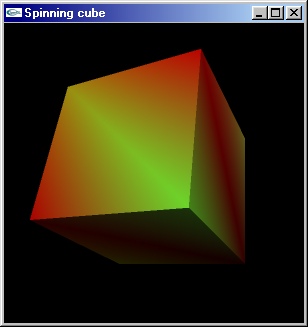
Extending on the previous tutorial's spinning cube code, this tutorial will explain how to calculate your cube's face normals and add OpenGL lighting to your program.
When you've completed this tutorial, you should have a good enough understanding of the of OpenGL lighting to be able to use it in your own code.
We'll be using the same code as we used in the previous tutorial, so load it up and we'll begin.
[size="5"]The Code
The first thing we'll do is add normals to our cube quad struct. Normals are vectors of length 1 which indicate the angle of facing of a polygon. The cube struct should now look like this:
struct
 {
 struct
 {
 float pos[3];
 float col[3];
 }ver[8];

 struct
 {
 unsigned int ver[6];
 float norm[3];
 }quad[6];
}cube;typedef struct
{
float pos[4];
float diffuse[4];
float specular[4];
float ambient[4];
}light_t;light_t light={
{6,10,15,1}, //position (the final 1 means the light is positional)
{1,1,1,1}, //diffuse
{0,0,0,1}, //specular
{0,0,0,1} //ambient
};glEnable(GL_LIGHTING); //enables lighting
glEnable(GL_LIGHT0); //enables a light
glLightModeli(GL_LIGHT_MODEL_TWO_SIDE,0); //sets lighting to one-sidedglEnable(GL_COLOR_MATERIAL);glColorMaterial(GL_FRONT,GL_DIFFUSE);float black[4]={0,0,0,0};
glMaterialfv(GL_FRONT,GL_AMBIENT,black);
glMaterialfv(GL_FRONT,GL_SPECULAR,black);void crossProduct(float *c,float a[3], float b[3]);
void normalize(float *vect);
void getFaceNormal(float *norm,float pointa[3],float pointb[3],float pointc[3]);The first thing it'll do is copy the points pointa, pointb and pointc into a 2-dimensional array, point[ ] [ ].
void
 getFaceNormal(float *norm,float pointa[3],float pointb[3],float pointc[3])
 {
 float vect[2][3];
 int a,b;
 float point[3][3];

 for (a=0;a<3;++a)
 {
 point[0][a]=pointa[a]; //copies points into point[][]
 point[1][a]=pointb[a];
 point[2][a]=pointc[a];
} for (a=0;a<2;++a) //calculates vectors from point[0] to point[1]
{ //and point[0] to point[2]
for (b=0;b<3;++b)
{
vect[a]=point[2-a]-point[0];
}
} crossProduct(norm,vect[0],vect[1]); //calculates vector at 90? to to 2 vectors
normalize(norm); //makes the vector length 1
}void crossProduct(float *c,float a[3], float b[3]) //finds the cross product of two vectors
{
c[0]=a[1]*b[2] - b[1]*a[2];
c[1]=a[2]*b[0] - b[2]*a[0];
c[2]=a[0]*b[1] - b[0]*a[1];
}length=sqrt( //A^2 + B^2 + C^2 = length^2
pow(vect[0],2)+
pow(vect[1],2)+
pow(vect[2],2)
);for (a=0;a<3;++a)
{
vect[a]/=length;
}for (a=0;a<6;++a)
{
getFaceNormal(cube.quad[a].norm, cube.ver[ cube.quad[a].ver[2] ].pos,
cube.ver[ cube.quad[a].ver[1] ].pos,
cube.ver[ cube.quad[a].ver[0] ].pos);
}glClear(GL_COLOR_BUFFER_BIT | GL_DEPTH_BUFFER_BIT);
glLightfv(GL_LIGHT0,GL_POSITION,light.pos); //updates the light's position
glLightfv(GL_LIGHT0,GL_DIFFUSE,light.diffuse); //updates the light's diffuse colour
glLightfv(GL_LIGHT0,GL_SPECULAR,light.specular); //updates the light's specular colour
glLightfv(GL_LIGHT0,GL_AMBIENT,light.ambient); //updates the light's ambient colour
glPushMatrix();for (a=0;a<6;++a)
{
glNormal3fv(cube.quad[ a ].norm); //sets the current normal to this quad's normal
for (b=0;b<4;++b)
{
currentVer=cube.quad[a].ver; This tutorial is Copyright (C) 2001 Ben Woodhouse
Related Tutorials

Procedural Generation of 2D Tile Maps in Games
The article explains how to build a procedural 2D cave map generator using cellular automata. It covers map representat…

Localizing A Game Into French — Which Variant Should You Choose?
So, you’re making an awesome indie game, and now you’re thinking about localizing it into French? Great idea! There ar…
 Level Up Translation

How Long Does It Take To Localize An Indie Game?
So you’re planning on localizing your indie game, but you’re not sure how much time to schedule in. While the timing o…
Level Up Translation

Creating game videos: best practices and pitfalls to avoid
Game video production: practical tips on how to create a game trailer or teaser that you can be proud of. Give your aud…
 Alconost

Adopting CI/CD: How Midwinter Entertainment iterates at speed with the help of IMS
Game development was once like one long sprint: a huge effort until you reached the finish line — at which point you co…
 GameDev.net

5 Things to Consider When Making a Video to Promote Your App or Game
How can you show an app or game in your video in a way that attracts new users? Let’s take a look at what to go by when…
Alconost
Discussion
More from Ben Woodhouse
Comparing Shadow Mapping Techniques with Shadow Explorer
New Incentives and a Whole New Platform From The Intel AppUp developer program
The final installment in this series on Intel's AppUp program details additional incentives and opportunities for devel…
The Game Maker
This book excerpt contains the first chapter of the book that introduces beginning game developers to the Game Maker pr…
Discussion