
Writing Game Music
Learn the basics of music theory, notation and composition to make your game sound better. Written for both musicians and non-musicians
This article was originally published to GameDev.net back in 2000 as a 4-part series. It was revised and combined by the original author into a single article in 2008 and published in the book Design and Content Creation: A GameDev.net Collection, which is one of 4 books collecting both popular GameDev.net articles and new original content in print format.
Basic Music Theory
Notes
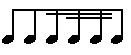
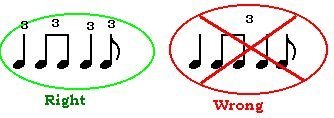
Music, in the classical sense, is at first nothing more than a collection of notes. The note is the atom of a musical piece. These notes each have a different pitch (frequency) and are held for a certain amount of time. So, in theory, that's basically what you're reading when you look at a sheet of music: what pitch to play the notes at, how long to hold them, and at what volume. As you can see, there are different kinds of notes: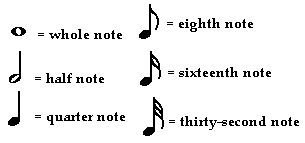

Rests
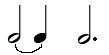
Well of course, you can't play notes forever! Whenever you see a rest, it's the opposite of a note, it tells you not to play. So then, rests have beats. Here are some kinds of rests:
Measures, the Staff and Clefs
The staff (plural is staves) is what all music is put on. It consists of five horizontal lines. The staff is split up into sections called measures. The vertical lines that separate measures are called measure bars. Here's a staff split up into three measures: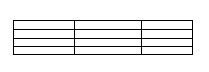
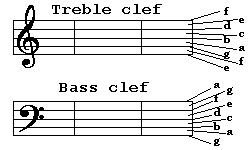
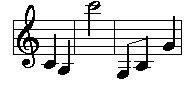
Accidentals
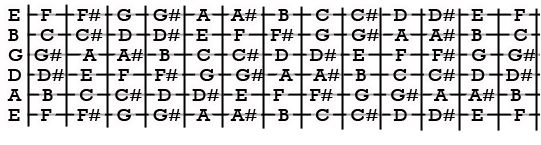
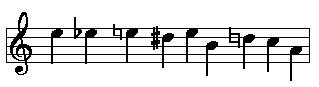
Okay, take a deep breath and let's move on. There are some pitches in between some of the pitches we described above, like one in between C and D. To notate those, you either sharp or flat a note. Making a note sharp moves it up, and making it flat moves it down. A sharp looks like a number sign ( # ) and a flat looks like a lower-case letter b. When actually drawing the note, the sign goes before the note, but when writing the actual letter (like in this text) it goes after. So A# (A sharp) is the note in between A and B. It can also be called Bb (B flat). A note that has been sharped or flatted (or is that "sharpened" and "flattened"?) is called an Accidental. So, that in mind, here are all the notes in an octave, in order from lowest to highest: A A#/Bb B C C#/Db D D#/Eb E F F#/Gb G G#/Ab A As you can see, some letters don't have a sharp or flat note in between them. So then what happens when you sharp or flat those notes? Nothing different happens, it still moves up. So if you wrote the note B#, it would be the same as writing C, as they are exactly the same pitch. If you wrote the note Fb, it would be the same pitch as E. Moving up or down one position on that scale above is called moving up or down one half step. A half step above D is D#. A half step below F is E. On a piano, each key represents a note. The C closest to the center of the piano is the middle C. To tell which key is which on the piano, look at the black keys. The black keys are the sharps and flats. The pattern of black keys and no black keys goes, black key, black key, no black key, black key, black key, black key, no black key, and starts all over. So look at the piano, and you'll see the pattern: two black keys, no black key, and then three black keys. The white key to the right of the two black keys is a C. So here's a piano with the notes written on it: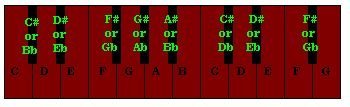
Time Signatures
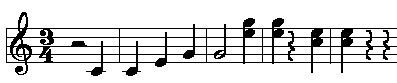
Actually, time signatures aren't that hard. It is just two numbers at the beginning of each song that tells you about the measures and notes. You've probably seen them, one number on top of the other. Here's a time signature:
Volume Levels
There are basically two different kinds of music levels: Piano, and Forte. Piano means soft, and Forte means loud. Yes, Piano is also what we call the instrument you can play, but try not to confuse the two. You see... (harp plays and we travel back in time) When the piano was invented, it was a revolutionary keyboard where you could control the volume just by pressing soft or pressing hard. Since it could be both soft (piano) and loud (forte), it was called the pianoforte. Eventually it was shortened to piano. Okay, that's the story. Back in modern times, all you have to do is remember these four things and you'll be fine: Piano - Soft Forte - Loud Mezzo - Medium Issi - A word that pretty much means "very." The more "issi"s there are, the more "very"s there are. The last "issi" ends in "mo." (That sounds quite simple-ississimo, right?) Okay, Forte means loud. So then what does fortissimo mean? It means "very loud." Then, what does fortississimo mean? Very very loud. Get it now? Same thing applies to piano, pianissimo, pianississimo, etc. Regarding the word mezzo: Loosely translated, it means medium. So if I order you to play a song at the volume level "mezzo-forte", think "medium-loud." That's the volume level in between mezzo-piano (medium soft) and forte. So then here's a basic succession of volume levels, from softest to loudest: Pianississimo Pianissimo Piano Mezzo-Piano Mezzo-Forte Forte Fortissimo Fortississimo Of course, you can create more volume level descriptions than that, like fortississississississimo, but these are practically more than you'll need. It's hard to describe exactly how loud the volume levels are since you're just reading an article; I can't yell at you in writing. (OR CAN I...?) For the purpose of computer-generated music, we can let the software worry about that. The volume level "piano" is represented by the letter p. Pianissimo is represented by pp. So that means pianississimo is represented by ppp, etc. The volume level "forte" is represented by an F. The word "mezzo" is represented by an m. So if you wanted to write the volume mezzo-forte, you would write MF. Here's a sample picture: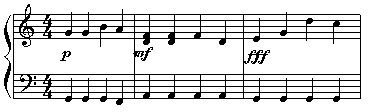
The Crescendo, Decrescendo, and other tricks
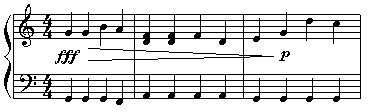
In the picture above, measure one is played piano. (Not the instrument, the volume level.) All four notes in each staff are played at the same volume level. Then, all of a sudden, when you reach the second measure, it becomes louder, at the volume level mezzo forte. Very abrupt. What if you want to make it a gradual change? For example, instead of having piano the first measure, mf the second measure, and fff the third measure, what if you just wanted it to start at piano, and gradually change to fff until the third measure? Then you use a crescendo. A crescendo sort of looks like a "less than" sign in math. ( < ) The only difference is that it is a lot wider. Here is the same picture as above, except this time there is a crescendo: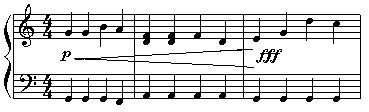

Intermediate Level Music Theory
Whoa....you just read "intermediate level music theory." But don't be intimidated. We've already dealt with the basics of how to read and write notes. Now that you can read and write, let's put some words together. Maybe even some sentences! Sweet!Scales
No, not those things on fish, I'm talking about a musical scale. (lol? No? Tough crowd.) Let's talk about major scales first. Recall the Middle C. It's the C that's one leger line below a treble clef staff, or one leger line above a bass clef staff. On a piano, it's the C that's closest to the center of the piano. Now, put your musically talented fingers on the middle C. Now, play that note, and play every single white note until you get to the next C up. When you finish, you should have played eight notes. From middle C to the next C, that was an entire octave. (abbreviated as "8va".) Just FYI, each note is twice the frequency of the note one octave below. So if you played middle C and somehow multiplied its frequency by two, you would be playing the next C up. Anyway, when you played those eight white keys, you just played the C Major Scale. The notes, played in that order, should have sounded natural and aesthetically pleasing. Each note was the right pitch above the one before it, and all those pitch changes together created what we call the major scale. A major scale is eight notes, expanding over one octave. If you try to play all the white keys from one G to the next G up, you'll notice that the second to last note (the F) sounds weird. Now, try it again, but when you play F, instead of playing F, play F#. Ahh you say, that fixed it, and now it sounds natural. Anyway, now try playing all the white keys from one A to the next. The weirdness is back! And worse! To understand why, you need to understand what an interval is. Once again, the succession of notes is: A A#/Bb B C C#/Db D D#/Eb E F F#/Gb G G#/Ab A If you start on one of these notes and move one to the left or right, that would be moving one half-step. So if I moved from C#/Db to D, that would be regarded as moving one half-step. If I moved from C to B, or from B to C, or from E to Eb, or from D# to E, each one of those would be regarded as a half step. Okay, you get the picture. So what if I moved two to the right or left? You guessed it - it would be moving a whole step. So from F to G is one half step, from A to B is a half step, from C to Bb is one half step, et cetera. These are called intervals. So the interval between F and G, for example, is a whole step. The interval between B and C is a half step. The interval between B and D is a one and a half step, or 1 1/2 step. The pattern of intervals, or formula for a major scale is: whole, whole, half, whole, whole, whole, half Or (1, 1, 1/2, 1, 1, 1, 1/2). Using this formula, you can create a major scale starting from any note. Take a look at your piano and let's play the C scale again. Start on C. According to the formula, the next note would be one whole step up. The next key would be a whole step up. The next key would be a half step up. So if you play the entire scale, you would see that you are playing each white key for the C major scale. Any other scale has at least one black key in it. Now try it with the A major scale. Using the formula above, you will find that the A major scale is: A, B, C#, D, E, F#, G#, A And once you've recovered, we can continue. Let's look at some scales just to make sure we all understand.
The Key Signature
Why do they call sharps and flats accidentals? Because they weren't included in the key signature! I guess only a musician would laugh at that. No...they wouldn't either. Remember how accidentals only last for one measure? Key Signatures are a bunch of sharps or flats that are in front of the time signature that make those notes flat or sharp for the entire song, or until a new key signature is made. Let's look at the D scale with and without a key signature: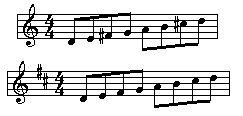
Minor Keys
Okay, you already know how to play major keys. Now let's go on to minor keys. Remember the formula for a major key? (1, 1, 1/2, 1, 1, 1, 1/2) Here's the formula for a harmonic minor key: 1, 1/2, 1, 1, 1/2, 1 1/2, 1/2 That second-to-last interval is a one and a half step. Now play the C harmonic minor key. Sounds weird, doesn't it? Listen to MIDI3-1.mid in the downloadable file - it just plays the C minor scale going up, and then down. Some of you might be thinking, "are there key signatures for minor keys?" Well, yes and no. Let me explain. Every major key has a relative minor key. This minor key is the one that's three half steps below it. So the relative minor key of C major is A minor. (Since the note A is three half steps below C.) The relative minor key of Eb major is C minor, etc. The relative minor key of any key has the same key signature as its relative major. So then if you wanted to write a song in C minor, you would make the key signature the same as the key of Eb major. (Eb major has three flats: Bb, Eb, and Ab.) There is one kind of minor key which is the most commonly used, and that is the harmonic minor key. I've made reference to this before, but haven't really explained what this was. Let's say we wanted to write a song in the key of G minor. Since G minor's relative major key is Bb major, we would make the key signature the Bb major key signature. (Two flats: Bb, and Eb.) When we play the scale going up, we use the formula for a harmonic minor key, which I've given above. But wait, the second-to-last note before the last G is not an F, like the key signature says. Instead, it's an F sharp! And that's the partially confusing part. When playing a song in a harmonic minor key, whenever you play the second-to-last note of that key, (in the G scale that key is F.) it is raised one half step. Unfortunately, we can't include that fact in the key signature. It would be easier if we would just add an F# to the key signature, but we can't. (some of you might be thinking, why not put a Gb? Well, that wouldn't solve our problem, because that would change the note G, and what we want to change here is the note F.) Just to make sure we're all clear, here are some pictures of minor scales: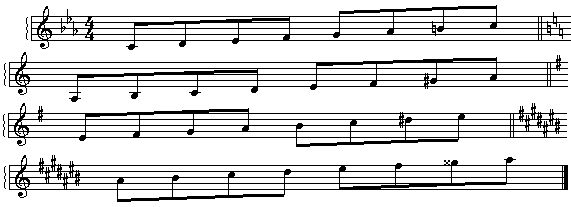
The I, IV, and V7 patterns
Make sure all of the previous sections soak into your brain and stay there permanently, because we're moving fast here. Okay, before we move on, you must know that a chord is three or more notes played at the same time. Specifically three notes played at once is a triad, and two played at once is a dyad. Each major key has three primary chords. These are three triads that sound beautiful and are absolutely essential to harmonics (try not to confuse harmonics with harmonica...). The first primary chord is the I chord. This is the first note of the scale, the third note, and the fifth note. So the I chord for the C scale consists of the notes C, E, and G played at the same time. Go ahead, try it. Play those three notes at the same time. Don't it just sound heavenly? The IV chord consists of the first note, the fourth note, and the sixth note played at the same time. For the C scale, those notes would be C, F, and A. Finally, the V7 chord consists of the fourth note, the fifth note, and (pay attention to this one now.) the note one note below the first note. So for the C scale, those notes would be B(the one below the first note, not the one before the last note), F, and G. Got it? Now you can make up your own happy song with these chords. Go ahead, try it. Try playing the chords in this order: I, IV, V7, I The same basic rules apply to minor keys. So for the C minor key, the I triad would be C, Eb, and G. The IV triad would be C, F, and Ab. Finally, the V7 triad would be B(B natural, the one below the first note.), F, and G.Patterns and broken chords
This part might as well be called "Advanced Music Theory." Instead I present you with a watered down version of chords and harmony, by describing it the way I originally learned it. Now, each note on the scale has at least one chord that it "harmonizes" with. A chord harmonizes with a note if that note is in the chord. So notes that match with the I chord in the C scale are C, E, and G, because those are the notes that make up the chord. Try it. Sit on a piano, and with your right hand, play either one of the notes I mentioned, and with your left hand, at the same time, but one octave lower, play a I chord in the C scale. Sounds beautiful, eh? Now try playing the same thing, but with the right hand, play one of the notes that are not part of the scale, like D, or F. It gives you a completely different sound. Not bad, keep in mind, just a different type of harmony than the one I'm trying to describe here. Now, like I said earlier, each note has at least one chord it matches with. So let's stick with the C scale again. Let's look at the note C, first. What chords have the note C in them? The I chord, and the IV chord. (The I chord is C, E, and G, and the IV chord is C, F, and A.) Now let's look at the note A. Unlike the note C, the note A has only one chord that harmonizes with it, and that is the IV chord. (Actually, there are lots of more chords that fit in with these notes, but you don't know all of the chords yet.) Go ahead, try it. Sit at the piano, and explore. By the way, you might think that the note D in the C major scale has no chord that it harmonizes with. For now, just play the V7 chord with that note. Now here's a song that consists of two different instruments playing at the same time. The one on the top is playing the melody, and the one on the bottom is playing the harmony. It is also MIDI3-2.mid, which you can find in the downloadable file. Here's what the music looks like: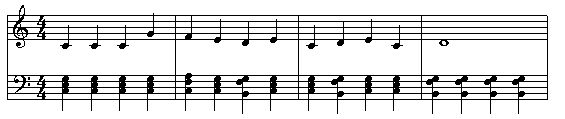
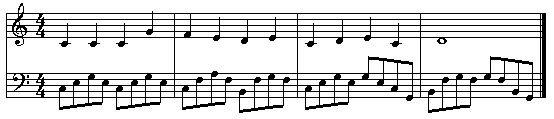
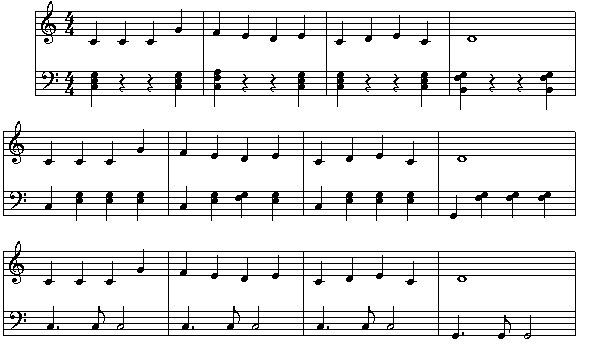
Composition and Theme Development
The Basic Theme
Stop. Before even touching this section, keep in mind that it assumes an intuitive understanding and familiarity with the previous one. Very important! If you feel you're ready, then now I'm going to talk about how to write a basic theme and then how to change it into a song. When you want to write a song, rarely does the opportunity come when you have an entire song, completed, in your head. (with all instruments, notes, etc.) So what I do is, write down the basic theme of a song first. The file MIDI2-1.mid plays this theme. To get an idea of how simplified it is, let's look at the notes:
Opening a song - How to introduce the theme
Take a look at any song over three minutes. Notice anything? It doesn't take musical training to realize that many songs consist of one or more themes, repeated over and over and in different ways. This is why I suggested you write the theme first. Once you've got the theme, then you should get started on the beginning. (Some people, including myself, write a beginning first and just wait until a theme comes to them. It doesn't really matter, different people do different things. Once again, I want to stress how writing music is almost absolute freedom, unless the type of music you can write is restricted by the people you are writing the music for.) Here are some types of introductions, described as abstractly as possible:- Building up: This type of beginning is one where you start with something simple, say a drum solo, and then slowly the background to the theme comes in, and then more background, and then eventually the theme itself comes in. Sometimes the background (the music that would be playing in the background while the theme would be playing) is just playing by itself, then comes the bass and/or drums, then comes the main theme. MIDI4-1.mid is an example of one of those songs. The main theme comes in, played usually by different instruments from those that were used in the introduction. That way it more clearly distinguishes itself.
- Introducing an alternate theme: Here, you start with a different theme and slowly introduce the other theme. For example, you play another theme, and then play a part of the theme, and then play the other theme, and then play the main theme, and then the other theme, and then again, and each time you play the main theme you play it louder and place more emphasis on the main theme and less on the alternate theme. Eventually the alternate theme stops and you play the main theme all the time. These intros are usually pretty long.
- No playing around: In here, you don't do any stuff in the beginning; instead you just play the theme, with all of the background and everything, starting from the beginning. This isn't really an intro, but for some themes, it works better than any of the others. This is what you will probably use if there is no ending to your song; if it will repeat over and over. Often this is done in fanfares and other formal themes. Think military marches or graduations.
- Teasing: When the theme is already one that is familiar to most of the listeners, it helps to use a combination of introduction styles (1) and (2). For example: Build up an introduction, then play some notes that are similar to the theme. Similar enough so that they can remind the listener of the main theme, but distorted enough so that it's not satisfying. Then perhaps, play another theme, and tease with another distortion of the theme. Then build up, get loud and play the actual theme in full force, without distortion. This works great with long introduction screens, where the main theme finally plays when the game's hero appears or the start screen shows.
The middle - Making people love the theme
Uh...yeah, that's basically what the middle of the song does. This is the "meat" of the song, the fish in the sushi, the dog in the corn......dog. The middle of the theme (middle being defined as any part of the song that is not the beginning or end, obviously) must make the people love the theme. Here you must really think about what the purpose of this particular piece of music is. Will it be a theme that will loop for a long time? Is it meant to be somewhat of an orchestral piece, which builds up to a climactic, epic ending? Looping: Very common for game music. When using themes in a loop that's going to play for quite a while, it's general practice to make the majority of the song very subtle. I'm thinking of an overworld theme in a RPG, or the music in a puzzle game. Music that's over-the-top and very crowded, with a hundred instruments playing at once and the main theme played at full force may be cool for an in-game cinema sequence, but people will get sick of it pretty quickly if it has to loop. Using Dual Themes: In this way, you just use the theme, play it in the beginning, and then play a different theme. Eventually you play the next theme and then you play the original theme again, and then go back to the other theme. Each time you do this, you make each theme sound better by adding more background to it. Each time you change from one theme to another theme, you have to make sure to make the transition smoother and smoother each time. To make the audience have a feel for the theme, play one of the themes as background to another of the themes once in a while. Listen to "Dual of the Fates" from the Star Wars: Episode I soundtrack. That has three different themes, you should practice by identifying them. I can't stress enough, that these lists are not an exhaustive set. The best way to learn different styles and develop your own is by listening to hours and hours of great music and spending ten times that actually writing music!The Ending
There isn't much use to studying song endings when it comes to game music. Most songs for games don't have endings, because they loop. But if you want to make a song that you would be able to put on a soundtrack, you're going to want to end it, usually in one of two ways: climactic ending, or a fade out to nothing. As my High School band teacher said, "when the audience hears a song for the first time, the only parts they remember are the beginning and the end." So given the choice, I prefer a spectacular ending. The secret here, in this case, is in the buildup to the endingVariations
Often, composers take a good song, and write a variation on it. Sometimes the variation on the song sounds very similar to the song, because the composer wants the listener to recognize what it is a variation of. We usually refer to these as covers, I'm sure you're familiar with a few. Sometimes, the composer makes it sound so different that it is and can be considered a completely different song. And that my friends, is what you can do. When you just can't get your creativity to work, just write a variation on a song. Be warned, however: make sure it sounds different! If your variation is very similar to the song it is a variation of, and you make money off of the song, you could get sued by the original composers! A good general test is to have someone else listen to it, and see if they can guess what the original song was that this is a variation of. If they can't, good! Now here's a sample. You all know the song "Mary had a little lamb", right? Here's a variation I threw together, by adding some broken chords and messing with the main theme. It's MIDI3-5.mid. That's a sample of a variation. From that variation, I could actually just take that and make it into a song that I could call my own. It's using another theme as a jumping off point. Variations can be particularly useful when writing different themes for the same project. A variation of the main theme for the love theme, or for the boss battles, provides variety in the music of the game while still providing a familiar feeling that's consistent throughout.Expanding Your Creativity
Now that you know how to write down the basic music, you can sit at the piano or guitar, and keep a piece of paper with pre-drawn staves with you, so whenever you come up with a song, you can find out the notes by playing it on the piano and then writing it down. You have to remember this one thing: No matter how stupid it sounds, write it down. Creativity is like that. If you do something creative, it usually sounds different, because it IS different. That's what you want. You don't want to get sued by somebody else because you made money off a song that was already copyrighted. I can't tell you how many times I've thought of what I believed were the stupidest songs in the world. I wrote them down anyway, and then when my friends heard them, they loved them! One man's trash, another man's treasure... The way a composer thinks of his or her theme is usually different than how the audience thinks of it. If you think of a theme, you'll have an opinion that is loaded with all these extra thoughts: changes you made while writing it, ideas you had but decided not to use, and emotional attachments to certain parts are just some of these. Just try it out, and ask a friend to give you an honest opinion on it. A trick I often use is, write down a song, then come back to it in about a day or two. Work on something else. By then, you probably will have forgotten exactly how it sounds. (If you still remember, that's a good sign that it's a good song!) Listen to it now, and then if you still like it, it's a keeper. If you don't like it still, then that probably means it's not a good one. Keep it anyway, it's not good to waste songs. You'll probably find a use for it in the future. I've got some songs that I've written years ago, but I still haven't found uses for them. Key thing to remember here: Never delete a composition! It's almost mandatory for it to be completely quiet when you are trying to think of songs. Use your eyes to think of new songs, just look around. If you want to think of a sad, emotional song, look at something that reminds you of something sad that happened to you, usually one that wasn't resolved. If you broke up with your girlfriend and then you got back together, you usually won't get into the "sad" mood when you think about her. If you really loved your girlfriend, and then she broke up with you because she wanted to date your best friend, and she stole your wallet, now that's a tragedy. Now, looking at a picture of her and then sitting down with a musical instrument, what's likely to come from your fingers is a song in a minor key, either slow and sad or heavy, loud and angry. That's one of the ways that musicians vent--if they are sad about something, they write a song about it, and they feel a bit better. They express themselves through music. Events in your life can inspire you to write better music. Take the great Ludwig Van Beethoven, for example. By his 30s he was completely deaf. He was insulted at the kids at school because he was "dirty," and "different." He wrote Fur Elise for a woman named Elise. He proposed, and she said no. He wrote the moonlight sonata, one of the most beautiful piano pieces ever written, for a Countess named Giulietta Guicciardi. He proposed, but she was married off to a count. The point of that little history lesson was, experience makes you stronger. Use experiences you've had to get you into the mood. Of course, I'm not saying that you should cause yourself to experience emotional pain just so you can get the songs. If you are one of the lucky people who haven't had a sad experience before, then watch a sad movie or something. Read a story. Get emotional depth. Music composition is an artistic pursuit, something which can't be done mechanically according to a formula or set of procedures. One needs to feel music to truly understand it. Usually, when developing a game, the team makes a sample of the game, and then gives it to the musician, so that he can have an easier time thinking of a song. If time is not a problem, I think this is a good thing to do. That way the musician can just look at the game, or screenshots of the game, and think, "what would sound perfect in this situation?" While doing this, make sure to keep a piano or another musical instrument next to you, so once you think of a theme, it can be written down and not forgotten or changed. You want to try to avoid having too many changes made to an original game idea, because usually that change is made so that it can sound more like a song that was already written. Earlier I said that it would be good to make changes to a song a bit, and with a time interval of a few days in between each time you make a change to the song. This is different, because each time you make your changes, there will be a different song in your head, and therefore a different song you are trying to change it to. Yes, I know that you're thinking, "he's not right. When I make changes to my songs, I'm not trying to make it into a song I already know." Yet, somewhere, subconsciously you might be. Also remember that creativity improves with practice. If you first start and you can't even think of one song, just keep trying. As time passes by, you'll think of songs, and if you work diligently, they will get much better. If you tried once and then gave up, and then tried again a month later and gave up, and then tried again a year later and gave up, you probably won't be able to come up with good songs. At that rate, it would take years for you to get better. Instrumental music (music without human voices talking or singing) is the kind of music most commonly used in games. If you plan to use human voices (a chorus singing, or somebody rapping or singing, etc.) then keep in mind that you'll actually have to have somebody perform if you want others to hear the music. You might actually have to pay somebody, or you'll actually have to teach somebody your music. (Unless of course, you plan to sing yourself or have some good friends that are willing.) If you only use instrumental music, then all you have to do is have a good synthesizer.The Software Side, and Various
File Formats
It's likely most of you already know about the different types of music files that are out there, but here is a brief summary anyway, of the three music formats you're probably going to spend most of your time dealing with. Midi Files (.mid) - These are files that actually store the information like individual notes, instruments, etc. This used to be the dominant format for music on the internet, due to its small size and quick download time. The problem is that the computer itself uses its own prerecorded sounds to synthesize the file into music, so it sounds different on each computer. Wave Files (.wav) - These files, on the other hand, are much larger because of the fact that they store the actual recording of the musical performance. Most musical files derive from this format. If you want to store the most amount of detail in your music, wave files are the way to go. MP3 Files (.mp3) - Currently the dominant form of music, mp3 files use an effective compression algorithm to reduce the size of a musical recording.Choosing the Right Software
Now comes the time to choose which software you want to use to write and produce your music. If you want to get into it to a deep level, the best software can run from $100 to $500 per license. There are three primary ways to store original music. Writing It Through Software - is when you actually specify the notes, the volume levels, the type of instrument, and everything else that we learned in this article manually. A good program should be able to store the information exactly as you entered it, and export it to a file format that you choose. Recording the actual performance - Obviously makes it so that you won't be able to view or edit the actual note data, but can make for a more high quality sound (it's how the professionals do it). For this you'll need a good, sound proof room in which to record, a good microphone, and of course, good software. Recording the instrument data - is somewhere in between the above two solutions. An example of this is when you have a keyboard connected directly to the computer, and it records not the sound of what you're playing, but the actual notes being pressed. This usually stores the data in a midi-type format and is much less tedious than inputting each note manually. A high quality, expensive piece of music composition software should be able to do all three of these and more. That in mind, here is a list of some links to software that some hobbyists and professionals use: http://www.flstudio.com http://www.propellerheads.se/products/reason/ http://www.cakewalk.com http://www.sonycreativesoftware.com/products/acidfamily.asp http://www.sibelius.comTips for the Broke
You don't need thousands of dollars to start writing; in fact if you just want to get started for free there are a lot of options. Here are some simple, free midi sequencers for windows: http://www.anvilstudio.com/ http://www.buzzmachines.com/ http://noteedit.berlios.de/ and a more detailed list, including software for mac and linux, can be found at: http://en.wikipedia.org/wiki/List_of_MIDI_editors_and_sequencers Of course, because most of these programs don't allow you to export to anything commonly used other than MIDI, you'll want to find a nice, free midi to mp3 converter. A quick Google search can turn up many useful results.Publication - Getting Out there
If you only want to write music for your game and stop there, this is probably where you're done reading. But if you plan on taking a more active role in the game music industry, then the first step is clear: start writing! Start writing music and start saving them in categories of what type of project they could be used for. When you get hired for a game project you'll already have a collection of themes from which you can choose. The next step is to start looking for projects. The forums on GameDev.net are a good place to look first. Look for projects that look reliable and volunteer your musical talents. Don't expect much money if any at all to come out of the first few projects, you want to create a portfolio of work you can display on a personal website. The next thing you can do is create an account somewhere that you can use to share your music. Myspace.com and Newgrounds.com are great for this. Create an account, start uploading your music, and hopefully small game developers will come to you. I've gone to Newgrounds many times when I was looking for music for a small project I was programming.Using the Work of Others
If, in a small project, you decide you want to work on the programming or art side instead, it's always possible to find a musician to write music for you. In that case you have two choices, original compositions or already-written music. For small projects I generally prefer the latter, because then I know exactly what I'm getting before I agree to anything. A great way to find pre-written pieces of music is to browse public profiles, on http://music.myspace.com or http://www.newgrounds.com/audio . Myspace music is becoming a bit more commercialized than it was in the beginning, so you may not be able to find small, independent artists as easily there anymore, but Newgrounds has tons of small authors with compositions you can listen to for free. It's much easier to get someone who's already written music to agree to letting you use that piece of music on your project, as long as you give the proper credit and share an agreed-upon cut of the profit if you make any. For bigger projects, asking an artist to write an original composition for your game isn't much different, except that there's more work involved and generally if they're getting paid they'll expect a little more than the previous option. In this case you need to be as specific as possible with what you want; provide the musician with an entire design document and as much art as you can, so they can get a feel for the setting of the game. You need to list exactly how many compositions you need, write descriptions of each one and decide a general length. The artist also needs to know if it will be a loop or not. Because so much detail is needed, generally the person who makes these decisions about what type of music is needed is someone who is familiar with composition him or herself. If you know almost nothing about the subject and don't want to know anything, then either delegate the responsibility to someone else or give the musician more freedom. Creativity doesn't flourish very well under oppression. Finding that balance between allowing enough freedom for creativity and being specific enough to create the desired effect is a difficult skill to acquire. BE HONEST! It's important that you have an agreement before you start using any of their work and way before any income comes in, if any. If you're not expecting any income be honest about that as well. Many small developers will want to participate in projects for experience and a completed project they can put on their resume or website, so stress that benefit if money is not an option. Finally, be realistic with your expectations. If you have a composer who has never done any games before, who only has one or two sample tracks, you can't expect them to throw together a masterpiece symphony in a week. Know who you're working with and know what they're capable of!Conclusion
Music in video games is an industry that can only expand and grow as games become more detailed. It's such a deeply embedded expectation in the minds of most gamers that it's not even thought about much when it's there, but when it's missing they'll notice. We've gone over the basics of music theory, enough to get you started on an instrument and plucking away at notes until you can come up with something workable. Even if you end up not writing a single song for an actual game, exercising your musical side a bit always does good for you. It's always a fun party trick to bust out the Tetris theme on the piano, or the theme from Yoshi's island. And if you do decide that game music is what you want to get into, be the best you can at it. You are the modern day Mozart, striving to become the master of your craft. As I've said many times before, the best way to be good at composing is to just start composing. Even if your creations sound like pieces of junk, as long as you keep learning you'll eventually get to the level you're reaching for. I hope you got what you needed out of this article. Good luck!Related Tutorials
The Physics Update Loop
I explain how I separate the updating of the physics from general updating. I consider different frequency schemes: per…
Godot Engine Under the Hood
Over the past few years, the Godot Engine has emerged as the darling of the indie game development world. Born as an op…
Beginner Graphics Programming Study Guide
This is a roadmap for learning the basics of graphics programming on one's own, from free online resources.
 raynmetal

Manual, mipmapped atlas texture wrapping on lower-end mobiles (WebGL1/GLES 2)
Manual texture wrapping within atlas textures / tilemaps with mipmapping on mobiles without EXT_shader_texture_lod.
 RmbRT
RmbRT

Capsule Collision Detection Tutorial
Collision detection between a Capsule and a Line Segment and a Capsule and a Capsule. Prerequisite: Linear Algebra (Ve…

Lesson 1 — What C# Actually Is
Why is C# the language driving the production of thousands of indie games using Unity and custom engines all around the…
Discussion
More from John Licato
Reverse-Normal 3d Outline Tutorial
A simple trick for getting a crisp outline on a 3d mesh.
Color Palettes
Creating a custom color palette can be a very satisfying and powerful way to establish your own unique look. I'll guide…
Composition 101: Balance
What are the principles of Balance in Composition? Otto Ostera discusses the 3 elements of balance: shape, direction, a…
Discussion