
Spinning Cube
Expands on the previous tutorial's code to show you the basics of animation and models using OpenGL and GLUT. By the end you should know how to create a spinning cube.
PRO Tired of ads? Read GameDev.net ad-free and help keep the community independent with GameDev Pro — $3/month.
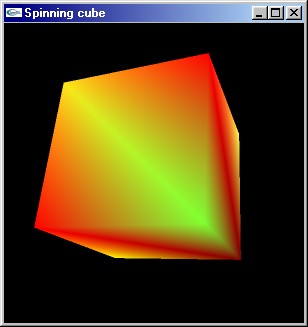
While we could use the GLUT function glutSolidCube() to create our cube, that wouldn't teach much about storing and drawing 3D objects (and it wouldn't leave much for me to write) so we're going to do it the hard way using glBegin() and glEnd().
[size="5"]A Note On Coordinates
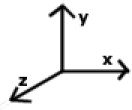
As we're going to be dealing a lot with coordinates in this tutorial, I feel it would be a good idea to explain a bit about them. As you probably know, a point in 3D space is specified by an X, Y and Z value, each value showing how far the point is along a particular axis. If you're new to 3D programming, you may not be familiar with the direction of the axes. Well, in the right-handed coordinate system OpenGL uses, the X axis points right, the Y axis up, and the Z axis points backwards.
[size="5"]The Code
We're going to build on the code for the previous tutorial, so load it up. The main function should look like this:
int main(int argc, char **argv)
 {
 glutInit(&argc,argv);
 glutInitDisplayMode(GLUT_RGB | GLUT_DOUBLE | GLUT_DEPTH);
 glutCreateWindow("My first GLUT program");

 glutDisplayFunc(redraw);

 glMatrixMode(GL_PROJECTION); //hello
 gluPerspective(45, //view angle
 1.0, //aspect ratio
 10.0, //near clip
 200.0);//far clip
 glMatrixMode(GL_MODELVIEW);

 glutMainLoop();

 return 0;
}glutCreateWindow("Spinning cube");Because we're using backface culling we have to be careful about the order of the vertices when we draw our polygons, but we'll come to that later. For now, we'll just add following line just above the call to glutMainLoop().
glEnable(GL_CULL_FACE);struct
{
struct
{
float pos[3];
float col[3];
}ver[8];
struct
{
unsigned int ver[4];
} quad[6];
}cube;initCube();void initCube(void); 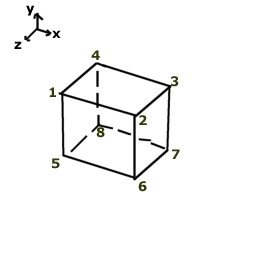
The first thing we'll to do is lay out the positions of all our vertices of our cube in the local array vertexPosDat[ vertex ][ dimension (x/y/z) ].
void initCube(void)
 {
 //defines the position of each vertex
 float vertexPosDat[8][3]=
 {
 {-10, 10, 10}, //left,top,front
 {10, 10, 10}, //right,top,front
 {10, 10,-10}, //right,top,back
 {-10, 10,-10}, //left, top,back
 {-10,-10, 10}, //left,bottom,front
 {10, -10, 10}, //right,bottom,front
 {10, -10,-10}, //right,bottom,back
 {-10,-10,-10} //left,bottom,back
}; //defines the colour of each vertex
float vertexColDat[8][3]=
{
{0.5, 0 ,0}, //dark red
{1, 1, 0.3}, //yellow
{1, 0, 0}, //red
{0.5, 1, 0.2}, //dull yellow??
{1, 1, 0}, //yellow
{0.9, 0.5, 0}, //orange
{1, 0.9, 0.1}, //yellow
{1, 0, 0}, //red
}; //defines the vertexes of each quad in anti-clockwise order
unsigned int quadVerDat[6][4]=
{
{0,1,2,3}, //top
{0,3,7,4}, //left
{3,2,6,7}, //back
{2,1,5,6}, //right
{0,4,5,1}, //front
{4,7,6,5}, //bottom
}; int a,b;
//put the vertex data into the cube.ver[] struct
for (a=0;a<8;++a)
{
for (b=0;b<3;++b)
{
cube.ver[a].pos=vertexPosDat[a];
cube.ver[a].col=vertexColDat[a];
}
}
//put the quad data into the cube.quad[] struct
for (a=0;a<6;++a)
{
for (b=0;b<4;++b)
{
cube.quad[a].ver=quadVerDat[a];
}
}
} //end of cubeInit()static void redraw(void)
{
static float rotateBy=0;
int a,b;
unsigned int currentVer;
rotateBy+=0.1;
glClear(GL_COLOR_BUFFER_BIT | GL_DEPTH_BUFFER_BIT); glPushMatrix();
glTranslatef(0,0,-50); glRotatef(rotateBy,1,1,0); //rotate by rotateBy degrees about the vector (1,1,0) glBegin(GL_QUADS);
for (a=0;a<6;++a) //quads loop
{
for (b=0;b<4;++b) //points loop
{
currentVer=cube.quad[a].ver; //sets the current vertex to this point's vertex
glColor3fv(cube.ver[ currentVer ].col); //changes the colour to the current vertex's colour
glVertex3fv(cube.ver[ currentVer ].pos); //draws a vertex at the current vertex's position
}
}Finally we call glEnd(), restore the old modelview matrix with glPopMatrix(), swap the buffers and call glutPostRedisplay() to tell GLUT to redraw the frame during the next cycle of the GLUT framework (not doing this would result in the frame only being redrawn when the window is opened or resized).
 glEnd();
 glPopMatrix();

 glutSwapBuffers();
 glutPostRedisplay();
} This tutorial is Copyright (C) 2001 Ben Woodhouse
Related Tutorials

Procedural Generation of 2D Tile Maps in Games
The article explains how to build a procedural 2D cave map generator using cellular automata. It covers map representat…

Localizing A Game Into French — Which Variant Should You Choose?
So, you’re making an awesome indie game, and now you’re thinking about localizing it into French? Great idea! There ar…
 Level Up Translation

How Long Does It Take To Localize An Indie Game?
So you’re planning on localizing your indie game, but you’re not sure how much time to schedule in. While the timing o…
Level Up Translation

Creating game videos: best practices and pitfalls to avoid
Game video production: practical tips on how to create a game trailer or teaser that you can be proud of. Give your aud…
 Alconost

Adopting CI/CD: How Midwinter Entertainment iterates at speed with the help of IMS
Game development was once like one long sprint: a huge effort until you reached the finish line — at which point you co…
 GameDev.net

5 Things to Consider When Making a Video to Promote Your App or Game
How can you show an app or game in your video in a way that attracts new users? Let’s take a look at what to go by when…
Alconost
Discussion
More from Ben Woodhouse
Comparing Shadow Mapping Techniques with Shadow Explorer
New Incentives and a Whole New Platform From The Intel AppUp developer program
The final installment in this series on Intel's AppUp program details additional incentives and opportunities for devel…
The Game Maker
This book excerpt contains the first chapter of the book that introduces beginning game developers to the Game Maker pr…
Discussion