
Daily update #1 - wet-dry shader variations
Today, I've modified the shader I've previously made so that it can take a "wetness" parameter.
Basically, in my palette, the first 4 columns represents a pair of colors, where as the first ones are dry colors and every other ones are wet colors. I just do a clever lerp between those two consecutive colors according to the given wetness parameter.
Here's an example:

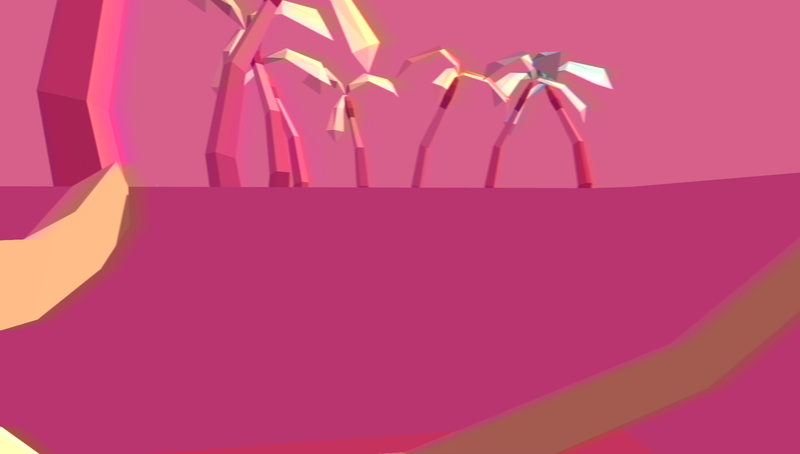
Here, you can see that the leaves of that palm tree is significantly more yellow that usual

Here it's way more green.
The way I did it was quite simple: I've just added a _Wetness parameter to my Unity shader.
I then just do a simple lerp like so:
/* In the shader's property block */

	_Wetness ("Wetness", Range(0,1)) = 0
	[Toggle(IS_VEGETATION)] _isVegetation ("Is Vegetation?", Float) = 0

/* In the SubShader body */

	void surf (Input IN, inout SurfaceOutputStandard o) {

		#ifdef IS_VEGETATION
			fixed4 wetColor;
			float uv_x = IN.uv_MainTex.x;

			// A pixel is deemed to represent something alive if its U coordinate is included in specific ranges (128 is the width of my texture)

			bool isVegetationUV = ((uv_x >= 0.0 && uv_x <= (1.0 / float(128)) ) || (uv_x >= (2.0 / float(128)) && uv_x <= (3.0 / float(128)) ));

			if (isVegetationUV) {
				fixed2 wetUV = IN.uv_MainTex;

				// To get the other color, we just shift by one pixel. that's all
				// The _PaletteIndex parameter represents the current levels' palette index. (In other words, it changes level by levels)
				// There are 8 colors per palette. that's where that "8" comes from...
				wetUV.x = ((wetUV.x + (1.0/float(128))) + 8.0 * float(_PaletteIndex) / float(128));
				wetColor = tex2D(_MainTex, wetUV);
			}

		#endif

		// This is part of my original palette shader
		IN.uv_MainTex.x = IN.uv_MainTex.x + 8.0 * float(_PaletteIndex) / float(128);
		fixed4 c = tex2D(_MainTex, IN.uv_MainTex);

		#ifdef IS_VEGETATION

			if (isVegetationUV){
				c = lerp(c, wetColor, _Wetness);
			}

		#endif

		o.Albedo = c.rgb;
		o.Metallic = _Metallic;
		o.Smoothness = _Glossiness;
		o.Alpha = _Alpha;
	}
Then it's just a matter of changing that parameter in a script like so:
GameObject palm = PropFactory.instance.CreatePalmTree(Vector3.zero, Quaternion.Euler(0, Random.Range(0, 360), 0), transform).gameObject;

MeshRenderer renderer = palm.GetComponentInChildren<MeshRenderer>();

for (int i = 0, length = renderer.materials.Length; i < length; ++i)
{
	renderer.materials[i].SetFloat("_Wetness", m_wetness);
}
I've also changed the lianas's colors, but because I was too lazy to generate the UV maps of these geometries, I've just gave them a standard material and just change the main color...
And I made a Unity script that takes care of that for me...
// AtlasPaletteTints is an Enum, and atlasPaletteTint is a value of that enum
// m_wetness is a float that represent the _Wetness parameter
// m_isVegetation is a bool that indicates whether or not the mesh is considered a vegetation (this script is generic after all)

Color col = AtlasPaletteController.instance.GetColorByPalette(atlasPaletteTint);

if (m_isVegetation)
{
	// Basically, we check whether or not a color can qualify for a lerp
	if ((atlasPaletteTint >= AtlasPaletteTints.DRY_DETAIL_PLUS_TWO && atlasPaletteTint <= AtlasPaletteTints.DRY_DETAIL_MINUS_TWO) || (atlasPaletteTint >= AtlasPaletteTints.DRY_VEGETATION_PLUS_TWO && atlasPaletteTint <= AtlasPaletteTints.DRY_VEGETATION_MINUS_TWO))
	{
		// Each colors have 5 tints; that where the "+ 5" is coming from
		col = Color.Lerp(col, AtlasPaletteController.instance.GetColorByPalette(atlasPaletteTint + 5), m_wetness);
	}

}

GetComponent<Renderer>().material.color = col;Recommended resources
Game Engines

Unreal Engine 5 Best Practices
Amazon · Book
Written by multi-award-winning Unreal generalist Tyson J. Butler-Boschma, Founder and Creative Director of Toybox Games Studios, this book addresses common challenges you face when advancing your expertise in lighting, environment design, and cinematic storytelling.
GameDev.net may earn a commission if you purchase through these links. This helps fund the site at no extra cost to you.
Discussion