
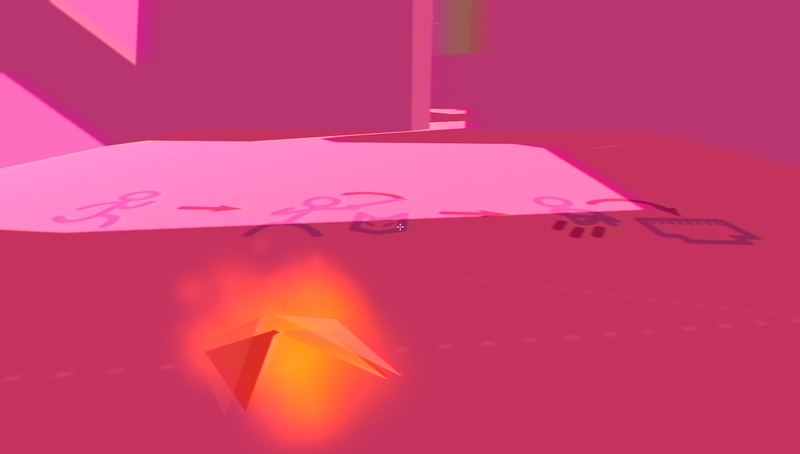
Daily Update #6 - Dynamically colored decals

Today was kind of a slow day too. I've haven't got a lot of sleep lately (thanks little hamster wheel in my head)
But at last, I was still able to add (and also fix) some graphical components here and there.
In short, I've made the first and last rooms of the level more distinct from every other room.
For example, I've added a room flow on these rooms to properly align props and, in the case of the starting room. the spawning rotation.
I've also added a little decal-like plane that tells the player what to do (take it as a little tutorial, if you may)

The important thing is that this decal is, not unlike my palette shader, dynamic in terms of colours.
What I've done is quite simple: I've mapped each channel of a texture to a specific colour.
Here's the original texture:

After inputting this texture in my shader, it was just a matter of interpolating values and saturating them:
Shader "Custom/TriColorMaps" {
	Properties {
		_MainTex ("Albedo (RGB)", 2D) = "white" {}
		_Glossiness ("Smoothness", Range(0,1)) = 0.5
		_Metallic ("Metallic", Range(0,1)) = 0.0
		_RedMappedColor ("Mapped color (Red channel)", Color) = (1, 0, 0, 1)
		_GreenMappedColor ("Mapped color (Green channel)", Color) = (0, 1, 0, 1)
		_BlueMappedColor ("Mapped color (Blue channel)", Color) = (0, 0, 1, 1)
	}
	SubShader {
		Tags {  "RenderType"="Transparent" }
		LOD 200

		CGPROGRAM
		// Physically based Standard lighting model, and enable shadows on all light types
		#pragma surface surf Standard fullforwardshadows vertex:vert decal:blend

		// Use shader model 3.0 target, to get nicer looking lighting
		#pragma target 3.0

		sampler2D _MainTex;

		struct Input {
			float2 uv_MainTex;
		};

		half _Glossiness;
		half _Metallic;
		fixed4 _RedMappedColor;
		fixed4 _GreenMappedColor;
		fixed4 _BlueMappedColor;

		void vert (inout appdata_full v) {
			v.vertex.y += v.normal.y * 0.0125;
		}

		// Add instancing support for this shader. You need to check 'Enable Instancing' on materials that use the shader.
		// See https://docs.unity3d.com/Manual/GPUInstancing.html for more information about instancing.
		// #pragma instancing_options assumeuniformscaling
		UNITY_INSTANCING_BUFFER_START(Props)
			// put more per-instance properties here
		UNITY_INSTANCING_BUFFER_END(Props)

		void surf (Input IN, inout SurfaceOutputStandard o) {
			// Albedo comes from a texture tinted by color
			fixed4 c = tex2D (_MainTex, IN.uv_MainTex);
			c.rgb = saturate((lerp(fixed4(0, 0, 0, 0), _RedMappedColor, c.r) + lerp(fixed4(0, 0, 0, 0), _GreenMappedColor, c.g) + lerp(fixed4(0, 0, 0, 0), _BlueMappedColor, c.b))).rgb;

			o.Albedo = c.rgb;
			// Metallic and smoothness come from slider variables
			o.Metallic = _Metallic;
			o.Smoothness = _Glossiness;
			o.Alpha = c.a;
		}
		ENDCG
	}
	FallBack "Diffuse"
}
Also, note that I've changed the vertices of the model. I needed a way to eliminate the Z-Fighting and just thought of offsetting the vertices by their normals.
In conclusion, It's nothing really special, really. But I'm still working hard on this.
EDIT:
After a little bit of searching, I've seen that you can give a Z-buffer offset in those Unity shaders by using the Offset state.
So I've then tried to change a bit my previous shader to use that functionality rather than just offsetting the vertices:
SubShader {
	Tags { "RenderType"="Opaque" "Queue"="Geometry+1" "ForceNoShadowCasting"="True" }
	LOD 200

	Offset -1, -1
	CGPROGRAM
	// Physically based Standard lighting model, and enable shadows on all light types
	#pragma surface surf Lambert decal:blend

	// Use shader model 3.0 target, to get nicer looking lighting
	#pragma target 3.0

	sampler2D _MainTex;

	struct Input {
		float2 uv_MainTex;
	};

	fixed4 _RedMappedColor;
	fixed4 _GreenMappedColor;
	fixed4 _BlueMappedColor;


	// Add instancing support for this shader. You need to check 'Enable Instancing' on materials that use the shader.
	// See https://docs.unity3d.com/Manual/GPUInstancing.html for more information about instancing.
	// #pragma instancing_options assumeuniformscaling
	UNITY_INSTANCING_BUFFER_START(Props)
		// put more per-instance properties here
	UNITY_INSTANCING_BUFFER_END(Props)

	void surf (Input IN, inout SurfaceOutput  o) {
		// Albedo comes from a texture tinted by color
		fixed4 c = tex2D (_MainTex, IN.uv_MainTex);
		c.rgb = saturate((lerp(fixed4(0, 0, 0, 0), _RedMappedColor, c.r) + lerp(fixed4(0, 0, 0, 0), _GreenMappedColor, c.g) + lerp(fixed4(0, 0, 0, 0), _BlueMappedColor, c.b))).rgb;

		o.Albedo = c.rgb;
		// We keep the alpha: it's supposed to be a decal
		o.Alpha = c.a;
	}
	ENDCG
} Recommended resources
Game Engines

Unreal Engine 5 Best Practices
Amazon · Book
Written by multi-award-winning Unreal generalist Tyson J. Butler-Boschma, Founder and Creative Director of Toybox Games Studios, this book addresses common challenges you face when advancing your expertise in lighting, environment design, and cinematic storytelling.
GameDev.net may earn a commission if you purchase through these links. This helps fund the site at no extra cost to you.
Discussion