
Designing Parametric Animation Systems
This article tends to show how a parametric animation system can be created and be used by other modules. In this article, Unity Mecanim animation system is used to create a parametric animation system.
Introduction
Today, making video games needs a wide area of knowledge. There exists programmers, game designers, artists and directors in a game development process and each of which is divided into different roles which need different skills. For example an artist can be an animator, modeler or concept artist or a programmer can be AI programmer, tools programmer, gameplay programmer, Network programmer or many other. To develop an entertaining game, this wide area of skills should be used appropriately together. Each person should help the development process by his/her view. To achieve this, some level of abstraction should be created between different people with different skills during game development process. This abstraction could be occurred in animation too. One way to reach this abstraction is to use parametric animations. Parametric animations separate animation system totaly from other modules which want to use it by presenting some parameters. These parameters are some numeric or boolean interfaces that let other modules to connect with the animation system. They can be anything like aim-direction, speed, force, surface gradient, health or maybe a boolean parameter like jump or many other possible parameters. By changing these parameters the animation system returns a suitable motion. There are many ways to create parametric animations like using animation blend trees and combining them with some techniques like animation layering and animation state machines. Other animation techniques can be combined to be used as parametric animation like runtime rigs or many other procedural animation techniques. The most important thing in parametric animation is that, it should respond well to parameter changes so any technique which can help the system to reach this goal can be used. After finding a way to separate details of animation from other game modules, the other modules can start making their own computations more easily. Most of the times, the animation parameters are specified from gameplay, control or AI modules like aim direction or run-speed. In next section a parametric animation system will be created by using animation blend trees and animation state machine.Parameterizing animation
In this section a parametric locomotion animation system will be designed and implemented. To implement this parametric locomotion system, blend trees and animation state machines are used. Unity's Mecanim animation system is used to implement this parametric locomotion system. Mecanim is selected for two reasons, first, Unity is very popular among game developers and second, Mecanim provides good features to separate animation from other modules like gameplay or AI. This article just uses one parameter to depict speed of the player. The speed parameter is calculated from other modules and it will be passed to the animation system and the animation system responds to it by selecting its best-suited animations. Figure 1 shows the animation state machine which is created for this reason. Based on the value of speed, animation system can change between idle and locomotion states.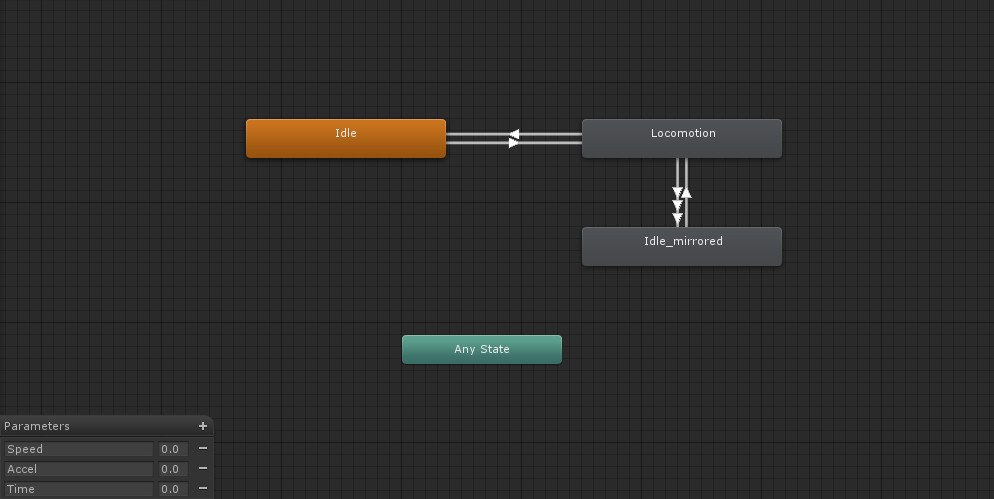 Figure1: Animation state machine created to handle parametric animation
 Locomotion state
In this article seven animations are used for locomotion and a blend tree is created for them which can blend between walk, run and sprint animations base on the speed parameter. Figure 2 shows the blend tree created in the locomotion state. Just note that Mecanim blend trees can blend between two or more animations with different timings like walk and run. If you want to use another animation blend tree system instead of Unity Mecanim and you don't know how to blend between animations with different timings like walk and run, then check out this post on my blog. As Figure 2 shows there are two walk animations, three run animations and two sprints. Before explaining why these seven animations are used, let's consider the existence of a parameter in the animation system named "Accel". The Accel parameter is defined within the animation system and the parametric animation users which want to control the speed know nothing about it. Accel is used to show the player is start or stop running or walking. By changing it, blend trees will blend between animations which are listed below: 1. walk, walk_accel: They are two walk animations, with same timings, but they have just one difference and that is in walk_accel animation, the head and the spine of the character is leaned forward to show that the character wants to start walking. This is also true for run, run_accel and sprint, sprint_accel. 2. run_deaccel: run_deaccel animation is like run animation with one difference and that is the character's head and spine leans backward to show that the character wants to stop running.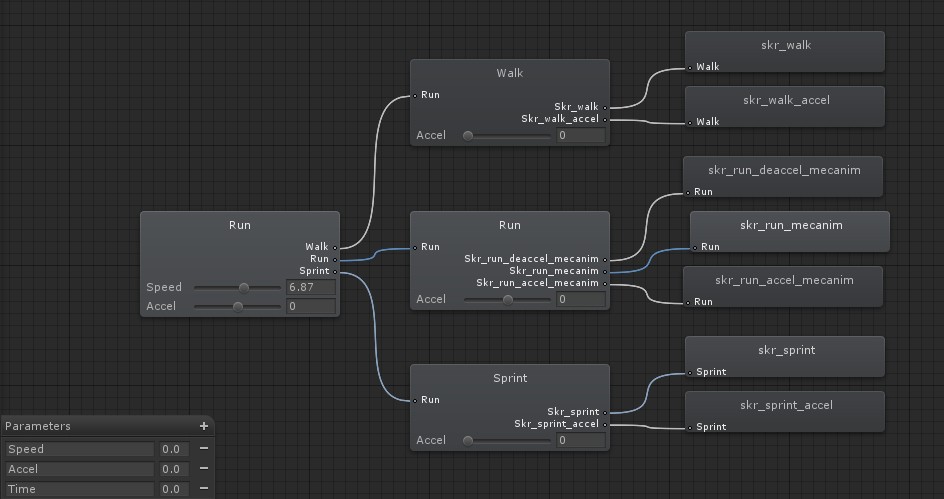 Figure2: Blend trees inside the Locomotion state
 Idle state
There is a blend tree in idle state which can blend between two idle animations. The idle_mecanim animation is a simple animation in which player is standing and the idle_accel_mecanim animation is similar to idle_mecanim animation while the head and spine of the character leaned forward in it showing that the character wants to start moving. Figure 3 shows blend tree inside the Idle state. The Accel parameter is used to blend between idle and idle_accel.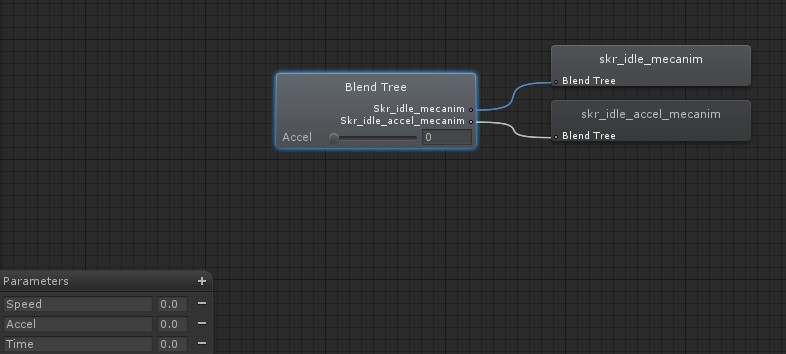 Figure3: Blend tree inside the Idle state
 Idle_mirrored state
The final state is named Idle_mirrored. It is like the idle state. This state is created to avoid foot skating. In idle_mecanim animation, the character's left foot is in front of the character and the right foot is back showing a more aggressive style of standing. This stance pose will lead the character to some foot skates while a transition is going to be made from walk to idle. When we make a transition from walk to idle, if the character's right foot is in front and his left foot is in back during walking, then making a transition to idle causes some foot skating because in idle animation left foot is in front and right foot is in back. To avoid foot skating the Idle_mirrored state is created. Idle_mecanim and idle_accel_mecanim animations are mirrored for this reason. Mecanim motion retargeting system named Avatar is used to mirror these two animations. Figure 4 shows the blend tree created in Idle_mirrored state.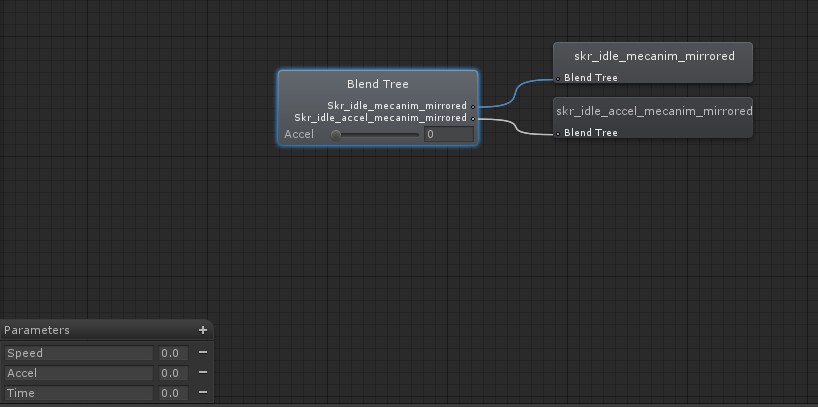 Figure4: Blend tree inside the Idle_mirrored state
 Animation state machine parameters
Three parameters are defined within animation state machine: 1. Speed: Speed is used to blend between walk, run and sprint animations or make transition to idle states. It is the exact value that the gameplay/AI modules pass to animation system. 2. Accel: Accel is used to blend between accelerated posed animations and normal posed to show that the character wants to start or stop moving. Accel is defined within the animation state machine and other modules know nothing about it and it's calculated in parametric animation modules. 3. Time: Time is used within the animation system to select which transition should be made, transition to Idle state or Idle_mirrored state. Time is defined within the animation state machine and other modules know nothing about it and it's calculated in parametric animation modules.Rules for making transitions
In Mecanim's animation state machine, transitions can be made by satisfying defined conditions. This section covers the rules used in our parametric animation system. The first rule is that if the speed parameter is below 2.5 then player should be stopped else he should move forward. This means that if player is in idle state and speed goes higher than 2.5 then he should make a transition to locomotion state. The second rule is about the time of the locomotion state. To avoid foot skating, transitions from locomotion to idle should be made at some specific time of walk animation. Human walk cycle has a phase named double support. At double support phase both left and right feet are planted on the ground. Double support phase of walk animation I created is presented here. The walk animation length is 1.2 seconds: (Time > 0.53 and Time < 0.75): Double support phase, left foot in front, right foot In back and both feet planted on the ground. If this condition is true and speed is less than 2.5 then system should make a transition to idle state (Time < 0.19 or (Time > 0.91 and Time < 1)): Double Support phase, right foot in front, left foot in back and both feet planted on the ground. If this condition is true and speed is less than 2.5 then system should make a transition to Idle_mirrored state. Figure 5 shows the rules defined for transition from locomotion to Idle state. Figure5: Conditions defined for transition from Locomotion to Idle
  Figure6: Conditions defined for transition1 from Locomotion to Idle_mirrored
  Figure7: Conditions defined for transition2 from Locomotion to Idle_mirrored
  Figure8: Conditions defined for transition from Idle and Idle_mirrored to Locomotion
 Passing parameters
Previous sections showed how we can use animation blend trees and animation state machines to make a parametric animation system but just using these two is not enough for our purposes. There need to be some coding to control the parameters defined within the scope of parametric animation system. Two parameters are defined which only the animation system have to deal them, Time and Accel. As I mentioned in previous sections the speed parameter is controlled by other modules. I wrote a class named ParametricAnimation with two methods, setSpeedParameter and updateSpeed. This class has access to the animation state machine or in other words the defined Animator component of the player's prefab in Unity. The ParametricAnimation class is a component itself and its updateSpeed function is called once per frame in its update function: public void setSpeed(float speed) { //mAnim is the Animator component which contains API to access Mecanim features mPreviousSpeed = mSpeed; mSpeed = speed; mAnim.SetFloat("Speed",speed); } void updateSpeed() { //Setting Time parameter float t = mAnim.GetCurrentAnimatorStateInfo(0).normalizedTime; //Normalized time increases by 1 for looped animations after each loop ends t -= Mathf.FloorToInt(t); mAnim.SetFloat("Time", t); //Setting the Aceel Parameter mAccel = mAnim.GetFloat("Accel"); if(Mathf.Abs(mSpeed - mPreviousSpeed) <= 0.001f) { if(mAccel < 0) { mAccel += Time.deltaTime; } else { mAccel -= Time.deltaTime; } if(Mathf.Abs(mAccel) <= 0.04f) { mAccel = 0; } } else { mAccel += 0.7f * (mSpeed -mPreviousSpeed); } mAnim.SetFloat("Accel", mAccel); if(mAccel <= -1) { mAnim.SetFloat("Accel", -1); } if(mAccel >= 1) { mAnim.SetFloat("Accel", 1); } mPreviousSpeed = mSpeed; } To achieve best visual results, the speed parameter should be calculated by acceleration and then be passed to parametric animation system. This means if you want to start running, it is better to increase speed through time rather than setting the speed to a specific value at just one frame. For example if you want to go from idle to run it's better to go from speed 0 to 5 through several frames not just setting the speed to 5 in just one frame. However this depends on the gameplay designed rules for each game, maybe some games need agile controls and others do not. Conclusion
Artists and animators prefer to have control over their artworks through the whole process of game development so a technique is needed to give this power to them. Parametric animation is a great way to separate the animation system from other systems. By using it animators and animation programmers can always change the animations at runtime without any need to deal with other programmers like AI/GamePlay programmers. This makes the animation pipeline very flexible and helps the team to achieve better results. In this article a simple parametric animation system was created which can work by a speed parameter. For this, an animation state machine and animation blend trees were created by using unity's Mecanim animation system. Other advanced animation techniques like runtime rigs, Physics-Based Animation or AI-Based animation techniques can be combined with the techniques used in this article to achieve more advanced parametric animation. Any animation technique which can help the animation system to respond well to the parameter changes can be used in a parametric animation system. A suggestion to improve the locomotion system designed here is to add a deviation parameter which can make the player turn or change direction.Article Update Log
22 June 2013: Initial releaseRelated Tutorials

Procedural Generation of 2D Tile Maps in Games
The article explains how to build a procedural 2D cave map generator using cellular automata. It covers map representat…

Localizing A Game Into French — Which Variant Should You Choose?
So, you’re making an awesome indie game, and now you’re thinking about localizing it into French? Great idea! There ar…
 Level Up Translation

How Long Does It Take To Localize An Indie Game?
So you’re planning on localizing your indie game, but you’re not sure how much time to schedule in. While the timing o…
Level Up Translation

Creating game videos: best practices and pitfalls to avoid
Game video production: practical tips on how to create a game trailer or teaser that you can be proud of. Give your aud…
 Alconost

Adopting CI/CD: How Midwinter Entertainment iterates at speed with the help of IMS
Game development was once like one long sprint: a huge effort until you reached the finish line — at which point you co…
 GameDev.net

5 Things to Consider When Making a Video to Promote Your App or Game
How can you show an app or game in your video in a way that attracts new users? Let’s take a look at what to go by when…
Alconost
Discussion
More from Peyman Massoudi
The Challenge of Having Both Responsiveness and Naturalness in Game Animation
This article discusses techniques to bring both responsiveness & naturalness to animations for increased entertainment
Skeletal Animation Optimization Tips and Tricks
Skeletal animation plays an important role in gaming industry. There are many techniques which can be used to optimize …
Discussion