A few months ago, I stumbled upon an interesting article by Eric Li titled "
Optimizing WebSockets Bandwidth" [1]. Eric mentions how the advent of WebSockets has made it easier to develop HTML5 multiplayer games. But delivering the positional and rotational data for each player in a 3D game can consume a lot of bandwidth. Eric does some calculations and illustrates several optimizations to expose how much bandwidth might be needed. After reading the article, I was thrilled because I have been dealing with bandwidth optimization of real-time data streaming for thirteen years now. I am the CTO and co-founder of Lightstreamer, a Real-Time Web Server that we originally created for the financial industry to deliver real-time stock prices. Well, many of the optimization algorithms created for online financial trading can be applied, unchanged, to online gaming. And we have worked with many banks across the world for several years to optimize bandwidth and reduce latency. So, I considered Eric's article as a challenge to demonstrate how well the algorithms we have developed in the last decade can give immediate benefit to multiplayer games, including MMOs, MMORPGs, and immersive 3D virtual worlds. Coming from the sector of real-time financial data, I am not a game development expert but I think that "cross-fertilization" between finance and gaming could give some unexpected benefits. We decided to work on an online demo of a simple multiplayer 3D world, using Lightstreamer for the real-time synchronization, while showing the actual bandwidth used. We added several buttons, sliders, and controls to allow tweaking the parameters of the scenario and simulate any flavor of data delivery.

The final result is a toolkit that can be exploited to experiment and tune different game communication scenarios. The full source code of the demo is freely available on GitHub. In this article, I will take you through the demo, showing you how to use it, explaining what's under the hood, and illustrating some of the advanced techniques employed. If you are interested to know how we optimized the network transport, you can skip to the section "Techniques to Employ in the Real-Time Web Stack" below.
Let's start with the link to the online demo: http://demos.lightstreamer.com/3DWorldDemo You can play with it right now. The demo can be tweaked on purpose to consume high amounts of bandwidth and CPU. For this reason, we had to put a limit on the number of connected users. If you find yourself unable to connect, please
let us know, and we will try to arrange some dedicated demo time.
Table of Contents
[alink=sec1]Preliminary Remarks[/alink] [alink=sec2]How to Use the Demo[/alink] [nbsp][nbsp][alink=sec3]How to Move Around[/alink] [nbsp][nbsp][alink=sec4]Your Identity[/alink] [nbsp][nbsp][alink=sec5]The Matrix[/alink] [nbsp][nbsp][alink=sec6]Tuning[/alink] [nbsp][nbsp][alink=sec7]Results[/alink] [alink=sec8]Under the Hood[/alink] [alink=sec9]Techniques to Employ in the Real-Time Web Stack[/alink] [nbsp][nbsp][alink=sec10]Dynamic Throttling[/alink] [nbsp][nbsp][alink=sec11]TCP vs. UDP[/alink] [nbsp][nbsp][nbsp][nbsp][nbsp][nbsp][alink=sec12] Batching and Nagles' Algorithm[/alink] [nbsp][nbsp][nbsp][nbsp][nbsp][nbsp][alink=sec13]Avoid Queuing[/alink] [nbsp][nbsp][alink=sec14]Delta Delivery[/alink] [nbsp][nbsp][alink=sec15]Stream-Sense[/alink] [nbsp][nbsp][alink=sec16]Client-to-Server in-Order Guranteed Messaging[/alink] [nbsp][nbsp][alink=sec17]Lightweight Protocol[/alink] [nbsp][nbsp][alink=sec18]Message Routing[/alink] [nbsp][nbsp][alink=sec19]Different Subscription Modes[/alink] [nbsp][nbsp][alink=sec20]Scalability[/alink] [alink=sec21]Conclusion[/alink] [alink=sec22]*Update*[/alink] [alink=sec23]Credits[/alink] [alink=sec24]Resources[/alink] [alink=sec25]References[/alink] [aname=sec1]
Preliminary Remarks
What this demo is about: - Lightweight 3D positional/rotational data streaming over the Web
- Bandwidth optimization and low-latency data delivery
- Dynamic throttling with adaptive data resampling for each client
What this demo is NOT about: - Lightweight 3D physics calculations
- Lightweight 3D rendering
- Cool 3D rendering
Warning:
Based on the tuning parameters you choose, you might experience high bandwidth, CPU, or memory usage. This is done on purpose, to let you experiment with many of the variables affecting the optimization of the multiplayer 3D world. In other words, we show how the real-time transmission of the coordinates of a 3D world over normal Web protocols (HTTP and WebSockets) can be easily achieved, while passing through any kind of proxy and firewall, and optimizing the bandwidth required by data streaming. We did not focus on optimizing the client-side rendering of the world (for which we used
Three.js, a very nice lib, in a basic way), nor on optimizing the physics engine itself. Basically, we are just the delivery guys but we are pretty good at that ;) For efficient HTML5 3D rendering, it seems that Chrome and Firefox browsers are currently better than other browsers. In any case, feel free to do your own tests with any browser you want (including mobile browsers). The demo server is located in US (at Amazon's data center in Oregon). Take this into account when evaluating the latency you are experiencing. The demo can work in two different modes:
- In server-side mode, the physics is calculated on the server side, according to a stream of input from clients. Every change to the coordinates of each object is streamed back to the clients. This means that not only there is no prediction done on the client side, but also no interpolation! This is really an extreme scenario, where the client acts as a "dumb renderer".
- In client-side mode, the physics is calculated both on the server side and the client side. The rendering is based on physics calculations (translation and rotation for all the players) performed by the JavaScript client. Each client receives in real time from the server the commands originated by all the other clients (or, more precisely, the changes to the velocity vector and the angular momentum), which are used as input for the physics calculations.In addition, the client periodically receives from the server (which still calculates the physics for the world) a snapshot with the positional and rotational data for all the objects. This way, the client can resynchronize with the authoritative data coming from the server-side physics engine and can correct any drift. It is also possible to stop the periodic resynchronization. In this case, each client will make its state of the world evolve independently, with possible divergences arising with time passing.
For more information on the two modes, a good reading is "
Networked Physics" by Glenn Fiedler [2]. [aname=sec2]
How to Use the Demo
Point your browser to
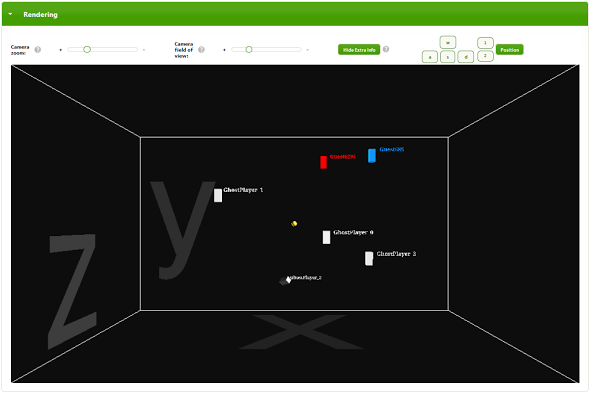
http://demos.lightstreamer.com/3DWorldDemo. You will see some controls and a 3D rendering of a virtual world, where some 3D objects are floating. You are the
red object. Other human players are represented by
blue objects, whereas
white objects are played by robots (they are there to make the Default world less lonely, in case you are the only player there).
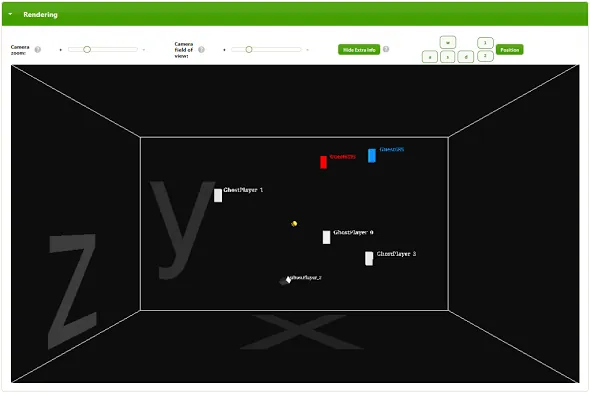
And now, the magic of the Real-Time Web... Open another browser window, or a different browser, even on a different computer, and go to the same address (
http://demos.lightstreamer.com/3DWorldDemo). You will see the same world, fully synchronized. All the controls in the page have a question mark icon next to them, which provides full details on their purpose. In the Rendering box, you have two sliders for controlling the
camera zoom and the
camera field of view. If you close the Rendering box, you are still there, but the rendering algorithms in the client are stopped to save on CPU. [aname=sec3]
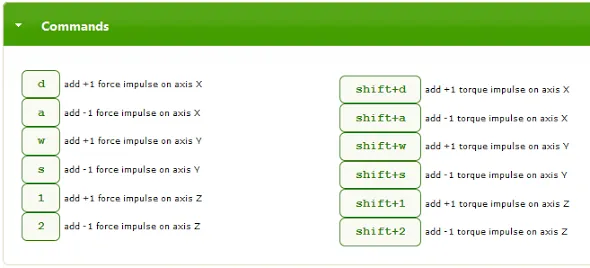
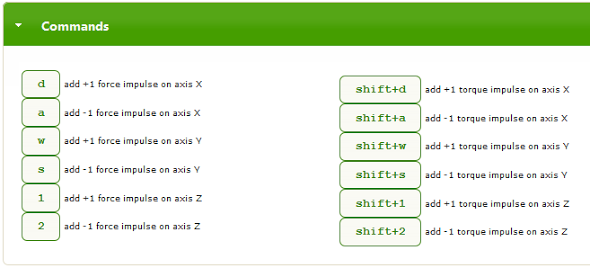
HOW TO MOVE AROUND You can start moving your red object by using the keyboard. Open the Commands box to know what keys to use. Basically, you can add force impulses and torque (rotation) impulses on the three axes. If you can't use the keyboard, just press the on-screen keys with your mouse or finger. The on-screen keys are available in both the Commands and Rendering boxes. The more impulses you give, the higher the speed becomes in that direction.
[aname=sec4]
YOUR IDENTITY The Identity box allows you to change your nickname, broadcast a message associated to you, and choose your world. You will start in the "Default" world, but you can be teleported to any other world. Just Enter the name of another world, either existing (agree with your friends on a name) or brand new.

If there are too many users connected to a world, you will be put in
watcher mode. Try another world to become an active player. [aname=sec5]
THE MATRIX Open the Matrix box to see the actual data being delivered by the remote server. In other words, the table shows in real time all the positional and rotational data that is actually being received on the streaming connection of your browser window.

By default, the client-side physics engine is used, which means that only some periodic world synchronization will be delivered by the server. This is why you will see the numbers in the matrix change very infrequently. But read more in the Tuning section below to change that radically... [aname=sec6]
TUNING The Tuning box contains most of the juice of the demo and is the actual toolkit provided for your experiments.
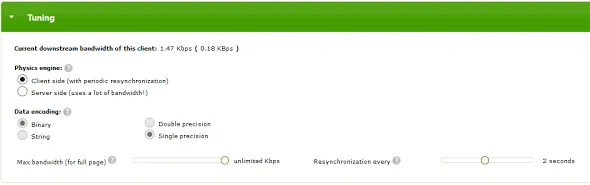
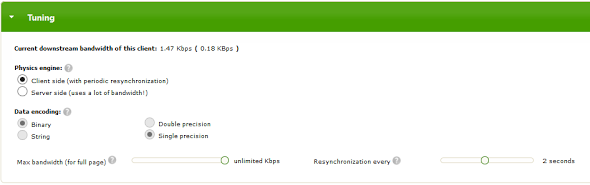
When the demo starts, the default mode is client-side, with 2-second resynchronization. In the Tuning box, you can easily switch between server and client side modes. As a result, you can see the
current bandwidth, displayed at the top of the box, change dramatically. Moving to a world where there are no other players, information about the bandwidth used by the whole page is a fairly accurate estimate of the required bandwidth for each player. When client-side mode is used, you can tweak the resynchronization period with a slider, which by default is 2 seconds. In server-side mode, many more parameters can be tweaked. You can have real fun going through some of the cases discussed in Eric's article, by choosing the precision of the incoming data and the frequency of the updates. You can have even more fun if you open the Matrix box and see the crazy speed of changes of the coordinates. First, you can change the frequency for updates streamed by the server via the "Max frequency" slider. By default, it's 33 updates/second for each object. You can increase it up to the server-side physics engine clock, which works at 100 Hz (100 updates/second). Look how the bandwidth changes when changing the max frequency. Then, you can play with data encoding. You can choose between binary and string encoding for the coordinates. In case of binary encoding, you can switch between double precision and single precision. In case of string encoding, you can choose the number of decimals (8 by default). Finally, you can choose the maximum bandwidth allowed for the downstream channel (bottom slider). The data flow will be resampled on the fly to respect the allocated bandwidth. Try to reduce it and see the movements become less fluid. [aname=sec7]
RESULTS We can now simulate some of the scenarios depicted in
Eric's article. For example, let's take a single user (create a new lonely world to see the resulting bandwidth). If we deliver 33 updates/s in double-precision floating point format, when the object is translating and rotating on all three axes, the bandwidth consumption is about
5.6 KBps. In this particular kind of scenario, a fixed decimal length string with 1 or 2 decimal digits may be enough. With this encoding, the bandwidth decreases to about
3.6 KBps. But these are worst case scenarios, where all seven coordinates change (translation and rotation on all three axes). If any of these coordinates does not change, or change less frequently, Lightstreamer automatically uses a delta delivery feature to only send changed data. For example, with a single object that is only moving on the X axis, with string encoding, 2 decimals, and 33 updates/s, we get a bandwidth usage of about
1.5 KBps. More information on the optimization algorithms implemented by Lightstreamer is in the "Techniques to Employ in the Real-Time Web Stack" section below. [aname=sec8]
Under the Hood
Lightstreamer is used in this demo for full-duplex, bi-directional, real-time data delivery. More simply, Lightstreamer is a special Web server that is able to send and receive continuous flows of updates to/from any kind of client (browsers, mobile apps, desktop apps, etc.) using only Web protocols (that is, HTTP and WebSockets). Based on a form of publish/subscribe paradigm, it applies several optimizations on the actual data flows, rather than acting as a "dumb pipe". This demo is made up of some client-side code and server-side code. On the client side, the application was developed in pure HTML and JavaScript. The source code is
available on GitHub. The client uses the JS libs below:
On the server side, two Lightstreamer Adapters were developed in Java. The Adapters are custom components that are plugged into the Lightstreamer Server to receive, elaborate, and send messages. The source code of the Adapters is
available on GutHub too. The Adapters use the
CroftSoft Code Library for the physics calculations. So, the 3D physics engine was built on the server side as a Java Adapter for Lightstreamer. The Adapter keeps the positional and rotational data for all the players in the game, and recalculates the information with a configurable frequency up to 100 Hz. The clients send the user's commands (keys pressed) to the server via the
sendMessage facility of Lightstreamer. Each user can also change her nickname and send a message to the other players at any time (which means that a basic chat is built into the demo). The clients receive the real-time data by subscribing to Lightstreamer
items, with a set of
fields, using a
subscription mode (see the sections "
Message Routing" and "
Different Subscription Modes" to learn more):
- There exists an item for each world in the game (actually, there is one item for each combination of world and representation precision, but let's keep the explanation simple). Such item works in COMMAND mode and delivers the dynamic list of players in that world, signaling players entering and leaving the world, in addition to notifying nickname changes and chat messages. The fields available for this item are: "key" (the unique identifier of each player), "command" (add, update, or delete), "nick" (the current nickname), and "msg" (the current chat message).
- For each player that enters a world, a specific item is created by the server (and subscribed by the clients) to carry all the real-time coordinates and movements for that player. This item works in MERGE mode and it is subscribed-to/unsubscribed-from by each client in that world based on the commands received as part of the first item above. The fields available for this item are: - The coordinates and the quaternions, which represent the current position of the object: "posX", "posY", "posZ", "rotX", "rotY", "rotZ", "rotW"This set of fields above is subscribed to in server-side mode, to get the actual positions in real time and render the objects accordingly. It subscribed to in client-side as well, to get the periodic authoritative resynchronizations (unless the resync period is set to 'never'). The matrix widget uses these fields to feed a Lightstreamer widget called DynaGrid. - The velocity vector and the angular momentum, which represent the current movement of the object: "Vx", "Vy", "Vz", "momx", "momy", "momz"This set of fields is subscribed to in client-side mode only, to receive the input for the client-side physics engine.
- Each client subscribes to an item in DISTINCT mode to implement presence. In other words, each player signals her presence by keeping this subscription active. By leaving the page, the automatic unsubscription determines the loss of presence, and the server can let all the other players know that the user has gone away (by leveraging the COMMAND-mode item above).
- Each client subscribes to an item in MERGE mode, to know the current downstream bandwidth (used by its own connection) in real time.
You are encouraged to study the source code of this demo, fork it on GitHub, and derive any possible work from it, only limited by your fantasy. For example, you might attach a Unity front-end, you might want to create a real game, or you might create a mobile app. Lightstreamer offers libraries for many different client-side technologies. You can
download the Vivace edition of Lightstreamer, which contains a free non-expiring demo license for 20 connected users. [aname=sec9]
Techniques to Employ in the Real-Time Web Stack
Several techniques and features are required, as part of the real-time web stack, to help game developers implement multiplayer communication in a simple, reliable, and optimized way. Let's see some of them, delving a bit deeper. [aname=sec10]
DYNAMIC THROTTLING There exists many kinds of data, which can be filtered (that is, resampled) by their very own nature. When a data feed provides a series of real-time samples for some given physical characteristics, you might want to resample such series to decrease the frequency, if you don't need all of the samples. Imagine you have a sensor that measures the current temperature 100 times per second and you want to deliver the measurements in real time to a software application. If you just want to display the value to a human user, perhaps 10 updates per second are more than enough. Or, even better, you might want to deliver as many updates as possible without saturating the link bandwidth.
Resampling a real-time data flow is a complex procedure that needs to take several variables as input: the unsampled data flow, the desired maximum frequency, the desired maximum bandwidth, and the available bandwidth. Back to our 3D virtual world, when server-side physics is used, a lot of data is produced to keep all the clients in sync with the world changes. If the server-side physics works at 100 hz, in many cases, you don't need or cannot afford to send the data with the same frequency to all the clients. You want to send as many updates as you can, based on the actual bandwidth available at any time for each individual client connection. On the
Developer Community pages of Valve [3] (the engine that powers some famous 3D games), you read:
Clients usually have only a limited amount of available bandwidth. In the worst case, players with a modem connection can't receive more than 5 to 7 KB/sec. If the server tried to send them updates with a higher data rate, packet loss would be unavoidable. Therefore, the client has to tell the server its incoming bandwidth capacity by setting the console variable rate (in bytes/second). This is the most important network variable for clients and it has to be set correctly for an optimal gameplay experience.
This is done automatically and dynamically by Lightstreamer. Thanks to its adapting throttling algorithms (originated in the financial industry), Lightstreamer is able to resample the data flow for each individual user on the fly, taking into account all the dynamic variables:
- Bandwidth allocation: For each client, a maximum bandwidth can be allocated to its multiplexed stream connection. Such allocation can be changed at any time and Lightstreamer guarantees that it is always respected, whatever the original data flow bandwidth is.
- Frequency allocation: For each data flow (a subscription, in Lightstreamer terms) of each client's multiplexed stream connection, a maximum update frequency can be allocated. Again, such allocation can be changed at any time.
- Real bandwidth detection: Internet congestions are automatically detected and Lightstreamer continuously adapt to the real bandwidth available.
Lightstreamer heuristically combines these three categories of information to dynamically throttle the data flow with resampling. In our
3D World Demo, you can see all this in action. In the Tuning box, switch to server side. The "Max bandwidth" and "Max frequency" sliders allows you to govern bandwidth allocation and frequency allocation in real time. The data flow is resampled accordingly. Now, try to move to an unreliable network. Perhaps use your tablet or smartphone connected via 3G (or, better, 2G) and move to a place where the mobile signal is not very strong. In other words, you should provoke some packet loss and bandwidth shrinking. Lightstreamer will detect this and instead of buffering the updates and playing them back as an aged history later, it will begin resampling and reducing frequency and bandwidth automatically. Basically, every client will find its sweet spot for bandwidth usage, while still receiving fresh data. Receiving less frequent updates does not mean receiving old updates. When you have a chance to get an update, it must be the most recent available, not a piece of data buffered some time ago. Lightstreamer does exactly this. It sends fresh data even on tiny-bandwidth links, by resampling the data flow, rather than queuing it. You can see another live example in the simpler Bandwidth and Frequency Demo (
http://demos.lightstreamer.com/BandwidthDemo). Resampling works better with
conflation. Conflation means that instead of simply discarding updates, when resampling is done, the sender should try to merge them to save as much information as possible. Let's clarify with an example. In the 3D World Demo, as part of each subscription to the coordinates of an object, 7 fields are sent (3 for position and 4 for rotation), as you can see in the Matrix box. Now, let's take into account only the 3 positions for the sake of simplicity and imagine this sequence of updates for the original data flow:
- X=5.1; Y=3.0; Z=2.3
- X=unchanged; Y=3.1; Z=2.5
- X=5.3; Y=unchanged; Z=2.8
If the resampling algorithms decides to drop event 2, the conflation mechanism will produce a single update that replaces event 3, as follows: [nbsp][nbsp]X=5.3; Y=3.1; Z=2.8 As you see, event 2, which carried an update to Y, has not been fully discarded but has been conflated with event 3. Conflation is enabled by default in Lightstreamer when subscriptions are done in MERGE mode. This means you can produce data at any rate and let Lightstreamer automatically and transparently resample and conflate them on the fly for each individual connection. [aname=sec11]
TCP vs. UDP TCP is often considered a bad choice when implementing a gaming communication layer. Its congestion control mechanisms and in-order delivery with automatic retransmission may cause degraded games' performance. A couple of examples from literature: In a
paper by National Taiwan University [4], a protocol comparison for MMORPGs was performed, showing the cons of TCP. And Glenn Fiedler wrote [5]:
Using TCP is the worst possible mistake you can make when developing a networked game! To understand why, you need to see what TCP is actually doing above IP to make everything look so simple!
I'm not going to disagree with these positions, as they totally make sense, but I would like to introduce another perspective. Let's highlight the advantages of TCP versus UDP:
- It is reliable (and even if you don't always need it, it's better to have it than not, provided, of course, that the price to pay is not too high).
- If used under Web protocols (HTTP and WebSockets), it can pass through any proxy, firewall, and network intermediary.
So, it would be nice to be able to use TCP even for games. Lightstreamer, which leverages HTTP and WebSockets, uses TCP and it tries to overcome some of the limits with its smart algorithms. I am not saying here that Lightstreamer has magically made TCP as efficient as UDP... But I seriously maintain that it makes it usable enough for several games. Let's see how. [aname=sec12]
Batching and Nagles' Algorithm As mentioned by Glenn Fiedler, going for the TCP_NODELAY option (that is, disable the TCP Nagle's algorithms) is a must. Lightstreamer, after disabling Nagles', uses its own algorithms to decide how to pack data into TCP segments. A trade-off between latency and efficiency can be configured. What is the maximum latency you can accept to forge bigger packets and decrease the overheads (both network overheads and CPU overheads)? You can answer this question for each application and game and configure it in Lightstreamer via the
max_delay_millis parameter. The highest the acceptable delay, the more data can be stuffed into the same TCP segment (batching), increasing overall performance. For extreme cases, you can use 0 for
max_delay_millis. Consider that delivering real-time market data to professional traders, who work with 8 screens and have The Matrix-like capabilities of reading them, is somehow similar to connecting multiplayer games... We found that a batching interval of 30 ms works for most cases. [aname=sec13]
Avoid Queuing The real issue with TCP is with packet retransmissions. If a segment is lost, newer data queues up in the server buffers until the initial segment is actually delivered. This provokes a clutter on the network, as bursts of aged data are sent out, with the risk of triggering a continuous packet loss on small-bandwidth networks. As explained above, Lightstreamer's dynamic throttling makes it possible to stop queuing data that has been produced but not yet sent out to the network if fresher data is available. Basically, when network congestion provokes packet loss, Lightstreamer begins resampling and conflating the data flow, overriding aged queued data with fresher data. Again, this has its roots in financial market data dissemination. You want to be watching the very latest price of a stock. If a network congestion blocks the data flow, when the network is available again, you don't want to see a playback of old data, you want new data at once. [aname=sec14]
DELTA DELIVERY On the
Developer Community pages of Valve [3], you read:
Game data is compressed using delta compression to reduce network load. That means the server doesn't send a full world snapshot each time, but rather only changes (a delta snapshot) that happened since the last acknowledged update. With each packet sent between the client and server, acknowledge numbers are attached to keep track of their data flow. Usually full (non-delta) snapshots are only sent when a game starts or a client suffers from heavy packet loss for a couple of seconds.
Delta delivery is used by default on Lightstreamer, as it has always been a mean to reduce the amount of financial data that need to be sent. If a users subscribes to 20 different fields for each stock (price, bid, ask, time, etc.), only a few of them really change at every tick. Lightstreamer automatically extracts the delta and the client-side library is able to rebuild the full state. Upon initial connection, Lightstreamer sends a full snapshot for all the subscribed items. Even in case of disconnections, the Lightstreamer client-side library automatically reconnects and restores the state via a full snapshot. [aname=sec15]
STREAM-SENSE The
documentation of Unity [7] (one of the most used 3D rendering engines) says:
Connecting servers and clients together can be a complex process. Machines can have private or public IP addresses and they can have local or external firewalls blocking access. Unity networking aims to handle as many situations as possible but there is no universal solution.
Stream-Sense is an exotic name we use in Lightstreamer to refer to the ability to automatically detect the best transport protocol to use over TCP. WebSocket is the best choice, but there are many cases in the real world where WebSockets simply don't work. Apart from browser support, the real issue is with some network intermediaries (firewalls, proxies, caches, NATs, etc.) that don't speak WebSockets and block them. In all these cases, Lightstreamer automatically switches to HTTP Streaming, which is as efficient as WebSocket for sending data from the server to the client. But there are even some cases where HTTP Streaming is blocked by some corporate proxies. In such extreme situations, Lightstreamer still works by automatically switching to HTTP Smart Polling (a.k.a Long Polling). This polling style is very different from traditional polling, as the polling frequency is dynamic and data-driven. See
this slide deck [6] for more details.
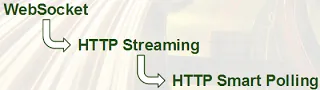
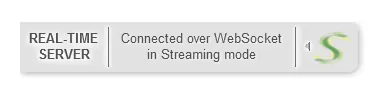
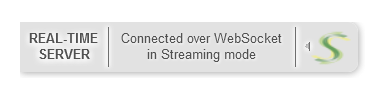
For many applications, the user experience provided by Smart Polling is the same as WebSockets. And for games, being able to play behind a super-strict corporate firewall, even if with less frames per second, is better than nothing. Consider that even Smart Polling in Lightstreamer is subjected to resampling, conflation, and bandwidth management. So, at each polling cycle, you are guaranteed to receive fresh data. We have mentioned the situation where the network (including all the intermediaries) imposes to use Smart Polling. But there is another case in Lightstreamer where Smart Polling may be used automatically. Even if the network supports Streaming (based on HTTP or WebSocket), the event rate of the data stream might be too high for the processing capacity of the client. This applies particularly to older devices that cannot keep the pace of a high-frequency data flow. In these cases, the Lightstreamer client library can automatically detect that the client code is not dequeuing the received events fast enough and decide to switch to Smart Polling. This way, the actual update rate will be driven by the client capacity to process a batch of events and request the new batch. Subsequent batches are subjected to conflation. Though it could sound strange, in these cases, Smart Polling can be used even over WebSocket. For interactive games, polling, even in its smart form, is never as good as streaming. But, again, being able to play behind very strict corporate firewalls with a slightly decreased quality of service is better than nothing. The selected transport is totally transparent to the application (the game), which does not need to take any specific actions based on the transport being used. To know which transport is being used when you connect to the 3D World Demo, just roll the mouse pointer over the top-left "S" tag. The tag will slide to the right, revealing the actual transport in use (WebSocket or HTTP, in Streaming or Polling mode).
[aname=sec16]
CLIENT-TO-SERVER IN-ORDER GUARANTEED MESSAGING Contrary to what you read sometimes, HTTP Streaming does not have any additional overhead than WebSocket in sending messages from the server to the client. The real benefit of WebSocket over HTTP Streaming is when you need to send messages
from the client to the server. The reason is that HTTP, when sending messages from client to server, as managed by any normal web browser, has three main limitations:
- It requires a full round trip for each message (unless HTTP pipelining is used, which is turned off by default in most browsers).
- There is no control over message ordering, as multiple messages might be sent over multiple connections. This is decided by the HTTP connection pool logic of the browser and no information is exposed to the JavaScript layer. So, even if you send two messages in sequence from your JavaScript code (with 2 HTTP requests), they might surpass each other on the network.
- There is no control over connection reuse. As said above, the browser has exclusive control over its connection pool and usually closes an idle connection after a timeout. So, if after some time you need to send a low-latency update to the server, you have to set up a new TCP connection first, thus increasing latency.
Lightstreamer implements a layer of abstraction so the three issues above are eliminated even when using HTTP as a transport. In particular, Lightstreamer acts as follows:
- It automatically batches high-frequency client messages. This means if the client tries to deliver 100 messages in a burst, instead of sending 100 HTTP requests, the browser will send just a couple of HTTP requests.
- The client messages are automatically numbered. The server can send back ACKs for each message and reorder out-of-order messages. There is mechanism in the client that controls automatic retransmission of unacknowledged messages. In other words, some sort of "TCP over HTTP" has been implemented to get reliable messaging from client to server inside a browser!
- Reverse heartbeats can be activated so the browser keeps the connection open and ready to use as soon as needed. Reverse heartbeats are tiny messages sent by the client to force the browser to avoid closing the underlying TCP connection.
Such layer for optimized in-order guaranteed messaging from client to server originated in Lightstreamer to deliver order submissions as part of online trading front ends. This drove the need to make it very reliable and support high-frequency messaging. This layer is exposed to the application layer via a very easy
sendMessage function call. [aname=sec17]
LIGHTWEIGHT PROTOCOL Given a working transport (as chosen by the Stream-Sense mechanism) and a data model (see Message Routing below), a protocol is needed to deliver the data to the clients with full semantics. Lightstreamer avoids using JSON or, even worse, XML, as the base of its protocol. These are extremely verbose protocols, which carry large amounts of redundant data with each event (for example, the field names), resulting in increased bandwidth usage. Lightstreamer uses a position-based protocol, which reduces the overhead to a minimum. The actual payload accounts for most of the bandwidth. Below is an example taken from the 3D World Demo by dumping the network traffic, where server-side mode with string encoding is used. In this case, a JS-based protocol is used, though not JSON. Other protocols are possible.
d(27,1,2,'-18.85667',3,'0.91879','-0.39474',1);d(30,1,5,'-0.70090',1,'-0.71325','-59.00561');d(31,1,3,'27.42105','-0.00389','-0.44682','0.89365','-0.04139',1);d(29,1,3,'-57.12912','-0.00389','-0.44682','0.89365','-0.04139',1);d(28,1,2,'42.71763',1,'-0.40773','0.48877','-0.05785','-0.76909','-7.72828');
[aname=sec18]
MESSAGE ROUTING Having implemented optimized and reliable transports and protocols is not enough for developing complex real-time applications and games. On top of such mechanisms, you need an easy and flexible way to route messages, that is, to govern which messages should be delivered to which clients. Lightstreamer is based on what I call an
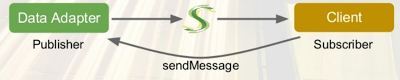
asymmetric publish-subscribe paradigm. Clients can subscribe to items and can send messages to the server, but the actual publishers are on the server side. Based on any back-end data feed, any back-end data computation algorithms, and any message received from the clients, the publishers (Lightstreamer Data Adapters) inject real-time updates on any item into the Lightstreamer Server. Then, it's up to the server to route the updates based on the client subscriptions.
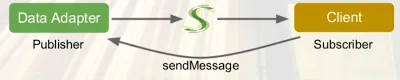
In the 3D World Demo, the Data Adapter contains the game engine. Based on the movement commands received from the clients (via the
sendMessage facility), it calculates physics and publishes item updates accordingly. Client subscriptions are based on
items and
schemas (sets of fields). For example, in the 3D World Demo, if a client wants to know the real-time position of an object, it will subscribe to a specific item, which represents that object, using the schema below:
"posX", "posY", "posZ", "rotX", "rotY", "rotZ", "rotW"
Let's suppose the client is interested in knowing the coordinates and the velocity vector. It will subscribe to the same item with a different schema:
"posX", "posY", "posZ", "Vx", "Vy", "Vz"
If the client wants to know the nicknames and messages of the other players, in addition to be notified of players entering and leaving a world, it will subscribe to the main item (which represents that world), with a schema like this:
"nick", "msg", "key", "command"
Basically, every client can subscribe to as many items it needs, each with its own schema.

As a result, the Lightstreamer Server will
multiplex the updates for all the subscribed items of each client on the top of the same physical connection.

Clients can subscribe to and unsubscribe from any item at any time in their life cycle, without interrupting the multiplexed stream connection. Lightstreamer uses an
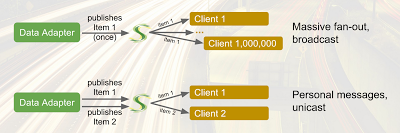
on-demand publishing model. Only when an item is first subscribed by a client, the Data Adapter (publisher) is notified to begin publishing data for that item. Then, further clients can subscribe to the same item and the Lightstreamer Server takes care of broadcasting updates to all them. When the last client unsubscribes from that item, the Data Adapter is notified to stop publishing data for that item. This way, no data needs to be produced when no actual recipient exists, saving on systems resources. With this item-based approach, all the routing scenarios are supported by Lightstreamer:
broadcasting,
multicasting, and
unicasting. For example, if 1 million different clients subscribe to the same item, the Data Adapter will need to publish the updates only once, and the Lightstreamer Server will take care of performing the
massive fan-out. On the other hand, each client may subscribe to its own individual item, thus enabling the delivery of
personal messages. The good thing is that different routing scenarios can be mixed together as part of the same multiplexed connections.
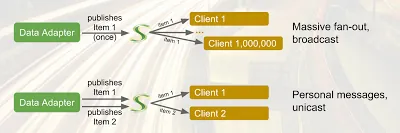
In a game, the flexibility of this publish and subscribe model makes it much easier to control what data should reach each player. [aname=sec19]
DIFFERENT SUBSCRIPTION MODES Okay, we have a reliable and optimized transport/protocol, we have a message routing mechanism with support for items and schemas. What else might be needed?
Content-aware subscription modes. In Lightstreamer, when an item is subscribed to, the client can specify a subscription mode, choosing among MERGE, DISTINCT, COMMAND, and RAW. The subscription mode, together with further subscription parameters, determines the filtering mechanism that should be used (resampling with conflation, queuing, etc.) and opens the door to so-called
meta-push, thanks to COMMAND mode. With COMMAND mode, you can push not only changes to fields of subscribed items, but you can also control, from the server, what items should be subscribed to and unsubscibed from by the client at any time. This is done by sending
add,
delete. and
update commands as part of an item, which provokes subscriptions to and unsubscriptions from
underlying items. The delivery of such commands on the network is extremely optimized, with the auto-detection and elimination of redundant commands. In the 3D World Demo, the heart of the world is delivered in COMMAND mode. Whenever a player enters and leaves the world, a real-time command is sent to add or remove an object in the rendering pane and a row in the matrix. Then, for each added object (and row), an underlying item is subscribed to in MERGE mode to get the positions, vectors, etc. COMMAND mode originated in financial trading applications to manage a dealer's portfolio in real time (stocks entering, being updated, and leaving the portfolio at any time). [aname=sec20]
SCALABILITY To manage the real-time data for massively multiplayer online games, very high scalability is needed for the streaming server. Lightstreamer employs a concurrent staged-event driven architecture with non-blocking I/O. This means that the number of threads in the server is fully decoupled from the number of connections. The number of threads in the pools is automatically tuned based on the number of CPU cores. This architecture allows
graceful degradation of the quality of service. In other words, in the extreme case that the server CPU should saturate, the game will not be blocked abruptly, but all the users will be slightly penalized, receiving lower-frequency (but still fresh) updates. The main driver in the scalability of Lightstreamer is the overall message throughput, more than the total number of connections. For example, a single server instance was successfully tested with one million connected clients, with a low message rate on each connection (a few updates per minute). By increasing the message frequency to tens of messages per second per client, the number of concurrent clients managed by a single machine is reduced to tens of thousands. Several Lightstreamer Server instances can be clustered via any good Web load-balancing appliance, to reach much higher scalability. This should enable high-frequency massively multiplayer online games to become easily deployed in a more cost-effective way. [aname=sec21]
Conclusion
We have presented an online demo that shows how a technology created for the financial industry can be used with great benefits in the gaming industry. Adaptive streaming (dynamic throttling, conflation, delta delivery, etc.) is a set of techniques to make sure that the amount of real-time data needed to synchronize a 3D virtual world among several clients is governed by the actual network capacity for each client. Several low-level optimizations and high-level abstractions are required to make multiplayer game development easier with reliable results. If you want to solve the problems of real-time gaming efficiently, you should use similar techniques in your real-time web stack. The source code of this demo is available on GitHub. Feel free to modify it and create any derivative work; perhaps a full-fledged game! Let us know if you find the demo code useful and if you will be working on any project based on it. We are eager for any feedback on both the demo and this article. You can contact us at
support@lightstreamer.com. [aname=sec22]
*Update*
In October 2013, I had the pleasure to give a talk at
HTML5 Developer Conference in San Francisco. I delved into the subject of this article and showed several live demonstrations, because seeing is believing. You can watch the full recording of the session, together with the slide deck, here:
http://blog.lightstreamer.com/2013/12/html5devconf-more-than-just-websockets.html [aname=sec23]
Credits
Many thanks to
Eric Li,
Matt Davey, and
Michael Carter for the comments. Originally publish on the
Lightstreamer blog. [aname=sec24]
Resources
[aname=sec25]
References









 Level Up Translation


 Alconost

 GameDev.net

Discussion